
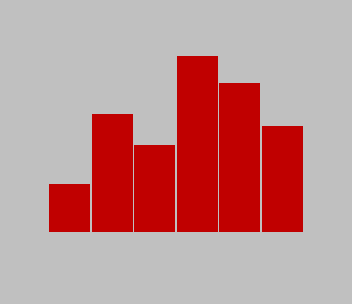
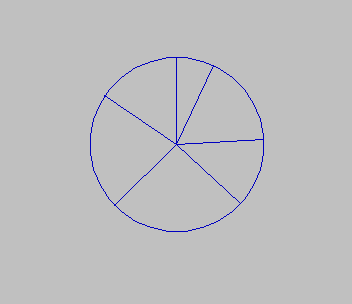
Turns a short list of numbers into a line graph, a bar graph or a pie chart. After you say how many items there are and type each value, a menu offers the three chart types, editing a single value, and saving or loading the data on tape. Each chart asks for an ink colour, fills the screen, and waits for a key; pressing c copies it to the printer. The bar and line graphs scale to the largest value, and the pie chart divides the circle in proportion to each item’s share of the total.
The REM in line 5 reads “Charts ZX-APPEAL 1-88”: the program was printed in ZX-Appeal, the Vancouver Sinclair Users Group newsletter, in January 1988. No author is named.
Program Analysis
- Lines 40–90: the number of items and the values in
d();a()later holds the pie angles. - Lines 100–310: the menu, with
GO SUB VAL a$*1000to reach the routine for the key pressed. - Lines 1000–1130: line graph with
DRAWsteps of255/(n-1)across. Lines 2000–2140: bar graph, each bar filled with vertical lines. Lines 3000–3220: pie chart, a circle of radius 87 with a radius drawn at each cumulative angle. - Lines 4000–6070: edit,
SAVE "chart" DATAandLOAD "chart" DATA.
Notable Techniques
- The menu choice becomes a line number directly:
GO SUB VAL a$*1000. - The item count is saved as a one-element array
n()in front of the data, so loading can re-dimensiond()before reading the values. - Pie angles are converted to sine and cosine of the angle measured from the top, so the slices run clockwise from twelve o’clock.
Potential Issues
- The line graph starts its first segment from the bottom-left corner of the screen rather than from the first value, and a single data item divides by zero.
- Negative values are not handled: bars and lines run off the screen, and the pie chart’s angles go wrong.
- Both data files are saved under the same name,
"chart", so only one data set can be told apart on a tape.
This program came from an Oliger (JLO SAFE) disk and was converted to load from tape. This copy needed no changes: it already used plain tape commands. Another copy from a different disk began with a call to a printer driver at 62000 that is not part of the program, and a variant used the Oliger COPY /. It was tested in ZEsarUX.
Image Gallery
Source Code
    5 REM Charts ZX-APPEAL 1-88
    8 BORDER 7: PAPER 7: INK 0: CLS
   10 PRINT AT 10,10;"Charts"
   20 PAUSE 50
   30 CLS
   40 INPUT "How many items of data? ";n
   50 DIM d(n)
   60 DIM a(n)
   70 FOR a=1 TO n
   80 INPUT ("Data item ";a;" ");d(a)
   90 NEXT a
  100 CLS
  110 PRINT AT 3,12;"Options"
  120 PRINT : PRINT : PRINT
  130 PRINT "Produce line graph.............1"
  140 PRINT
  150 PRINT "Produce bar graph..............2"
  160 PRINT
  170 PRINT "Produce pie chart..............3"
  180 PRINT
  190 PRINT "Edit data......................4"
  200 PRINT
  210 PRINT "Save data......................5"
  215 PRINT
  220 PRINT "Load data......................6"
  230 PRINT : PRINT : PRINT
  240 PRINT TAB 5; INVERSE 1; FLASH 1;"Key in desired option"
  250 PAUSE 0
  260 LET a$=INKEY$
  270 IF a$<"1" OR a$>"6" THEN GO TO 250
  280 CLS
  290 GO SUB VAL a$*1000
  300 CLS
  310 GO TO 100
 1000 INPUT "Colour ";c
 1010 INK c
 1020 LET max=0
 1030 FOR a=1 TO n
 1040 IF d(a)>max THEN LET max=d(a)
 1050 NEXT a
 1060 LET vs=175/max
 1070 LET hs=255/(n-1)
 1080 FOR a=2 TO n
 1090 DRAW hs,(d(a)-d(a-1))*vs
 1100 NEXT a
 1110 PAUSE 0
 1115 IF INKEY$="c" THEN COPY
 1120 INK 0
 1130 RETURN
 2000 INPUT "Colour ";c
 2010 INK c
 2020 LET max=0
 2030 FOR a=1 TO n
 2040 IF d(a)>max THEN LET max=d(a)
 2050 NEXT a
 2060 LET vs=175/max
 2070 LET hs=255/n
 2080 FOR a=1 TO n
 2085 FOR b=1 TO hs-1
 2090 PLOT (a-1)*hs+b,0: DRAW 0,d(a)*vs
 2095 NEXT b
 2100 NEXT a
 2110 PAUSE 0
 2120 IF INKEY$="c" THEN COPY
 2130 INK 0
 2140 RETURN
 3000 INPUT "Colour ";c
 3010 INK c
 3020 CIRCLE 128,87,87
 3030 LET sum=0
 3040 FOR a=1 TO n
 3050 LET sum=sum+d(a)
 3060 NEXT a
 3070 FOR a=1 TO n
 3080 LET a(a)=(d(a)/sum)*360
 3090 NEXT a
 3100 LET rotate=0
 3110 FOR a=1 TO n
 3120 LET b=a(a)+rotate
 3130 LET s=SIN (b*PI/180)
 3140 LET c=COS (b*PI/180)
 3150 PLOT 128,87
 3160 DRAW s*87,c*87
 3170 LET rotate=rotate+a(a)
 3180 NEXT a
 3190 PAUSE 0
 3200 IF INKEY$="c" THEN COPY
 3210 INK 0
 3220 RETURN
 4000 FOR a=1 TO n
 4010 PRINT "Data item ";a;"=";d(a)
 4020 NEXT a
 4030 INPUT "Edit which item ";i
 4040 INPUT "Change to what ";d(i)
 4050 RETURN
 5000 DIM n(1)
 5010 LET n(1)=n
 5020 SAVE "chart" DATA n()
 5030 SAVE "chart" DATA d()
 5040 RETURN
 6000 DIM n(1)
 6020 LOAD "chart" DATA n()
 6030 LET n=n(1)
 6040 DIM d(n)
 6050 DIM a(n)
 6060 LOAD "chart" DATA d()
 6070 RETURN
Note: Type-in program listings on this website use ZMAKEBAS notation for graphics characters.