
This program implements a checkbook balancing assistant that guides the user through reconciling their bank statement with their personal records. It collects outstanding check numbers and amounts, recent deposits not yet reflected on the statement, and the ending statement balance, then computes the reconciled balance using the formula: (statement balance + recent deposits) − outstanding checks. A rounding correction using INT(p*100+0.5)/100 ensures the final balance displays to two decimal places. The program uses an infinite FOR/NEXT loop idiom (FOR i=1 TO i) as a controlled input loop, exiting via GO TO when a sentinel value of zero is entered. Screen layout is managed with AT coordinates, and INVERSE, FLASH, PAPER, and OVER attributes are used for visual emphasis of totals and prompts.
Program Analysis
Program Structure
The program is organized into a linear flow with two subroutine calls and a handful of input loops. Execution proceeds as follows:
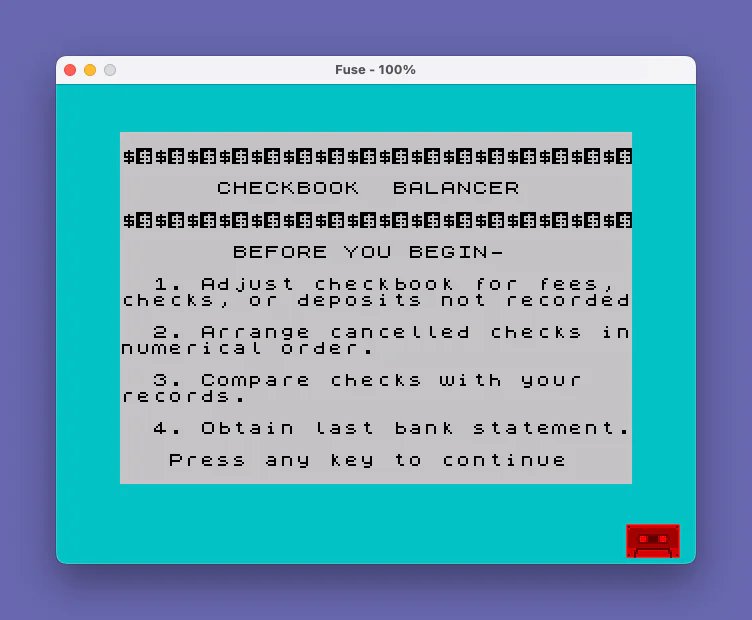
- Lines 20–140: Initialize variables, display a decorative banner via the subroutine at line 450, and present a four-step instruction screen with a flashing “Press any key” prompt.
- Lines 150–270: Draw a red-papered left-column area for outstanding checks, then collect check numbers and amounts in a loop, accumulating a total
t. - Lines 280–420: Collect the statement balance
band recent unposted depositsd, compute totals, and display the reconciliation layout on the right side of the screen. - Lines 430–445: Offer the user a choice to print a copy (
COPY), restart, or re-prompt. - Lines 450–500: Subroutine that prints a decorative banner row of
$$characters (16 pairs). - Line 9999: A save/verify utility block not reached during normal execution.
Key BASIC Idioms
The program uses the well-known FOR i=1 TO i infinite loop idiom at lines 220 and 290. Because i is already set to 1 from a prior loop iteration (or initialized by the FOR statement itself), the loop condition is always satisfied, making it effectively infinite. Exit is achieved by a GO TO when the user enters the sentinel value 0. This avoids needing a pre-known count of entries while staying within standard BASIC.
The subroutine at line 450 is called with GO SUB 450 to print decorative separator lines. It uses a FOR/NEXT loop to print 16 pairs of $$, creating a dollar-sign banner, then returns. The line numbering jumps (450, 470, 490, 500) suggest earlier editing removed intermediate lines.
Rounding Technique
Line 380 applies a classic two-decimal rounding formula: LET p=INT(p*100+.5)/100. Multiplying by 100 shifts two decimal places, adding 0.5 before truncating via INT achieves standard rounding, and dividing by 100 restores the scale. This guards against floating-point artifacts that could produce results like 123.999999 instead of 124.00.
Screen Layout
The program divides the display into a left column (columns 0–13) for the outstanding checks list and a right column (columns 14–31) for the statement reconciliation. PAPER 1 (blue) is applied to the check area background. INVERSE 1 highlights the intermediate total and final balance labels. OVER 1 is used at lines 350 and 410 to draw underline-style separator marks using underscore characters without overwriting existing content.
Notable Techniques and Observations
- Variable reuse:
a$is reused at line 435 for the Copy/Again prompt, which is safe since the earlier use ofa(numeric) for check amounts is complete by that point. However,a(numeric) anda$(string) are distinct variables, so there is no conflict. - Line 220 initializes the check-entry loop with
FOR i=1 TO i; at this pointihas not been explicitly set, so it defaults to 0. The FOR statement setsi=1and compares to the limit, which is now also evaluated as 1, so the loop body executes once before the variable diverges — but because the exit is viaGO TO 270, notNEXT i, the loop effectively runs indefinitely until the sentinel is entered. - Line 110 contains “innumerical” (missing space between “in” and “numerical”) — a minor typographical error in the instruction text.
- The
COPYcommand at line 440 sends a screen dump to a printer, a standard peripheral of the era. - Line 9999 provides a self-contained tape save/verify sequence with
BEEPprompts and is only reached manually, not during normal program execution. - The
FOR j=1 TO 22loop at lines 160–180 paints 22 rows of the left column withPAPER 1background before printing column headers, establishing the visual layout.
Variable Summary
| Variable | Purpose |
|---|---|
x | Current screen row for printing checks (starts at 3) |
t | Running total of outstanding check amounts |
d | Running total of recent unposted deposits |
b | Statement ending balance entered by user |
s | Subtotal: statement balance plus recent deposits |
p | Final reconciled balance (rounded to 2 decimal places) |
c | Check number entered by user |
a | Check amount entered by user |
r | Individual recent deposit amount |
i | Loop counter (reused for both input loops) |
j | Loop counter for painting background rows |
a$ | User response to Copy/Again prompt |
Image Gallery
Source Code
    5 REM John Colonna, SINCUS
   10 REM checkbal  VER. 1.4
   20 BORDER 5: CLS
   30 LET x=3: LET t=0: LET d=0
   40 GO SUB 450
   50 PRINT "      CHECKBOOK  BALANCER"
   60 GO SUB 450
   70 PRINT TAB 7;"BEFORE YOU BEGIN-"
   80 PRINT
   90 PRINT AT 9,2;"1. Adjust checkbook for fees, checks, or deposits not recorded"
  100 PRINT AT 12,2;"2. Arrange cancelled checks innumerical order."
  110 PRINT AT 15,2;"3. Compare checks with your   records."
  120 PRINT AT 18,2;"4. Obtain last bank statement."
  130 PRINT AT 20,3; FLASH 1;"Press any key to continue"
  140 PAUSE 0
  150 CLS
  160 FOR j=1 TO 22
  170 PRINT TAB 0; PAPER 1;"              "
  180 NEXT j
  190 PRINT AT 0,1;"OUTSTANDING"
  200 PRINT AT 1,3;"CHECKS"
  210 PRINT AT 2,2;"#";AT 2,7;"Amt."
  220 FOR i=1 TO i
  230 INPUT "Enter check number (Enter '0'   when completed) #";c: PRINT AT x,1;c: IF c=0 THEN GO TO 270
  240 INPUT "Indicate amount $";a: PRINT AT x,7;a
  250 LET x=x+1: LET t=t+a
  260 NEXT i
  270 PRINT AT x+1,0;"TOTAL";" $";t
  280 INPUT "Enter balance from statement    $";b: PRINT AT 1,15;"STATEMENT": PRINT AT 2,16;"BALANCE  ";b
  290 FOR i=1 TO i
  300 INPUT "Enter recent deposits not shown on statement (Enter '0' when    completed) $";r: IF r=0 THEN GO TO 330
  310 LET d=d+r
  320 NEXT i
  330 PRINT AT 4,16;"RECENT"
  340 PRINT AT 5,15;"DEPOSITS +";d
  350 PRINT AT 5,25; OVER 1;"______"
  360 LET s=b+d
  370 PRINT AT 7,17; INVERSE 1;"TOTAL"; INVERSE 0;"   ";s
  380 LET p=s-t: LET p=INT (p*100+.5)/100
  390 PRINT AT 9,17;"OUT."
  400 PRINT AT 10,16;"CHECKS  -";t
  410 PRINT AT 10,25; OVER 1;"______"
  420 PRINT AT 12,16; INVERSE 1;"BALANCE"; INVERSE 0;AT 12,25;p
  430 PRINT AT 14,17; PAPER 5;"YOUR PRESENT";AT 16,15;"CHECKBOOK BALANCE";AT 18,19;"SHOULD BE";AT 20,20;"$";p
  435 INPUT "COPY or AGAIN? (C/A) ";a$
  440 IF a$="c" OR a$="C" THEN COPY
  443 IF a$="a" OR a$="A" THEN GO TO 20
  445 GO TO 435
  450 PRINT
  470 FOR i=1 TO 16: PRINT "$$";: NEXT i
  490 PRINT : PRINT
  500 RETURN
 9999 CLEAR : CLS : SAVE "checkbal" LINE 1: BEEP 1,32: PRINT : PRINT INVERSE 1;"Rewind to VERIFY": VERIFY "checkbal": PRINT FLASH 1;" V E R I F I E D ": BEEP .5,32: BEEP .5,32
Note: Type-in program listings on this website use ZMAKEBAS notation for graphics characters.