
This program is a menu-driven clip-art viewer that lets the user select from ten pre-drawn graphics — including a box, flower, sun, cake, bee, church, Valentine heart, girl, star, and sunburst — and layer them on the screen by chaining selections before clearing. Each image is built entirely from PLOT, DRAW, and CIRCLE commands, with DRAW’s optional arc parameter (the third argument controlling arc angle, e.g. 0.6*PI) used extensively to render curved petals, wings, and heart lobes. The dispatch mechanism at line 50 uses the elegant expression GO TO 500*Number, routing directly to subroutine blocks spaced 500 lines apart. Block graphics characters embedded in PRINT AT statements supplement the vector drawing for details like eyes and wing markings, and selections loop back through line 50 so multiple images can be superimposed before a final input of 11 terminates via the STOP at line 5500.
Program Analysis
Program Structure
The program is organized as a dispatcher with ten self-contained drawing blocks, each occupying a 500-line band. The main menu (lines 15–30) prints instructions describing all ten options, then line 30 accepts a number. Line 40 clears the screen and line 50 routes execution with the single expression GO TO 500*Number. Each drawing block ends with another INPUT Number and GO TO 50, allowing images to be layered before the user finally enters 11, which resolves to GO TO 5500 where STOP ends the program.
| Number | Line | Subject |
|---|---|---|
| 1 | 500 | Note Box |
| 2 | 1000 | Flower |
| 3 | 1500 | Sun |
| 4 | 2000 | Cake |
| 5 | 2500 | Bee |
| 6 | 3000 | Church |
| 7 | 3500 | Valentine |
| 8 | 4000 | Girl |
| 9 | 4500 | Star |
| 10 | 5000 | Sunburst |
| 11 | 5500 | STOP |
Dispatch Mechanism
The key idiom is GO TO 500*Number at line 50. Because line numbers are evaluated as arithmetic expressions, multiplying the input by 500 cleanly maps integers 1–11 to the first line of each drawing block or the terminator. This is more compact and maintainable than a chain of IF/GO TO statements and is a well-regarded BASIC technique for structured dispatch.
Drawing Techniques
All graphics are produced using three commands: PLOT, DRAW, and CIRCLE. The two-argument form of DRAW draws straight line segments, while the three-argument form DRAW dx,dy,angle produces circular arcs. The arc parameter is consistently expressed as a fraction of PI (e.g. 0.6*PI, 0.3*PI, 0.5*PI), giving precise control over curvature.
- The Flower (line 1000) uses eight sets of paired arcs radiating from a central circle to simulate petals in four diagonal directions.
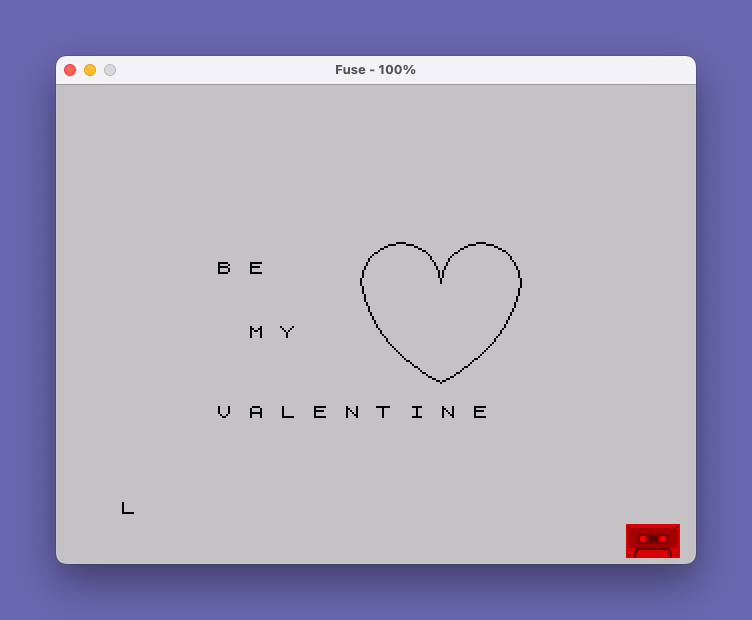
- The Valentine heart (line 3500) constructs the two lobes with
DRAW -40,0,PI— a semicircle — applied twice from adjacent start points, then closes the shape with two angled straight segments. - The Bee (line 2500) combines a body ellipse via arcs, a
CIRCLEfor the head, and a hand-drawn antenna/tail path. - The Sunburst (lines 5000–5110) fans out ~28 straight
DRAWrays from a common origin at pixel (132,90), systematically incrementing both x and y offsets to cover the right and left hemispheres.
Block Graphics Usage
Several drawings supplement vector graphics with embedded block graphic characters placed via PRINT AT row,col. These characters are baked into string literals:
- Sun (line 1530):
▖ ▖— lower-left quarter-block characters suggest rays or texture. - Bee (line 2520):
▌ ▌and▖ ▖for wing and body detail. - Girl (line 4030):
█ █full blocks represent eyes. - Sunburst (line 5010):
______█______marks the centre of the burst as a printed reference point.
Layering Feature
Because line 40 (CLS) is only reached when re-entering from the menu prompt at line 30, and each drawing block loops back via GO TO 50 which jumps directly to GO TO 500*Number without clearing, images accumulate on screen. The user guide text at lines 27–29 explicitly instructs users to input 11 before copying or adding text, confirming that layering is an intentional design feature.
Notable Anomalies
- Line 1530 uses
PRINT AT 7,17;"▖ ▖"to add detail to the Sun, but the Sun’s circle is drawn centred at pixel (145,110), which maps approximately to row 3, column 18 in text coordinates. The PRINT row 7 places the characters noticeably below the circle, suggesting a calibration issue between pixel and character-cell coordinates. - The Star (line 4510) begins with
PLOT 0,100placing the first point at the far left edge of the screen, thenPLOT 70,100immediately repositions without drawing — the initialPLOT 0,100serves no visible purpose and is likely a leftover from development. - Line 1010 uses
DRAW 14,0andDRAW -15,0,.6*PIconsecutively afterCIRCLE 127,90,10; the straight draw moves the graphics cursor before the arc begins, which is an intentional but subtle technique to anchor the petal arc’s starting position relative to the circle. - The long
PRINTstring at line 20 relies on the system’s automatic word-wrap across the screen to display all ten menu options, trading readability in the listing for economy in line count.
Image Gallery

Source Code
   15 REM "cl art 1a"
   16 PRINT AT 1,7;"Clip Art Program"
   17 PRINT
   18 PRINT AT 3,4;"(Allows Menu Selection)"
   19 PRINT
   20 PRINT "Input  1 for # 500 -Box,        Input  2 for #1000 -Flower,     Input  3 for #1500 -Sun,        Input  4 for #2000 -Cake,       Input  5 for #2500 -Bee,        Input  6 for #3000 -Church,     Input  7 for #3500 -Valentine,  Input  8 for #4000 -Girl,       Input  9 for #4500 -Star,       Input 10 for #5000 -Sunburst,   Input 11 if you are finished."
   21 PRINT
   27 PRINT "Input the next Clip Art number   if you want to add  it to the  previous one."
   29 PRINT "Note: Always input an 11 before  copying or inputing text."
   30 INPUT Number
   40 CLS
   50 GO TO 500*Number
  500 REM "Note Box"
  510 DRAW 0,160: DRAW 250,-0: DRAW 0,-160: DRAW -250,0: PLOT 24,16: DRAW 0,125: DRAW 200,-0: DRAW 0,-125: DRAW -200,0
  520 INPUT Number
  530 GO TO 50
 1000 REM "A Flower"
 1010 CIRCLE 127,90,10: DRAW 14,0: DRAW -15,0,.6*PI: DRAW 15,0,.6*PI
 1020 PLOT 117,90: DRAW -14,0: DRAW 15,0,.6*PI: DRAW -15,0,.6*PI
 1030 PLOT 127,100: DRAW 0,14: DRAW -0,-15,.6*PI: DRAW 0,15,.6*PI
 1040 PLOT 127,80: DRAW 0,-14: DRAW -0,15,.6*PI: DRAW 0,-15,.6*PI
 1050 PLOT 119,85: DRAW -9,-11: DRAW 11,11,.6*PI: DRAW -12,-12,.6*PI
 1060 PLOT 118,97: DRAW -9,11: DRAW 11,-12,.6*PI: DRAW -11,12,.6*PI
 1070 PLOT 136,95: DRAW 10,10: DRAW -11,-11,.6*PI: DRAW 11,11,.6*PI
 1080 PLOT 135,81: DRAW 10,-10: DRAW -11,11,.6*PI: DRAW 11,-11,.6*PI
 1090 PLOT 127,75: DRAW 0,-45: DRAW 6,22: DRAW 4,-16: DRAW -7,-5: DRAW -3,0: DRAW -8,25: DRAW -4,-8: DRAW 12,-18
 1100 INPUT Number
 1110 GO TO 50
 1500 REM "The Sun"
 1510 CIRCLE 145,110,20
 1520 CIRCLE 145,111,20
 1530 PRINT AT 7,17;"▖ ▖"
 1540 PLOT 136,110
 1550 DRAW 20,0,PI
 1560 INPUT Number
 1570 GO TO 50
 2000 REM "B. Cake"
 2010 CIRCLE 160,90,17
 2020 PLOT 143,90: DRAW 0,-25: DRAW 34,0: DRAW 0,25: PLOT 135,80: DRAW 50,0,PI: PLOT 135,80: DRAW 2,6: DRAW 6,9: PLOT 185,80: DRAW -2,6: DRAW -6,9
 2030 PLOT 165,90: DRAW 0,20: PLOT 165,115: DRAW 1,1: PLOT 155,95: DRAW 0,20: PLOT 155,120
 2040 INPUT Number
 2050 GO TO 50
 2500 REM "A Bee"
 2510 PLOT 125,90: DRAW -50,0,.6*PI: DRAW 50,0,.6*PI: CIRCLE 130,95,7: DRAW -5,20: DRAW 5,-20: DRAW 5,20
 2520 PRINT AT 10,11;"▌ ▌": PRINT AT 11,11;"▌ ▌": PRINT AT 9,11;"▖ ▖"
 2530 PLOT 120,95: DRAW -50,0,.3*PI: PLOT 110,100: DRAW -15,20: DRAW -10,3: DRAW -3,-3: DRAW 2,-10: DRAW 10,-6: DRAW 12,-3
 2540 INPUT Number
 2550 GO TO 50
 3000 REM "Church"
 3010 PLOT 125,110: DRAW 50,4: DRAW 30,-30: DRAW -60,0: DRAW -22,27: DRAW -22,-25: DRAW 4,4: DRAW 0,-50: DRAW 35,0: DRAW 0,48: DRAW 0,-48: DRAW 55,12: DRAW 0,32
 3020 PLOT 125,111: DRAW 0,40: DRAW 5,-40: DRAW -10,0: DRAW 3,40: DRAW -3,-40: DRAW 0,-3
 3030 PLOT 128,75: DRAW -13,0,PI: DRAW 0,-29: DRAW 13,0: DRAW 0,29
 3040 INPUT Number
 3050 GO TO 50
 3500 REM "Valentine"
 3510 PLOT 200,100
 3530 DRAW -40,0,PI: PLOT 160,100: DRAW -40,0,PI
 3540 PLOT 120,100: DRAW 40,-50,.3*PI: DRAW 40,50,.3*PI
 3550 PRINT AT 8,6;"B E"
 3560 PRINT AT 12,8;"M Y"
 3570 PRINT AT 17,6;"V A L E N T I N E"
 3580 INPUT Number
 3590 GO TO 50
 4000 REM   Girl
 4010 CIRCLE 125,90,20
 4020 DRAW 20,0,PI: PLOT 85,90: DRAW 20,0,PI
 4030 PRINT AT 10,14;"█ █"
 4040 PLOT 120,81: DRAW 10,0,.5*PI
 4050 INPUT Number
 4060 GO TO 50
 4500 REM   Star
 4510 PLOT 0,100: PLOT 70,100: DRAW 100,0: DRAW -70,-50: DRAW 10,100: DRAW 50,-100: DRAW -90,50
 4520 INPUT Number
 4530 GO TO 50
 5000 REM  Sunburst
 5010 PRINT AT 10,10;"______█______"
 5020 PLOT 132,90: DRAW 0,45: PLOT 132,90: DRAW 0,-45: PLOT 132,87: DRAW 10,44: PLOT 132,87: DRAW 10,-44: PLOT 132,87: DRAW 20,42
 5030 PLOT 132,87: DRAW 20,-42: PLOT 132,87: DRAW 30,38: PLOT 132,87: DRAW 30,-38
 5040 PLOT 132,87: DRAW 40,32: PLOT 132,87: DRAW 40,-32: PLOT 132,90: DRAW 50,20
 5050 PLOT 132,89: DRAW 50,-23: PLOT 132,89: DRAW 50,12: PLOT 132,89: DRAW 50,-12
 5060 PLOT 132,90: DRAW 10,-10
 5070 REM Start on left side
 5080 PLOT 132,90: DRAW -10,45: PLOT 132,90: DRAW -10,-45
 5090 PLOT 132,90: DRAW -20,45: PLOT 132,90: DRAW -20,-45: PLOT 132,90: DRAW -30,42
 5100 PLOT 132,90: DRAW -30,-42: PLOT 132,90: DRAW -40,36: PLOT 132,90: DRAW -40,-36: PLOT 132,90: DRAW -50,22
 5110 PLOT 132,90: DRAW -50,-22: PLOT 132,90: DRAW -53,12: PLOT 132,90: DRAW -53,-12
 5120 INPUT Number
 5130 GO TO 50
 5500 STOP
Note: Type-in program listings on this website use ZMAKEBAS notation for graphics characters.