
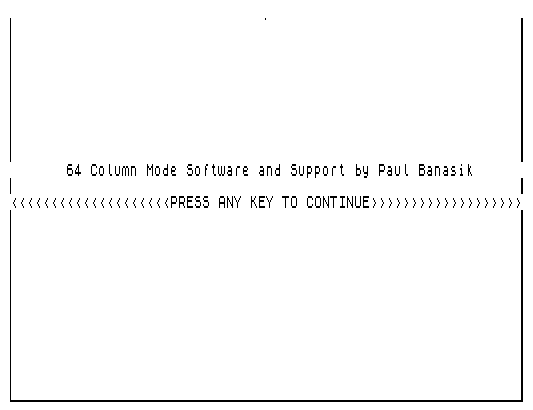
DEMO64 is a demonstration and documentation program for a 64-column display system implemented in machine code on the TS2068. It loads a 373-byte machine code routine at address 56000 that provides six entry points: INITIALIZE (56000), PRINT CHARACTER (56022), CLEAR SCREEN (56136), PLOT (56167), UNPLOT (56270), and parameter storage locations for LINE, COLUMN, CHAR CODE, X1, X2, and Y at addresses 56373–56378. The program opens with an animated border-drawing routine using the PLOT entry point, tracing a rectangle around the screen by iterating through X and Y coordinates. It then pages through five screens of documentation explaining how to call each machine code routine from BASIC, including color selection via OUT 255 and the dual display file layout at 16384 and 24576. A subroutine at line 5000 writes 64-character strings to the 64-column display by POKEing each character code individually to address 56375 and calling USR 56022.
Program Structure
The program is organized into a linear sequence of display pages, a reusable print subroutine, and a save/restore block at the end. The high-level flow is:
- Lines 15–130: REM documentation of the machine code entry points and variable locations.
- Lines 140–150: Load the machine code and initialize the 64-column display.
- Lines 160–380: Animated border-drawing sequence using the PLOT routine.
- Lines 390–1520: Five successive documentation screens, each waiting for a keypress before continuing.
- Lines 1530–1580: Optional tape save of both the BASIC program and machine code block.
- Lines 5000–5050: String-printing subroutine that writes exactly 64 characters to a chosen screen line.
- Line 9999: Alternate save line (SAVE both files, then branch to 1530).
Machine Code Interface
The 373-byte machine code block is loaded at address 56000 and communicates with BASIC entirely through a set of single-byte parameter locations immediately following the code:
| Address | Purpose | Range |
|---|---|---|
| 56373 | LINE (row) | 0–23 |
| 56374 | COLUMN | 0–63 |
| 56375 | CHAR CODE | 32–127 |
| 56376 | X1 (low byte of X) | 0–255 |
| 56377 | X2 (high byte / bank select) | 0 or 1 |
| 56378 | Y coordinate | 0–191 |
Each routine is called with LET C= USR address; the return value is discarded but the LET C= pattern is required syntax since USR returns a value. The dual-byte X coordinate (X1/X2) extends the horizontal pixel range to 512 positions total, split into two 256-pixel banks, with X2 acting as a bank selector for the secondary display file at address 24576.
Animated Border Routine
Lines 160–380 draw a rectangular border by driving the PLOT entry point (56167) in four passes, tracing the left edge, bottom edge, right edge, and top edge in sequence. The approach uses separate loops for X and Y axes:
- Left edge (lines 170–200): Y from 0 to 191, X1=0, X2=0.
- Bottom edge (lines 210–270): X from 0 to 255 with Z cycling 0–1 (both banks), Y=191.
- Right edge (lines 280–310): Y from 191 down to 0, X fixed at end.
- Top/left return (lines 320–380): X from 255 down to 0, Z from 1 down to 0.
There is a bug in lines 360: the code reads POKE 56378,X:POKE 56378,0, which immediately overwrites the Y-coordinate POKE with 0, meaning the top edge is always plotted at Y=0 rather than at the intended row. The first POKE to 56378 in that line is therefore redundant and never takes effect.
Print Subroutine (Line 5000)
The subroutine at line 5000 provides a convenient wrapper for printing a full 64-character line. The caller sets LINE and T$ before issuing GO SUB 5000. The subroutine POKEs LINE to address 56373 once, then iterates X from 0 to 63, POKEing the column (56374) and the character code via CODE T$(X+1) (56375) before calling USR 56022 for each character. All text strings in the program are padded to exactly 64 characters to match this fixed-width loop.
Key BASIC Idioms and Techniques
IF INKEY$="" THEN GO TO line— standard busy-wait keypress detection at lines 430, 650, 830, 1250, 1510.LET C= USR addr— return value is discarded; the variableCis reused throughout as a dummy sink for USR calls.PAUSE 120at line 1550 followed by anINKEY$check provides a timed auto-continue if no key is pressed.- Line 1560 uses a compound statement:
IF INKEY$="" THEN LET C= USR 56136:RUN 140, restarting the demo from the animation if no key was pressed after the pause. OUT 255,0andOUT 255,6at line 1580 manipulate hardware color output before and after saving, restoring the default white-on-black palette.- Line 1580 uses a long compound statement to: reset color, clear, save the BASIC file, save the code block, restore color, clear screen, and loop back — all in one line.
CLEAR 56000at line 140 sets RAMTOP to protect the machine code from BASIC and fromNEW.
Notable Anomaly: Line 360
Line 360 contains POKE 56378,X:POKE 56378,0. Since 56378 is the Y-coordinate register, the intent appears to be to set Y=X (using X as a row counter) but then immediately overwrites it with 0. This means the top-edge return pass always plots at Y=0, which happens to be the correct top row but through an apparent coding error rather than deliberate logic. The variable X at that point ranges from 255 down to 0 and is being used as the X-coordinate via 56376 on the previous line — the first POKE in line 360 is simply incorrect and has no useful effect.
Save/Restore Architecture
The program supports two save paths. Line 1580 saves the BASIC program under the name “DEMO64” with auto-run at line 10, and saves the machine code block as “CODE64”. Line 9999 saves the machine code under the original name “DEMO64 C” (matching the LOAD at line 130). This dual naming reflects the split between the demonstration code and the relocatable machine code library it documents.
Image Gallery
Source Code
   15 REM      DEMO 64demo program and machine code by  Paul Banasik
   20 REM 56000=INITIALIZE
   30 REM 56022=PRINT CHARACTER
   40 REM 56136=CLEAR SCREEN
   50 REM 56167=PLOT
   60 REM 56270=UNPLOT
   70 REM 56373=LINE
   80 REM 56374=COLUMN
   90 REM 56375=CHAR. CODE
  100 REM 56376=X1
  110 REM 56377=X2
  120 REM 56378=Y
  130 LOAD "DEMO64 C"CODE 56000,373
  140 CLEAR 56000
  150 LET C= USR 56000
  160 POKE 56376,0:POKE 56377,0
  170 FOR Y=0 TO 191
  180 POKE 56378,Y:LET C= USR 56167
  200 NEXT Y
  210 FOR Z=0 TO 1
  220 POKE 56377,Z
  230 FOR X=0 TO 255
  240 POKE 56376,X:POKE 56378,191
  260 LET C= USR 56167
  270 NEXT X:NEXT Z
  280 FOR Y=191 TO 0 STEP -1
  300 POKE 56378,Y:LET C= USR 56167
  310 NEXT Y
  320 FOR Z=1 TO 0 STEP -1
  330 POKE 56377,Z
  340 FOR X=255 TO 0 STEP -1
  360 POKE 56378,X:POKE 56378,0
  370 LET C= USR 56167
  380 NEXT X:NEXT Z
  390 LET T$="       64 Column Mode Software and Support by Paul Banasik      "
  400 LET LINE=9:GO SUB 5000
  410 LET T$="<<<<<<<<<<<<<<<<<<<<PRESS ANY KEY TO CONTINUE>>>>>>>>>>>>>>>>>>>"
  420 LET LINE=11:GO SUB 5000
  430 IF INKEY$="" THEN GO TO 430
  440 LET C= USR 56136
  450 LET T$="     The 64 column mode support code is a machine code program  "
  460 LET LINE=0:GO SUB 5000
  470 LET T$="that takes care of the 64 column display available to the user. "
  480 LET LINE=1:GO SUB 5000
  490 LET T$="Available to the user are the following machine code routines:  "
  500 LET LINE=2:GO SUB 5000
  510 LET T$="  INITIALIZE        PRINT        CLS        PLOT         UNPLOT "
  520 LET LINE=4:GO SUB 5000
  530 LET T$="The routines are basically used by POKEing in the variables and "
  540 LET LINE=6:GO SUB 5000
  550 LET T$="then calling them with the USR function. The next page will show"
  560 LET LINE=7:GO SUB 5000
  570 LET T$="the specific variable locations and the routine starting        "
  580 LET LINE=8:GO SUB 5000
  590 LET T$="addresses. The information is mainly self explanatory, and should"
  600 LET LINE=9:GO SUB 5000
  610 LET T$="pose no problem.                                                "
  620 LET LINE=10:GO SUB 5000
  630 LET T$="<<<<<<<<<<<<<<<<<<<<<<<<<<PRESS ANY KEY>>>>>>>>>>>>>>>>>>>>>>>>>"
  640 LET LINE=15:GO SUB 5000
  650 IF INKEY$="" THEN GO TO 650
  660 LET C= USR 56136
  670 LET T$="    ROUTINES                        VARIABLES                   "
  680 LET LINE=6:GO SUB 5000
  690 LET T$="INITIALIZE   =56000             LINE         =56373             "
  700 LET LINE=8:GO SUB 5000
  710 LET T$="PRINT        =56022             COLUMN       =56374             "
  720 LET LINE=9:GO SUB 5000
  730 LET T$="CLEAR SCREEN =56136             CHAR CODE    =56375             "
  740 LET LINE=10:GO SUB 5000
  750 LET T$="PLOT         =56167             X1           =56376             "
  760 LET LINE=11:GO SUB 5000
  770 LET T$="UNPLOT       =56270             X2           =56377             "
  780 LET LINE=12:GO SUB 5000
  790 LET T$="                                Y            =56378             "
  800 LET LINE=13:GO SUB 5000
  810 LET T$="<<<<<<<<<<<<<<<<<<<<<<<<<<PRESS ANY KEY>>>>>>>>>>>>>>>>>>>>>>>>>"
  820 LET LINE=17:GO SUB 5000
  830 IF INKEY$="" THEN GO TO 830
  840 LET C= USR 56136
  850 LET T$="EXPLANATION  EXPLANATION  EXPLANATION  EXPLANATION  EXPLANATION "
  860 LET LINE=0:GO SUB 5000
  870 LET T$="     To use the INITIALIZE routine, type LET C=USR 56000, and   "
  880 LET LINE=2:GO SUB 5000
  890 LET T$="the screen will be initialized for the 64 column mode.          "
  900 LET LINE=3:GO SUB 5000
  910 LET T$="     Using the PRINT routine requires several parameters. You   "
  920 LET LINE=4:GO SUB 5000
  930 LET T$="have to POKE 56373,LINE number (0-23), POKE 56374,COLUMN number "
  940 LET LINE=5:GO SUB 5000
  950 LET T$="(0-63), and POKE 56375,CHARACTER CODE (32-127). Then type LET C="
  960 LET LINE=6:GO SUB 5000
  970 LET T$="USR 56022. Do this for every character placed on the screen.    "
  980 LET LINE=7:GO SUB 5000
  990 LET T$="     CLEARing the SCREEN is a simple thing to accomplish. Just  "
 1000 LET LINE=8:GO SUB 5000
 1010 LET T$="type LET C=USR 56136. Both display files will be cleared.       "
 1020 LET LINE=9:GO SUB 5000
 1030 LET T$="     PLOTting is done using three variables. The variable X1 in "
 1040 LET LINE=10:GO SUB 5000
 1050 LET T$="conjunction with X2 determine the X coordinate to be used. Y is "
 1060 LET LINE=11:GO SUB 5000
 1070 LET T$="all by itself. To use the routine, POKE 56378,Y (0-191, where 0 "
 1080 LET LINE=12:GO SUB 5000
 1090 LET T$="is the top of the screen and 191 is the bottom of the screen).  "
 1100 LET LINE=13:GO SUB 5000
 1110 LET T$="Then, if you want the first 256 X-positions, POKE 56376,X       "
 1120 LET LINE=14:GO SUB 5000
 1130 LET T$="(0-255) and POKE 56377,0. If you want to plot the next 256      "
 1140 LET LINE=15:GO SUB 5000
 1150 LET T$="positions, then POKE 56376,X (0-255), and POKE 56377,1. Then    "
 1160 LET LINE=16:GO SUB 5000
 1170 LET T$="type LET C=USR 56167. The point will appear. To UNPLOT a point, "
 1180 LET LINE=17:GO SUB 5000
 1190 LET T$="use the same process, except use LET C=USR 56270. The point will"
 1200 LET LINE=18:GO SUB 5000
 1210 LET T$="disappear.                                                      "
 1220 LET LINE=19:GO SUB 5000
 1230 LET T$="<<<<<<<<<<<<<<<<<<<<<<<<<<PRESS ANY KEY>>>>>>>>>>>>>>>>>>>>>>>>>"
 1240 LET LINE=21:GO SUB 5000
 1250 IF INKEY$="" THEN GO TO 1250
 1260 LET C= USR 56136
 1270 LET T$="NOTES  NOTES  NOTES  NOTES  NOTES  NOTES  NOTES  NOTES  NOTES   "
 1280 LET LINE=0:GO SUB 5000
 1290 LET T$="     Before using the machine code, type CLEAR 55999. This will "
 1300 LET LINE=2:GO SUB 5000
 1310 LET T$="protect the code against being overwritten by BASIC. It will    "
 1320 LET LINE=3:GO SUB 5000
 1330 LET T$="also protect the code from NEW.                                 "
 1340 LET LINE=4:GO SUB 5000
 1350 LET T$="     To change the color selection for the screen, type OUT 255,"
 1360 LET LINE=5:GO SUB 5000
 1370 LET T$="and the following numbers for PAPER/INK selections:6:white/black"
 1380 LET LINE=6:GO SUB 5000
 1390 LET T$="14:yellow/blue,22:cyan/red,30:green/magenta,38:magenta/green,   "
 1400 LET LINE=7:GO SUB 5000
 1410 LET T$="46:red/cyan,54:blue/yellow, and 62:black/white.                 "
 1420 LET LINE=8:GO SUB 5000
 1430 LET T$="     The primary display file is at 16384, and the secondary    "
 1440 LET LINE=9:GO SUB 5000
 1450 LET T$="display file is at 24576. None of the attribute files are used  "
 1460 LET LINE=10:GO SUB 5000
 1470 LET T$="in the 64 column mode.                                          "
 1480 LET LINE=11:GO SUB 5000
 1490 LET T$="<<<<<<<<<<<<<<<<<<<<<<<<<<PRESS ANY KEY>>>>>>>>>>>>>>>>>>>>>>>>>"
 1500 LET LINE=14:GO SUB 5000
 1510 IF INKEY$="" THEN GO TO 1510
 1520 LET C= USR 56136
 1530 LET T$="Press any key to save this program WITH machine code on tape...."
 1540 LET LINE=10:GO SUB 5000
 1550 PAUSE 120
 1560 IF INKEY$="" THEN LET C= USR 56136:RUN 140
 1570 LET C= USR 56136
 1580 OUT 255,0:CLEAR 56000:SAVE "DEMO64" LINE 10:SAVE "CODE64"CODE 56000,373:OUT 255,6:LET C= USR 56136:RUN 1530
 5000 POKE 56373,LINE
 5010 FOR X=0 TO 63
 5020 POKE 56374,X
 5030 POKE 56375, CODE T$(X+1)
 5040 LET C= USR 56022:NEXT X
 5050 RETURN
 9999 SAVE "DEMO64" LINE 10:SAVE "DEMO64 C"CODE 56000,373:RUN 1530
Note: Type-in program listings on this website use ZMAKEBAS notation for graphics characters.