
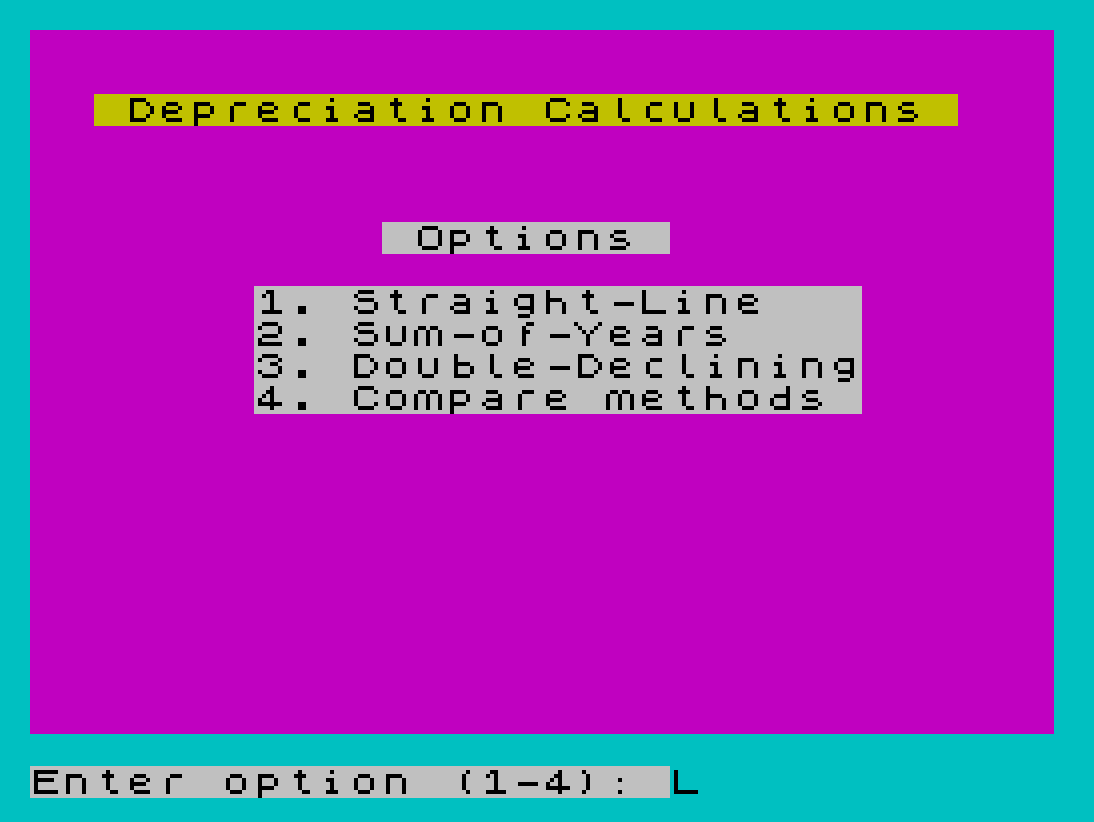
This program calculates and displays depreciation schedules using three standard accounting methods: Straight-Line, Sum-of-Years Digits, and Double-Declining Balance. It presents a menu-driven interface with color attributes (PAPER, BORDER, FLASH) and allows the user to view any single method or a side-by-side comparison of all three. Numeric formatting is handled by two DEF FN functions — one rounds to two decimal places and the other appends “.00” or a trailing “0” to ensure consistent currency display. The Double-Declining Balance method includes a switch-over calculation at line 35–38, where it transitions to straight-line when that becomes more favorable, controlled by the crossover year variable `t`.
Program Analysis
Program Structure
The program is organized into clearly separated functional blocks:
- Lines 2–4: REM header with copyright notice.
- Lines 10–14: Two
DEF FNdefinitions for numeric rounding and currency string formatting. - Line 16: Initialization — sets screen colors, rounding constant
k=100, and jumps to the menu. - Lines 20–38: Subroutine library: formatting helper (line 20), Straight-Line (line 25), Sum-of-Years (line 30), and Double-Declining Balance (lines 35–38).
- Lines 50–56: Main menu display and input validation.
- Lines 60–100: Single-method report loop.
- Lines 120–160: Comparison report (all three methods side by side).
- Line 200:
SAVEwith auto-start.
Depreciation Algorithms
Each of the three depreciation methods is implemented as a short subroutine reached via computed GO SUB:
| Line | Method | Formula |
|---|---|---|
| 25 | Straight-Line | d = (c - s) / l |
| 30 | Sum-of-Years Digits | d = 2*(c-s)*(l+1-z) / (l*(l+1)) |
| 35–38 | Double-Declining Balance | Declining phase: d = 2*(c-s)/l * (1-2/l)^(z-1); switch-over phase: d = (c-s)*(1-2/l)^(t-1) / (l-t+1) |
The Double-Declining Balance method spans two lines. Line 35 handles the declining phase for years before the crossover year t, and line 38 handles the remaining years with a straight-line distribution of the residual value. The crossover year is computed as t = INT((l+1)/2) + 1 at lines 90 and 130.
Computed GO SUB Dispatch
A particularly elegant idiom appears at line 90: GO SUB 20+5*x. Since the menu option x is 1, 2, or 3, this resolves to GO SUB 25, GO SUB 30, or GO SUB 35 respectively, selecting the correct depreciation subroutine without any IF/THEN branching. This is a compact and efficient dispatch table technique well-suited to BASIC’s numeric expression evaluation in GO SUB.
Currency Formatting with DEF FN
Two DEF FN functions cooperate to produce consistently formatted monetary output:
FN a(x)at line 10 rounds a value to two decimal places usingINT(k*x+0.5)/kwherek=100.FN a$(x,c$)at line 14 takes a number and its string representation and appends".00"if the value is an integer, or a trailing"0"if there is only one decimal digit. This is achieved by checking whether the last character before the string’s end is a"."using string slicing:("0"+c$)(LEN c$)=".". TheANDoperator is used in its string-conditional form to conditionally concatenate suffix strings.
The combined effect is that values like 500 become "500.00" and values like 12.5 become "12.50", giving uniform two-decimal-place currency appearance throughout the output.
Input Validation
Input validation uses the arithmetic OR idiom common in Sinclair BASIC. At line 54, IF (x<1)+(x>4) treats the boolean results as integers (0 or 1) and sums them — if either condition is true the sum is non-zero and the input is rejected with a warning beep. Similarly, line 72 checks (s>=c)+(s<0) to reject illogical salvage values. The salvage check includes re-displaying the method header by jumping back to line 60 rather than just re-prompting, which ensures a clean screen.
Output Layout
The single-method report (lines 80–100) right-aligns monetary values by computing TAB 15-LEN d$ and TAB 29-LEN b$, producing a column of numbers neatly flush-right regardless of their length. The comparison report (lines 120–150) uses the same technique across three columns. Horizontal separator lines are drawn using a row of block graphic ▀ characters (zmakebas \'' sequences).
Notable Techniques and Idioms
- The
FLASH 1attribute on the input prompt at line 52 draws attention to the entry field. PAUSE 100at line 56 briefly highlights the selected menu option with>>markers before clearing the screen.- The subroutine at line 20 uses the shared variable
yas both input and output, updating bothy(rounded) andc$(formatted string) for the caller to use. LET l=ABS lat line 74 silently corrects a negative lifetime entry rather than rejecting it.- The double
STOPat line 160 is redundant but harmless.
Image Gallery
Source Code
    2 REM  Depreciation Schedule
    4 REM  \* 1985 I. Auersbacher
   10 DEF FN a(x)=INT (k*x+0.5)/k
   14 DEF FN a$(x,c$)=c$+(".00" AND x=INT x)+("0" AND ("0"+c$)(LEN c$)=".")
   16 BORDER 5: PAPER 3: LET k=100: CLS : BEEP 0.07,22: GO TO 50
   20 LET y=FN a(y): LET c$=FN a$(y,STR$ y): RETURN
   25 LET d=(c-s)/l: RETURN
   30 LET d=2*(c-s)*(l+1-z)/(l*(l+1)): RETURN
   35 IF z<t THEN LET d=2*(c-s)/l*(1-2/l)^(z-1): RETURN
   38 LET d=((c-s)*(1-2/l)^(t-1))/(l-t+1): RETURN
   50 PRINT PAPER 6;AT 2,2;" Depreciation Calculations "; PAPER 7;AT 6,11;" Options ";AT 8,7;"1. Straight-Line   ";AT 9,7;"2. Sum-of-Years    ";AT 10,7;"3. Double-Declining";AT 11,7;"4. Compare methods "
   52 INPUT ; PAPER 7; FLASH 1;"Enter option (1-4): ";x
   54 LET x=INT x: IF (x<1)+(x>4) THEN BEEP 1,-20: GO TO 52
   56 PAPER 7: PRINT PAPER 6;AT 7+x,4;">>": PAUSE 100: CLS
   60 IF x=1 THEN PRINT PAPER 6;" 1. Straight-Line Depreciation "
   62 IF x=2 THEN PRINT PAPER 6;" 2. Sum-of-Years Digits Method "
   64 IF x=3 THEN PRINT PAPER 6;" 3. Double-Declining-Balance   "
   66 IF x=4 THEN PRINT PAPER 6;" 4. Comparison of all methods  "
   70 PRINT : PRINT "Original Cost: ";: INPUT c: PRINT c
   72 PRINT "Salvage Value: ";: INPUT s: PRINT s: IF (s>=c)+(s<0) THEN BEEP 1,-20: CLS : GO TO 60
   74 PRINT "Lifetime (yr): ";: INPUT l: LET l=ABS l: PRINT l
   76 IF x=4 THEN GO TO 120
   80 PRINT : PRINT "Year  Depreciation   Book Value ": PRINT "\''\''\''\''\''\''\''\''\''\''\''\''\''\''\''\''\''\''\''\''\''\''\''\''\''\''\''\''\''\''\''\''"
   90 LET t=INT ((l+1)/2)+1: LET b=c: FOR z=1 TO l: GO SUB 20+5*x
   95 LET b=b-d: LET y=d: GO SUB 20: LET d$=c$: LET y=b: GO SUB 20: LET b$=c$: PRINT TAB 2;z;
  100 PRINT TAB 15-LEN d$;d$;TAB 29-LEN b$;b$: NEXT z: STOP :
  120 PRINT : PRINT "Yr";TAB 4;"Straight";TAB 14;"Sum-of";TAB 23;"Double-": PRINT "#";TAB 5;"-Line";TAB 14;"-Years";TAB 23;"Declining": PRINT "\''\''\''\''\''\''\''\''\''\''\''\''\''\''\''\''\''\''\''\''\''\''\''\''\''\''\''\''\''\''\''\''"
  130 LET t=INT ((l+1)/2)+1
  140 FOR z=1 TO l: GO SUB 25: LET y=d: GO SUB 20: LET s$=c$: GO SUB 30: LET y=d: GO SUB 20: LET b$=c$: GO SUB 35: LET y=d: GO SUB 20: LET d$=c$: PRINT z;
  150 PRINT TAB 11-LEN s$;s$;TAB 21-LEN b$;b$;TAB 31-LEN d$;d$
  160 NEXT z: STOP : STOP
  200 SAVE "deprec" LINE 10
Note: Type-in program listings on this website use ZMAKEBAS notation for graphics characters.