
Graphics Toolkit is a machine code utility for the ZX81/TS1000 that provides a suite of display manipulation routines accessible via RAND USR calls. The first program segment installs the toolkit by copying machine code stored in a REM statement (line 10) into high memory using an LDIR block-copy routine, then saves it to tape. The demonstration program (second segment) showcases the toolkit’s capabilities: scrolling in four directions (up, down, left, right via USR 30696, 30699, 31666, and 30656), screen on/off toggling (USR 30702/30705), background fill with a selectable character (USR 31351), search-and-replace of screen characters (USR 31398), shape-behind-others (priority drawing, USR 30946/30954), and rectangle/square drawing (USR 31329). The banner in the first program is rendered entirely using ZX81 block graphics characters to spell out “GRAPHICS TOOLKIT” in large pixel-art lettering across six print lines. A guard check at line 250 uses PEEK 27394 to verify the system state before proceeding.
Program Analysis
Overview and Structure
The listing contains two independent programs. The first (lines 10–260) is an installer/loader that embeds machine code in a REM statement, copies it into high RAM, and saves the result to tape. The second (lines 10–1020) is a demonstration program that exercises the installed toolkit’s routines one by one, with explanatory text and animated effects.
Program 1: The Installer
Line 10 is a REM statement whose body is raw Z80 machine code. The bytes decode as follows:
2A 10 40—LD HL,(4010H): load the source address11 06 00—LD DE,0006H: offset19—ADD HL,DE: advance past the REM header to the payload01 40 04—LD BC,0440H: byte count for the block copy11 C0 77—LD DE,77C0H(decimal 30656): destination in high RAMED B0—LDIR: block copy machine code to destination3A 25 40—LD A,(4025H): read a system variableFE F7—CP F7H: compare20 F9—JR NZ,-7: loop if not equal21 C0 77—LD HL,77C0H: reload destination22 04 40—LD (4004H),HL: poke address into system variableC9—RET
Lines 20–30 initialize two toolkit parameters via POKE before the installer runs. Line 225 triggers the copy routine with RAND USR 31152, pointing into the REM body. Line 230 saves the configured system to tape. The guard at line 250 (PEEK 27394 <> 179) detects whether the toolkit is properly installed and calls NEW if not, preventing the demo from running on a bare system.
Program 2: The Demonstration
The demo introduces each toolkit feature in sequence, using delay loops and PRINT AT captions. The structure is largely linear with a single subroutine at line 1000 used as a short busy-wait delay (10 iterations of an empty FOR/NEXT).
Toolkit Entry Points
| USR Address | Function |
|---|---|
30656 | Scroll up |
30696 | Scroll left |
30699 | Scroll right |
31666 | Scroll down |
30702 | Screen off |
30705 | Screen on |
30946 | Draw shape (with priority/behind) |
30954 | Erase shape |
30962 | Background fill setup |
31017 | Initialization |
31152 | Main installer entry point |
31329 | Draw rectangle/square |
31351 | Fill with background character |
31398 | Search and replace screen characters |
Toolkit Parameter Passing
Parameters are passed to machine code routines by POKEing values into fixed RAM locations immediately before calling RAND USR. For example, the background fill routine reads the target character from address 31740/31741, the rectangle drawer reads coordinates from 31732/31733, and search-and-replace uses 31730/31731 for the find/replace character pair. The shape-drawing routines use 31738 for a position parameter, and PRINT AT is used to set the cursor before some calls, suggesting the routines read the system cursor position.
Block Graphics Banner
Lines 100–150 of program 1 print a large six-line banner spelling “GRAPHICS TOOLKIT” using only ZX81 2×2 block graphic characters. Each character cell is constructed from combinations of quarter-block elements (▘▝▀▖▌▞▛▄▟▙█▜▐▚▗), forming pixel-art letterforms without any UDG or PLOT operations. This is a common space-efficient technique for titles on systems with limited graphics modes.
REM as Data Store
Storing machine code in a REM statement (line 10 of program 1) is a well-established technique. The LDIR-based copy then relocates the code to a fixed high-memory address where it persists through subsequent RUN commands. The block size of 0x0440 (1088 bytes) indicates a substantial machine code library.
Delay Loops
Timing throughout the demo relies entirely on empty FOR/NEXT loops. The subroutine at line 1000 provides a short 10-iteration delay reused at multiple points, while inline loops of 100 or 200 iterations provide longer pauses between demonstration sections. There is no use of PAUSE.
REM Strings as Shape Data
Lines 10 and 20 of the demo program contain REM statements labeled SNAKE and CACTUS with sequences of characters that appear to encode shape data (using #, >, <, V, ", and colon sequences). These are likely sprite/shape definitions read by the machine code shape-drawing routines, which would scan the program text for these named records.
Anomalies and Notes
- Line 970 and 990 in program 1 both contain
RUN, creating a path where the program restarts after saving — a common loader idiom to re-enter the demo automatically after tape operations. - The
RAND USRidiom is used throughout rather thanUSRin aLETstatement, discarding the return value as is conventional when calling machine code for side effects only. - Line 40 of the demo POKEs
151into address31742and line 50 POKEs22into30989before the initialization call, suggesting these are configuration registers for the toolkit (possibly screen dimensions or feature flags). - Lines 755–785 demonstrate search-and-replace by iterating
Ifrom 0 to 63, usingRND*63for the replacement character — effectively randomizing a range of character values across the screen.
Image Gallery

Source Code
  10 REM 2A1040116019140411C077EDB03A2540FEF720F921C07722440C9
  20 POKE 31737,0
  30 POKE 31736,24
  90 PRINT AT 4,0;
 100 PRINT " .:'':. '::':.  .:':. '::':. '% ' '::' ''::'' .:'':. .:'':. "
 110 PRINT " ::    :: %   :: %   :: %  %   ::   ::  %  '' ::  '' "
 120 PRINT " ::    :: %   :: %   :: %  %   ::   ::  %    ':..."
 130 PRINT " :: '::  ::':.  ::'%   ::''  % '''::   ::  %      :: "
 140 PRINT " ::  ::  :: %   :: %   ::   %   ::   ::  %  .. ..  :: "
 150 PRINT " ':..:' .:: % . .:: % . .::.  .% . .::. ..::.. ':..:' ':..:' "
 160 PRINT
 170 PRINT "   :'% ': .:'':. .:'':. '% '  '::' ::' ''::'' :'% ':"
 180 PRINT "    %   ::  :: %  %  %    :: .::   ::   % "
 190 PRINT "    %   ::  :: %  %  %    ::.:'   ::   % "
 200 PRINT "    %   ::  :: %  %  %    :: %    ::   % "
 210 PRINT "    %   ::  :: %  %  %    :: '::   ::   % "
 220 PRINT "    .% .  ':..:' ':..:' .% ..: .::  ::. ..::..  .% . "
 221 PRINT
 222 PRINT
 223 PRINT "  (C) PAUL HOLMES 1982"
 225 RAND USR 31152
 230 SAVE "GRTOO%L"
 240 RAND USR 16514
 250 IF PEEK 27394<>179 THEN NEW
 260 STOP

  10 REM SNAKE:..>.:>':>..>: A%":
  20 REM CACTUS:##>">##V##<"<##<"<##V##>##>##>##>##V"<"<##V##V##:
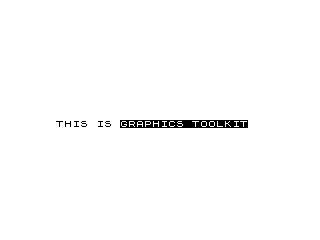
  30 PRINT AT 12,3;"THIS IS %G%R%A%P%H%I%C%S% %T%O%O%L%K%I%T"
  40 POKE 31742,151
  50 POKE 30989,22
  60 RAND USR 31017
  70 FOR I=1 TO 200
  80 NEXT I
  90 POKE 31743,0
  95 POKE 31737,0
 100 POKE 31736,24
 110 FOR I=1 TO 10
 115 GOSUB 1000
 120 RAND USR 31152
 130 NEXT I
 140 FOR I=1 TO 100
 150 NEXT I
 160 PRINT AT 8,3;"I CAN BE USED IN A PROGRAM"
 170 PRINT AT 10,3;"TO SCROLL IN ALL DIRECTIONS"
 180 FOR I=1 TO 100
 190 NEXT I
 200 FOR I=1 TO 32
 210 RAND USR 30696
 220 NEXT I
 230 FOR I=1 TO 32
 240 RAND USR 30699
 250 NEXT I
 260 FOR I=1 TO 24
 270 RAND USR 31666
 280 NEXT I
 290 FOR I=1 TO 24
 300 RAND USR 30656
 310 NEXT I
 320 FOR I=1 TO 200
 330 NEXT I
 340 PRINT AT 10,3;"TO SET A BACKGROUND         "
 350 FOR I=1 TO 100
 360 NEXT I
 370 RAND USR 30962
 380 POKE 31361,23
 390 POKE 31740,0
 400 FOR I=1 TO 37
 410 POKE 31741,I
 420 RAND USR 31351
 430 NEXT I
 440 POKE 31741,27
 450 RAND USR 31351
 460 FOR I=1 TO 100
 470 NEXT I
 480 PRINT AT 10,3;"TO TURN SCREEN ON OR OFF   "
 490 FOR I=1 TO 200
 500 NEXT I
 510 FOR I=1 TO 10
 520 RAND USR 30705
 530 GOSUB 1000
 540 RAND USR 30702
 550 GOSUB 1000
 560 NEXT I
 570 FOR I=1 TO 100
 580 NEXT I
 590 PRINT AT 10,3;"TO MOVE SHAPES BEHIND OTHERS"
 600 FOR I=1 TO 200
 610 NEXT I
 620 PRINT AT 14,20;
 630 POKE 31738,20
 640 RAND USR 30946
 645 POKE 31738,10
 650 FOR I=1 TO 26
 660 PRINT AT 18,I;
 670 RAND USR 30946
 680 GOSUB 1000
 690 RAND USR 30954
 700 NEXT I
 710 FOR I=1 TO 100
 720 NEXT I
 730 PRINT AT 10,3;"TO SEARCH AND REPLACE CHARS."
 740 FOR I=1 TO 200
 750 NEXT I
 755 FOR I=0 TO 63
 760 POKE 31730,I
 770 POKE 31731,RND*63
 780 RAND USR 31398
 785 NEXT I
 790 FOR I=1 TO 100
 800 NEXT I
 810 CLS
 820 PRINT AT 12,2;"TO DRAW RECTANGLES OR SQUARES"
 830 FOR I=1 TO 100
 840 NEXT I
 850 FOR I=1 TO 10
 860 LET A=RND*31
 870 LET B=RND*21+22
 880 LET X=RND*31+32
 890 LET Y=RND*21
 900 PLOT A,B
 910 POKE 31733,X
 920 POKE 31732,Y
 925 RAND USR 31329
 930 NEXT I
 940 FOR I=1 TO 200
 950 NEXT I
 960 CLS
 970 RUN
 980 SAVE "DEM%O"
 990 RUN
 999 STOP
 1000 FOR Z=1 TO 10
 1010 NEXT Z
 1020 RETURN
Note: Type-in program listings on this website use ZMAKEBAS notation for graphics characters.