
This program is a multi-section graphics demonstration that cycles through six different mathematical drawing routines using the Spectrum’s PLOT, DRAW, and CIRCLE commands. Section 100 draws user-defined spirograph-style arcs using the angular form of DRAW with a calculated arc angle based on input X multiplied by PI. Section 200 plots a parametric spiral using X·sin(X) and X·cos(X) coordinates. Sections 300–600 explore further arc patterns, sine-wave compositions with relative DRAW offsets, vertical arc fans, and a circle-of-circles arrangement. The program uses OVER 1 (XOR drawing mode) in sections 100 and 300 so that repeated drawing erases itself, and ends with a colour-cycling text banner and a thank-you message before auto-saving.
Program Analysis
Program Structure
The program is divided into numbered sections, each handling one graphical effect followed by a pause-for-keypress prompt. The layout is consistent throughout:
- Lines 100–110: User-controlled spirograph arcs using angular
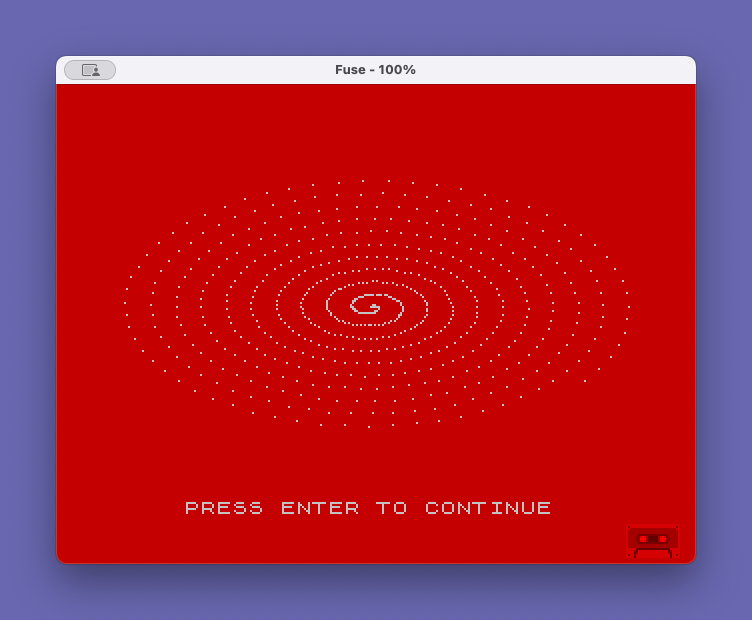
DRAW - Lines 200–210: Parametric polar spiral (
X·SIN X,X·COS X) - Lines 300–310: Arc fan with user-supplied odd number, drawn with
OVER 1 - Lines 400–410: Sine wave with relative
DRAWdecorations - Lines 500–510: Rotating arc fans from a central point, stepping J from 49 to 99
- Lines 600–610: Circle-of-circles arrangement using trigonometric positioning
- Lines 700–800–900: Colour-cycling text banner followed by a two-line thank-you message
- Line 9999: Auto-saving
SAVEwithLINE 1
Each graphical section sets its own PAPER and INK colours and calls CLS, giving each effect a distinct colour scheme.
Wait-for-Keypress Idiom
Lines 110, 210, 310, 410, 510, and 610 all use PRINT #1;TAB 4;"PRESS ENTER TO CONTINUE" followed by PAUSE 0. Printing to stream #1 sends text to the lower screen (the two-line input area), keeping the graphics display in the upper screen intact. PAUSE 0 waits indefinitely until any key is pressed, which on this platform is satisfied by the Enter key being held.
Angular DRAW and OVER 1
The three-argument form DRAW dx,dy,angle draws a circular arc. Section 100 calculates the arc angle as (X*10+9)*3*PI, which for X in the range 0–46 produces a wide variety of arc lengths, creating spirograph-like patterns. The loop counter Y (entered by the user) is applied with OVER 1 active implicitly because DRAW OVER 1; sets XOR mode for that draw call — even numbers of repetitions restore the screen to blank, as the prompt text explains.
Section 300 similarly uses OVER 1 set globally before a two-iteration loop (FOR N=0 TO 1), so the arc is drawn and then erased, leaving the screen blank — which appears to be intentional given the instruction to choose an odd number to produce a visible multi-petal arc.
Parametric Spiral (Section 200)
The loop FOR X=0 TO 65 STEP .1 plots each point at coordinates (2*X*SIN X + 125, X*COS X + 88). This is a variant of an Archimedean or involute spiral expressed in Cartesian form using X as both the parameter and the radius scaling factor. The step of 0.1 means 651 PLOT calls, which is slow but produces a smooth curve.
Sine Wave with Relative DRAW (Section 400)
Section 400 plots a sine wave baseline with PLOT X, 40*SIN(X/10)+88 and then adds decorative elements at each point using two successive relative DRAW calls: DRAW 10,10 followed by DRAW -10,5. This creates a jagged zigzag overlay on top of the sine wave, producing a distinctive saw-tooth visual texture.
Circle-of-Circles (Section 600)
Section 600 steps N from 0 to 360 in steps of 8 degrees, converting to radians via N*PI/180. For each angle it computes a point on a circle of radius 50 centred near the middle of the screen, then draws a CIRCLE of radius 30 at that point. With OVER 1 not set, overlapping circles accumulate, but because the Spectrum’s CIRCLE command uses XOR at the pixel level when circles overlap, some arcs erase each other, creating interference patterns.
Colour-Cycling Banner (Section 700)
Lines 700 uses nested loops — FOR M=1 TO 5 outer, FOR N=0 TO 7 inner — to PRINT the string "L.I.S.T. USR GR " repeatedly while cycling PAPER N through all eight colours. INK 9 selects contrasting ink using the “bright” attribute value. Because CLS is not called within the loop, the text fills the screen progressively with a rainbow-striped effect.
Thank-You Message Centering
Lines 800 and 900 centre their respective strings using the formula INT((33 - LEN A$) / 2). The value 33 (rather than the standard 32) as the screen width divisor is slightly off — the Spectrum screen is 32 columns wide — so the centring will be shifted one column to the right compared to a perfectly centred calculation. This is a minor cosmetic anomaly.
Variable Usage Summary
| Variable | Used in | Purpose |
|---|---|---|
X | 100, 200, 300, 400 | User input or loop counter / coordinate |
Y | 100 | User-entered repeat count for arc loop |
N | 100, 300, 600, 700 | Loop counter (multi-use across sections) |
J | 500 | Arc angle parameter for fan effect |
M | 700 | Outer repeat count for colour banner |
A$ | 800 | “THANK YOU” message string |
B$ | 900 | “FOR YOUR INTEREST !” message string |
Image Gallery

Source Code
   10 REM "GRAPHICS"
   20 REM Courtesy John W. Petersen; adapted by Cedric R. Bastiaans
   30 BORDER 2: PAPER 1: INK 6: CLS
  100 INPUT "TYPE A #, 0 TO 46: ";X: INPUT "HOW MANY REPEATS? (EVEN NUMBERS WILL CAUSE THE SCREEN TO END UP BLANK AGAIN; TRY 2): ";Y: FOR N=1 TO Y: PLOT 65,27: DRAW OVER 1;120,120,(X*10+9)*3*PI: NEXT N
  110 PRINT #1;TAB 4;"PRESS ENTER TO CONTINUE": PAUSE 0
  200 PAPER 2: INK 7: CLS : FOR X=0 TO 65 STEP .1: PLOT 2*X*SIN X+125,X*COS X+88:: NEXT X
  210 PRINT #1;TAB 4;"PRESS ENTER TO CONTINUE": PAUSE 0
  300 PAPER 4: INK 0: CLS : INPUT "CHOOSE AN ODD #(101 TO 255): ";X: OVER 1: FOR N=0 TO 1: PLOT 65,27: DRAW 110,110,PI*X: NEXT N
  310 PRINT #1;TAB 4;"PRESS ENTER TO CONTINUE": PAUSE 0
  400 PAPER 6: INK 2: CLS : FOR X=0 TO 245: PLOT X,40*SIN (X/10)+88: DRAW 10,10: DRAW -10,5: NEXT X
  410 PRINT #1;TAB 4;"PRESS ENTER TO CONTINUE": PAUSE 0
  500 PAPER 3: INK 0: CLS : FOR J=49 TO 99 STEP 10: CLS : PRINT J: PLOT 128,0: DRAW 0,175,J^3*PI: NEXT J
  510 PRINT #1;TAB 4;"PRESS ENTER TO CONTINUE": PAUSE 0
  600 PAPER 6: INK 1: CLS : FOR N=0 TO 360 STEP 8: LET X=50*SIN (N*PI/180): LET Y=50*COS (N*PI/180): CIRCLE X+127,Y+87,30: NEXT N
  610 PRINT #1;TAB 4;"PRESS ENTER TO CONTINUE": PAUSE 0
  700 CLS : BORDER 2: FOR M=1 TO 5: FOR N=0 TO 7: PAPER N: INK 9: PRINT "L.I.S.T. USR GR ";: NEXT N: NEXT M
  800 PAUSE 120: CLS : LET A$="THANK YOU": PAPER 3: INK 0: PRINT AT 10,INT ((33- LEN A$)/2);A$
  900 PAUSE 60 : LET B$="FOR YOUR INTEREST !": PAPER 5: PRINT AT 12,INT ((33-LEN B$)/2);B$
 9999 SAVE "graphics" LINE 1
Note: Type-in program listings on this website use ZMAKEBAS notation for graphics characters.