
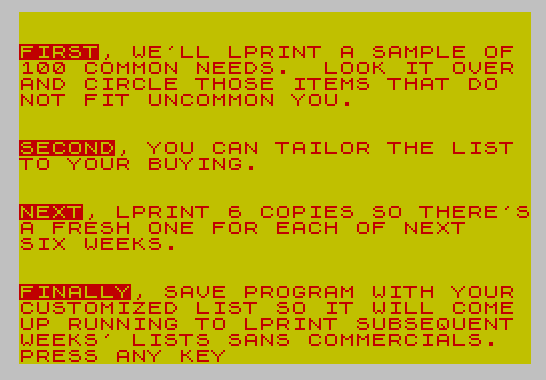
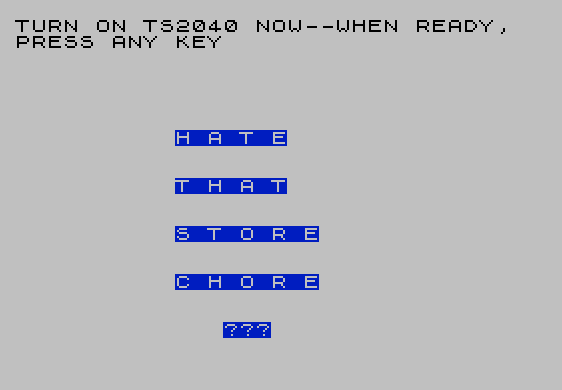
This program manages a personalized grocery checklist of up to 100 items, storing them in a two-dimensional string array and printing them via the TS2040 thermal printer. The program opens with an animated introduction sequence using BEEP, PAPER, and INK commands to display a color splash screen before walking the user through the purpose of the list. Users can customize any of the 100 slots by substituting their own item names, then print up to six personalized copies in a single print run. Two SAVE commands at lines 9998–9999 offer different auto-run entry points: one that skips the intro and goes straight to printing (line 30), and one that replays the full introduction (line 1). The POKE 23658,8 at line 40 enables Caps Lock on the Spectrum-compatible machine, a common idiom to force uppercase input.
Program Analysis
Program Structure
The program is organized into several distinct functional regions:
- Lines 1–5: Startup — printer prompt, intro subroutine call, jump to main flow.
- Lines 10–25: Data entry —
DIM A$(100,25)andINPUTloop to populate all 100 grocery items from scratch (bypassed by the normalGO SUB 1000/GO TO 30flow). - Line 30: Main print routine —
LPRINTs the full 100-item list with index numbers. - Lines 35–50: Post-print interaction — caps lock poke, personalization subroutine, loop to print six copies, then
STOP. - Lines 1000–1110: Introduction subroutine — animated color screens explaining the program’s benefits.
- Lines 2000–2120: Personalization subroutines — explains why to customize, then loops to accept slot substitutions.
- Lines 9997–9999: Save options with two different
LINEauto-run entry points.
Array Usage
DIM A$(100,25) at line 10 declares a two-dimensional string array: 100 elements each 25 characters wide. This is the standard Sinclair BASIC fixed-length string array format. Because the array is dimensioned with a fixed width of 25, any item name shorter than 25 characters is automatically padded with spaces, which is visible in the LPRINT output. The items must be typed in from scratch if the data entry path (lines 10–25) is used, which the REM at line 2 explicitly warns about.
Control Flow and Subroutine Design
The program uses a mixture of GO SUB and GO TO for navigation. Notably, line 47 calls GO SUB 2050 (jumping into the middle of the personalization subroutine, past the “why personalize?” explanatory screens at 2000–2045). Line 2065 uses GO TO 45 to exit the customization loop back to the copy-count prompt, bypassing the subroutine return stack — this is an intentional structured-exit idiom rather than a bug, though it leaves the subroutine return address on the GOSUB stack unused.
Line 2110 checks IF R$<>"Y" THEN GO TO 30, which re-runs the full list print before offering further copies. Line 2120 then redundantly checks IF R$="Y" — since line 2110 only falls through when R$="Y", this condition is always true and the explicit test is unnecessary.
Key BASIC Idioms
- Empty-string guard: Lines 46, 2100 use
IF Q$="" THEN GO TO ...andIF R$="" THEN GO TO ...to re-prompt on blank input, a standard Sinclair idiom sinceINPUTcan return an empty string. - PAUSE 0 keypress wait: Lines 1050 and 1100 use
PRINT AT 21,0;"PRESS ANY KEY": PAUSE 0— the canonical Sinclair idiom for halting until a key is pressed. - VAL for numeric conversion: Line 2068 uses
LET G=VAL G$to convert the user’s string input slot number into an integer for array indexing. - LPRINT with apostrophe: Line 30 uses
LPRINT ''"..."— the leading''forces a blank line before the subtitle on the printout.
Hardware and System Interaction
The program targets the TS2040 thermal printer (Timex’s rebrand of the Sinclair ZX Printer). The POKE 23658,8 at line 40 writes to the FLAGS2 system variable, setting bit 3 to force caps lock on — this ensures that subsequent INPUT responses like Y and N are received in uppercase, matching the string comparisons in lines 47, 2065, 2100, 2110, and 2120.
Save Strategy
Lines 9998 and 9999 provide two distinct SAVE "GROCLIST" LINE n commands with different entry points:
| Line | Entry Point | Effect on Load |
|---|---|---|
9998 | LINE 30 | Skips intro; immediately prints the grocery list |
9999 | LINE 1 | Runs the full introduction sequence first |
This gives the user a choice between a “production” save for weekly use and a “demo” save for showing the program to others, all within the same program file with different names or the user simply running whichever SAVE line they prefer.
Anomalies and Minor Issues
- Lines 10–25 (the full data entry path) are never reached during normal operation: the flow at line 3 calls
GO SUB 1000and line 5 jumps to 30, entirely bypassing lines 10–25. They serve as a documented escape for re-entering all 100 items from scratch. - The redundant check at line 2120 (
IF R$="Y") is always true at that point, making the conditional unnecessary — a plainGO TO 2050would suffice. - The six-copy loop at line 48 re-prints the current state of
A$(), correctly reflecting any substitutions made via the personalization subroutine.
Image Gallery
Source Code
    1 CLS : PRINT "TURN ON TS2040 NOW--WHEN READY, PRESS ANY KEY": PAUSE 0
    2 REM LINES 10 THROUGH 25 PERMIT SUBSTITUTION OF 100 DIFFERENT ITEMS BUT NEW STRING WILL HAVE TO BE TYPED IN FROM SCRATCH & RE-SAVED
    3 GO SUB 1000
    5 GO TO 30
   10 DIM A$(100,25)
   15 FOR G=1 TO 100
   20 INPUT "GROCERY ITEM?";A$(G)
   25 NEXT G
   30 LPRINT "G R O C E R Y   L I S T";''"CHECK BESIDE CURRENT NEEDS": FOR G=1 TO 100: LPRINT G;"  ";A$(G): NEXT G
   35 LPRINT ''"________________________________"
   40 POKE 23658,8: GO SUB 2000
   45 INPUT "READY FOR 6 PERSONALIZED COPIES?  Y/N?",Q$
   46 IF Q$="" THEN GO TO 45
   47 IF Q$="N" THEN GO SUB 2050
   48 FOR Z=1 TO 6: LPRINT "G R O C E R Y   L I S T";''"CHECK BESIDE CURRENT NEEDS": FOR G=1 TO 100: LPRINT G;"  ";A$(G): NEXT G: LPRINT ''"________________________________": NEXT Z
   50 STOP
 1000 BEEP 1,-30: PAPER 1: INK 7: PRINT AT 7,10;"H A T E";AT 10,10;"T H A T";AT 13,10;"S T O R E";AT 16,10;"C H O R E";AT 19,13;"???"
 1005 PAUSE 300: CLS
 1010 BEEP .05,10: BEEP .05,20: BEEP .05,30: PAPER 6: INK 2: PRINT ''"BRIGHTEN UP WITH A "
 1015 PRINT ''"PERSONALIZED CHECKLIST--SAVE "
 1020 PRINT ''"TIME, MONEY, AND ANNOYANCE WITH"
 1025 PRINT ''"A GROCERY LIST CUSTOMIZED TO    YOUR LIFESTYLE"
 1030 PAUSE 480: CLS
 1035 PRINT ''"TIME--OVER A PERIOD OF THREE    MONTHS YOU WILL BUY THE SAME    ITEMS OVER AND OVER BUT NOT     EVERY ITEM EVERY WEEK."
 1040 PRINT ''"MONEY--NO MORE WANDERING AROUND THE STORE TO SEE WHAT CATCHES   YOUR EYE."
 1045 PRINT ''"ANNOYANCE--NO WONDERING WHAT YOU FORGOT AND RECALLING BACK HOME"
 1050 PRINT AT 21,0;"PRESS ANY KEY": PAUSE 0: CLS
 1060 PRINT ''"FIRST, WE'LL LPRINT A SAMPLE OF 100 COMMON NEEDS.  LOOK IT OVER AND CIRCLE THOSE ITEMS THAT DO  NOT FIT UNCOMMON YOU."
 1070 PRINT ''"SECOND, YOU CAN TAILOR THE LIST TO YOUR BUYING."
 1080 PRINT ''"NEXT, LPRINT 6 COPIES SO THERE'SA FRESH ONE FOR EACH OF NEXT    SIX WEEKS."
 1090 PRINT ''"FINALLY, SAVE PROGRAM WITH YOUR CUSTOMIZED LIST SO IT WILL COME UP RUNNING TO LPRINT SUBSEQUENT WEEKS' LISTS SANS COMMERCIALS."
 1100 PRINT AT 21,0;"PRESS ANY KEY": PAUSE 0: CLS
 1110 RETURN
 2000 CLS : REM PERSONALIZING A$
 2010 PRINT ''"WHY PERSONALIZE?"
 2020 PRINT ''"TAKE ITEM #63.  SUPPOSE YOU     HAVE NO GREED FOR THE WEED?     YOU CAN SUBSTITUTE YOUR OWN     CHOICE IN THAT SLOT."
 2030 PRINT '"IN ADDITION, LOOK AT #56-NEEDLE OR #57-THREAD, #96-LENSCARE, #97-NAIL POLISH, #99-HAIRSPRAY."
 2035 PRINT '"IS THIS YOU??"
 2040 PRINT '"MIGHT RAZORBLADES OR SHAVING    CREAM  MORE PRACTICALLY  FILL   THOSE SLOTS? BEER? WINE? COLAS?"
 2045 PRINT AT 21,0;"PRESS ANY KEY": PAUSE 0
 2050 CLS : PRINT AT 5,8;"CUSTOMIZING"
 2055 PRINT ''"ANSWER NONE TO 1ST INPUT TO GET MORE COPIES UNCHANGED."
 2060 INPUT "WHICH ITEM NUMBER?",G$
 2065 IF G$="NONE" THEN GO TO 45
 2068 LET G=VAL G$
 2070 INPUT "NEW PURCHASE FOR THIS SLOT",S$
 2080 LET A$(G)=S$
 2090 INPUT "MORE SUBSTITUTIONS? Y/N";R$
 2100 IF R$="" THEN GO TO 2090
 2110 IF R$<>"Y" THEN GO TO 30
 2120 IF R$="Y" THEN GO TO 2050
 9997 STOP
 9998 PRINT "THIS SAVE WILL IMMEDIATELY LPRINT YOUR GROCERY LIST ON LOADING": SAVE "GROCLIST" LINE 30
 9999 PRINT "THIS SAVE BEGINS WITH PROGRAM   INTRODUCTION": SAVE "GROCLIST" LINE 1
Note: Type-in program listings on this website use ZMAKEBAS notation for graphics characters.