
Two programs for a small business. The invoicing program keeps a file of up to 100 customers with four address lines each and produces numbered invoices: it prints a four-line letterhead, the invoice number, the date and the customer’s address, then takes item descriptions of up to 22 characters, each with a price, totals them and sends the screen to the printer with COPY. Its menu can also list every invoice on the printer with a grand total, and SAVE the invoice list for the ledger followed by the program itself, so the customers and invoice numbers carry over to the next session. The sales ledger loads that invoice list, gathers each customer’s invoices, lets you post dated payments, and shows invoice and payment totals and the outstanding balance for each customer, ending with the total outstanding. It then saves itself so the posted payments are kept.
From pages 33–39 (“Invoicing” and “Sales Ledger”) of Roger Valentine’s The Timex Sinclair 2068. The letterhead DATA lines hold placeholders.
Neither part carries a credit. They were CASH pt1 and CASH pt2 on a SNUG library disk, where the saved invoice and payment arrays were empty. They are different programs from the Invoice and Cash Flow programs elsewhere on this site.
Program Analysis
Invoicing (CASH pt1)
- Customers are held in
a$(100,4,20), four 20-character address lines each, with the count inno. Each invoice keeps its date, the customer’s first address line and its total ino$(100,3,10), with the invoice count inin. - Lines 60–85 show the menu: 1 Produce Invoice, 2 List Invoices, 3 SAVE.
- Lines 130–230 list the customers by number; 0 adds a new one, whose address lines are typed at
INPUT ATpositions. - Line 240 READs the letterhead from DATA lines 90–120 and centres each line with
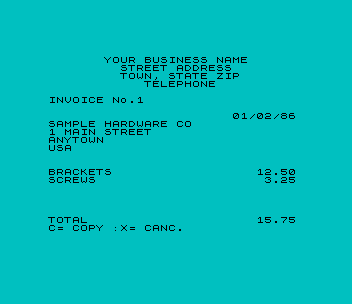
(32-LEN t$)/2. Lines 250–350 take the date and the items, and lines 360–410 show the total with “C= COPY :X= CANC.”. - Lines 420–490
LPRINTthe date, customer and total of every invoice and a grand total. - Lines 500–540 save
o$()as"INVOICES" DATA, then the program as"INVOICING" LINE 50, which skips theDIMstatements so the customer file survives.
Sales Ledger (CASH pt2)
- Line 80 loads
"INVOICES" DATA o$(). Payments are kept inp$(100,3,10)(date, customer, amount) with the count innp. - Lines 90–520 take each invoice in turn. The customer name is overwritten with “x” once it has been handled, a blank name marks the end of the list, and the inner loop at lines 180–250 collects that customer’s other invoices.
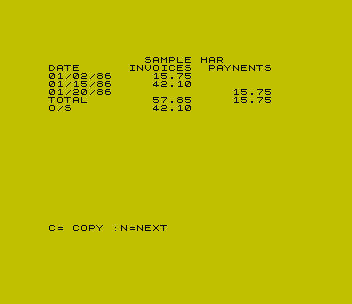
- Lines 260–400 list the customer’s earlier payments and offer to post new ones. Lines 410–470 print the totals and the outstanding (“O/S”) balance, worked out in whole cents in line 460 to avoid rounding errors.
- Line 570 saves the program as
"SALES" LINE 40, which keeps the payments array and reloads the invoice list on the next run, then ends withGO TO 9999, a line that does not exist.
Money Formatting
The subroutine at line 550 (line 580 in the ledger) formats an amount in an eight-character fixed-length string m$. It assigns STR$ p, which is left-aligned and padded with spaces, moves it right until the last character is not a space, then adds “.00” or a final “0” as needed. If the decimal point does not end up in position 6, the subroutine sets x, and the price prompt asks again, which rejects amounts with more than two decimal places.
Notable Techniques
- Saving the program with
SAVE … LINEto a line after theDIMstatements keeps the customer file and the payments with the program, whileSAVE … DATApasses the invoice list from one program to the other. - Assigning to a fixed-length
DIMstring pads and truncates automatically, which the money subroutine uses to align amounts. - Invoices are printed with
COPY, after the prompt line is blanked by printing a 32-space string over it.
Potential Issues
- Line 390 offers “C= COPY” but accepts a capital C or a lower-case o; a lower-case c does nothing.
- X (“CANC.”) starts the same invoice again rather than cancelling it. The only way back to the menu from an invoice is C, which prints it.
- After the second SAVE in line 540 the program runs on into the money subroutine, which appears to end with “7 RETURN without GO SUB”. Both files have been saved by then.
- An invoice stores only the first 10 characters of the customer’s first address line, and the ledger groups invoices by that, so two customers whose names begin with the same 10 characters would be merged.
- Whole-number amounts of 100,000 or more appear to lose their leading digit instead of being rejected.
- Nothing checks the limits of 100 customers, 100 invoices or 100 payments. The ledger’s column heading is misspelled “PAYNENTS”.
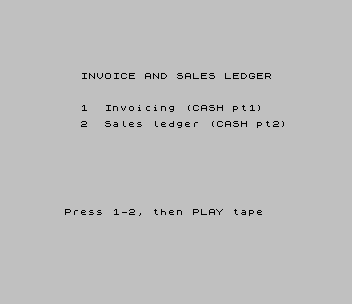
Both programs came from an Oliger (JLO SAFE) disk and were converted for tape. The letterhead lines now hold placeholder text. Three bugs were repaired: menu option 3 could not be reached because line 85 tested for “2” instead of “3”; line 520 had a colon before DATA, which made it save the program instead of the invoice list; and the ledger’s lines 160–170 used an undefined variable a where q was meant, which stopped it with “2 Variable not found”. The tape starts with a short menu that loads either part, and ends with a small sample INVOICES file of three invoices for two made-up customers so the ledger has something to load. It was tested in ZEsarUX: the menu, an invoice for a sample customer with two items, the ledger with a posted payment, and the SAVE option.
Image Gallery
Source Code
   10 DIM a$(100,4,20)
   20 LET no=0: LET in=0
   30 DIM b$(32)
   40 DIM o$(100,3,10)
   50 BORDER 6: PAPER 6: INK 9: CLS
   60 PRINT AT 5,0;"1: Produce Invoice"'''"2: List Invoices"'''"3: SAVE "
   70 LET i$=INKEY$: IF i$<"1" OR i$>"3" THEN GO TO 70
   75 IF I$="1" THEN GO TO 130
   80 IF I$="2" THEN GO TO 420
   85 IF I$="3" THEN GO TO 500
   90 DATA "YOUR BUSINESS NAME"
  100 DATA "STREET ADDRESS"
  110 DATA "TOWN, STATE ZIP"
  120 DATA "TELEPHONE"
  130 BORDER 5: PAPER 5: CLS
  140 FOR j=1 TO no
  150 PRINT j;TAB 4;a$(j,1)
  160 NEXT j
  170 PRINT 0;TAB 4;"NEW CUSTOMER"
  180 INPUT "Customer number? ";t
  190 IF t>no OR t<>INT t THEN GO TO 180
  200 IF t<>0 THEN GO TO 230
  210 LET no=no+1: FOR j=1 TO 4: INPUT AT j*2,0;("Address line ";j);":";a$(no,j): NEXT j
  220 LET t=no
  230 LET in=in+1
  240 CLS : RESTORE : FOR j=0 TO 3: READ t$: PRINT AT j,(32-LEN t$)/2;t$: NEXT j: PRINT : PRINT "INVOICE No.";in: PRINT
  250 INPUT "Date ";t$: LET o$(in,1)=t$: LET o$(in,2)=a$(t,1)
  260 PRINT TAB 31-LEN t$;t$
  270 FOR j=1 TO 4: PRINT a$(t,j): NEXT j: PRINT '': LET ip=0
  280 INPUT "Narrative ";t$: IF LEN t$>22 THEN LET t$=t$( TO 22)
  290 PRINT t$;
  300 INPUT "Price ";p: GO SUB 550: IF x THEN GO TO 300
  310 PRINT TAB 23;m$: LET ip=ip+p
  320 INPUT "Any more items (Y/N)? ";t$
  330 IF t$="y" OR t$="Y" THEN GO TO 280
  340 IF t$="n" OR t$="N" THEN GO TO 360
  350 GO TO 320
  360 PRINT AT 20,0;"TOTAL";: LET p=ip: GO SUB 550
  370 PRINT TAB 23;m$
  380 PRINT AT 21,0;"C= COPY :X= CANC."
  390 IF INKEY$="o" OR INKEY$="C" THEN PRINT AT 21,0;b$: COPY : LET o$(in,3)=m$: GO TO 50
  400 IF INKEY$="x" OR INKEY$="X" THEN GO TO 240
  410 GO TO 390
  420 CLS : LET p=0: FOR j=1 TO in
  430 FOR k=1 TO 3
  440 LPRINT o$(j,k);
  450 NEXT k: LPRINT : LET p=p+VAL o$(j,3)
  460 NEXT j
  470 LPRINT : LPRINT "TOTAL";TAB 20;
  480 GO SUB 550: LPRINT m$
  490 GO TO 50
  500 BORDER 4: PAPER 4: CLS
  510 PRINT "First SAVE invoice list for"''"SALES LEDGER program"
  520 SAVE "INVOICES" DATA o$()
  530 CLS : PRINT "Now SAVE entire program"''"(For use as INVOCING program"''"next time)"
  540 SAVE "INVOICING" LINE 50
  550 LET x=0: DIM m$(8): LET m$=STR$ p
  560 IF m$(8)=" " THEN LET m$=" "+m$: GO TO 560
  570 FOR j=1 TO 8
  580 IF m$(j)="." THEN GO TO 600
  590 NEXT j
  600 IF j=9 THEN LET m$=m$(4 TO )+".00"
  610 IF j=7 THEN LET m$=m$(2 TO )+"0"
  620 IF m$(6)<>"." THEN LET x=1
  630 RETURN
  650 SAVE "CASH pt1" LINE 0

   10 REM SALES LEDGER
   20 DIM p$(100,3,10): DIM O$(100,3,10)
   30 LET np=0
   40 DIM b$(32)
   50 LET tos=0
   60 BORDER 6: PAPER 6: INK 9: CLS
   70 PRINT "Please LOAD your INVOICES tape"
   80 LOAD "INVOICES" DATA o$()
   90 FOR q=1 TO 100: CLS
  100 LET a$=o$(q,2)
  110 LET o$(q,2)="x"
  120 IF a$=b$( TO 10) THEN LET q=100: GO TO 520
  130 IF a$="x"+b$( TO 9) THEN GO TO 520
  140 PRINT TAB 12;a$
  150 PRINT "DATE";TAB 10;"INVOICES";TAB 20;"PAYNENTS"
  160 LET t=VAL o$(q,3)
  170 PRINT o$(q,1);o$(q,3)
  180 FOR k=1 TO 100
  190 IF o$(k,2)<>a$ THEN GO TO 230
  200 LET t=t+VAL o$(k,3)
  210 PRINT o$(k,1);o$(k,3)
  220 LET o$(k,2)="x"
  230 IF o$(k,2)="x"+b$( TO 9) THEN GO TO 250
  240 IF o$(k,2)=b$( TO 10) THEN LET k=100
  250 NEXT k
  260 LET t1=0
  270 FOR k=1 TO np
  280 IF p$(k,2)<>a$ THEN GO TO 310
  290 LET t1=t1+VAL p$(k,3)
  300 PRINT p$(k,1);TAB 20;p$(k,3)
  310 NEXT k
  320 INPUT "POST A PAYMENT (Y/N)? ";t$
  330 IF t$="n" OR t$="N" THEN GO TO 410
  340 IF t$="y" OR t$="Y" THEN GO TO 360
  350 GO TO 320
  360 LET np=np+1: INPUT "Date ";p$(np,1): PRINT p$(np,1);
  370 INPUT "Amount ";p: GO SUB 580: IF x THEN GO TO 370
  380 PRINT TAB 20;m$: LET p$(np,3)=m$: LET p$(np,2)=a$
  390 LET t1=t1+VAL m$
  400 GO TO 320
  410 PRINT "TOTAL";TAB 10;
  420 LET p=t: GO SUB 580
  430 PRINT m$;TAB 20;
  440 LET p=t1: GO SUB 580
  450 PRINT m$
  460 LET p=((INT (t*100)+.1)-(INT (t1*100)+.1))/100: GO SUB 580
  470 PRINT "O/S";TAB 10;m$: LET tos=tos+VAL m$
  480 PRINT AT 21,0;"C= COPY :N=NEXT "
  490 IF INKEY$="c" OR INKEY$="C" THEN PRINT AT 21,0;b$: COPY : GO TO 480
  500 IF INKEY$="n" OR INKEY$="N" THEN GO TO 520
  510 GO TO 490
  520 NEXT q
  530 BORDER 4: PAPER 4: CLS
  540 LET p=tos: GO SUB 580
  550 PRINT "TOTAL OUTSTANDING: ";m$'''
  560 PRINT "Now SAVE for use as SALES"''"program next time"
  570 SAVE "SALES" LINE 40: GO TO 9999
  580 LET x=0: DIM m$(8): LET m$=STR$ p
  590 IF m$(8)=" " THEN LET m$=" "+m$: GO TO 590
  600 FOR j=1 TO 8
  610 IF m$(j)="." THEN GO TO 630
  620 NEXT j
  630 IF j=9 THEN LET m$=m$(4 TO )+".00"
  640 IF j=7 THEN LET m$=m$(2 TO )+"0"
  650 IF m$(6)<>"." THEN LET x=1
  660 RETURN
  670 SAVE "CASH pt2" LINE 0
Note: Type-in program listings on this website use ZMAKEBAS notation for graphics characters.