
This program implements a simple one-dimensional jumping game called “Jackrabbit,” displaying a 5×5 grid of characters where a single marker (CHR$ 128) moves along a linear array of 25 positions. The playing field is populated with CHR$ 27 (a ZX81 block graphic) and the marker advances by a random step of 1, 4, or 5 positions (±) each turn, with steps of 2 and 3 explicitly excluded by the re-roll loop at line 150. A move counter D is displayed with each frame refresh using the PRINT comma tab idiom. The program contains no boundary checking on variable Z, so the marker can step outside the valid array range 1–25, which would cause an error on out-of-bounds access.
Program Analysis
Program Structure
The program divides into three clear phases:
- Initialisation (lines 1–50): Titles the game, dimensions array
A(25), sets move counterD=0, fills every cell with27, and places the marker value128at centre positionZ=13. - Display loop (lines 60–110): Reprints the grid from
AT 6,0by iterating over the array and printing each cell as a character; a newline is inserted after every fifth element (IF 5*INT(A/5)=A) to form a 5×5 layout. - Move logic (lines 120–190): Increments the counter, picks a random step, erases the old marker, updates
Z, then loops back to line 50 to re-draw.
Character Values
| Value | CHR$ | Role |
|---|---|---|
| 27 | CHR$ 27 | Empty cell graphic (block character on ZX81) |
| 128 | CHR$ 128 | Player/marker position |
Random Step Selection
Line 140 picks C from {1, 2, 3, 4, 5}. Line 150 re-rolls if C is 2 or 3, leaving only {1, 4, 5} as legal magnitudes. Line 160 then randomly negates C with 50 % probability, giving a final step set of {−5, −4, −1, +1, +4, +5}. This creates a “jackrabbit” movement pattern with no small adjacent steps of ±2 or ±3.
Display Technique
The grid is redrawn in-place each cycle using PRINT AT 6,0 at line 60, which repositions the cursor without clearing the screen. The 25-cell linear array is printed as a 5×5 grid by detecting every fifth element with the integer-division test 5*INT(A/5)=A and issuing a bare PRINT to advance the line. The move counter is appended after the grid using PRINT ,D, which tabs to the second print zone.
Notable Techniques and Idioms
- The loop variable
Adoubles as the array nameA(); the subscript expressionA(A)at lines20and80uses the same identifier for both, which is valid BASIC but can be confusing. - No
CLSis issued; redrawing from a fixedATposition is a common flicker-reduction idiom on this platform. GOTO 50at line190bypasses the full re-initialisation and jumps directly to setting the new marker, avoiding redundant array refilling.
Bugs and Anomalies
- No boundary check on Z: Variable
Zis updated at line180without clamping to 1–25. Steps of ±4 or ±5 from near the edges will quickly pushZout of range, causing a subscript-out-of-bounds error at line50. This may be the intended game-over condition, but it is not handled gracefully. - Array dimension conflict:
DIM A(25)at line5creates a numeric array, and theFOR A=loop at line10reusesAas a simple numeric variable. While this works at runtime, it is an unusual overloading of the same name for both the array and the loop counter. - Unreachable lines 200–210: The
SAVEandRUNlines at200–210can never be reached during normal execution because the game loops infinitely from line190back to line50.
Image Gallery
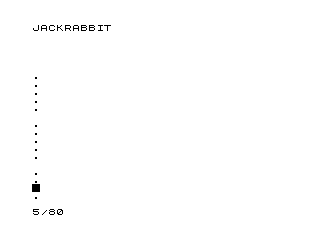
Source Code
   1 PRINT "JACKRABBIT"
   5 DIM A(25)
   7 LET D=0
  10 FOR A=1 TO 25
  20 LET A(A)=27
  30 NEXT A
  40 LET Z=13
  50 LET A(Z)=128
  60 PRINT AT 6,0;
  70 FOR A=1 TO 25
  80 PRINT CHR$ A(A)
 100 IF 5*INT (A/5)=A THEN PRINT
 110 NEXT A
 120 LET D=D+1
 130 PRINT ,D
 140 LET C=INT (RND*5)+1
 150 IF C=2 OR C=3 THEN GOTO 140
 160 IF RND>.5 THEN LET C=-C
 170 LET A(Z)=27
 180 LET Z=Z+C
 190 GOTO 50
 200 SAVE "1022%5"
 210 RUN
Note: Type-in program listings on this website use ZMAKEBAS notation for graphics characters.