
This program demonstrates joystick-controlled cursor movement with wraparound behavior on a 32×22 character grid, using the STICK function to read a joystick input. A single asterisk character is moved around the screen by polling the joystick direction codes (1–10), with diagonal movement supported. The wraparound logic uses a compact BASIC expression combining OR and AND operators to detect screen boundaries and loop the cursor from one edge to the opposite edge. A FIRE button check via STICK’s second parameter displays the word “FIRE” at a fixed position when pressed.
Program Analysis
Program Structure
The program is a tight main loop occupying lines 300–400, with a SAVE/VERIFY utility at line 410, a STOP at 420, and an embedded reference comment at line 430 that documents all variable names. Execution begins at line 300 (a REM), initializes column c and line l to 10, then enters the display/input loop at line 320.
Joystick Reading
Lines 340 and 350 use the TS2068 STICK keyword to read the joystick. STICK(1,2) returns the directional value of joystick 1 into s, and STICK(2,2) returns the fire-button state into b. The direction codes used are:
| Code | Direction |
|---|---|
| 1 | Up |
| 2 | Down |
| 4 | Left |
| 5 | Up-Left |
| 6 | Down-Left |
| 8 | Right |
| 9 | Up-Right |
| 10 | Down-Right |
Wraparound Logic
Lines 360 and 370 contain the most technically interesting code in the program. Each uses a pair of compound boolean expressions to both move the coordinate and implement wraparound. Consider the column update on line 360:
LET c=c+((-31 OR c<31) AND (s=8 OR s=9 OR s=10))-((-31 OR c>0) AND (s=4 OR s=5 OR s=6))
In Sinclair BASIC, boolean expressions evaluate to 1 (true) or 0 (false), and OR between a numeric value and a boolean acts as addition when combined with AND. The sub-expression (-31 OR c<31) evaluates to -31 when c<31 is false (i.e., c=31), effectively wrapping the column back by 32 positions; when c<31 is true, it evaluates to -31+1 = -30… actually, more precisely: since boolean TRUE=1 and FALSE=0, -31 OR c<31 computes as -31 + (c<31). When c<31, this is -31+1=-30, but multiplied by the direction AND term the net effect is +1 or -31 respectively, giving normal movement or wraparound. The same pattern is mirrored for line l on line 370 using limits of 21 and 0.
Efficient Screen Update
Line 390 uses the string-AND idiom: PRINT AT ll,cc;" " AND (ll<>l OR cc<>c). The expression " " AND condition prints a space (erasing the old cursor position) only when the cursor has actually moved, avoiding unnecessary screen writes when the joystick is centered. This requires saving the previous coordinates into cc and ll at line 330 before updating.
Fire Button Display
Line 380 uses the same string-AND technique to display the word FIRE at screen position AT 9,9 only when b=1 (button pressed). When the button is not pressed, the expression evaluates to an empty string, effectively printing nothing — though this does not erase a previously displayed “FIRE”. This is a minor display anomaly: once displayed, “FIRE” will persist on screen until the button is pressed again on the next polling cycle.
Key BASIC Idioms
- Boolean arithmetic (
AND/ORreturning 0/1) used as conditional multipliers string AND conditionfor conditional printing withoutIFstatements- Saving prior coordinates to minimize
PRINTcalls - All logic condensed into a handful of lines for a fast polling loop
Variable Summary
The inline documentation at line 430 lists all variables, reproduced here for clarity:
| Variable | Meaning | Range |
|---|---|---|
c | Current column | 0–31 |
l | Current line | 0–21 |
cc | Previous column | — |
ll | Previous line | — |
s | Stick direction value | — |
b | Button (FIRE) value | — |
Image Gallery
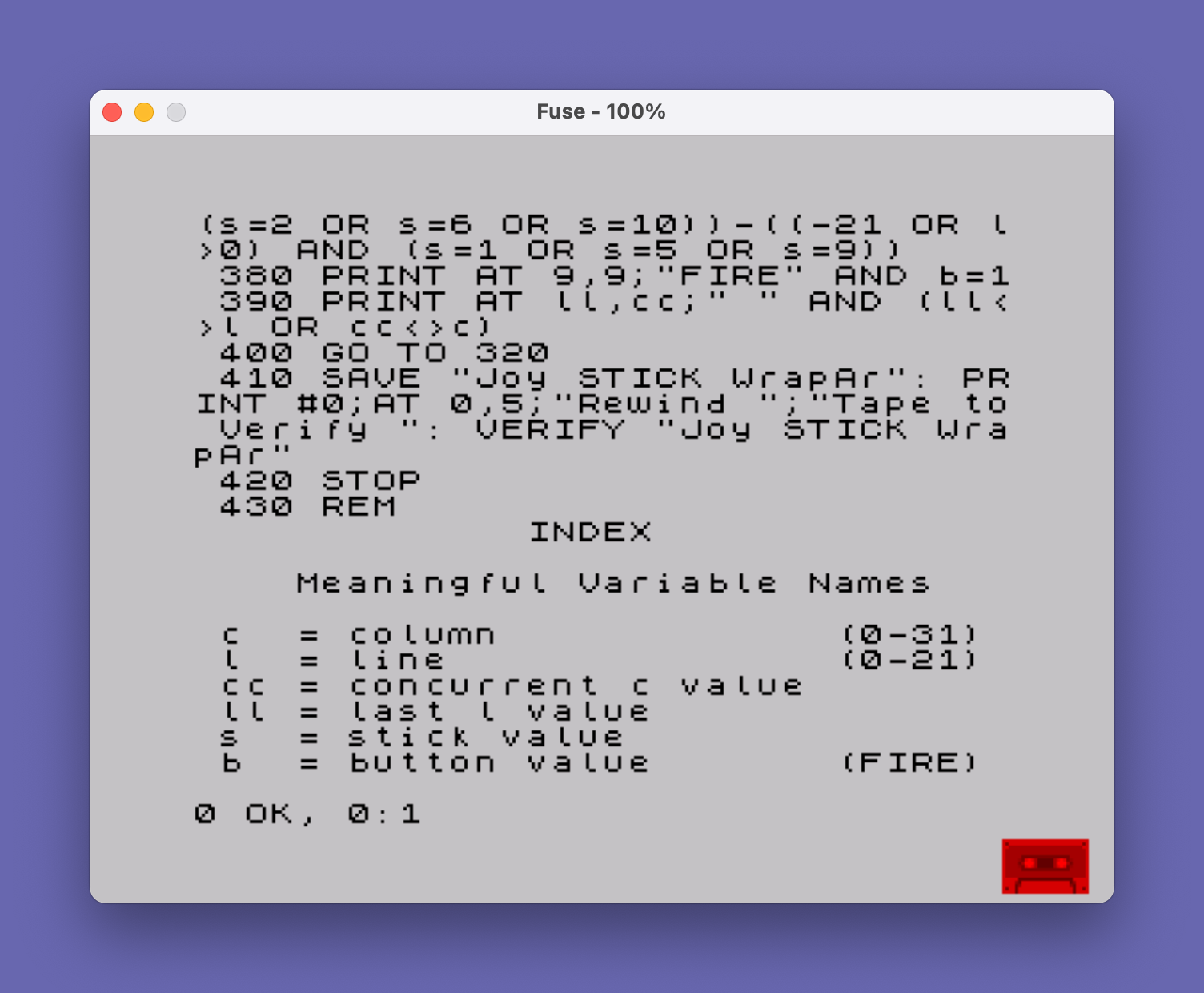
Source Code
  300 REM Joy Stick Wrap around    © Martin DeBoniface 30/09/85
  310 LET c=10: LET l=10
  320 PRINT AT l,c;"*"
  330 LET cc=c: LET ll=l
  340 LET s=STICK(1,2)
  350 LET b=STICK(2,2)
  360 LET c=c+((-31 OR c<31) AND (s=8 OR s=9 OR s=10))-((-31 OR c>0) AND (s=4 OR s=5 OR s=6))
  370 LET l=l+((-21 OR l<21) AND (s=2 OR s=6 OR s=10))-((-21 OR l>0) AND (s=1 OR s=5 OR s=9))
  380 PRINT AT 9,9;"FIRE" AND b=1
  390 PRINT AT ll,cc;" " AND (ll<>l OR cc<>c)
  400 GO TO 320
  410 SAVE "JoySTICKWrapAr": PRINT #0;AT 0,5;"Rewind ";"Tape to Verify ": VERIFY "JoySTICKWrapAr"
  420 STOP
  430 REM                                     INDEX                                                  Meaningful Variable Names                                    c  = column             (0-31)  l  = line               (0-21)  cc = concurrent c value         ll = last l value               s  = stick value                b  = button value       (FIRE)
Note: Type-in program listings on this website use ZMAKEBAS notation for graphics characters.