
This program implements a miniature Breakout clone in ZX81/TS1000 BASIC. The playing field is drawn with inverse-video block graphics forming the border and a grid of brick rows, and the paddle is three characters wide, controlled by the “8” and “Y” keys. Ball collision detection is performed by peeking at the display file address stored at system variables 16398–16399, reading the character code under the ball’s current position to determine hits against bricks, walls, or the paddle. The score increments by 10 per brick hit, the paddle shrinks one column at a time as rows are cleared, and the game ends either with a win (all bricks cleared, ball passes top) or loss (ball reaches the paddle row without hitting it).
Program Analysis
Program Structure
The program is divided into several logical phases:
- Initialisation (lines 20–50): Numeric constants are derived from
NOT PIandNOT Zto produce 0 and 1 without typing literals. - Screen draw (lines 50–160): Border walls, brick rows, and the title line are printed once.
- Game variable setup (lines 170–250): Paddle row, score, ball position, and velocity are initialised.
- Main game loop (lines 260–350): Reads keyboard, moves paddle, peeks display file for collision, updates ball.
- Collision subroutines (lines 360–460): Lines 360–380 handle wall/ceiling bounces; lines 390–460 handle paddle, brick, and game-over logic.
- End sequence (lines 470–520): Flashing ball animation, win/lose message, score display.
Constant Encoding Idiom
Rather than using numeric literals, the program derives its small integer constants from floating-point system values:
| Variable | Expression | Value | Role |
|---|---|---|---|
Z | NOT PI | 0 | Zero / left margin |
P | NOT Z | 1 | One / loop start / unit step |
T | P+P | 2 | Two / column stride |
PI in FOR R=P TO PI (lines 70, 470) evaluates as ~3.14159, so the loop runs for integer values 1, 2, 3 — giving three brick rows. This is a compact way to iterate a small fixed count without a separate variable.
Display-File Collision Detection
The core collision mechanism (lines 290–330) does not use coordinate arithmetic to test brick positions. Instead it reads the character code directly from the display file:
PEEK 16398 + 256 * PEEK 16399fetches the D-FILE pointer from ZX81 system variables.- Adding the ball’s screen offset into that address gives the character currently displayed at the ball’s position.
- If the peeked value
Ais between 1 and 128 (non-space, non-inverse-space) a brick or wall is present; ifA > 128it is an inverse character (the paddle or wall edge).
This technique avoids maintaining a separate data structure for brick presence and works entirely from the live screen contents.
Key BASIC Idioms
Boolean arithmetic is used throughout to avoid IF branches in the main loop. Line 270 moves the paddle:
LET C=C+T*(K$="8")*(C<27)-T*(K$="Y")*(C>P)
Each boolean expression evaluates to 0 or 1, acting as a conditional multiplier. The paddle position is clamped to the screen by the boundary tests C<27 and C>P in the same expression. Line 220 similarly uses RND>P/T (i.e. RND>0.5) to randomise the initial horizontal ball direction.
Paddle and Ball Variables
| Variable | Purpose |
|---|---|
R | Paddle row (starts at CODE "$" = 36, used as row 20 after mod) |
C | Paddle column |
X, Y | Ball column, row |
H, V | Horizontal and vertical velocity (±1) |
XX, XY, XC | Previous ball column/row and paddle column, for erase-before-redraw |
S | Score (increments by 10 per brick) |
CODE "$" = 36 and CODE "£" = 96 provide row/column seed values without numeric literals, consistent with the program’s avoidance of plain integer constants. CODE "?" = 63 is used similarly for the bottom wall row.
Paddle Shrink Mechanic
Lines 430–460 implement an unusual difficulty escalation: each time the ball hits the paddle row successfully, R is decremented by 1 (LET R=R-P), moving the paddle row upward. If R reaches 10 the game ends, giving the player a finite number of paddle-row hits before losing regardless of catch success.
Win/Lose Detection
A win is detected in line 390 when Y=P (ball reaches row 1, above the brick area) and directed to line 470. The end routine at line 500 checks Y=P again to distinguish win from loss before printing the appropriate message.
Potential Anomalies
- Line 280 prints the ball’s next position before computing the collision peek, so the character read at line 290 may be influenced by the just-drawn ball character
"O"rather than the underlying brick — this could cause missed collision detections in some positions. - The loop variable
Ris shared between the brick-row drawing loop (lines 70–100), the main loop’s wall-drawing (lines 130–150), and the paddle row variable, meaning re-entry into the draw loops would corrupt the paddle position. This is not a runtime issue since the draw loops run only at startup. - Line 400’s compound condition —
A<>128 OR (A=128 AND (Y=R-P OR Y=14))— whenA<>128is already true the second clause is unreachable; effectively the condition triggersV=-VwheneverAis not the paddle character, or when the ball is on a specific row.
Image Gallery
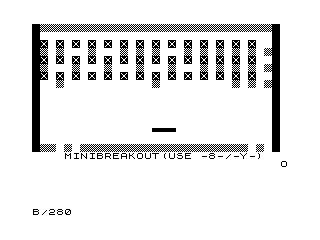
Source Code
  10 REM **MINIBREAKOUT**
  20 LET Z=NOT PI
  30 LET P=NOT Z
  40 LET T=P+P
  50 PRINT "\@@\@@\@@\@@\@@\@@\@@\@@\@@\@@\@@\@@\@@\@@\@@\@@\@@\@@\@@\@@\@@\@@\@@\@@\@@\@@\@@\@@\@@\@@\@@"
  60 PRINT
  70 FOR R=P TO PI
  80 PRINT " %X %X %X %X %X %X %X %X %X %X %X %X %X %X "
  90 PRINT " \@@ \@@ \@@ \@@ \@@ \@@ \@@ \@@ \@@ \@@ \@@ \@@ \@@ \@@ \@@"
 100 NEXT R
 110 LET C=CODE "?"
 120 PRINT AT C,Z;"\@@\@@\@@\@@\@@\@@\@@\@@\@@\@@\@@\@@\@@\@@\@@\@@\@@\@@\@@\@@\@@\@@\@@\@@\@@\@@\@@\@@\@@\@@\@@"
 130 FOR R=Z TO C
 140 PRINT AT R,Z;"% ";AT R,C+C;"% "
 150 NEXT R
 160 PRINT TAB 4;"MINIBREAKOUT(USE -8-/-Y-)"
 170 LET R=CODE "$"
 180 LET S=Z
 190 LET Y=CODE "£"
 200 LET X=8+T*INT (RND*8)
 210 LET V=-P
 220 LET H=P-T*(RND>P/T)
 230 LET XX=X
 240 LET XY=Y
 250 LET XC=C
 260 LET K$=INKEY$
 270 LET C=C+T*(K$="8")*(C<27)-T*(K$="Y")*(C>P)
 280 PRINT AT R,XC;"   ";AT R,C;"\''\''\''";AT Y+V,X+H;
 290 LET A=PEEK (PEEK 16398+256*PEEK 16399)
 300 IF A>Z AND A<=128 THEN GOSUB 390
 310 LET X=X+H
 320 LET Y=Y+V
 330 IF A>128 THEN GOSUB 360
 340 PRINT AT XY,XX;" ";AT Y,X;"O"
 350 GOTO 230
 360 LET V=-V
 370 LET S=S+10
 380 RETURN
 390 IF Y=P THEN GOTO 470
 400 IF A<>128 OR (A=128 AND (Y=R-P OR Y=14)) THEN LET V=-V
 410 IF A=128 THEN LET H=-H
 420 IF Y<>14 THEN RETURN
 430 PRINT AT R,C;"   "
 440 LET R=R-P
 450 IF R=10 THEN GOTO 470
 460 RETURN
 470 FOR R=P TO PI
 480 PRINT AT Y,X;"%O";AT Y,X;"O"
 490 NEXT R
 500 IF Y=P THEN PRINT AT T,T*PI;"*****YOU WIN*****"
 510 PRINT AT T+T,T+PI;"GAME OVER SCORE= ";S
 520 STOP
 600 SAVE "1006%8"
 700 RUN
Note: Type-in program listings on this website use ZMAKEBAS notation for graphics characters.