
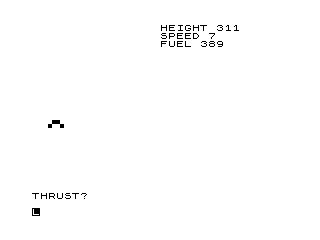
This program implements a text-based Moon Lander simulation where the player must safely touchdown a spacecraft by controlling thrust. Three variables track the mission state: height (B, initialised between 120–499), vertical speed (A, initialised between -20 and 40, where negative values indicate descent), and remaining fuel (C, initialised between 321–410). Each turn the player enters a thrust value, which is deducted from fuel and adjusts both height and speed according to a simple Newtonian model: speed and height both change by (T−5)/2 per step. The lander graphic is rendered using a block-graphic character sequence at a screen row calculated from the current height, giving a rudimentary visual altitude indicator.
Program Analysis
Program Structure
The program is a turn-based simulation loop. Initialisation (lines 10–30) sets up the three state variables randomly, then the main game loop (lines 40–140) clears the screen, displays the current status, draws the lander sprite, solicits a thrust value, updates physics, and branches back to line 40 until a terminal condition is met. End conditions are handled at lines 150–200.
- Lines 10–30: Randomise height
B, speedA, and fuelC. - Lines 40–70: Clear screen, print status panel, draw lander graphic.
- Lines 80–90: Accept thrust input
T; clamp to zero if it exceeds remaining fuel. - Lines 100–120: Update fuel, height, and speed.
- Lines 130–140: Check for out-of-fuel and in-flight continuation.
- Lines 150–200: Evaluate landing outcome (safe or crash) and stop.
Physics Model
Speed A represents vertical velocity (positive = upward or slowing descent depending on sign convention). Each turn, both height and speed are updated by the same delta: (T-5)/2. A thrust of 5 is the neutral point — less than 5 accelerates the fall, more than 5 decelerates it. Since both B and A are updated by the identical expression, speed integrates into height as expected for a simple Euler integration step.
Variable Summary
| Variable | Role | Initial Range |
|---|---|---|
A | Vertical speed (positive = rising) | −20 to +40 |
B | Height (arbitrary units) | 120 to 499 |
C | Remaining fuel | 321 to 410 |
T | Player-entered thrust per turn | 0 to C |
Lander Graphic and Display
Line 60 uses PRINT AT with a row calculated as 15-B/100, which maps height values roughly 0–1500 onto screen rows 15 down to 0, giving a simple vertical position indicator. The column is randomised with 5+RND*3-RND*3 to jitter the lander left and right slightly each turn. The lander shape \.'\'. decodes to the block-graphic sequence ▖▘▝▖, forming a small spacecraft silhouette.
Notable Techniques and Idioms
- Fuel cap on thrust (line 90): If the player requests more thrust than fuel available,
Tis silently set to 0 rather than clamping toC, which is a somewhat harsh penalty. - Dual-column print layout (line 50): Commas in the
PRINTstatement use the tab-stop mechanism to align HEIGHT, SPEED, and FUEL into columns without explicitATpositioning. - ABS on height and speed (line 150/190):
ABS BandABS Aare used in the landing checks to handle the case where values may go negative (below ground or reversed speed).
Bugs and Anomalies
- Speed initialisation sign:
A=21-INT(RND*60)produces values from −38 to +21. Large negative values ofAmean the lander is already falling very fast at the start, which together with the height update on line 110 can causeBto drop to landing range in very few turns — or even go negative immediately. - Out-of-fuel jump to crash (line 130): If fuel runs out while still at high altitude (
B>100), the game jumps to line 180 (out-of-fuel message) then falls through to line 190 (crash message). However, line 140 redirects back to line 40 whileB>19, so the fuel-out check at line 130 only triggers when height is ≤ 100, meaning the player can continue to fall without fuel from high altitude untilBreaches 19. - Typo in success message (line 150): “SAFETLY” should be “SAFELY”.
- Missing STOP after safe landing (line 150): The safe-landing
PRINTon line 150 does not include aSTOPorGOTO, so execution falls through to line 170, which checksC>1and potentially jumps to line 190, printing a crash message even after a safe landing. - Line 220 (
RUN): After theSAVEon line 210, line 220 executesRUN, which would restart the program — this is unreachable during normal play since line 200 containsSTOP, but would execute if lines 210–220 were reached by a fall-through.
Image Gallery
Source Code
   5 REM "MOONLANDER"
  10 LET A=21-INT (RND*60)
  20 LET B=120+INT (RND*380)
  30 LET C=321+INT (RND*90)
  40 CLS
  50 PRINT ,"HEIGHT ";INT B,,"SPEED ";INT A,,"FUEL ";INT C
  60 PRINT AT (15-B/100),(5+RND*3-RND*3);"\.'\'."
  70 PRINT AT 21,0;"THRUST?"
  80 INPUT T
  90 IF T>C THEN LET T=0
 100 LET C=C-T
 110 LET B=B+A+(T-5)/2
 120 LET A=A+(T-5)/2
 130 IF C<1 AND B>100 THEN GOTO 180
 140 IF B>19 THEN GOTO 40
 150 IF ABS B<20 AND ABS A<15 THEN PRINT AT 21,0;"YOU HAVE LANDED SAFETLY  STOP "
 170 IF C>1 THEN GOTO 190
 180 PRINT AT 20,0;"YOU HAVE RUN OUT OF FUEL"
 190 PRINT AT 21,0;"CRASHED AT ";ABS A;"MPS"
 200 STOP
 210 SAVE "1022%7"
 220 RUN
Note: Type-in program listings on this website use ZMAKEBAS notation for graphics characters.