
This program displays multiplication tables for a user-chosen number, printing the series from 1× to 10× in a formatted layout. After displaying the table, it prompts the user to try another and loops back unless “NO” is entered. The condition `IF NOT A$=”NO”` is a characteristic Sinclair BASIC idiom where `NOT` applies to the entire string comparison, returning 1 (true) if the strings are not equal. The double commas in line 12 (`PRINT ,,J`) use comma column-tabbing to position output across the screen. The program includes a SAVE command with an auto-run flag embedded in the filename.
Program Analysis
Program Structure
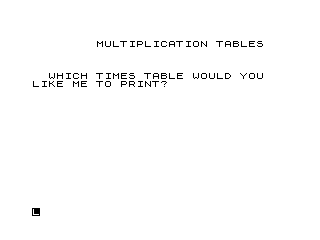
The program is divided into three logical phases: an introduction/input screen (lines 1–3), the table display loop (lines 10–13), and a replay prompt with conditional branching (lines 14–21). Line 30 halts execution cleanly with STOP, while lines 40 and 45 are utility lines for saving and auto-running.
- Introduction (lines 1–3): Titles the program and solicits the multiplier via
INPUT A. - Table display (lines 10–13): A
FORloop from 1 to 10 prints each multiplication result. - Replay logic (lines 14–21): Prompts for another try, branching back to line 2 unless the user types “NO”.
Key BASIC Idioms
Line 12 uses PRINT ,,J;" X ";A;" = ";A*J. The two leading commas advance the print position by two tab columns before printing the expression, giving the output a centred appearance on a 32-column display. This is a common Sinclair BASIC spacing trick.
Line 19 uses IF NOT A$="NO" THEN GOTO 2. In Sinclair BASIC, NOT has lower precedence than the relational operator, so this evaluates as IF NOT (A$="NO") — i.e., loop back unless the user typed exactly “NO”. This idiom is idiomatic but can surprise programmers expecting C-style logical-NOT behaviour.
Line 2 uses a single PRINT statement with a comma-separated string to print on two consecutive lines, a standard Sinclair multi-line print shorthand.
Program Flow Table
| Lines | Purpose |
|---|---|
| 1–3 | Title display and initial multiplier input |
| 10–13 | FOR loop printing the ×1 to ×10 table |
| 14–17 | Prompt and input for replay decision |
| 18–19 | CLS and conditional branch back to line 2 |
| 21 | Farewell message |
| 30 | STOP |
| 40 | SAVE with auto-run flag |
| 45 | RUN (executed if program is loaded without auto-run) |
Notable Techniques
- The loop variable is
J(line 11), while the multiplier isA(line 3), keeping variable names distinct and avoiding shadowing. - The replay loop reuses the
INPUT A$at line 17 without re-displaying the full title (line 1), branching directly to line 2 to re-prompt for a new table number — a minor UX economy. - Line 21 uses
PRINT AT 21,0;,with a trailing comma before the string, which tabs to the next print zone before outputting the farewell, centering it roughly on screen.
Bugs and Anomalies
- The replay check is case-sensitive: entering “no” or “No” will cause the program to loop back rather than exit, which may surprise users.
- There is no validation of the
INPUT Avalue — entering 0 or a non-numeric value will either produce trivial output or cause an error. - Line 14 uses
PRINT AT 20,0, which may overlap table output if 10 rows of data have scrolled or if the screen has not been cleared since the previous iteration; however, theCLSat line 10 ensures a clean display at the start of each table.
Image Gallery
Source Code
   1 PRINT AT 2,8;"MULTIPLICATION TABLES"
   2 PRINT AT 6,2;"WHICH TIMES TABLE WOULD YOU","LIKE ME TO PRINT?"
   3 INPUT A
  10 CLS
  11 FOR J=1 TO 10
  12 PRINT ,,J;" X ";A;" = ";A*J
  13 NEXT J
  14 PRINT AT 20,0;"DO YOU WANT ANOTHER TRY?"
  17 INPUT A$
  18 CLS
  19 IF NOT A$="NO" THEN GOTO 2
  21 PRINT AT 21,8;,"OK. BYE FOR NOW."
  30 STOP
  40 SAVE "1004%9"
  45 RUN
Note: Type-in program listings on this website use ZMAKEBAS notation for graphics characters.