
MUZIK MASTER is an interactive music keyboard program that draws a two-octave piano keyboard on screen using PLOT/DRAW graphics and allows the user to play notes via keypresses. The white keys (C through E, spanning two octaves) are mapped to Q–P on the bottom row, while the black keys (sharps/flats) are mapped to the number keys 2, 3, 5, 6, 7, 9, 0. Each keypress triggers a BEEP and a brief flashing animation of the corresponding key label. A built-in demo mode (triggered by pressing “z”) plays a short melody using the same note subroutines, with PAUSE statements controlling note durations. The subroutine bank at lines 2000–2174 pairs each note with two entry points: one for short duration (0.15 seconds) and one for long duration (0.4 seconds), covering semitones 0–16 above middle C.
Program Structure
The program is divided into five functional regions:
- Lines 8–222: Screen setup — border, PLOT/DRAW piano staff lines and vertical bar lines.
- Lines 228–600: Keyboard overlay — note labels, accidental markers (#/b), inverse-video key letter assignments, and initial scale run via GO SUB.
- Lines 2000–2174: Note subroutine bank. Each semitone has two entry points: even-tens+2 for short (0.15 s) and even-tens+4 for long (0.4 s) BEEP, followed by key-flash GO SUB 3500 and RETURN.
- Lines 3000–3170: Main input loop — sequential INKEY$ polling for every mapped key, branching to corresponding note subroutines.
- Lines 4010–4680: Demo melody — a sequence of GO SUB calls to note subroutines with PAUSE spacers, ending with a return to the main loop.
Keyboard Mapping
| Key | Note (semitones above middle C) | Type |
|---|---|---|
| Q | 0 (C) | White |
| 2 | 1 (C#/Db) | Black |
| W | 2 (D) | White |
| 3 | 3 (D#/Eb) | Black |
| E | 4 (E) | White |
| R | 5 (F) | White |
| 5 | 6 (F#/Gb) | Black |
| T | 7 (G) | White |
| 6 | 8 (G#/Ab) | Black |
| Y | 9 (A) | White |
| 7 | 10 (A#/Bb) | Black |
| U | 11 (B) | White |
| I | 12 (C’) | White |
| 9 | 13 (C#’) | Black |
| O | 14 (D’) | White |
| 0 | 15 (D#’) | Black |
| P | 16 (E’) | White |
Note Subroutine Convention
Lines 2012–2174 follow a strict naming convention: for semitone n, the short-duration entry point is at line 2000 + n*10 + 2 and the long-duration entry point is at 2000 + n*10 + 4. Each subroutine sets variables y (screen row), x (screen column), and z$ (key character), then calls GO SUB 3500 for the flash animation before returning. This makes it straightforward to extend the range by adding further subroutine pairs.
Key-Flash Animation (GO SUB 3500)
The subroutine at line 3500 flashes a solid block character (█) at the key’s screen position four times using a FOR loop, with a PAUSE 1 between each flash/clear cycle. After the loop, it reprints the key letter in INVERSE 1 mode to indicate the key remains highlighted. This provides visible feedback synchronized to each BEEP.
Drawing the Piano Staff
The staff and keyboard graphic is built entirely with PLOT and DRAW commands in lines 15–222. Horizontal staff lines are drawn with DRAW 240,0 or DRAW -242,0, and vertical bar lines with DRAW 0,-99 or DRAW 0,-38. Black key visual columns are rendered using OVER 1 PRINT with a string of ██ block characters at lines 240–270, which XOR-overlays the existing staff lines correctly.
Notable Techniques
- OVER 1 at line 235 uses the XOR drawing mode so the solid block characters merge with the staff lines without fully obscuring them, simulating black piano keys drawn atop the staff.
- The opening scale run at line 592 calls subroutines in descending order (
GO SUB 2132: GO SUB 2122: … GO SUB 2014) to play a descending arpeggio as the program finishes rendering, giving audio confirmation the keyboard is ready. - The main loop at lines 3000–3170 polls INKEY$ individually for each of the 17 keys in sequence. Because the loop falls through all checks on every pass, there is some latency when no key is pressed, but it is functionally adequate for single-note play.
- Line 9999 provides a
CLEAR : SAVE "MUZIK" LINE 1utility to save the program with autorun, accessible manually.
Image Gallery
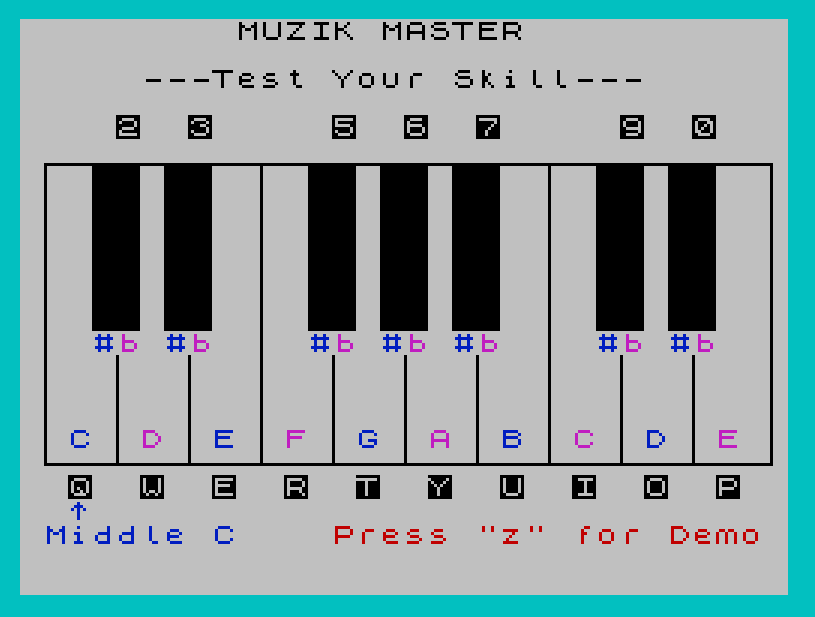
Source Code
    3 REM RESET  By Frank Bouldin,W5GAA, 11-25-83; ALL RIGHTS RESERVED
    4 REM LOAD "MUZIK" or LOAD ""
    5 REM Enter "GOTO 8" to Run.
    6 REM Line 2000: Change vari-able "t" (seconds) to adjust    sound note duration.
    8 CLS
   10 BORDER 5: PAPER 7: INK 0
   11 PRINT AT 0,9;"MUZIK MASTER"
   12 PRINT AT 2,5;"---Test Your Skill---"
   14 PAUSE 60
   15 PLOT 10,127: GO SUB 2014: DRAW 240,0: GO SUB 2034
   30 DRAW 0,-100: GO SUB 2054: DRAW -242,0: GO SUB 2064: DRAW 0,100: GO SUB 2084
   60 PLOT 32,65: GO SUB 2104: DRAW 0,-38: GO SUB 2124: PLOT 56,65: GO SUB 2134: DRAW 0,-38
  100 PLOT 80,126: DRAW 0,-99: PLOT 104,65: DRAW 0,-38:
  140 PLOT 128,65
  150 DRAW 0,-38
  160 PLOT 152,65
  170 DRAW 0,-38
  180 PLOT 176,126
  190 DRAW 0,-99
  200 PLOT 200,65
  210 DRAW 0,-38
  220 PLOT 224,65
  222 DRAW 0,-38
  228 INK 0
  230 LET x=6
  235 OVER 1
  240 PRINT AT x,2;" ██ ██    ██ ██ ██    ██ ██"
  250 LET x=x+1
  260 IF x=13 THEN GO TO 280
  270 GO TO 240
  280 OVER 0
  290 PLOT 8,127
  300 DRAW 240,0
  310 INK 1
  315 PRINT AT 17,2;"C"
  317 PRINT AT 17,8;"E"
  319 PRINT AT 17,14;"G"
  321 PRINT AT 17,20;"B"
  323 PRINT AT 17,26;"D"
  325 INK 3
  330 PRINT AT 17,5;"D"
  350 PRINT AT 17,11;"F"
  370 PRINT AT 17,17;"A"
  390 PRINT AT 17,23;"C"
  410 PRINT AT 17,29;"E"
  420 INK 1
  440 PRINT AT 13,3;"#"
  442 PRINT AT 13,6;"#"
  444 PRINT AT 13,12;"#"
  446 PRINT AT 13,15;"#"
  448 PRINT AT 13,18;"#"
  450 PRINT AT 13,24;"#"
  452 PRINT AT 13,27;"#"
  454 INK 3
  455 PRINT AT 13,4;"b"
  457 PRINT AT 13,7;"b"
  459 PRINT AT 13,13;"b"
  461 PRINT AT 13,16;"b"
  463 PRINT AT 13,19;"b"
  465 PRINT AT 13,25;"b"
  467 PRINT AT 13,28;"b"
  470 INK 1
  480 PRINT AT 20,2;"^"
  490 PRINT AT 21,1;"Middle C"
  492 INK 2
  494 PRINT AT 21,13;"Press ""z"" for Demo"
  500 INK 0
  505 INVERSE 1
  510 PRINT AT 19,2;"Q"
  515 PRINT AT 19,5;"W"
  520 PRINT AT 19,8;"E"
  525 PRINT AT 19,11;"R"
  530 PRINT AT 19,14;"T"
  535 PRINT AT 19,17;"Y"
  540 PRINT AT 19,20;"U"
  545 PRINT AT 19,23;"I"
  550 PRINT AT 19,26;"O"
  555 PRINT AT 19,29;"P"
  560 PRINT AT 4,4;"2"
  565 PRINT AT 4,7;"3"
  570 PRINT AT 4,13;"5"
  575 PRINT AT 4,16;"6"
  580 PRINT AT 4,19;"7"
  585 PRINT AT 4,25;"9"
  590 PRINT AT 4,28;"0"
  592 GO SUB 2132: GO SUB 2122: GO SUB 2102: GO SUB 2082: GO SUB 2062: GO SUB 2052: GO SUB 2032: GO SUB 2014
  595 INK 0
  600 INVERSE 0
  610 GO TO 2000
 2005 GO TO 3000
 2012 BEEP .15,0: LET y=19: LET x=2: LET z$="Q": GO SUB 3500: RETURN
 2014 BEEP .4,0: LET y=19: LET x=2: LET z$="Q": GO SUB 3500: RETURN
 2022: BEEP .15,1: LET y=4: LET x=4: LET z$="2": GO SUB 3500: RETURN
 2024: BEEP .4,1: LET y=4: LET x=4: LET z$="2": GO SUB 3500: RETURN
 2032 BEEP .15,2: LET y=19: LET x=5: LET z$="W": GO SUB 3500: RETURN
 2034 BEEP .4,2: LET y=19: LET x=5: LET z$="W": GO SUB 3500: RETURN
 2042 BEEP .15,3: LET y=4: LET x=7: LET z$="3": GO SUB 3500: RETURN
 2044 BEEP .4,3: LET y=4: LET x=7: LET z$="3": GO SUB 3500: RETURN
 2052 BEEP .15,4: LET y=19: LET x=8: LET z$="E": GO SUB 3500: RETURN
 2054 BEEP .4,4: LET y=19: LET x=8: LET z$="E": GO SUB 3500: RETURN
 2062 BEEP .15,5: LET y=19: LET x=11: LET z$="R": GO SUB 3500: RETURN
 2064 BEEP .4,5: LET y=19: LET x=11: LET z$="R": GO SUB 3500: RETURN
 2072 BEEP .15,6: LET y=4: LET x=13: LET z$="5": GO SUB 3500: RETURN
 2074 BEEP .4,6: LET y=4: LET x=13: LET z$="5": GO SUB 3500: RETURN
 2082 BEEP .15,7: LET y=19: LET x=14: LET z$="T": GO SUB 3500: RETURN
 2084 BEEP .4,7: LET y=19: LET x=14: LET z$="T": GO SUB 3500: RETURN
 2092 BEEP .15,8: LET y=4: LET x=16: LET z$="6": GO SUB 3500: RETURN
 2094 BEEP .4,8: LET y=4: LET x=16: LET z$="6": GO SUB 3500: RETURN
 2102 BEEP .15,9: LET y=19: LET x=17: LET z$="Y": GO SUB 3500: RETURN
 2104 BEEP .4,9: LET y=19: LET x=17: LET z$="Y": GO SUB 3500: RETURN
 2112 BEEP .15,10: LET y=4: LET x=19: LET z$="7": GO SUB 3500: RETURN
 2114 BEEP .4,10: LET y=4: LET x=19: LET z$="7": GO SUB 3500: RETURN
 2122 BEEP .15,11: LET y=19: LET x=20: LET z$="U": GO SUB 3500: RETURN
 2124 BEEP .4,11: LET y=19: LET x=20: LET z$="U": GO SUB 3500: RETURN
 2132 BEEP .15,12: LET y=19: LET x=23: LET z$="I": GO SUB 3500: RETURN
 2134 BEEP .4,12: LET y=19: LET x=23: LET z$="I": GO SUB 3500: RETURN
 2142 BEEP .15,13: LET y=4: LET x=25: LET z$="9": GO SUB 3500: RETURN
 2144 BEEP .4,13: LET y=4: LET x=25: LET z$="9": GO SUB 3500: RETURN
 2152 BEEP .15,14: LET y=19: LET x=26: LET z$="O": GO SUB 3500: RETURN
 2154 BEEP .4,14: LET y=19: LET x=26: LET z$="O": GO SUB 3500: RETURN
 2162 BEEP .15,15: LET y=4: LET x=28: LET z$="0": GO SUB 3500: RETURN
 2164 BEEP .4,15: LET y=4: LET x=28: LET z$="0": GO SUB 3500: RETURN
 2172 BEEP .15,16: LET y=19: LET x=29: LET z$="P": GO SUB 3500: RETURN
 2174 BEEP .4,16: LET y=19: LET x=29: LET z$="P": GO SUB 3500: RETURN
 3000 IF INKEY$="z" THEN GO TO 4000
 3008 IF INKEY$="q" THEN GO SUB 2010
 3010 IF INKEY$="2" THEN GO SUB 2020
 3020 IF INKEY$="w" THEN GO SUB 2030
 3030 IF INKEY$="3" THEN GO SUB 2040
 3040 IF INKEY$="e" THEN GO SUB 2050
 3050 IF INKEY$="r" THEN GO SUB 2060
 3060 IF INKEY$="5" THEN GO SUB 2070
 3070 IF INKEY$="t" THEN GO SUB 2080
 3080 IF INKEY$="6" THEN GO SUB 2090
 3090 IF INKEY$="y" THEN GO SUB 2100
 3100 IF INKEY$="7" THEN GO SUB 2110
 3110 IF INKEY$="u" THEN GO SUB 2120
 3120 IF INKEY$="i" THEN GO SUB 2130
 3130 IF INKEY$="9" THEN GO SUB 2140
 3140 IF INKEY$="o" THEN GO SUB 2150
 3150 IF INKEY$="0" THEN GO SUB 2160
 3160 IF INKEY$="p" THEN GO SUB 2170
 3170 GO TO 3000
 3500 FOR f=0 TO 3
 3510 PRINT AT y,x;"█"
 3520 PAUSE 1
 3530 PRINT AT y,x;" "
 3550 NEXT f
 3560 INVERSE 1: PRINT AT y,x;z$: INVERSE 0
 3570 RETURN
 4010 GO SUB 2032
 4020 GO SUB 2084
 4025 PAUSE 15
 4030 GO SUB 2032
 4040 GO SUB 2082
 4044 GO SUB 2032
 4046 GO SUB 2082
 4050 GO SUB 2102
 4060 GO SUB 2124
 4070 GO SUB 2084
 4080 PAUSE 45
 4090 GO SUB 2132
 4100 GO SUB 2132
 4110 GO SUB 2082
 4115 GO SUB 2102
 4120 GO SUB 2124
 4140 PAUSE 30
 4150 GO SUB 2032
 4160 GO SUB 2084
 4165 PAUSE 30
 4170 GO SUB 2032
 4180 GO SUB 2082
 4184 GO SUB 2032
 4186 GO SUB 2082
 4190 GO SUB 2102
 4200 GO SUB 2124
 4210 GO SUB 2084
 4215 PAUSE 30
 4220 GO SUB 2122
 4230 GO SUB 2122
 4240 GO SUB 2102
 4250 GO SUB 2102
 4260 GO SUB 2122
 4270 GO SUB 2104
 4280 PAUSE 45
 4290 GO SUB 2102
 4300 GO SUB 2102
 4310 GO SUB 2092
 4320 GO SUB 2102
 4330 GO SUB 2122
 4335 GO SUB 2102
 4340 GO SUB 2084
 4350 GO SUB 2034
 4355 PAUSE 45
 4360 GO SUB 2132
 4370 GO SUB 2132
 4375 GO SUB 2082
 4380 GO SUB 2102
 4390 GO SUB 2124
 4400 PAUSE 45
 4410 GO SUB 2052
 4420 GO SUB 2072
 4430 GO SUB 2082
 4440 GO SUB 2072
 4450 GO SUB 2082
 4460 GO SUB 2052
 4470 GO SUB 2034
 4480 GO SUB 2084
 4490 PAUSE 45
 4500 GO SUB 2102
 4510 GO SUB 2124
 4520 GO SUB 2134
 4530 GO SUB 2124
 4540 GO SUB 2104
 4550 GO SUB 2084
 4660 PAUSE 60
 4680 GO TO 3000
 9999 CLEAR : SAVE "MUZIK" LINE 1
Note: Type-in program listings on this website use ZMAKEBAS notation for graphics characters.