
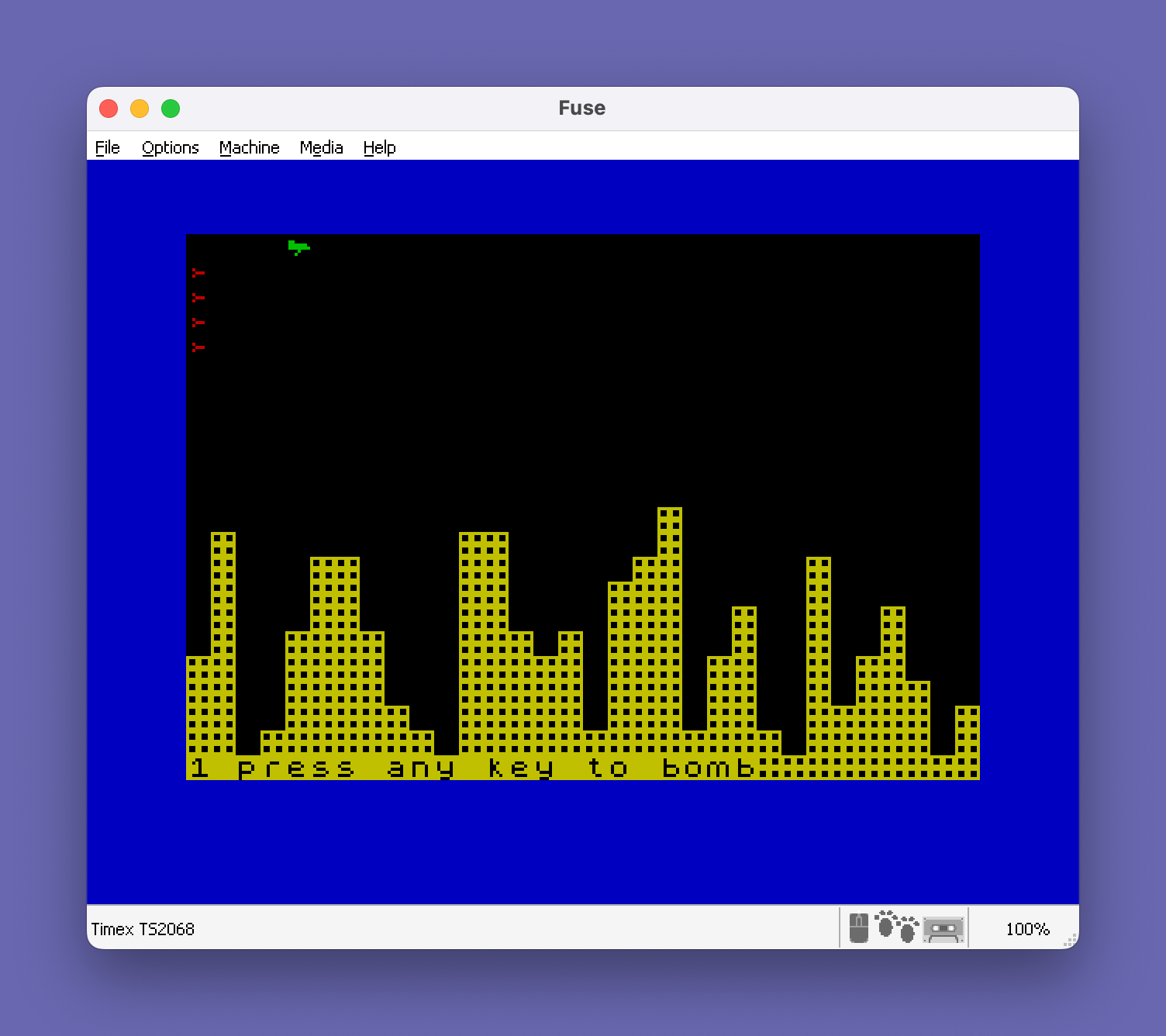
This program implements a falling-rain or “nightfall” arcade game where the player pilots a craft across the screen while bombs fall from above. The screen is seeded with rainfall columns drawn using UDG characters (CHR$ 146), with density controlled by a difficulty value derived from user input at line 30 via INKEY$ polling. Three UDGs are defined at startup via a DATA/READ loop in the subroutine at line 1000: a raindrop shape (UDG “a”, CHR$ 144), a bomb shape (UDG “b”, CHR$ 145), and a solid block (UDG “c”, CHR$ 146). Collision detection relies on reading the display file address stored in system variables 23684–23685 and checking whether the character cell under the sprite equals 255, a common Spectrum technique for attribute or pixel collision. The score variable tracks bomb hits, and every 250 points the border color is incremented via POKE 23624.
From Tim Hartnell’s The Timex Sinclair 2068 Explored.
Program Analysis
Program Structure
The program is organized into a main game loop, an initialization subroutine, and a game-over sequence. Execution begins at line 2 and branches to subroutine 1000 on the first run (guarded by h=0) to define UDG characters. The main flow proceeds through difficulty selection (line 30), screen seeding (lines 40–80), and the core movement/bombing loop (lines 90–190). Helper routines handle collision with the terrain (line 200), bomb falling (lines 300–340), and end-of-game (lines 400–420 and 1200–1270).
UDG Initialization (Lines 1000–1050)
Three User Defined Graphics are loaded from inline DATA at startup. A READ loop iterates over character names "a", "b", and "c", then POKEs 8 bytes per character into USR a$ through USR a$+7. The resulting characters are:
CHR$ 144(UDG “a”) — the player’s craft spriteCHR$ 145(UDG “b”) — the falling bomb spriteCHR$ 146(UDG “c”) — the rainfall/terrain block used to seed the playfield
Because the subroutine is only called when h=0 (line 4), UDGs are initialized once per program run rather than every game cycle, preserving the high score across rounds.
Difficulty and Screen Seeding (Lines 30–80)
Difficulty is accepted as a single keypress digit 1–9, validated by checking LEN d$, CODE d$ bounds, and looping with GO TO 30 until valid. The value is converted to a density parameter via d=12-VAL d$, so higher digit = lower d = more densely packed rainfall. The nested FOR loops at lines 40–80 fill each of the 32 columns from a random starting row down to row 21 using CHR$ 146, with the starting row determined by d+INT(RND*d).
Player Movement and Collision Detection (Lines 100–190)
The player craft moves left-to-right automatically: p is the column and u is the row, incrementing through lines 160–180. Collision is detected at lines 140 and 157 using a direct display-file read:
PEEK (PEEK 23684 + 256*PEEK 23685) = 255System variables 23684–23685 hold the address of the last PRINT AT position in the display file. A value of 255 means the cell is fully set (i.e., occupied by a UDG block), triggering a collision branch. This is a well-known Spectrum technique that avoids attribute-based collision and works at the pixel byte level.
Bombing Mechanic (Lines 144–340)
Pressing any key sets flag f=1 (line 148), capturing the bomb’s launch position in a and t at line 144. While f=1, the bomb (UDG “b”, CHR$ 145) descends one row per loop iteration with a rising pitch BEEP (line 158, note 60-a). If the bomb reaches row 22 without hitting terrain it resets (line 340). If it hits terrain (line 157 collision), the impact routine at lines 300–330 clears cells downward with random early termination (RND>.99), incrementing score s for each cleared cell. Every 250 score points, POKE 23624 shifts the border color upward by 8.
Player Collision and DRAW Effect (Lines 200–235)
When the craft collides with terrain (line 140), a visual explosion effect is produced using PLOT and DRAW (lines 207–210) with randomized endpoints relative to the collision pixel coordinates (x=p*8, y=(21-u)*8). The NEXT a at line 230 is a notable anomaly: it completes the outer FOR loop from lines 40–80 that was left open during the seeding phase, iterating the remaining columns — this appears to be an intentional reuse of the loop variable rather than a structural bug. After the loop exhausts, execution falls to line 235 and jumps to the score display at line 400.
Game Over Sequence (Lines 1200–1270)
When the player reaches row 22 (line 185), a three-note musical phrase is played using a DATA-driven loop: three notes (0, 4, 7) each repeated three times at one-third-second duration, followed by a longer closing note. Control then jumps to line 32 (CLS and restart) rather than line 2, preserving the high score in h.
Key Variables
| Variable | Role |
|---|---|
h | High score (persists across rounds; also used as first-run flag) |
s | Current score (cells cleared by bombs) |
d | Density/difficulty parameter (12 minus digit entered) |
u, p | Player row and column |
a, t | Bomb row and column at launch |
f | Bomb-in-flight flag (0=no bomb, 1=bombing) |
Notable Techniques and Anomalies
- The
NEXT aat line 230 reuses the seeding loop variable to iterate remaining columns after a crash — a creative but potentially confusing dual use ofa. - The status line at line 130 uses
CHR$ 20+CHR$ 1to embed a PAPER color control code inline in a PRINT statement. - The SAVE at line 1300 uses
LINE 32, so reloading the tape restarts from post-UDG-initialization, bypassing the high score reset guard at line 4 — meaning the high score will be 0 on a fresh load regardless. - Score display at line 410 uses a comma between
;"score: ";sand"hi-score: ";h, which tabs to column 16 on the same line — an efficient two-column layout.
Image Gallery
Source Code
    2 LET h=0
    4 IF h=0 THEN GO SUB 1000
    5 LET s=0
   10 PAPER 0: INK 6: BORDER 1
   30 PRINT AT 21,0;"Difficulty (1 to 9) ?": LET d$=INKEY$: IF LEN d$<>1 OR CODE d$<49 OR CODE d$>57 THEN GO TO 30
   32 CLS
   35 LET d=12-VAL d$
   40 FOR a=0 TO 31
   50 FOR b=d+INT (RND*d) TO 21
   60 PRINT PAPER 0;AT b,a;CHR$ 146
   70 NEXT b
   80 NEXT a
   90 LET u=0
  100 LET p=0
  110 LET f=0
  130 PRINT AT 21,0;CHR$ 20+CHR$ 1+d$+" press any key to bomb"
  140 PRINT AT u,p;: IF PEEK (PEEK 23684+256*PEEK 23685)=255 THEN GO TO 200
  142 PRINT INK 4;CHR$ 144
  144 IF f=0 THEN LET a=u: LET t=p
  148 IF INKEY$<>"" THEN LET f=1
  155 IF f=1 THEN PRINT AT a,t;"": LET a=a+1: IF a=22 THEN GO TO 340
  157 PRINT AT a,t;: IF PEEK (PEEK 23684+256*PEEK 23685)=255 THEN GO TO 300
  158 IF f=1 THEN PRINT INK 2;CHR$ 145: BEEP .01,60-a
  160 LET p=p+1
  170 PRINT AT u,p-1;" "
  180 IF p=32 THEN LET p=0: LET u=u+1: BEEP .1,u
  185 IF u=22 THEN GO TO 1200
  190 GO TO 140
  200 LET x=p*8: LET y=(21-u)*8
  207 PLOT x,y
  210 DRAW INK 6;INT (RND*256)-x,INT (RND*158)-y
  220 BEEP 1,20: BEEP .01,10
  230 NEXT a
  235 GO TO 400
  300 FOR a=a TO 21
  310 IF RND>.99 THEN GO TO 340
  315 BEEP .005,a-20
  320 PRINT AT a,t;" "
  325 LET s=s+1: IF s/250=INT (s/250) THEN POKE 23624,PEEK 23624+8
  330 NEXT a
  340 LET f=0: GO TO 140
  400 IF h<s THEN LET h=s
  410 PRINT AT 0,0;"score: ";s,"hi-score: ";h
  420 GO TO 5
 1000 DATA "a",0,0,96,126,127,8,16,0,"b",0,0,0,32,28,32,0,0,"c",255,153,153,255,255,153,153,255
 1005 FOR f=1 TO 3
 1007 READ a$
 1010 FOR a=0 TO 7
 1020 READ b: POKE USR a$+a,b
 1030 NEXT a
 1045 NEXT f
 1050 RETURN
 1200 DATA 0,4,7
 1210 FOR a=1 TO 3
 1215 READ c
 1220 FOR b=1 TO 3
 1230 BEEP 1/3,c
 1240 NEXT b
 1250 NEXT a
 1260 BEEP 1,12
 1270 GO TO 32
 1300 SAVE "NIGHTFALL" LINE 32
 1310 STOP
Note: Type-in program listings on this website use ZMAKEBAS notation for graphics characters.