
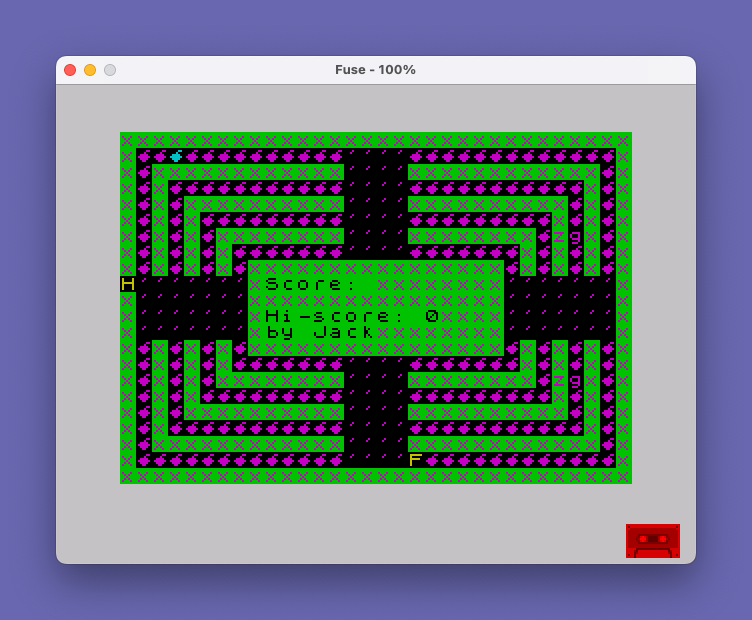
This program implements a Pac-Man-style maze game in which the player navigates a character through a nested-border playfield while eating dots and avoiding a pursuing enemy. Seven UDGs (characters \a through \g) are loaded at startup from DATA statements, defining the custom sprites used for the player, enemy, and pellets. The maze is drawn using INVERSE 1 mode with nested rectangular borders printed by a clever re-entrant GOSUB structure controlled by the flag variable `f`. The enemy AI tracks the player using a lane-based alignment system stored in variables `lj` and `lf`, and the game features a high-score table with a name-entry prompt persisting across playthroughs via variables `h` and `e$`.
Program Analysis
Program Structure
The program divides into several logical phases:
- Initialization (lines 2–78): Sets persistent variables (
h,e$), loads 56 bytes of UDG data into characters\a–\g, and resets per-game state. - Maze drawing (lines 79–290): Prints a concentric nested-border maze using a re-entrant flag technique.
- Game loop (lines 310–700): Handles player movement, collision detection, dot eating, scoring, and enemy movement.
- Subroutines (lines 710–1250): Enemy turning logic (710), game-over sequence (800), music playback (1040), bonus sound/score (1150), and pellet placement (1200).
- Persistence and restart (lines 880–890): High score is retained in
hande$across games;GO TO 75restarts without re-running UDG loading.
UDG Setup
Lines 10–60 read 56 bytes from DATA and POKE them into USR "\a" through USR "\g" (7 UDGs × 8 bytes). Character \g is used throughout as the dot/pellet tile. The player sprite cycles through four UDG characters (c runs 144–147, wrapping at 148 back to 144) to animate the Pac-Man mouth. The enemy is represented by the character "H" printed directly, and the player’s current cell by "F".
Maze Drawing Technique
The nested rectangular borders are built using a re-entrant GOSUB trick. Variable f is initially 0. The code prints each concentric ring line by line (lines 80–280). After all lines are printed once with f=0, line 290 sets f=1 and line 300 does GO SUB 240. On this second pass, the IF f=1 THEN GO TO / RETURN guards at lines 90, 110, 130, … cause the GOSUB to return after printing only the innermost row, creating the illusion of a re-drawn partial maze efficiently.
Player Movement
The player’s grid position is tracked by (u, p) with direction deltas (du, dp). Keys 5–8 are used for movement (standard Spectrum directional keys). Lines 630–680 implement turn requests: the player can only turn perpendicular to the current direction of travel ((du=0) or (dp=0) guards), and the new position is computed two cells ahead to check feasibility. Variable lj tracks the player’s lane for the enemy AI.
Enemy AI
The enemy at (a, t) moves with deltas (da, dt). Subroutine 710 is called when the enemy’s screen cell matches a dot character. It computes a turning preference based on the relative lane positions of the enemy (lf) and player (lj). The logic in lines 730–780 uses boolean arithmetic to derive signed offsets, nudging the enemy’s column or row toward the player’s lane over successive turns — a lightweight AI that avoids a full pathfinding implementation.
Collision Detection
All collision detection is done via SCREEN$ rather than coordinate comparison. Line 440 checks whether the player’s next cell contains "x" (a wall character); lines 1000–1015 handle the wall-bounce by rotating the direction deltas. Similarly, line 470 checks the enemy’s next cell. Line 542 uses ATTR to detect the player reaching a special cell (ATTR=6 signals the game-over trigger at line 800).
Dot and Pellet System
Regular dots are detected by SCREEN$ returning "," (a comma character used as a sentinel). The s2 variable counts total dots eaten; when it reaches 224 (line 557), the level is won (line 1110 increases difficulty by incrementing v with a random component, then restarts the maze). Power pellets are placed by subroutine 1200 at random valid positions, rendered with FLASH 1. Collecting a pellet (line 547 calls subroutine 1150) awards 5 bonus points and plays a descending beep.
Scoring and High Score
Variable s holds the current score; h and e$ hold the high score and name and are initialized only once at lines 2 and 5, persisting across game restarts (which loop back to line 75, skipping those initializations). On game over (line 875), if the current score beats the high score, the player is prompted for their name via INPUT, with a length check enforcing a maximum of 11 characters.
Music
Subroutine 1040 plays a two-phrase melody (56 notes total, stored in DATA at lines 1050–1055) using BEEP with durations divided by 10. It is called at startup (line 307) and between levels. The game-over sequence at lines 800–870 plays four notes from inline DATA and then 64 rapid beeps at pitch 25.
Notable Anomalies and Bugs
- Line 200 prints
INK z;"z"(the letter z) instead ofINK z;"x"for a wall segment — this is likely a typo causing a visual glitch in the maze border. - Line 525 sets
LET t=dtinstead ofLET t=t+dt, meaning the enemy’s column is assigned the raw delta value rather than being incremented — a probable bug in enemy horizontal movement. - Line 655 references
I$(uppercase I) which is a different variable fromi$(lowercase); on this platform variable names are case-insensitive for keywords but string variable names differing only in case may behave unexpectedly depending on the interpreter. - Line 510 compares
g$<>","twice in succession on the same line with no effect — the second condition is redundant. - The
DATAat line 585 mixes numeric and string values (du,"6","7",dp,"5","8"), relying on the interpreter reading numeric variables as numbers and strings as strings in alternatingREADcalls — an unusual but functional BASIC technique. - Line 515 is jumped to by lines 1020 and 1030 (enemy wall-bounce), bypassing the subroutine call at line 517 and the dot-detection at line 520, which is intentional to avoid recursive re-entry during bounce resolution.
- The
REMat line 9990 (“Needs fixin?”) acknowledges that the author was aware of outstanding issues.
Image Gallery
Source Code
    2 LET h=0
    5 LET e$="Jack"
   10 DATA 60,126,240,224,224,240,126,60
   12 DATA 0,66,195,195,231,255,126,60,60,126,15,7,7,15,126,60
   14 DATA 60,126,255,231,195,195,66,0,0,0,0,0,60,60,60,60
   18 DATA 60,125,255,255,255,255,126,60,0,6,8,60,126,60,24,0
   20 DATA 24,60,24,255,24,24,36,102
   30 FOR b=0 TO 55
   40 READ c
   50 POKE USR "\a"+b,c
   60 NEXT b
   75 LET s=0: LET v=1
   77 LET z=4: LET y=0: PAPER 3: INVERSE 1
   78 LET f=0
   79 CLS
   80 PRINT INK z;"xxxxxxxxxxxxxxxxxxxxxxxxxxxxxxxx"
   90 IF f=1 THEN RETURN
  100 PRINT INK z;"x"; INK y;"\g\g\g\g\g\g\g\g\g\g\g\g\g''''\g\g\g\g\g\g\g\g\g\g\g\g\g"; INK z;"x"
  110 IF f=1 THEN GO TO 80
  120 PRINT INK z;"x"; INK y;"\g"; INK z;"xxxxxxxxxxxx"; INK y;"''''"; INK z;"xxxxxxxxxxxx"; INK y;"\g"; INK z;"x"
  130 IF f=1 THEN GO TO 100
  140 PRINT INK z;"x"; INK y;"\g"; INK z;"x"; INK y;"\g\g\g\g\g\g\g\g\g\g\g''''\g\g\g\g\g\g\g\g\g\g\g"; INK z;"x"; INK y;"\g"; INK z;"x"
  150 IF f=1 THEN GO TO 120
  160 PRINT INK z;"x"; INK y;"\g"; INK z;"x"; INK y;"\g"; INK z;"xxxxxxxxxx"; INK y;"''''"; INK z;"xxxxxxxxxx"; INK y;"\g"; INK z;"x"; INK y;"\g"; INK z;"x"
  170 IF f=1 THEN GO TO 140
  180 PRINT INK z;"x"; INK y;"\g"; INK z;"x"; INK y;"\g"; INK  z;"x"; INK y;"\g\g\g\g\g\g\g\g\g''''\g\g\g\g\g\g\g\g\g"; INK z;"x"; INK y;"\g"; INK z;"x"; INK y;"\g"; INK z;"x"
  190 IF f=1 THEN GO TO 160
  200 PRINT INK z;"x"; INK y;"\g"; INK z;"x"; INK y;"\g"; INK z;"x"; INK y;"\g"; INK z;"xxxxxxxx";  INK y;"''''"; INK z;"xxxxxxxx"; INK y;"\g"; INK z;"z"; INK y;"g"; INK z;"x"; INK y;"\g"; INK z;"x"
  210 IF f=1 THEN GO TO 180
  220 PRINT INK z;"x"; INK y;"\g"; INK z;"x"; INK y;"\g"; INK z;"x" ; INK y;"\g"; INK z;"x"; INK y;"\g\g\g\g\g\g\g''''\g\g\g\g\g\g\g"; INK z;"x"; INK y;"\g"; INK z;"x"; INK y;"\g"; INK z;"x"; INK y;"\g"; INK z;"x"
  230 IF f=1 THEN GO TO 200
  240 PRINT INK z;"x"; INK y;"\g"; INK z;"x"; INK y;"\g"; INK z;"x"; INK y;"\g"; INK z;"x"; INK y;"\g"; INK z;"xxxxxxxxxxxxxxxx"; INK y;"\g"; INK  z;"x"; INK y;"\g"; INK z;"x"; INK y;"\g"; INK z;"x"; INK y;"\g"; INK z;"x"
  250 IF f=1 THEN GO TO 220
  260 FOR a=1 TO 4
  270 PRINT INK z;"x"; INK y;"'''''''"; INK z;"xxxxxxxxxxxxxxxx"; INK y;"'''''''"; INK z;"x"
  280 NEXT a
  290 LET f=1
  300 GO SUB 240
  305 INVERSE 0
  307 GO SUB 1040
  310 LET u=20
  315 PAPER 0: INK 6
  320 LET p=17
  330 LET du=0
  335 LET lj=4
  340 LET dp=1
  345 LET lf=4
  350 LET a=10
  355 LET g$="'"
  360 LET t=1
  365 LET l$="'"
  370 LET da=-1
  375 PRINT AT 9,9; PAPER 0; INK 4; INVERSE 1;"Score: "
  380 LET dt=0
  385 LET q=1
  390 LET c=144
  400 IF INKEY$<>"" THEN BEEP .01,0
  410 PRINT AT u,p; INK 6;CHR$ c
  440 IF SCREEN$ (u+du,p+dp)="x" THEN GO TO 1000
  460 PRINT AT a,t; INK 3;g$
  470 IF SCREEN$ (a+da,t+dt)="x" THEN GO TO 1020
  490 LET g$=SCREEN$ (a+da,t+dt)
  495 IF ATTR (a+da,t+dt)>128 THEN LET g$=","
  500 IF g$<>"," THEN LET q=v
  510 IF g$<>"," AND g$<>"," THEN LET g$="\g"
  515 LET a=a+da: LET t=dt
  517 IF a=ba AND t=rl THEN GO SUB 1200
  520 IF SCREEN$ (a,t)="," AND lj<>lf THEN GO SUB 710
  525 PRINT AT a,t;"H"
  530 PRINT AT u,p; INK 3;l$
  540 LET u=u+du: LET p=p+dp
  542 IF ATTR (u,p)=6 THEN GO TO 800
  545 LET m=0 : LET l$=SCREEN$ (u,p): IF l$="" THEN LET l$=",": LET m=1
  547 IF u=ba AND p=rl THEN GO SUB 1150
  550 PRINT AT u,p;"F"
  555 IF m=1 THEN LET s=s+1: LET s2=s2+1  : BEEP .005,-10: BEEP .005,-5: PRINT AT 9,17;s
  557 IF s2>=224 THEN GO TO 1110
  560 IF INKEY$="" OR l$="," THEN GO TO 400
  565 LET i$=INKEY$
  570 IF CODE INKEY$<53 OR CODE INKEY$>56 THEN GO TO 400
  580 RESTORE 585
  585 DATA du,"6","7",dp,"5","8"
  590 FOR i=1 TO 2
  600 READ j: READ j$: READ k$
  610 IF j=0 AND INKEY$<>j$ AND INKEY$<>k$ THEN GO TO 400
  620 NEXT i
  630 LET u1=u: LET p1=p
  640 LET u1=u+((i$="6")-(i$="7"))*(du=0)*2
  650 LET p1=p+((i$="8")-(i$="5"))*(dp=0)*2
  655 LET n=(i$="6")*(dp=1)+(i$="7")*(dp =-1)+(I$="5")*(du=1)+(i$="8")*(du=-1)
  660 IF n=0 THEN LET n=-1
  665 IF lj+n=0 OR lj+n=5 THEN GO TO 400
  670 LET lj=lj+n
  675 PRINT AT u,p; INK 3;l$
  680 LET u=u1: LET p=p1
  690 PRINT AT u,p;"F"
  695 BEEP .01,10
  700 GO TO 400
  710 IF INT q=0 THEN RETURN
  715 LET tf=lf+(lf<lj)-(lf>lj)
  720 LET q=q-1
  730 LET o=(lf>lj)*(da=-1)+(lf<lj)*(da=1)
  740 IF o=0 THEN LET o=-1*(dt=0)
  745 LET o=o*2
  750 LET t=t+o
  760 LET o=(lf>lj)*(dt=1)+(lf<lj)*(dt=-1)
  765 LET lf=tf
  770 IF o=0 THEN LET o=-1*(da=0)
  775 LET o=o*2
  780 LET a=a+o
  790 RETURN
  800 RESTORE 900
  805 FOR a=1 TO 4
  810 READ b$: READ r
  820 PRINT AT u,p;b$
  830 BEEP 1,r
  840 NEXT a
  850 FOR a=1 TO 64
  860 BEEP .01,25
  870 NEXT a
  872 PRINT AT 17,11;"GAME  OVER"
  875 IF h<s THEN INPUT "You have attained the high score:Please type in your name and press enter. ";e$: IF LEN e$>11 THEN PRINT AT u,p-5;"Too long.......": GO TO 800
  880 IF h<s THEN LET h=s
  885 IF INKEY$="" THEN GO TO 885
  890 GO TO 75
  900 DATA "F",30,"E",20,".",10,"",0
 1000 IF du=0 THEN LET du=-dp: LET dp=0: LET c=c+1: GO TO 420
 1010 IF dp=0 THEN LET dp=du: LET du=0 : LET c=c+1: IF c=148 THEN LET c=144
 1015 GO TO 420
 1020 IF da=0 THEN LET da=dt: LET dt=0: GO TO 515
 1030 IF dt=0 THEN LET dt=-da: LET da=0: GO TO 515
 1040 RESTORE 1050
 1042 LET s2=0
 1045 GO SUB 1200
 1050 DATA 7,1,7,.5,7,.5,10,1,12,1,14,.5,12,1.5,10,1.5,12,.5,7,1,7,.5,7,.5,10,1,12,1,7,2
 1055 DATA 7,1,7,1,10,1,12,1,14,.5,12,1.5,10,1,12,1,7,1,7,1,5,.5,4,1.5,0,2
 1060 FOR a=1 TO 28
 1070 READ w: READ x
 1080 BEEP x/10,w
 1090 NEXT a
 1095 IF h<s THEN LET h=s
 1100 PRINT AT 11,9; PAPER 4; INK 0;"Hi-score: ";h;AT 12,9;"by ";e$
 1105 RETURN
 1110 LET v=v+RND
 1120 GO TO 77
 1150 FOR d=24 TO 0 STEP -1
 1155 BEEP .01,d
 1160 NEXT d
 1165 BEEP .1,36
 1170 LET s=s+5
 1180 LET l$=","
 1200 LET ba=INT (RND*20)+1
 1210 LET rl=INT (RND*29)+1
 1220 LET b$=SCREEN$ (ba,rl)
 1230 IF b$="'" OR b$="x" OR (b$="," AND s2<112) OR (ba>8 AND ba<13) THEN GO TO 1200
 1240 PRINT AT ba,rl; FLASH 1; INK 5; PAPER 0;"\g"
 1245 IF s>=112 THEN LET s2=s2+1
 1250 RETURN
 9990 REM Needs fixin?
 9999 SAVE "PAC MAN" LINE 1
Note: Type-in program listings on this website use ZMAKEBAS notation for graphics characters.