
This program implements a simple memory editor (POKE tool) that lets the user navigate through RAM and modify individual bytes at addresses relative to the display file. It fills the screen with dots (704 characters via a FOR loop), then enters a loop that reads a byte at offset A from the start of the display file—calculated using PEEK 16396 and PEEK 16397 to find the display file base address—writing zero to erase the previous cursor position before writing the current character. Navigation is handled by single-key input: A/D move by 1 byte, Q/W/E and Z/X/C move by 32, 33, or 34 bytes respectively, S prompts for a new character to write, and K prompts for a filename and SAVEs the program. The cursor character is defined by A$, initialised to the ZX81 block graphic “@” (a checkerboard-style character).
Program Analysis
Program Structure
The program has three distinct phases:
- Initialisation (lines 1–5): Sets the byte offset
Ato 210, sets the cursor characterA$to a block graphic, then fills the screen with 704 dot characters. - Display loop (lines 6–8): Erases the previous cursor position with a zero byte, writes the cursor character, then busy-waits until a key is pressed.
- Input handling (lines 9–16): Decodes the keypress, adjusts the offset
A, optionally prompts for a new character or filename, and loops back.
Address Calculation
The display file base address is obtained at runtime using the system variables at addresses 16396 (low byte) and 16397 (high byte):PEEK 16396 + PEEK 16397 * 256 + A
This is a standard ZX81 idiom for reading the D_FILE system variable, making the POKE address relocatable regardless of where the display file happens to sit in RAM. Offset A is then added to reach the desired byte within the display area.
Key Mapping
| Key | Effect on A | Notes |
|---|---|---|
D | +1 | Move right one byte |
A | −1 | Move left one byte |
Z | +32 | Move down one display row |
E | −32 | Move up one display row |
X | +33 | Move diagonally down-right |
W | −33 | Move diagonally up-left |
C | +34 | Move diagonally down-right (wider) |
Q | −34 | Move diagonally up-left (wider) |
S | no change | INPUT new cursor/stamp character into A$ |
K | no change | INPUT filename Z$, then SAVE |
Notable Techniques
- Boolean arithmetic for navigation (line 10): The expression
(1 AND B$="D")evaluates to 1 if the condition is true and 0 otherwise on the ZX81, allowing all eight movement directions to be collapsed into a singleLETstatement without anyIFbranching. - Cursor rendering via POKE (lines 6–7): Rather than using
PRINT AT, the program writes directly to the display file withPOKE. Line 6 writes zero (blank) to erase the old cursor; line 7 writesCODE A$(the character code of the first character ofA$) to stamp the new cursor position. - Busy-wait keypress detection (line 8): The loop
IF INKEY$="" THEN GOTO 6continuously refreshes the cursor display while no key is held, combining animation with input polling. - 704-character fill (lines 3–5): The ZX81 display file for a 32-column screen consists of 24 rows of 32 characters plus 24 newline bytes (HALT opcodes), totalling 792 bytes. Printing 704 characters (22 full rows) initialises most of the visible screen area with dots, giving the editor a uniform canvas.
- Dual-use of A$ (line 11):
A$serves both as the cursor marker and as the stamp character: pressing S lets the user change it, effectively turning the cursor into a paint tool that writes arbitrary characters to display file addresses.
Image Gallery
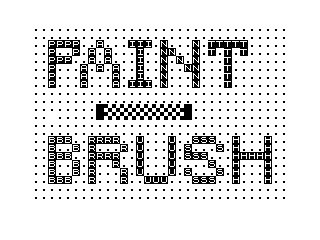
Source Code
   1 LET A=210
   2 LET A$="\@@"
   3 FOR I=1 TO 704
   4 PRINT ".";
   5 NEXT I
   6 POKE PEEK 16396+PEEK 16397*256+A,0
   7 POKE PEEK 16396+PEEK 16397*256+A,CODE A$
   8 IF INKEY$="" THEN GOTO 6
   9 LET B$=INKEY$
  10 LET A=A+(1 AND B$="D")+(32 AND B$="Z")+(33 AND B$="X")+(34 AND B$="C")-(1 AND B$="A")-(32 AND B$="E")-(33 AND B$="W")-(34 AND B$="Q")
  11 IF B$="S" THEN INPUT A$
  12 IF B$="K" THEN GOTO 14
  13 GOTO 6
  14 INPUT Z$
  15 SAVE Z$
  16 GOTO 6
Note: Type-in program listings on this website use ZMAKEBAS notation for graphics characters.