
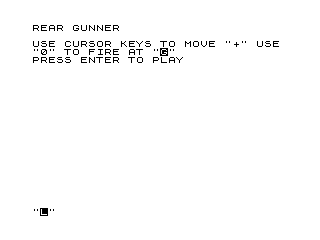
This program implements a simple shooting gallery game called “Rear Gunner,” in which the player moves a crosshair (displayed as “+”) around the screen using the cursor keys (5, 6, 7, 8) and presses “0” to fire at a randomly placed target character. The target is rendered using the inverse-video “G” character, and a hit is detected by checking whether the crosshair’s row and column coordinates match the target’s position. On a successful hit, a small explosion graphic is drawn using block graphic characters around the target’s location before the game restarts. The program uses a split structure: lines 5–200 contain the gameplay loop, while lines 220–270 provide a title screen and instructions that feed back into the main loop via RUN.
Program Analysis
Program Structure
The program is divided into two logical sections connected by RUN statements rather than GO TO:
- Title/instructions (lines 220–270): Clears the screen, prints the game name and control instructions, waits for ENTER via
INPUT Z$, then falls through toRUN(line 270), which restarts from the top. - Gameplay loop (lines 5–200): Initialises variables, places a random target, moves the crosshair in response to key presses, checks for a fire command, tests for a hit, draws an explosion, and then calls
RUNagain to reset.
The entry point for a fresh game start is line 5 (reached via RUN), which includes a short PAUSE 50 delay before play begins.
Variables
| Variable | Role |
|---|---|
A | Row position of the crosshair (initially 5) |
B | Column position of the crosshair (initially 7) |
C | Random column of the target (0–25) |
D | Random row of the target (0–16) |
Z$ | Dummy variable used to wait for ENTER on the title screen |
Gameplay Loop
Lines 30–40 randomise the target position each time the loop restarts. The target is drawn as an inverse-video “G” ("%G") at line 50. Lines 60–80 render the crosshair as a “+” with blank lines above and below it to erase its previous position. Lines 90–130 poll INKEY$ for the four cursor keys and the fire key; movement updates A or B directly. Line 130 branches to the hit-check on “0”, otherwise line 140 loops back to line 50.
Hit Detection Logic
Hit detection is performed in two steps. Line 150 checks whether the row (D<>A); if they differ, the shot missed and the loop restarts from line 50 with a new target. Line 160 checks whether the column matches (C=B), but there is a notable bug here: the condition branches to line 170 on a hit, but a miss (C<>B) also falls through to line 170 because there is no corresponding miss branch. In practice, any fire attempt that passes the row check will always reach the explosion code regardless of column alignment, making horizontal accuracy irrelevant.
Explosion Animation
Lines 170–190 draw a 3×4-character explosion graphic centred on the target using ZX81 block graphic characters. The pattern forms a small starburst:
- Line 170 (
AT D-1,C): top row — ▘ . ▝ (top-half block graphics) - Line 180 (
AT D,C): middle row — blank, inverse space, two blanks - Line 190 (
AT D+1,C): bottom row — ▖ . ▗ (bottom-half block graphics)
After the explosion is displayed, RUN at line 200 resets all variables and restarts the game from line 5.
Notable Techniques and Idioms
- The crosshair erasure is achieved by printing three-space strings above and below the “+” on every frame (lines 70–80), avoiding a full
CLSand preventing flicker. - Using
RUNinstead ofGO TOfor game reset is a common ZX81 idiom; it guarantees all variables are cleared, eliminating the need for explicit reinitialisation. - The title screen is placed after the game code in line numbering so that
RUNfrom line 200 skips it and goes directly to gameplay, while the very firstRUNfrom the title screen also lands at line 5 — a tidy dual-entry trick. - Polling four separate
INKEY$checks (lines 90–120) on every frame means only the last key pressed in the ZX81’s single-key-at-a-time model is acted upon, which is consistent with the hardware’s limitations. - No boundary checking is applied to
AorB, so moving the crosshair off-screen will cause aBerror.
Bugs and Anomalies
- Column hit check always passes: Line 160 (
IF C=B THEN GOTO 170) has no ELSE branch; whether the condition is true or false, execution continues to line 170. The player therefore only needs to match the target’s row to score a hit. - No boundary clamping:
AandBare decremented/incremented freely; moving the cursor to row −1 or past column 31 will crash with aB(out of screen range) error. - Explosion at edge rows: If the target spawns at row 0 or row 16,
AT D-1orAT D+1in lines 170/190 may reference an off-screen row and cause an error.
Image Gallery
Source Code
   5 PAUSE 50
  10 LET A=5
  20 LET B=7
  30 LET C=INT (RND*26)
  40 LET D=INT (RND*17)
  50 PRINT AT D,C;"%G"
  60 PRINT AT A,B;" + "
  70 PRINT AT A-1,B;"   "
  80 PRINT AT A+1,B;"   "
  90 IF INKEY$="5" THEN LET B=B-1
 100 IF INKEY$="8" THEN LET B=B+1
 110 IF INKEY$="7" THEN LET A=A-1
 120 IF INKEY$="6" THEN LET A=A+1
 130 IF INKEY$="0" THEN GOTO 150
 140 GOTO 50
 150 IF D<>A THEN GOTO 50
 160 IF C=B THEN GOTO 170
 170 PRINT AT D-1,C;"\'. \.'"
 180 PRINT AT D,C;" %  "
 190 PRINT AT D+1,C;"\.' \'."
 200 RUN
 210 SAVE "1018%3"
 220 CLS
 230 PRINT "REAR GUNNER"
 240 PRINT ,,"USE CURSOR KEYS TO MOVE ""+"" USE ""0"" TO FIRE AT ""%G"""
 250 PRINT "PRESS ENTER TO PLAY"
 260 INPUT Z$
 270 RUN
Note: Type-in program listings on this website use ZMAKEBAS notation for graphics characters.