
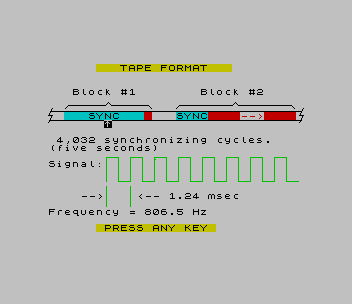
SAVE/LOAD Tape Tutor explains how the TS2068 records to and reads from an ordinary cassette recorder. It starts with diagrams of the tape format: two blocks, each with a synchronizing tone (4,032 cycles at 806.5 Hz for the header, 1,612 for the data), a separating gap and the data itself, with the bit timing drawn out (2040 Hz for a 0, 1020 Hz for a 1). A table gives the meaning of each byte of the tape header. Then come pages of colour-coded syntax for SAVE, VERIFY, LOAD and MERGE with programs, arrays, CODE and screens, with notes on record names and the empty name, and a trick for listing the contents of a tape by loading a name that isn’t there.
It finishes with “A FREE MODEM?”: since the signals are a version of the old Kansas City standard, you can hold a phone to the recorder and send programs down a telephone line. The opening page refers the reader to Appendix A and pages 254–255 of Appendix C of the TS2068 User’s Manual. The program has no on-screen credit. It was found on the same disk as two 1985 WIDJUP Co. programs by William J. Pedersen.
Program Analysis
Program Structure
- Lines 2000–2042: introduction, the tape-format diagram (subroutine 3010) with a flashing pointer moved along it, signal sketches (9100–9216) and the header table.
- Lines 2100–2506: the tape-command pages.
- Lines 2600–2999: the modem section and the closing page, then back to the title.
- Subroutine 9000 prints “PRESS ANY KEY”; 9300 clears the lower half of the screen.
Notable Techniques
IandZhold 1 and 0, andvholds 24, the height of the waveform, to save memory in the manyFLASH,INKandDRAWcalls.- Square waves are drawn with
DRAWsteps of different widths to show 0 and 1 bits. - Commas in
PRINTare used to blank parts of the screen between animation steps.
This copy comes from an Oliger (JLO SAFE) disk. It was converted for tape (the disk save at line 9400 was changed to a tape SAVE and the program now starts at its first line, 2000) and tested in ZEsarUX.
Image Gallery
Source Code
 2000 LET I=1: LET Z=0: LET v=24: PAPER 7: INK 0: CLS
 2001 PRINT '''' FLASH I;" STOP RECORDER "' FLASH Z'"  It is suggested that the 2068  USER'S MANUAL be used to sup-   plement this tutorial."'"  Much of APPENDIX A and pages   254 and 255 of APPENDIX C are   of particular value.  Figure    C-1 is especially useful." '' PAPER 6;" PRESS ANY KEY ": PAUSE Z: CLS
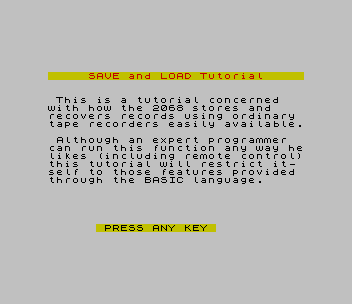
 2002 PRINT '' INK 2; PAPER 6;"     SAVE and LOAD Tutorial     "'' INK Z; PAPER 7'" This is a tutorial concerned   with how the 2068 stores and    recovers records using ordinary tape recorders easily available."''" Although an expert programmer  can run this function any way helikes (including remote control)this tutorial will restrict it- self to those features provided through the BASIC language."
 2005 GO SUB 9000: PAUSE Z: CLS
 2010 GO SUB 3010
 2017 PRINT ''" The tape recording consists of two blocks of data separated by a blank gap. (.835 sec)"'" Each block begins with synchro-nizing cycles.  SYNC and data   are separated by one transition cycle at 2400 Hz.  The SYNC is  needed to settle the bias to TTLlevels, thus SYNC #2 is shorter.": GO SUB 9000: PAUSE Z: PRINT AT 9,0;,,AT 10,0,,AT 11,0,,AT 12,0,,
 2020 PRINT AT 8,1; FLASH 1; OVER 1;"^";AT 8,31;"^"
 2021 PRINT '"Gap, and optional audio."'''"Signal:",,,,,,,,,,,,: GO SUB 9100
 2025 PAUSE 0: PRINT AT 8,1; OVER 1;"^";AT 8,31;"^";AT 8,7; FLASH 1;"^"
 2026 PRINT '" 4,032 synchronizing cycles."'"(five seconds)"''"Signal:",,,,,,,,: GO SUB 9200
 2027 PRINT AT 17,4;"-->";AT 17,11;"<-- 1.24 msec";AT 19,0;"Frequency = 806.5 Hz"
 2030 PAUSE 0: PRINT AT 8,7; OVER 1;"^";AT 8,17; FLASH 1;"^"
 2031 PRINT '" 1,612 synchronizing cycles."'"(two seconds) "''"Signal:",,,,,,,,: GO SUB 9200
 2035 PAUSE 0: PRINT AT 8,17; OVER 1;"^";AT 8,12; FLASH 1;"^"
 2036 PRINT '" Leader. (Tape label.)",,,,,"Signal:",,,,,,,,: GO SUB 9205: PAUSE Z
 2037 GO SUB 9300: INK Z: PRINT AT Z,Z;"      TAPE HEADER FORMATS", INVERSE 1'"BYTES TYPE  DESCRIPTION", INVERSE Z'"1     All   Header identifier",TAB 11;"(value=0)","2     All   Record type",TAB 11;"(value=0-3)","3-12  All   Record name",
 2038 PRINT "13,14  0    Length of prog & var";TAB 11;"(E_LINE)-(PROG)","      1,2   Length field from              data structure",TAB 7;"3    Specified length","15,16  0    Autostart line no.",TAB 11;"or 00 80h  (LSB/MSB)";TAB 6;"1,2   00,Array I.D. code",TAB 7;"3    Specified address"
 2039 PRINT "17,18  0    Length of program",TAB 11;"(VARS)-(PROG)",TAB 6;"1-3   N/A (value=0)","19    All   Checksum (XOR bytes)",: PAUSE Z
 2040 CLS : GO SUB 3010: GO SUB 9000
 2041 PRINT OVER 1;AT 8,21; FLASH 1;"^"' FLASH Z': PRINT "Record.  The record identifier  is a single byte = -1 (FFh).    The signal is the same type as  for the leader.  The record endswith a checksum byte.  One addi-tional transition is added to   assure a correct read."
 2042 PRINT " It takes about five seconds    per Kbyte of record.": PAUSE Z: CLS
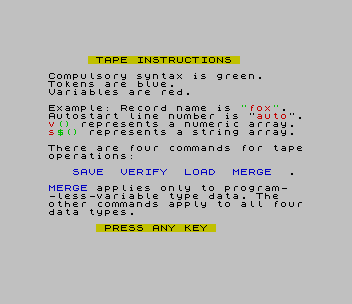
 2100 PRINT TAB 5; PAPER 6;" TAPE INSTRUCTIONS "
 2101 PRINT '"Compulsory syntax is green."'"Tokens are blue."'"Variables are red."
 2102 PRINT '"Example: Record name is "; INK 4;""""; INK 2;"fox"; INK 4;"""";
 2103 PRINT ".  Autostart line number is """; INK 2;"auto"; INK 0;"""";
 2104 PRINT "."; INK 2;"v"; INK 4;"()"; INK 0;" represents a numeric array";
 2105 PRINT ". "; INK 2;"s"; INK 4;"$()"; INK 0;" represents a string array."
 2106 PRINT '"There are four commands for tapeoperations:"'' INK 1;"   SAVE  VERIFY  LOAD  MERGE"; INK 0;"  ."
 2107 PRINT INK 1'"MERGE"; INK 0;" applies only to program-"'"-less-variable type data. The   other commands apply to all fourdata types.": GO SUB 9000: PAUSE Z: CLS
 2119 PRINT TAB 5; PAPER 6;" SAVE INSTRUCTIONS "
 2120 PRINT INK 1'"SAVE "; INK 4;""""; INK 2;"fox"; INK 4;""""' INK Z;"  Saves program and variables."' INK 1;"SAVE "; INK 4;""""; INK 2;"fox"; INK 4;""""; INK 1;" LINE "; INK 2;"auto"' INK Z;"  As above but starts running at program line number "; INK 2;"auto"; INK 0;" when   reloaded.  (see leader format)"
 2122 PRINT INK 1;"SAVE "; INK 4;""""; INK 2;"fox"; INK 4;""""; INK 1;" DATA "; INK 2;"v"; INK 4;"()"' INK Z;"  Saves numeric array "; INK 2;"v"; INK 0;"."
 2124 PRINT INK 1;"SAVE "; INK 4;""""; INK 2;"fox"; INK 4;""""; INK 1;" DATA "; INK 2;"s"; INK 4;"$()"; INK Z'"  Saves string array "; INK 2;"s$"; INK 0;"."
 2126 PRINT INK 1;"SAVE "; INK 4;""""; INK 2;"fox"; INK 4;""""; INK 1;" CODE "; INK 2;"location"; INK Z;","; INK 2;"bytes"' INK Z;"  Saves "; INK 2;"bytes "; INK Z;"of binary data"'" starting at "; INK 2;"location"; INK Z;"."
 2128 PRINT INK 1;"SAVE "; INK 4;""""; INK 2;"fox"; INK 4;""""; INK 1;" STRING$"; INK Z'" (equivalent to:"' INK 1;"SAVE "; INK 4;""""; INK 2;"fox"; INK 4;""""; INK 1;" CODE "; INK 4;"16384,6912";: PRINT " )"'"  Saves screen."'" (primary display file)": GO SUB 9000: PAUSE Z: CLS
 2150 PRINT " When SAVEing, the record name  must be from 1 to 10 characters.It cannot be omitted.";AT 1,Z; OVER 1;"____"' OVER Z''" For all other commands, only   the first record having matchingname and data type will be actedon, with one exception."
 2152 PRINT '" If the record name is specifiedas the null string """", the firstencountered record of matching  data type, regardless of name,  will be acted on.  ";
 2154 PRINT "This option  will be assumed in subsequent   examples, but not shown."''" Note that the same record name can be used once for each data  type without interference." : GO SUB 9000: PAUSE Z: CLS
 2200 PRINT TAB 5; PAPER 6;" VERIFY INSTRUCTIONS "
 2202 PRINT ' INK 1;"VERIFY "; INK 4;""""; INK 2;"fox"; INK 4;""""
 2203 PRINT "  Verifies program and variables"
 2204 PRINT INK 1;"VERIFY "; INK 4;""""; INK 2;"fox"; INK 4;""""; INK 1;" DATA "; INK 2;"v"; INK 4;"()"
 2205 PRINT "  Verifies numeric array "; INK 2;"v"; INK Z;"."
 2206 PRINT INK 1;"VERIFY "; INK 4;""""; INK 2;"fox"; INK 4;""""; INK 1;" DATA "; INK 2;"s"; INK 4;"$()"
 2207 PRINT "  Verifies string array "; INK 2;"s$"; INK Z;"."
 2208 PRINT INK 1;"VERIFY "; INK 4;""""; INK 2;"fox"; INK 4;""""; INK 1;" CODE "; INK 2;"location"; INK Z;","; INK 2;"bytes"
 2209 PRINT "  Verifies "; INK 2;"bytes"; INK Z;" of binary data"'" starting at "; INK 2;"location"; INK Z;"."
 2210 PRINT INK 1;"VERIFY "; INK 4;""""; INK 2;"fox"; INK 4;""""; INK 1;" CODE "; INK 2;"16384"; INK Z;","; INK 2;"4288"' INK 0;"  Verifies as much of SCREEN as possible.  The computer alters  the lower two lines for reports.  Because of the way D-FILE is  organized, these bytes are intermixed with those for the bottom eight lines.  This test is in-  complete, but usually enough."
 2213 GO SUB 9000: PAUSE Z: CLS
 2300 PRINT TAB 6; PAPER 6;" LOAD INSTRUCTIONS "
 2302 PRINT ' INK 1;"LOAD "; INK 4;""""; INK 2;"fox"; INK 4;""""
 2303 PRINT "  Loads new program and vari-    ables from tape, over any that  were already present."
 2304 PRINT INK 1;"LOAD "; INK 4;""""; INK 2;"fox"; INK 4;""""; INK 1;" DATA "; INK 2;"v"; INK 4;"()"
 2305 PRINT "  Loads numeric array "; INK 2;"v"; INK Z;"."
 2306 PRINT INK 1;"LOAD "; INK 4;""""; INK 2;"fox"; INK 4;""""; INK 1;" DATA "; INK 2;"s"; INK 4;"$()"
 2307 PRINT "  Loads string array "; INK 2;"s$"; INK Z;"."
 2308 PRINT INK 1;"LOAD "; INK 4;""""; INK 2;"fox"; INK 4;""""; INK 1;" CODE "; INK 2;"location"; INK Z;","; INK 2;"bytes"
 2309 PRINT "  Loads at most "; INK 2;"bytes"; INK Z;" of binary  data starting at "; INK 2;"location"; INK Z;"."
 2310 PRINT INK 1;"LOAD "; INK 4;""""; INK 2;"fox"; INK 4;""""; INK 1;" CODE "'"  Loads back where it came from."
 2311 PRINT INK 1;"LOAD "; INK 4;""""; INK 2;"fox"; INK 4;""""; INK 1;" SCREEN$"
 2312 PRINT "  Loads from tape to screen, ex-cept for the bottom two lines.  It is interesting to watch.": GO SUB 9000: PAUSE Z: CLS
 2400 PRINT TAB 5; PAPER 6;" MERGE INSTRUCTIONS "
 2402 PRINT ' INK 1;"MERGE "; INK 4;""""; INK 2;"fox"; INK 4;""""
 2403 PRINT "  Keeps old program and vari-    ables, then loads new program   less variables from tape."'"  New program lines are inserted or overwrite old program lines.  No variables are added, nor    replaced."
 2404 PRINT '"  MERGE requires free memory to  provide a work space.  There is also no prompt to tell you to   stop the recorder, other than a change in border pattern."
 2406 GO SUB 9000: PAUSE Z: CLS
 2500 PRINT AT Z,5; PAPER 6;" INPUT MONITORING "
 2502 PRINT '"  For all tape playback operat-  ions, a message is displayed on the screen every time a leader  is read.  This happens during   the gap between the leader and  the record."
 2504 PRINT "  If the leader matches the data type and name specified, the    record is read and acted upon.  If not, the message remains and reading continues.  Messages    accumulate in a list until a    match is found or no more data  is left to read."
 2506 PRINT "   "; PAPER 6;"LOAD ""bFWzVj"""; PAPER 7;" makes an index  for a tape which has no program record named bFWzVj.": GO SUB 9000
 2600 PAUSE 0: CLS : PRINT ' INK 7;"      A FREE MODEM? "' INK 1'" Hard to believe, isn't it?"''" Examining the tape signals withan eye to history reveals that  they are simple modifications ofthe old ""Kansas City"" method."''" These signals can be sent over the telephone without the use ofa MODEM!"
 2610 PRINT '" Simply place your telephone on your data recorder speaker with the recorder in MONITOR or PLAY mode and you have an acoustical-ly coupled ""MODEM"" for transmit-ting.": GO SUB 9000
 2620 PAUSE 0: CLS : PRINT " Simply place your telephone on your data recorder microphone   with the recorder in RECORD modeand you have an acoustically    coupled ""MODEM"" for receiving."
 2630 PRINT '" For messages, assign a string  array.  Then SAVE it in MONITOR mode with PAUSE depressed, or   record it first.  You can then  PLAY it back for transmission."
 2640 PRINT '" Probably you will have to firstrecord incoming data; then PLAY it into the 2068."'" Only a few data recorders pro- vide a MONITOR jack which can bedirectly connected to the 2068."
 2650 PRINT '" A bit of trouble, perhaps--but:": GO SUB 9000
 2660 PAUSE 0: CLS : PRINT AT 11,8; FLASH 1;" IT'S FREE! ": GO SUB 9000
 2700 PAUSE Z: CLS : PRINT AT 10,1; FLASH 1;"  THIS COMPLETES THE TUTORIAL  "' FLASH 0'"  Press any key to return to the beginning for another look."''"  You may want to COPY the lists of formats for easy reference."
 2999 PAUSE Z: CLS : GO TO 2002
 3010 PRINT AT 1,6; PAPER 6;"   TAPE FORMAT   ";AT 4,3; PAPER 7;"Block #1        Block #2"'''"  "; PAPER 5;"   SYNC   "; PAPER 2;" "; PAPER 7;"   "; PAPER 5;"SYNC"; PAPER 2;"    "; PAPER 7; INK 2;"-->"; PAPER 2;"    "
 3011 PLOT 2,120: DRAW 251,0
 3012 PLOT 2,111: DRAW 251,0
 3013 PLOT 17,123: DRAW 3,3: DRAW 37,0: DRAW 3,3: DRAW 3,-3: DRAW 37,0: DRAW 3,-3
 3014 PLOT 128,123: DRAW 3,3: DRAW 53,0: DRAW 3,3: DRAW 3,-3: DRAW 53,0: DRAW 3,-3
 3015 PLOT 4,123: DRAW -4,-7: DRAW 4,0: DRAW -4,-7
 3016 PLOT 255,123: DRAW -4,-7: DRAW 4,0: DRAW -4,-7
 3017 RETURN
 9000 PRINT AT 21,6; PAPER 6;" PRESS ANY KEY ": RETURN
 9100 INK 4: PLOT 10,60: DRAW 60,0
 9101 FOR n=1 TO 64: PLOT 70+n,60: DRAW 0,24*RND-12: NEXT n
 9102 PLOT 135,60: DRAW 60,0: INK 0: RETURN
 9200 INK 4: PLOT 58,50
 9201 FOR n=1 TO 8: DRAW 0,24: DRAW 12,0: DRAW 0,-24: DRAW 12,0: NEXT n
 9202 PLOT 58,45: DRAW 0,-20: PLOT 82,45: DRAW 0,-20
 9203 INK 0: RETURN
 9205 INK 4: PLOT 58,50
 9206 DRAW Z,v: DRAW 4,Z: DRAW Z,-v: DRAW 4,Z
 9207 DRAW Z,v: DRAW 8,Z: DRAW Z,-v: DRAW 8,Z
 9208 DRAW Z,v: DRAW 8,Z: DRAW Z,-v: DRAW 8,Z
 9209 DRAW Z,v: DRAW 4,Z: DRAW Z,-v: DRAW 4,Z
 9210 DRAW Z,v: DRAW 4,Z: DRAW Z,-v: DRAW 4,Z
 9211 DRAW Z,v: DRAW 8,Z: DRAW Z,-v: DRAW 8,Z
 9212 DRAW Z,v: DRAW 4,Z: DRAW Z,-v: DRAW 4,Z
 9213 DRAW Z,v: DRAW 8,Z: DRAW Z,-v: DRAW 8,Z
 9214 PRINT INK 0;AT 13,20;"=""01100101""";AT 14,22;"example";AT 16,4;"-->";AT 16,9;"<-- 0.49 msec  ";AT 17,5;"-->";AT 17,11;"<-- 0.98 msec",,,;AT 19,12;"2040 Hz for a ""0""";AT 20,12;"1020 Hz for a ""1"""
 9215 PLOT 58,45: DRAW 0,-5: PLOT 66,45: DRAW 0,-13
 9216 RETURN
 9300 PRINT AT 9,0;,,,,,,,,,,,,,,,,,,,,,,,,: RETURN
 9400 SAVE "Tape Tutor" LINE 1
Note: Type-in program listings on this website use ZMAKEBAS notation for graphics characters.