
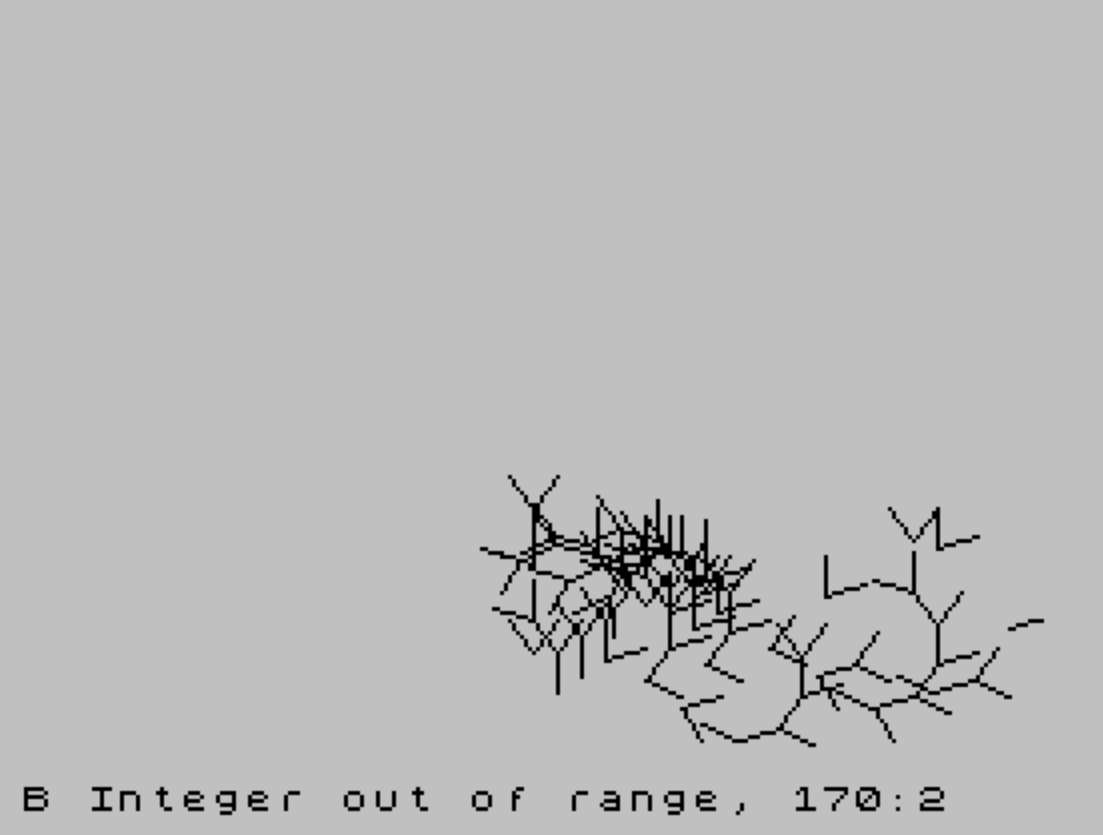
STACK is a recursive tree-drawing program that uses an explicit software stack implemented as a numeric array to simulate recursive branching without using nested GOSUB calls. The program draws a fractal-like branching structure on the graphics screen, starting from a fixed origin point, by randomly choosing at each step whether to extend a branch or retreat to a previously saved state. Branch directions are rotated using a 3-4-5 right-triangle approximation (multiplying by 3/5 and 4/5) to avoid trigonometric functions, producing a fixed 37-degree twist angle. The stack array s(100) stores position and heading data in groups of four elements, with k serving as the stack pointer. User-supplied seed value jj controls the RANDOMIZE seed, making each run deterministic and reproducible.
Program Structure
The program is organized into a main loop and two subroutines, with a block of REM documentation lines at the end:
- Lines 20–60: Initialization — user input, array allocation, RANDOMIZE seeding, and drawing the initial line segment.
- Lines 70–90: Main control loop — randomly dispatches to either the extend subroutine (line 100) or the retreat subroutine (line 200), terminating when the stack is empty (
k<1). - Lines 100–190: Extend subroutine — pushes current state onto the stack, rotates heading, draws a new segment, and updates position.
- Lines 200–240: Retreat subroutine — pops state from the stack and redraws the saved segment to restore the previous branch point.
- Lines 250–310: REM comments explaining program operation (non-executing documentation).
Software Stack Implementation
The central technique is the simulation of recursion using an explicit stack stored in the numeric array s(100), allocated at line 30. The integer variable k is the stack pointer, initialized to 1 at line 50. Each stack frame occupies four consecutive elements:
| Offset from k | Contents |
|---|---|
s(k) | Saved X position (pt1) |
s(k+1) | Saved Y position (pt2) |
s(k+2) | Saved X heading component (twisted) |
s(k+3) | Saved Y heading component (twisted) |
Pushing increments k by 4 (line 110); popping decrements it by 4 (line 230). The stack capacity supports up to 25 frames before overflowing the 100-element array.
Trigonometry-Free Rotation
Rather than using SIN and COS, the program rotates the heading vector using the 3-4-5 Pythagorean triple as a rational approximation to a fixed angle. The transformation applied at lines 130–160 is:
- New X = (4·b1 + 3·b2) / 5
- New Y = (4·b2 − 3·b1) / 5
This corresponds to rotation by arctan(3/4) ≈ 36.87 degrees and also scales the vector by 1 (since the 3-4-5 triple is a unit-scaled Pythagorean triple with hypotenuse 5). The saved twisted heading stored in s(k+2) and s(k+3) at line 140 uses a slightly different weighting: (1/5)*(4*b1+3*b2) and (1/5)*(4*b2-3*b1), which is the normalized (scaled by 1/5) version, while line 150–160 computes the full-scale rotated vector and then divides by 5, producing the same result.
Randomized Branching
The main loop at line 70 uses IF RND<1/2 THEN GO SUB 100: GO TO 70 to randomly choose to extend the current branch with 50% probability on each iteration. If the random test fails, control falls to line 80, which calls the retreat subroutine. This creates a stochastic branching pattern whose overall shape is determined by the RANDOMIZE seed supplied by the user. Termination occurs when k<1 after a retreat, meaning the stack has been fully unwound.
Notable Bug
Line 220 contains an error in the expression for restoring pt2: the code reads LET pt2=(k+1)+s(k+3), but the correct expression should be LET pt2=s(k+1)+s(k+3). The k+1 is a bare arithmetic expression rather than an array subscript, so the restored Y position is computed from the numeric value of the stack pointer plus an offset rather than from the saved Y coordinate. This means that after a retreat, the current Y position will be incorrect unless k happens to equal s(k+1). The visual effect of this bug will vary with the stack depth at the time of each retreat.
Key BASIC Idioms
- The condition
IF RND<1/2produces a fair coin flip using the built-in pseudo-random number generator. PAUSE 200at line 80 provides a brief display pause before restarting when the stack empties.- Using
DIM s(100)for a stack is a standard BASIC technique for implementing data structures without machine code. - The program uses
SAVE "STACK" LINE 10to save with an auto-run line.
Image Gallery
Source Code
  10 REM "THE POWER OF THE STACK" BY DICK SCOVILLE-TRIANGLE UG
  20 CLS :INPUT "INPUT a number ";jj
  30 DIM s(100)
  40 RANDOMIZE jj
  50 LET k=1
  60 PLOT 128,50:DRAW 0,10:LET pt1=128:LET pt2=60:LET b1=0:LET b2=10
  70 IF RND<1/2 THEN GO SUB 100:GO TO 70
  80 GO SUB 200:IF k<1 THEN PAUSE 200:GO TO 20
  90 GO TO 70
 100 REM extend
 110 LET k=k+4
 120 LET s(k)=pt1:LET s(k+1)=pt2
 130 LET x=(1/5)*(4*b1+3*b2):LET y=(1/5)*(4*b2-3*b1)
 140 LET s(k+2)=x:LET s(k+3)=y
 150 LET x=4*b1-3*b2:LET y=3*b1+4*b2
 160 LET b1=x/5:LET b2=y/5
 170 PLOT pt1,pt2:DRAW b1,b2
 180 LET pt1=pt1+b1:LET pt2=pt2+b2
 190 RETURN
 200 REM quit
 210 PLOT s(k),s(k+1):DRAW s(k+2),s(k+3)
 220 LET pt1=s(k)+s(k+2):LET pt2=(k+1)+s(k+3):LET b1=s(k+2):LET b2=s(k+3)
 230 LET k=k-4
 240 RETURN
 250 REM 20 to 60 set the seed for the random number generator
 260 REM  30 sets up the stack. 50 sets the stack pointer. 60 draws the initial line and loads pt1 and pt2 with our position and b1 and b2 with heading
 270 REM 70-we decide either to extend the branch GOSUB 100 or retreat GOSUB 200.
 280 REM  100 We extend- 110 keeps track of the top of the stack. 120 -our present position on the stack. Starting at 150-we extend the branch. After first saving a twisted version of our heading and making note of our new present position. Then we RETURN.
 290 REM 200-we have decided to retreat-we take the position item and heading-item at the top of the stack(at k,k+1 and k+2 and k+3), DRAW them, set our new position, fix the stack pointer so it points to the(new)top of the stack. and RETURN.
 300 REM  On returning we repeat the process unless the stack has become empty(k<1).
 310 REM Some choices for jj are not interesting and others will run off the screen. By changing the twist angle you can get a different effect.
 320 SAVE "STACK" LINE 10
Note: Type-in program listings on this website use ZMAKEBAS notation for graphics characters.