
This program implements a simple ball-throwing arcade game called “SYNCHRO-SMASH” in which the player launches a ball upward toward a scrolling row of targets. The scrolling target row is stored in the string A$, which is rotated one character left each frame by the idiom at line 120 using a string slice concatenation. Targets marked with a block-graphic character (▌ or ▐) score 100 points, targets marked with a percent-V character score 10 points, and hitting a blank space deducts 50 points; the game ends immediately if the score drops below −150 or when all targets have been cleared. Player movement uses Z to fire and keys “0”/”1″ to move the paddle left and right, with boundary clamping at columns 2 and 29.
Program Analysis
Program Structure
The program is organised into three functional blocks: initialisation (lines 10–40), the main game loop (lines 50–160), and subroutines for firing and end-game states (lines 230–530). Line 999 restarts the program after a SAVE statement at line 998, which saves the game under the name SYNCHRO-SMASH.
- Lines 10–40 – Set up paddle position
P=15, scoreT=0, and the scrolling target stringA$. - Lines 50–160 – Main loop: render the target row and paddle, read keys, scroll
A$, and repeat. - Lines 230–340 – Fire subroutine: animate the ball travelling upward, score the hit, clear the target, check loss/win conditions.
- Lines 400–420 – Game-over (lose) branch.
- Lines 500–530 – Game-over (win) branch, with perfect-score detection.
Scrolling Mechanism
The target row is stored in the 31-character string A$. Each iteration of the main loop, line 120 performs:
LET A$=A$(2 TO 31)+A$(1)
This rotates the string one character to the left by slicing off the first character and appending it to the end. The updated string is then printed at row 1, column 0 via PRINT AT 1,0;A$, producing smooth continuous scrolling across the top of the screen without any machine code.
Target Types and Scoring
| Character in A$ | Glyph | Score Change |
|---|---|---|
%V (the letter V) | V | +10 |
\': (▌) or \:' (▐) | Block graphic | +100 |
" " (space) | — | −50 |
The fire subroutine checks A$(P+1) — the column directly above the paddle — against each target type in sequence (lines 270–290). A perfect score of 340 requires clearing all high-value targets without hitting any gaps; it is checked explicitly at line 520.
Paddle Control and Boundary Clamping
Lines 90–110 handle movement. The expression 2*(INKEY$="0")-2*(INKEY$="1") evaluates to +2, −2, or 0 depending on which key is held, and is added to P in a single statement. Clamping is then applied: P is constrained to the range 2–29, keeping the paddle fully on screen.
Ball Animation
The GOSUB 230 subroutine (triggered when INKEY$="Z") animates the ball by looping from row 17 down to row 1 in STEP -1. At each step, the previous position is erased with a space (line 240) and the asterisk is printed one row higher (line 250). This gives the visual impression of the ball travelling upward toward the target row.
Loss and Win Conditions
After each shot, line 310 checks whether T < -150; if so, execution jumps to the GAME OVER / YOU LOSE branch at line 400. Line 320 checks whether A$ consists entirely of spaces (all 31 characters), indicating every target has been cleared, and jumps to the win branch at line 500. Both branches end with STOP.
Score Display
Lines 330 uses block-graphic characters to draw a simple rectangular score box on rows 19–21, centred around columns 11–18. The current score T is printed inside it at AT 20,13 followed by a trailing space to erase any leftover digits when the score decreases.
Notable Idioms
- Boolean arithmetic for movement:
2*(INKEY$="0")-2*(INKEY$="1")— a classic Sinclair BASIC idiom exploiting the fact that a true condition evaluates to 1. - String rotation via slice concatenation (line 120) — no arrays or machine code required.
- Inline fire detection in the main loop (
IF INKEY$="Z" THEN GOSUB 230) without halting the scroll.
Image Gallery
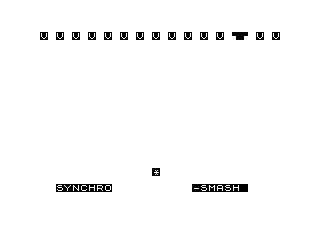
Source Code
  10 LET P=15
  20 LET T=0
  30 LET A$=" %V %V %V %V %V %V %V %V %V \':\:' %V %V %V %V %V "
  40 PRINT AT 20,3;"%S%Y%N%C%H%R%O";AT 20,20;"%-%S%M%A%S%H% "
  50 PRINT AT 1,0;A$;AT 18,P-2;"  %*  "
  80 IF INKEY$="Z" THEN GOSUB 230
  90 LET P=P+2*(INKEY$="0")-2*(INKEY$="1")
 100 IF P<2 THEN LET P=2
 110 IF P>29 THEN LET P=29
 120 LET A$=A$(2 TO 31)+A$(1)
 160 GOTO 50
 230 FOR N=17 TO 1 STEP -1
 240 IF N<17 THEN PRINT AT N+1,P;" "
 250 PRINT AT N,P;"*"
 260 NEXT N
 270 IF A$(P+1)="%V" THEN LET T=T+10
 280 IF A$(P+1)="\':" OR A$(P+1)="\:'" THEN LET T=T+100
 290 IF A$(P+1)=" " THEN LET T=T-50
 300 LET A$(P+1)=" "
 310 IF T<-150 THEN GOTO 400
 320 IF A$="                               " THEN GOTO 500
 330 PRINT AT 19,11;"\:'\''\''\''\''\''\''\':";AT 20,11;"\:       \ :";AT 21,11;"\:.\..\..\..\..\..\..\.:";AT 20,13;T;" "
 340 RETURN
 400 CLS
 410 PRINT AT 10,11;"GAME OVER";AT 12,12;"YOU LOSE"
 420 STOP
 500 CLS
 510 PRINT AT 10,11;"GAME OVER";AT 12,9;"YOU SCORED ";T
 520 IF T=340 THEN PRINT AT 14,8;"PERFECT SCORE"
 530 STOP
 998 SAVE "SYNCHRO-SMAS%H"
 999 RUN
Note: Type-in program listings on this website use ZMAKEBAS notation for graphics characters.