
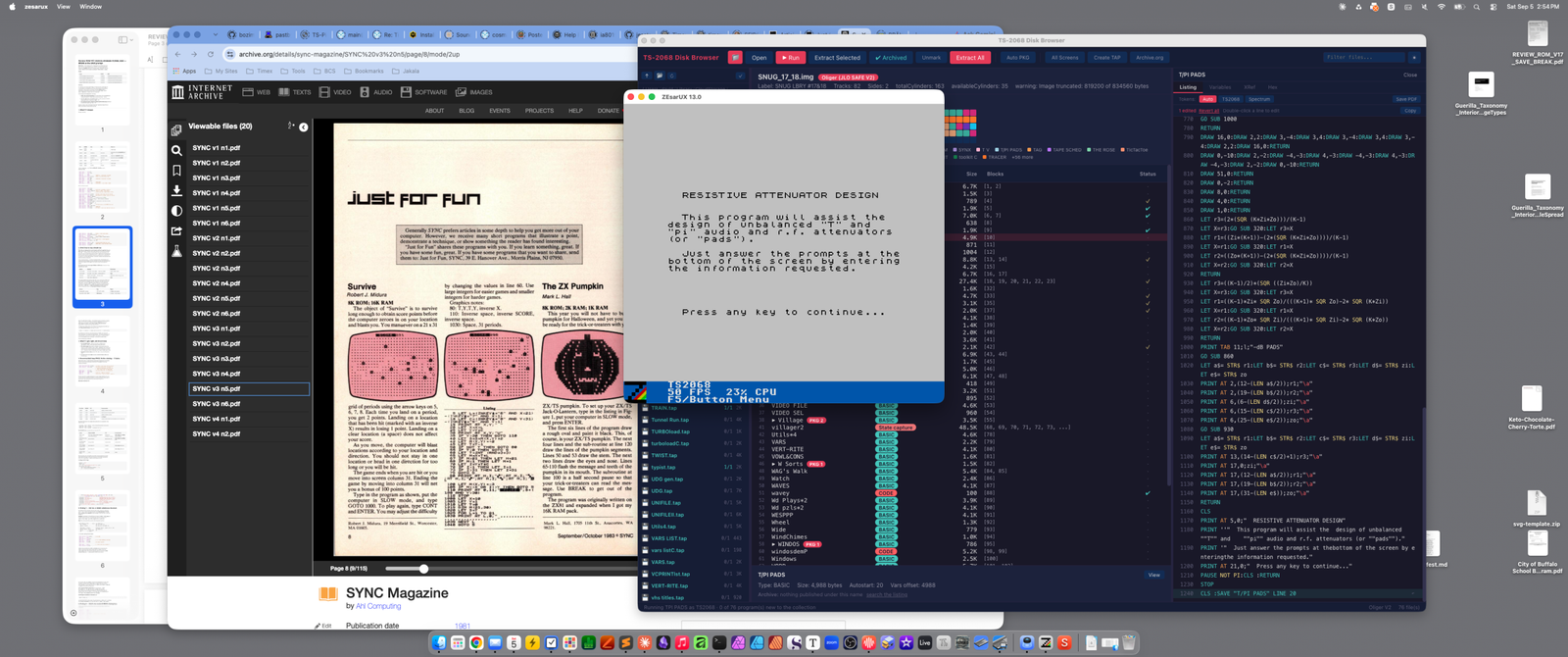
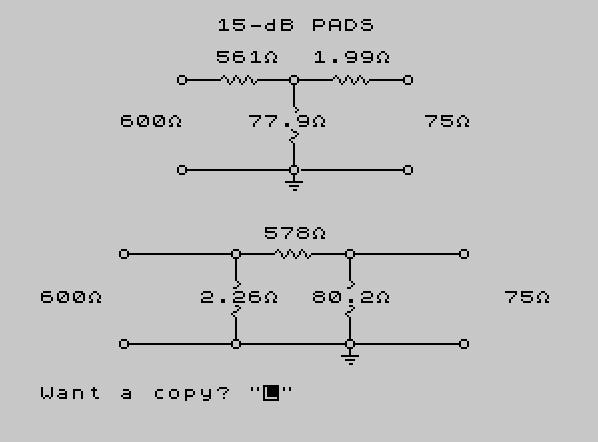
T-PI PADS calculates component values for unbalanced T-pad and pi-pad resistive attenuator networks used in audio and RF circuits. Given input and output impedances (Zi and Zo), the program computes the minimum achievable pad loss and then calculates resistor values (r1, r2, r3) for both topologies at a user-specified dB loss, using the standard voltage-ratio formula K = e^(L/4.342944819). A custom rounding subroutine at lines 320–450, driven by two DEF FN functions, normalizes computed resistor values to a sensible number of significant figures depending on magnitude. The program draws schematic diagrams of both pad types on screen using PLOT, DRAW, and CIRCLE commands, with a UDG character (defined from DATA at line 500) used as an ohm symbol suffix on printed values. A COPY command at line 260 allows the results screen to be sent directly to a printer.
Program Structure
The program is organized as a menu-driven calculator with a clear flow:
- Lines 4–5: Define two helper functions
FN randFN sfor rounding. - Lines 30–60: Startup splash screen with tape-stop prompt.
- Lines 70–300: Main calculation loop — gather Zi/Zo, compute minimum loss, prompt for desired dB, then branch to display.
- Lines 320–450: General-purpose magnitude-aware rounding subroutine.
- Lines 460–500: UDG loader (reads DATA into UDG “A” for use as an ohm symbol).
- Lines 520–780: Screen drawing routine — renders schematic outlines for both T and pi pads using PLOT/DRAW/CIRCLE.
- Lines 790–850: Short DRAW subroutines for resistor symbols (zigzag horizontally/vertically) and wire segments.
- Lines 860–920: T-pad (pi topology in the code labeled for T) resistor value calculation.
- Lines 930–990: Pi-pad resistor value calculation.
- Lines 1000–1150: Result display — prints component values positioned near schematic nodes using
ATand string-length centering. - Lines 1160–1210: Introduction/help screen.
Attenuator Mathematics
The core math uses the standard voltage ratio K = EXP(l / 4.342944819), where 4.342944819 is 20 / LN(10), converting dB to a linear voltage ratio. The minimum pad loss for a mismatched impedance pair is computed at line 150 using the standard formula involving the impedance ratio. Lines 860–920 compute T-pad resistors, and lines 930–990 compute pi-pad resistors, both involving SQR(K * Zi * Zo) as the geometric mean term.
Rounding Subroutine (Lines 320–450)
This subroutine normalizes a value in X to a meaningful number of significant figures depending on its magnitude. Two DEF FN functions are used:
FN r(q)=INT(X/q + 0.5) / q— rounds to the nearest multiple of1/q(used for large values to reduce precision).FN s(q)=INT(X*q + 0.5) / q— rounds to the nearest multiple of1/q(used for small values to increase precision).
The cascade of IF statements from line 320 to 440 selects the appropriate rounding scale based on magnitude, covering values from 10,000,000 down to 0.00001. This ensures displayed resistor values appear with a sensible number of digits regardless of the impedance and loss inputs.
Schematic Drawing
The schematic diagrams for both T and pi topologies are drawn entirely with BASIC graphics primitives (PLOT, DRAW, CIRCLE). Resistor symbols are rendered as zigzag lines using sequences of short diagonal DRAW commands in subroutines at lines 790 and 800. Wire stubs are handled by short DRAW subroutines (lines 810–850). The layout draws both pads on screen simultaneously, occupying the upper and lower halves of the display.
UDG Usage
The subroutine at lines 460–480 loads an 8-byte pattern from the DATA statement at line 500 into UDG “A”. This UDG is then appended to printed resistor values via "\\a" in PRINT statements (lines 1030–1140), serving as an ohm (Ω) symbol. The DATA bytes 0,24,36,66,66,36,102,0 form a simple omega-like glyph.
Value Positioning
Resistor values are printed near their schematic positions using PRINT AT row, col. The column is calculated dynamically using LEN(STR$(value)) to approximately center each value on its node — a common BASIC centering idiom. For example, line 1030 uses (12 - LEN(a$)/2) as the column offset.
Input Validation and Error Handling
Line 130 enforces that Zo ≤ Zi, redirecting to a message and back to the input prompt if violated. Line 210 rejects a dB loss of 0 or ≥ 300 as impractical, pausing and looping back. There is no validation that the requested loss exceeds the computed minimum (line 180 only displays the minimum; the program proceeds regardless), which could yield negative or nonsensical resistor values if the user enters a loss below the minimum.
Notable Idioms
PAUSE NOT PIat line 1210 is an efficient way to wait for a keypress:NOT PIevaluates to 0, so this is equivalent toPAUSE 0.COPY /at line 260 sends the screen to a printer in a single command, including the schematic diagram.POKE 23658,0at line 60 disables the CAPS LOCK state after the initial keypress.VAL "number"is not used here; line numbers in GO TO/GO SUB are given as literals.- Line 1240 saves the program with
LINE 20, causing it to auto-run from line 20 (skipping the DEF FN lines at 4 and 5, which are handled before execution begins).
Potential Anomaly
The SAVE line (1240) specifies LINE 20 as the auto-run start, but the DEF FN statements at lines 4 and 5 are before line 20. Since DEF FN lines must be executed before the functions can be called, and the auto-run skips to line 20, the functions FN r and FN s would not be defined when the program runs automatically. This would cause an error the first time the rounding subroutine is called (line 320). Running the program manually from line 1 (or including the DEF FN lines after line 20) would be required for correct operation.
Image Gallery
Source Code
    4 DEF FN r(q)= INT (X/q+.5)/q
    5 DEF FN s(q)= INT (X*q+.5)/q
   10 REM "T/PI PADS"
   20 REM ** ADAPTED FROM VARIOUSSOURCES BY K. L. CORWIN, 1986
   30 BORDER 0:PAPER 0:CLS
   40 BEEP .2,12:PRINT AT 10,9; INK 6;"\{18}\{1} STOP THE TAPE \{18}\{0}"
   50 PRINT AT 12,9; INK 4;"PRESS ANY KEY"
   60 PAUSE 0:POKE 23658,0:BORDER 7:PAPER 7:INK 0:CLS
   70 GO SUB 1160
   80 GO SUB 460
   90 PRINT "   RESISTIVE ATTENUATOR PADS"
  100 INPUT "Enter input impedance in ohms",Zi
  110 PRINT ''"If Zi=";Zi;" ohms and"
  120 INPUT "Enter output impedance in ohms",Zo
  130 IF Zo>Zi THEN GO TO 310
  140 PRINT "if Zo=";Zo;" ohms, then"
  150 LET Kmin=((2*(Zi/Zo))-1)+(2*(SQR ((Zi/Zo)*((Zi/Zo)-1))))
  160 LET M=10*0.4342944819* LN Kmin
  170 LET X=M:GO SUB 320:LET M=X
  180 PRINT "the minimum pad loss is ";M;" dB."
  190 PRINT ''"What dB loss do you want?  (Mustbe greater than minimum, above.)"
  200 INPUT l
  210 IF l=0 OR l >=300 THEN PRINT #1;"That's impractical.  Try again.":PAUSE 120:GO TO 200
  220 PRINT ''"Loss required is ";l;" dB.":PAUSE 120
  230 LET K= EXP (l/4.342944819)
  240 CLS :GO SUB 520
  250 DIM z$(1):INPUT "Want a copy? ";z$
  260 IF z$="y" OR z$="Y" THEN COPY /
  270 INPUT "Another calculation? (y/n) ";z$
  280 IF z$="n" OR z$="N" THEN STOP
  290 CLS
  300 GO TO 90
  310 CLS :PRINT #1;"Use the largest impedance as theinput impedance.  Try again.":PAUSE 240:CLS :GO TO 90
  320 IF X >=10000000 THEN LET X= FN r(100000)
  330 IF X >=1000000 THEN LET X= FN r(10000)
  340 IF X >=100000 THEN LET X= FN r(1000)
  350 IF X >=10000 THEN LET X= FN r(100)
  360 IF X >=1000 THEN LET X= FN r(10)
  370 IF X >=100 THEN LET X= INT (X+.5)
  380 IF X >=10 THEN LET X= FN s(10)
  390 IF X >=1 THEN LET X= FN s(100)
  400 IF X >=.1 THEN LET X= FN s(1000)
  410 IF X >=.01 THEN LET X= FN s(10000)
  420 IF X >=.001 THEN LET X= FN s(100000)
  430 IF X >=.0001 THEN LET X= FN s(1000000)
  440 IF X >=.00001 THEN LET X= FN s(10000000)
  450 RETURN
  460 FOR X=0 TO 7
  480 READ n:POKE USR "A"+X,N:NEXT x:RETURN
  500 DATA 0,24,36,66,66,36,102,0
  520 CIRCLE 71,144,2:PLOT 74,144:GO SUB 790
  530 CIRCLE 127,144,2:PLOT 130,144:GO SUB 790
  540 CIRCLE 184,144,2
  550 PLOT 127,141:GO SUB 800
  560 CIRCLE 71,99,2:PLOT 74,99:GO SUB 810
  570 CIRCLE 127,99,2:PLOT 131,99:GO SUB 810
  580 CIRCLE 184,99,2
  590 PLOT 127,96:GO SUB 820
  600 PLOT 123,93:GO SUB 830
  610 PLOT 125,91:GO SUB 840
  620 PLOT 127,89:GO SUB 850
  630 CIRCLE 42,57,2:PLOT 45,57:GO SUB 810
  640 CIRCLE 98,57,2:PLOT 101,57:GO SUB 790
  650 CIRCLE 155,57,2:PLOT 158,57:GO SUB 810
  660 CIRCLE 212,57,2
  670 PLOT 98,54:GO SUB 800
  680 PLOT 155,54:GO SUB 800
  690 CIRCLE 42,12,2:PLOT 45,12:GO SUB 810
  700 CIRCLE 98,12,2:PLOT 101,12:GO SUB 810
  710 CIRCLE 155,12,2:PLOT 158,12:GO SUB 810
  720 CIRCLE 212,12,2
  730 PLOT 155,9:GO SUB 820
  740 PLOT 151,6:GO SUB 830
  750 PLOT 153,4:GO SUB 840
  760 PLOT 155,2:GO SUB 850
  770 GO SUB 1000
  780 RETURN
  790 DRAW 16,0:DRAW 2,2:DRAW 3,-4:DRAW 3,4:DRAW 3,-4:DRAW 3,4:DRAW 3,-4:DRAW 2,2:DRAW 16,0:RETURN
  800 DRAW 0,-10:DRAW 2,-2:DRAW -4,-3:DRAW 4,-3:DRAW -4,-3:DRAW 4,-3:DRAW -4,-3:DRAW 2,-2:DRAW 0,-10:RETURN
  810 DRAW 51,0:RETURN
  820 DRAW 0,-2:RETURN
  830 DRAW 8,0:RETURN
  840 DRAW 4,0:RETURN
  850 DRAW 1,0:RETURN
  860 LET r3=(2*(SQR (K*Zi*Zo)))/(K-1)
  870 LET X=r3:GO SUB 320:LET r3=X
  880 LET r1=((Zi*(K+1))-(2*(SQR (K*Zi*Zo))))/(K-1)
  890 LET X=r1:GO SUB 320:LET r1=X
  900 LET r2=((Zo*(K+1))-(2*(SQR (K*Zi*Zo))))/(K-1)
  910 LET X=r2:GO SUB 320:LET r2=X
  920 RETURN
  930 LET r3=((K-1)/2)*(SQR ((Zi*Zo)/K))
  940 LET X=r3:GO SUB 320:LET r3=X
  950 LET r1=((K-1)*Zi* SQR Zo)/(((K+1)* SQR Zo)-2* SQR (K*Zi))
  960 LET X=r1:GO SUB 320:LET r1=X
  970 LET r2=((K-1)*Zo* SQR Zi)/(((K+1)* SQR Zi)-2* SQR (K*Zo))
  980 LET X=r2:GO SUB 320:LET r2=X
  990 RETURN
 1000 PRINT TAB 11;l;"-dB PADS"
 1010 GO SUB 860
 1020 LET a$= STR$ r1:LET b$= STR$ r2:LET c$= STR$ r3:LET d$= STR$ zi:LET e$= STR$ zo
 1030 PRINT AT 2,(12-(LEN a$/2));r1;"\a"
 1040 PRINT AT 2,(19-(LEN b$/2));r2;"\a"
 1050 PRINT AT 6,(6-(LEN d$/2));zi;"\a"
 1060 PRINT AT 6,(15-(LEN c$/2));r3;"\a"
 1070 PRINT AT 6,(25-(LEN e$/2));zo;"\a"
 1080 GO SUB 930
 1090 LET a$= STR$ r1:LET b$= STR$ r2:LET c$= STR$ r3:LET d$= STR$ zi:LET e$= STR$ zo
 1100 PRINT AT 13,(14-(LEN c$/2)+1);r3;"\a"
 1110 PRINT AT 17,0;zi;"\a"
 1120 PRINT AT 17,(12-(LEN a$/2));r1;"\a"
 1130 PRINT AT 17,(19-(LEN b$/2));r2;"\a"
 1140 PRINT AT 17,(31-(LEN e$));zo;"\a"
 1150 RETURN
 1160 CLS
 1170 PRINT AT 5,0;"  RESISTIVE ATTENUATOR DESIGN"
 1180 PRINT ''"  This program will assist the  design of unbalanced ""T"" and    ""pi"" audio and r.f. attenuators (or ""pads"")."
 1190 PRINT '"  Just answer the prompts at thebottom of the screen by enteringthe information requested."
 1200 PRINT AT 21,0;"  Press any key to continue..."
 1210 PAUSE NOT PI:CLS :RETURN
 1230 STOP
 1240 CLS :SAVE "T/PI PADS" LINE 20
Note: Type-in program listings on this website use ZMAKEBAS notation for graphics characters.