
TEST is a question-and-answer quiz authoring tool that lets users enter their own questions and answers, then administers the quiz in a randomized order. The program stores up to m questions and answers in string arrays, using a shuffle mechanism based on an index array y() that shrinks as questions are used. A two-attempt scoring system awards 2 points for a correct first answer and 1 point for a correct second answer, with a masked hint displayed between attempts — showing only the first and last letters of the answer with dashes filling the middle. The finished quiz is saved to tape using SAVE with LINE 20 so it restarts directly into the quiz loop rather than the authoring section.
Program Structure
The program is divided into two distinct phases. Lines 500–670 handle authoring: the user inputs questions, answers, and saves the compiled quiz. Lines 10–480 are the quiz engine itself. The SAVE at line 670 uses LINE 20 so that when the saved file is loaded back, execution begins at line 20 (the quiz engine), bypassing the authoring section entirely. The comment at line 15 (REM ***RUN 500) signals the user to manually GO TO 500 when authoring a new quiz.
Data Structures
Four arrays are allocated dynamically in line 520 after the number of questions m is known:
c$(m,64)— question/clue strings, up to 64 characters eacha$(m,15)— answer strings, up to 15 characters eachl(m)— length of each answer (used for hint masking and substring comparison)y(m)— index array for randomized question selection without repetition
Randomization Without Repetition
The shuffle technique uses an index array rather than rearranging the data arrays. At line 30, y(n)=n initializes the index. At line 60, a random position z is picked within the remaining count x, and the question index q=y(z) is extracted. Lines 70–80 then compact the array by shifting elements down, effectively removing the used entry. The variable x counts down from m to 0, controlling the loop at line 140.
Two-Attempt Scoring and Hint System
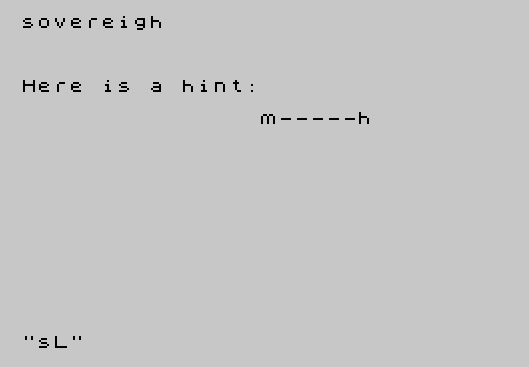
The variable t is set to 2 at line 90 for each new question, representing full marks for a correct first attempt. If the first answer is wrong, control passes to line 310 where t is reduced to 1 and a hint is displayed. The hint (line 330) reveals only the first and last characters of the answer, replacing intermediate characters with dashes from b$:
a$(q,1)— first character of the answerb$(1 TO l(q)-2)— dashes for the hidden middle portiona$(q,l(q))— last character of the answer
If the second attempt also fails (t=1 at line 260), the correct answer is revealed in full.
Answer Comparison
Line 110 compares the user’s input i$ against a truncated slice of the fixed-length answer array: a$(q)(TO l(q)). Since a$(m,15) pads entries with spaces, comparing the full field would always fail for answers shorter than 15 characters. Using l(q) (the original LEN of the answer) avoids this padding problem.
Authoring UX
During entry (lines 530–620), the program confirms each question/answer pair on screen and waits for either s (save) or d (delete and re-enter). This is handled by the single-keypress subroutine at lines 460–480, which first waits for any held key to be released (line 460) before waiting for a new keypress (lines 470–480), preventing key-repeat artifacts.
Subroutine at Line 400/410
Line 400 contains only a REM; the actual “Press ENTER to continue” prompt begins at line 410. The GO SUB 400 call at line 40 therefore executes the REM as a no-op and falls through to line 410 — this is intentional and harmless, functioning identically to GO SUB 410.
Display Management
The string e$ (32 spaces) is used throughout to clear specific screen regions with PRINT AT statements, avoiding a full CLS and preserving surrounding content. This is a common technique for flicker-free partial screen updates.
Notable Anomalies
- Line 40 calls
GO SUB 400before the quiz loop to display the answers for preview, then immediately clears the screen — this appears to be a demonstration/intro feature, cycling through all answers with a 50-frame pause each. - If the user presses ENTER immediately (empty input) on the first attempt, line 240 skips the “wrong” message and jumps straight to the hint at line 260, giving a cleaner flow when the user simply doesn’t know the answer.
- The variable
p$used in line 660 is not declared, which is fine in BASIC but means it holds whatever was last assigned to it if the authoring section is re-entered.
Image Gallery
Source Code
  10 REM INITIALIZATION
  15 REM ***RUN 500
  20 LET s=0:LET x=m:LET b$="---------------":LET e$="                                "
  30 FOR n=1 TO m:LET y(n)=n:NEXT n
  40 GO SUB 400:CLS :FOR n=1 TO m:PRINT AT 10,8;a$(n):PAUSE 50:CLS :NEXT n
  50 REM MAIN PROGRAM
  60 LET z= INT (RND*x+1):LET q=y(z)
  70 LET x=x-1
  80 FOR n=z TO x:LET y(n)=y(n+1):NEXT n
  90 CLS :LET t=2
 100 PRINT AT 3,0;c$(q):INPUT i$
 110 IF i$ <>a$(q)( TO l(q)) THEN GO TO 240
 120 LET s=s+t:GO TO 210
 130 GO SUB 410:CLS
 140 IF x>0 THEN GO TO 60
 150 REM FINAL SCORE
 160 PRINT AT 5,0;"Your score was ";s;" out of ";m*2
 170 STOP
 200 REM PRAISE
 210 PRINT AT 7,0;"Well done, ";i$;" was right."; AT 9,15;e$
 220 GO TO 130
 230 REM WRONG ANSWER
 240 IF i$="" THEN GO TO 260
 245 PRINT AT 7,0;i$;" was wrong.";e$; AT 9,0;e$
 250 GO SUB 410
 260 IF t=2 THEN GO TO 310
 270 PRINT AT 7,0;"The right answer was:";e$; AT 9,15;a$(q)
 280 GO TO 130
 300 REM HINT/SECOND TRY
 310 LET t=1
 320 PRINT AT 7,0;"Here is a hint:";e$; AT 21,0;e$
 330 PRINT AT 9,15;a$(q,1)+b$(1 TO l(q)-2)+a$(q,l(q))
 340 GO TO 100
 400 REM ENTER TO CONTINUE
 410 PRINT AT 21,0;"Press ENTER to continue."
 420 GO SUB 460
 430 IF CODE k$=13 THEN RETURN
 440 GO TO 420
 450 REM SINGLE KEY INPUT
 460 IF INKEY$ <>"" THEN GO TO 460
 470 IF INKEY$="" THEN GO TO 470
 480 LET k$= INKEY$:RETURN
 500 REM ENTER QUESTIONS/ANSWERS
 510 PRINT "How many questions?":INPUT m
 520 DIM c$(m,64):DIM a$(m,15):DIM l(m):DIM y(m)
 530 FOR q=1 TO m
 540 CLS :PRINT "Question ";q''
 550 PRINT "Type in the question or clue.":INPUT c$(q)
 560 PRINT 'c$(q)''"Type in the answer.":INPUT i$
 570 PRINT 'i$; AT 20,0;"If satisfactory, type s.","  To delete, type d."
 580 GO SUB 460
 590 IF k$="d" THEN GO TO 540
 600 IF k$ <>"s" THEN GO TO 580
 610 LET l(q)= LEN i$:LET a$(q)=i$
 620 NEXT q
 650 REM  SAVE  AND RUN
 660 CLS :INPUT "What is the program name?";p$
 670 SAVE p$ LINE 20
Note: Type-in program listings on this website use ZMAKEBAS notation for graphics characters.