
This program simulates a toll booth traffic scene, animating vehicles moving down the screen toward toll booths and then being directed into lanes. Each vehicle is randomly assigned as either a car (“%C”) or a truck (“%T”), and the program tracks cumulative toll revenue — 30 cents per car and 60 cents per truck — stored in array element S(32). The road scene is drawn using block graphics characters to depict booth structures, lane dividers, and a curved on-ramp plotted pixel by pixel with PLOT and SIN. After all vehicles have been processed, the simulation pauses and then restarts with RUN.
Program Structure
The program is divided into clearly separated routines accessed via GOSUB:
- Initialisation (lines 10–180): Sets display mode, prompts for vehicle count, draws the static scene (booths, road markings, curved ramp).
- Main loop (lines 185–399): Iterates
HHtimes, each iteration spawning one vehicle, animating it down the screen, directing it to a lane, and updating the score. - Vehicle approach from top (lines 2000–2550): Animates the vehicle from row 20 down to row 9, with a random or type-forced lane-change decision at the midpoint.
- Lane wander during descent (lines 300–360): Moves the vehicle from row 8 to row 2 with bounded random horizontal drift.
- Toll lane assignment (lines 4000–4130): Snaps the vehicle’s column to the nearest lane, increments that lane’s counter, flashes a symbol, and updates the revenue display.
- Revenue formatting (lines 5000–5030): Converts the running total to a string and pads it to two decimal places.
- Reset subroutine (line 3000): Resets position variables
IandIIto column 15 for each new vehicle.
Scene Construction
The static road scene is assembled entirely from block graphics literals embedded in PRINT AT statements. The three booth structures (lines 75–90 and 120) use ▌, ▐, ▄, ▀, and ▟ characters to create box outlines. The curved on-ramp is drawn pixel-by-pixel in two loops (lines 130–180) using PLOT 24-24*SIN(N/72*PI),N and PLOT 39+24*SIN(N/72*PI),N, producing sinusoidal merge curves for each carriageway.
Vehicle Representation
Vehicles are represented as two-character strings stored in A$. The token %T represents a truck and %C a car. These are printed at a screen position and the previous position is erased by printing a space at the trailing coordinate stored in II.
| Token | Type | Toll | Lane behaviour |
|---|---|---|---|
%T | Truck | £0.60 | Always forced right (RR=1) |
%C | Car | £0.30 | Random left or right lane |
Lane Boundary Enforcement
During the descent (lines 305–308) the column variable I is clamped with four conditional guards:
IF I<4 THEN LET I=4— left road edgeIF RR=0 AND I>13 THEN LET I=13— right edge of left carriagewayIF I<18 AND RR=1 THEN LET I=18— left edge of right carriagewayIF I>27 THEN LET I=27— right road edge
This dual-carriageway model means lane direction (RR) is decided before the wander phase and then enforced throughout.
Toll Lane Snapping
At line 4000–4002, the vehicle’s column is snapped to one of several discrete lane positions using arithmetic rounding:
- Left lanes:
I = 3*INT(I/3 + 1.5) - 2 - Right lanes:
I = 3*INT(I/3 + 1.5) - 3
This maps any column within a 3-cell band to the same lane peg, giving deterministic booth assignment from approximate positions. The per-lane count is stored in array S(), indexed by column, and printed at row 0 above the booth.
Revenue Formatting
The subroutine at lines 5000–5030 converts the float S(32) (the accumulator element) to a string and patches missing decimal places manually: if the string has length 1 it appends ".00"; if the second-to-last character is "." it appends "0". This is necessary because STR$ does not guarantee two decimal digits for monetary values like 0.3, 0.6, 0.9.
Notable Techniques
- FAST/SLOW switching:
FASTis used for drawing the static scene;SLOWis restored before animation so the display refreshes visibly. - Accumulator in array tail: Using
S(32)as a revenue accumulator within the same lane-count array is compact but relies on column indices never legitimately reaching 32. - Flash effect: Lines 4050–4080 print
%*then a space at the booth position, with short busy-wait loops (lines 4030–4070), simulating a flash to acknowledge payment. - Auto-restart: Lines 396–399 pause, switch to FAST, clear the screen, and issue
RUNto restart continuously without user intervention.
Image Gallery
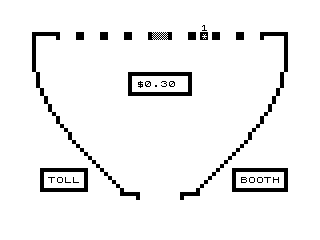
Source Code
  10 FAST
  20 DIM S(32)
  30 PRINT AT 10,0;"HOW MANY VEHICLES?"
  40 SLOW
  50 INPUT HH
  60 FAST
  70 CLS
  75 PRINT AT 6,12;":'''''''''''''':";AT 7,12;": $      :";AT 8,12;":..............:"
  80 PRINT AT 18,1;":'''''''''':";AT 19,1;": TOLL :";AT 20,1;":..........:"
  90 PRINT AT 18,25;":'''''''''''':";AT 19,25;": BOOTH :";AT 20,25;":............:"
 100 LET A$=":''''':   ::   ::   ::   :@@@@:   ::   ::   ::   :''''':"
 110 PRINT AT 1,0;A$
 120 PRINT AT 21,11;"'''':      :''''"
 130 FOR N=2 TO 40
 140 PLOT 24-24*SIN (N/72*PI),N
 150 NEXT N
 160 FOR N=2 TO 40
 170 PLOT 39+24*SIN (N/72*PI),N
 180 NEXT N
 185 FOR Q=1 TO HH
 190 GOSUB 3000
 195 SLOW
 200 LET R=RND
 210 IF R>.9 THEN LET A$="%T"
 220 IF R<.9 THEN LET A$="%C"
 230 GOSUB 2000
 300 FOR N=8 TO 2 STEP -1
 305 IF I<4 THEN LET I=4
 306 IF RR=0 AND I>13 THEN LET I=13
 307 IF I<18 AND RR=1 THEN LET I=18
 308 IF I>27 THEN LET I=27
 310 PRINT AT N,I;A$;AT N+1,II;" "
 320 LET II=I
 330 LET I=I+(INT (RND*3)-1)
 350 NEXT N
 355 IF II=0 THEN STOP
 360 PRINT AT 2,II;" "
 370 GOSUB 4000
 390 NEXT Q
 396 PAUSE 40000
 397 FAST
 398 CLS
 399 RUN
 1000 IF A$="%T" THEN GOTO 1500
 1010 LET RRR=INT (2*RND)
 1020 IF RRR=1 THEN GOTO 1500
 1030 LET I=I+(INT (RND*3)-1)
 1100 RETURN
 1500 LET I=I+(INT (RND*3)-1)
 1510 RETURN
 2000 FOR N=20 TO 16 STEP -1
 2010 PRINT AT N,I;A$;AT N+1,II;" "
 2020 NEXT N
 2100 LET RR=INT (2*RND)
 2110 IF A$="%T" THEN LET RR=1
 2115 IF A$="%T" THEN GOTO 2500
 2120 IF RR=1 THEN GOTO 2500
 2130 FOR N=15 TO 9 STEP -1
 2140 PRINT AT N,I;A$;AT N+1,II;" "
 2150 LET II=I
 2160 LET I=I-1
 2170 NEXT N
 2180 RETURN
 2500 FOR N=15 TO 9 STEP -1
 2510 PRINT AT N,I;A$;AT N+1,II;" "
 2520 LET II=I
 2530 LET I=I+1
 2540 NEXT N
 2550 RETURN
 3000 LET I=15
 3010 LET II=15
 3020 RETURN
 4000 IF RR=0 THEN LET I=3*INT ((I/3)+1.5)-2
 4002 IF RR=1 THEN LET I=3*INT ((I/3)+1.5)-3
 4005 LET S(I)=S(I)+1
 4010 PRINT AT 1,I;A$
 4030 FOR N=1 TO 10
 4040 NEXT N
 4050 PRINT AT 1,I;"%*"
 4060 FOR N=1 TO 10
 4070 NEXT N
 4080 PRINT AT 1,I;" "
 4090 PRINT AT 0,I;S(I)
 4100 IF A$="%C" THEN LET S(32)=S(32)+.3
 4110 IF A$="%T" THEN LET S(32)=S(32)+.6
 4115 GOSUB 5000
 4120 PRINT AT 7,14;S$
 4130 RETURN
 5000 LET S$=STR$ S(32)
 5010 IF LEN S$=1 THEN LET S$=S$+".00"
 5020 IF S$(LEN S$-1)="." THEN LET S$=S$+"0"
 5030 RETURN
 9998 SAVE "TOLLBOOT%H"
 9999 RUN
Note: Type-in program listings on this website use ZMAKEBAS notation for graphics characters.