
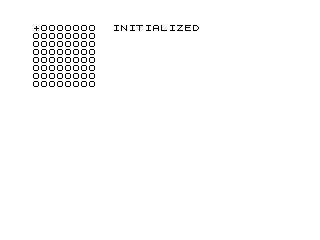
This program implements a simple 8×8 grid editor where the user moves a cursor (“+”) around the grid and can mark or clear individual cells. The grid is stored as a two-dimensional string array A$(8,8), with each cell holding either “O” (empty) or an inverse space character (marked). Navigation uses keys 5/6/7/8 (up/down/left/right style), while “D” marks a cell, “E” erases it, “C” clears the entire grid, and “I” reinitialises the program. The editor uses single-character cell access via A$(row,col) and restores the previous cell’s display character before drawing the cursor at its new position, implementing a lightweight sprite-style cursor movement. A SAVE command at line 600 stores the program under a filename, though it is never reached by normal program flow.
Program Analysis
Program Structure
The program is organised into a main initialisation block, an input/display loop, and several subroutine-like sections reached by GOTO:
- Lines 1–2: Initialise cursor position variables
X(row) andY(column) to 1. - Lines 10–100: Declare the 8×8 string array
A$, fill every cell with"O", and print the grid. - Lines 101–250: Main editor loop — display cursor, poll keyboard, dispatch commands, move cursor with wrapping.
- Lines 300–320: “Draw” handler — marks the current cell with an inverse space character.
- Lines 400–420: “Erase” handler — resets the current cell to
"O". - Lines 500–590: “Clear” handler — reinitialises the whole grid and redraws it.
- Lines 600–610: A
SAVEand restart block that is unreachable from normal program flow.
Grid Representation
The grid is stored in DIM A$(8,8), a two-dimensional string array where each element is a single character. Cells hold either "O" for empty or an inverse-video space ("% " in the source) for marked. Individual cells are accessed with the two-index form A$(Z,M) and A$(X,Y), while entire rows are written using the single-index form A$(A) during initialisation, assigning the string "OOOOOOOO" to fill all eight columns at once.
Cursor Movement and Display
Before moving the cursor, the program saves the current position into Z and M (lines 145–146) and reads both the old cell content D$ and the new cell content C$ from A$ (lines 231–232). It then restores the vacated cell’s original character (line 240) and draws "+" or inverse "%+" at the new position depending on whether that cell is marked (lines 241–242). This ensures the cursor does not corrupt the underlying grid data.
Keyboard Polling Idiom
Lines 105–107 implement a busy-wait for a keypress using a short FOR loop (lines 105–106) followed by a check on INKEY$. The loop target at line 104 does not exist, so GOTO 104 falls through to line 105 — a well-known technique to re-enter a loop efficiently. The key is then read again into B$ at line 110 to capture the value for dispatch.
Wrapping Logic
Cursor wrapping at the grid boundaries is handled by a series of IF statements on lines 200–230. When X or Y reaches 0 it wraps to 8, and when it reaches 9 it wraps to 1, producing a toroidal grid where movement off any edge reappears on the opposite side.
Key Bindings
| Key | Action |
|---|---|
8 | Move cursor right (Y+1) |
5 | Move cursor left (Y−1) |
7 | Move cursor up (X−1) |
6 | Move cursor down (X+1) |
D | Mark (draw) current cell |
E | Erase current cell |
C | Clear entire grid |
I | Reinitialise (restart program) |
Bugs and Anomalies
- Missing line 104:
GOTO 104at line 107 targets a non-existent line; execution resumes at line 105, which is the intended behaviour for re-entering the polling loop. - Double INKEY$ read: Lines 107 and 110 both call
INKEY$. The first read at line 107 is used only to test for “no key pressed”; the actual key value is re-read at line 110. In theory a very brief keypress could be detected at line 107 but missed at line 110, though this is unlikely in practice. - Unreachable SAVE: Line 600 (
SAVE "1008%8") is never reached during normal execution. It appears to be a developer utility for saving the program state. - Redundant status messages: Lines 20 and 510 print initialisation/clearing status text but lines 102 and 586 print
"ED "in a fixed corner regardless of state, with no semantic distinction between editing modes.
Image Gallery
Source Code
   1 LET X=1
   2 LET Y=1
  10 DIM A$(8,8)
  20 PRINT AT 0,10;"INITIALIZING";AT 1,12;"       "
  30 FOR A=1 TO 8
  40 LET A$(A)="OOOOOOOO"
  50 NEXT A
  70 PRINT AT 0,0;
  80 FOR A=1 TO 8
  90 PRINT A$(A)
 100 NEXT A
 101 PRINT AT X-1,Y-1;"+"
 102 PRINT AT 0,19;"ED "
 105 FOR A=1 TO 4
 106 NEXT A
 107 IF INKEY$="" THEN GOTO 104
 110 LET B$=INKEY$
 120 IF B$="E" THEN GOTO 400
 125 IF B$="D" THEN GOTO 300
 130 IF B$="C" THEN GOTO 500
 140 IF B$="I" THEN GOTO 1
 145 LET Z=X
 146 LET M=Y
 160 IF B$="8" THEN LET Y=Y+1
 170 IF B$="5" THEN LET Y=Y-1
 180 IF B$="7" THEN LET X=X-1
 190 IF B$="6" THEN LET X=X+1
 200 IF X=0 THEN LET X=8
 210 IF X=9 THEN LET X=1
 220 IF Y=0 THEN LET Y=8
 230 IF Y=9 THEN LET Y=1
 231 LET D$=A$(Z,M)
 232 LET C$=A$(X,Y)
 240 PRINT AT Z-1,M-1;D$
 241 IF C$="% " THEN PRINT AT X-1,Y-1;"%+"
 242 IF C$="O" THEN PRINT AT X-1,Y-1;"+"
 250 GOTO 105
 300 LET A$(X,Y)="% "
 310 PRINT AT X-1,Y-1;"%+"
 320 GOTO 105
 400 LET A$(X,Y)="O"
 410 PRINT AT X-1,Y-1;"O"
 420 GOTO 105
 500 DIM A$(8,8)
 510 PRINT AT 0,10;"           ";AT 1,12;"CLEARING"
 520 FOR A=1 TO 8
 530 LET A$(A)="OOOOOOOO"
 540 NEXT A
 555 PRINT AT 0,0;
 560 FOR A=1 TO 8
 570 PRINT A$(A)
 580 NEXT A
 585 PRINT AT X-1,Y-1;"+"
 586 PRINT AT 1,17;"ED "
 590 GOTO 105
 600 SAVE "1008%8"
 610 GOTO 1
Note: Type-in program listings on this website use ZMAKEBAS notation for graphics characters.