
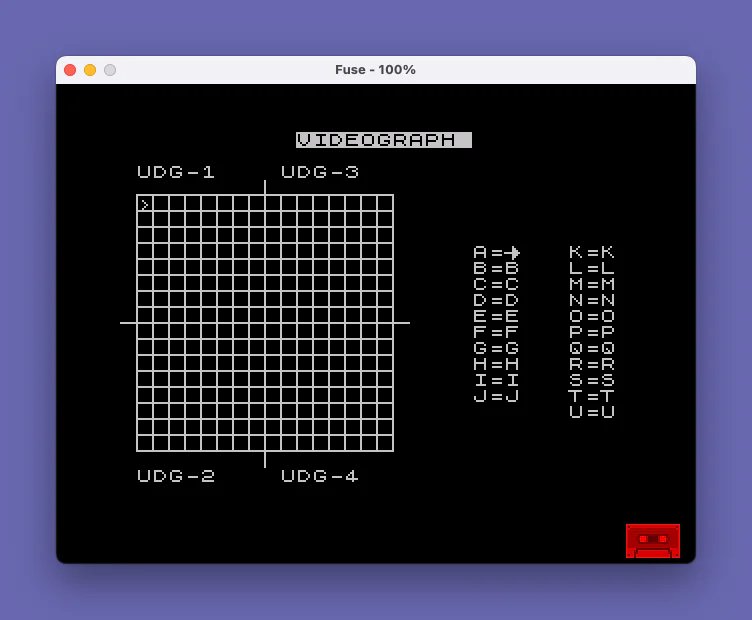
Video Graph 8000 is a pixel-art editor for designing User Defined Graphics (UDGs). The editor displays a 16×16 grid workspace where the user moves a cursor using number keys and toggles individual pixels on or off, with the grid state stored in a 32×8 string array z$. Up to four UDGs can be assigned at once; the program encodes each 8-row segment of the grid into byte values and POKEs them directly into UDG memory using USR. A custom UDG character (char \u, initialized with a DATA statement loading pattern 128,128,128,128,128,128,128,255) is used as the pixel representation within the grid. The program can save itself with SAVE "VIDEOGRAPH" LINE 8000 for auto-restart.
Program Analysis
Program Structure
The program is organized into clearly commented blocks, all residing in the 8000–9998 line range, suggesting it is one module within a larger suite:
- Initialization (8000–8040): Sets screen colors, initializes cursor position variables, loads a custom UDG via DATA, and prepares the 32×8 string array
z$. - Display / Grid Draw (8100–8135): Clears screen, draws a cross-hatch grid using
PLOT/DRAW, and prints the UI labels. - Main Edit Loop (8140–8190): Positions and draws the cursor, waits for a keypress (digits 0–9), and dispatches via a computed
GO TO. - Action Handlers (8520–8690): Separate REM-labelled blocks handle pixel off, pixel on, cursor movement (left/down/up/right).
- UDG Definition (8700–8810): Prompts for up to four UDG assignments, encodes grid rows to bytes, and POKEs them into UDG memory.
- Save / Data (8900–9998): Two
SAVElines and the UDG pixel DATA.
Key Variables
| Variable | Purpose |
|---|---|
l | Cursor row (screen AT row), range 4–19 |
c | Cursor column (screen AT column), range 1–16 |
r, b | Mapped row/column into z$ array (accounts for left/right halves) |
z$ | 32×8 string array storing pixel states as characters |
v$ | 8-char string of UDG \u chars used to fill z$ rows |
x$ | 4-char string holding the four UDG character assignments |
Computed GO TO Dispatch
The main keypress handler at line 8180 accepts only digit keys (ASCII 48–57, i.e., ‘0’–’9′). It dispatches with:
GO TO (CODE y$-47)*20+8500
This maps key ‘0’ → 8520 (pixel off), ‘1’ → 8540 (pixel on), ‘2’ → 8560 (unused/falls through to 8590), ‘3’/’4′ → 8600 (no-op), ‘5’ → 8600 wait (cursor left), ‘6’ → 8640, ‘7’ → 8660, ‘8’ → 8680, ‘9’ → 8700 (define UDG). The gap at lines 8560–8619 means keys ‘2’–’4′ all fall into the 8600 no-op loop, effectively ignored.
Grid Coordinate Mapping
The 16×16 editing grid is split horizontally: columns 1–8 use the left half of z$ (rows 1–16), and columns 9–16 use the right half (rows 17–32). The mapping at line 8140 is:
LET r=l-3+16*(c>8): LET b=c-8*(c>8)
This converts screen coordinates (l rows 4–19, c columns 1–16) into z$ indices. Each UDG covers an 8-row segment of z$, so four UDGs tile the full 32-row array.
UDG Pixel Encoding
The UDG definition routine at lines 8780–8800 iterates over 8 rows per UDG segment and encodes each row of z$ into a single byte using:
LET d=d+2^p*(CODE z$(y,x)=143)
Character code 143 is the block graphic █ (char \u as initialized), representing a set pixel. The power-of-two weighting with p counting down from 7 assembles the byte MSB-first. The byte is then POKEd via POKE USR x$(n)+a,d, directly writing into UDG bitmap memory for the assigned character.
Cursor Wrapping
Cursor movement uses arithmetic wrapping rather than conditionals. For example, cursor-left at line 8630:
LET c=c-1+16*(c=1)
When c equals 1 (leftmost column), the expression 16*(c=1) evaluates to 16, wrapping the cursor to the right edge. The same idiom is applied symmetrically for all four directions, keeping the cursor within bounds without any IF branches.
Notable Techniques
- The UDG \u character is initialized with DATA
128,128,128,128,128,128,128,255, giving it a distinctive “pipe with base” appearance useful as a pixel marker in the grid. OVER 1at line 8150 XORs the cursor character>onto the display without destroying the underlying pixel data.- The
INPUT FLASH 1prompt at line 8720 gives visual feedback during UDG assignment entry. - Entering ‘9’ during UDG character assignment (
IF x$(n)="9" THEN GO TO 8120) acts as an abort/escape back to the main display. - Line 8730’s
LET v=NOT vinside aFOR/NEXTloop with a conditionalNEXT nis an unusual control flow pattern used to toggle between upper and lower half UDG label positions.
Bugs and Anomalies
- Line 8780:
FOR y=1+8*(n-1) TO 8*8*(n-1)— the upper bound8*8*(n-1)evaluates to 0 whenn=1, meaning the loop does not execute for the first UDG. The intended expression was likely8*nor8*(n-1)+8, i.e.,1+8*(n-1) TO 8*n. - Keys ‘2’, ‘3’, and ‘4’ in the dispatch table all land in or near the 8590/8600 no-op block and loop back to wait, effectively making those keys do nothing. This appears intentional as a placeholder, but the REM comment at 8590 reads
"y$>1 AND y$<5"suggesting they were reserved. - The two
SAVElines at 8900 and 9998 save under different filenames (“VIDEOGRAPH” and “VIDEO GRAP”), likely reflecting a name-length limitation workaround or a versioning artifact.
Image Gallery
Source Code
 8000 REM VIDEOGRAPH
 8005 PAPER 0: INK 7: BORDER 0
 8010 LET l=4: LET c=1: LET x$="    "
 8020 FOR n=0 TO 7: READ a: POKE USR "U"+n,a: NEXT n
 8030 LET v$="\u\u\u\u\u\u\u\u": DIM z$(32,8)
 8040 FOR n=1 TO 32: LET z$(n)=v$: NEXT n
 8100 CLS : REM display
 8110 FOR n=1 TO 17: PLOT 8-8*(n=9),n*8+8: DRAW 128+16*(n=9),0: PLOT n*8,8+8-8*(n=9): DRAW 0,128+16*(n=9): NEXT n
 8115 PRINT AT 0,0;"           VIDEOGRAPH            "
 8120 PRINT AT 2,1;"UDG-1";TAB 10;"UDG-3  ";AT 21,1;"UDG-2";TAB 10;"UDG-4  "
 8130 FOR n=7 TO 16: PRINT AT n,22;CHR$ (n+58);"=";CHR$ (n+137);TAB 28;CHR$ (n+68);"=";CHR$ (n+147): NEXT n: PRINT AT 17,28;"U";"=";"U"
 8135 REM Cursor & Controls
 8140 LET r=l-3+16*(c>8): LET b=c-8*(c>8)
 8150 PRINT AT l,c; OVER 1;">"
 8160 PAUSE 0
 8180 LET y$=INKEY$: IF CODE y$<48 OR CODE y$>57 THEN GO TO 8160
 8190 GO TO (CODE y$-47)*20+8500
 8520 REM Pixel off
 8530 LET z$(r,b)="U": PRINT AT l,c;"U": GO TO 8140
 8540 REM Pixel on
 8550 LET z$(r,b)=" ": PRINT AT l,c;" ": GO TO 8140
 8590 REM y$>1 AND y$<5
 8600 GO TO 8160
 8620 REM Cursor left
 8630 PRINT AT l,c;z$(r,b): LET c=c-1+16*(c=1): GO TO 8140
 8640 REM Cursor down
 8650 PRINT AT l,c;z$(r,b): LET l=l+1-16*(l=19): GO TO 8140
 8660 REM Cursor up
 8670 PRINT AT l,c;z$(r,b): LET l=l-1+16*(l=4): GO TO 8140
 8680 REM Cursor right
 8690 PRINT AT l,c;z$(r,b): LET c=c+1-16*(c=16): GO TO 8140
 8700 REM define user graghic
 8710 LET v=0: FOR n=1 TO 4
 8720 INPUT FLASH 1;"UDG-";CHR$ (n+48); FLASH 0;"=(character A to U)";x$(n): IF x$(n)="9" THEN GO TO 8120
 8730 IF x$(n)=" " THEN LET v=NOT v: NEXT n: GO TO 8760
 8740 LET k=(CODE x$(n)-32*(CODE x$(n)>96)): IF k<65 OR k>85 THEN LET v=NOT v: GO TO 8720
 8750 PRINT AT 2+19*v,6+9*(n>2);"=";CHR$ k: LET v=NOT v: NEXT n
 8760 PRINT AT 0,0; FLASH 1;"STAND-BY"; FLASH 0;" GRAPHICS BEING DEFINED"
 8770 FOR n=1 TO 4: LET a=0: IF x$(n)=" " THEN NEXT n: GO TO 8810
 8780 FOR y=1+8*(n-1) TO 8*8*(n-1): LET d=0: LET p=7: FOR x=1 TO 8
 8790 LET d=d+2^(p)*(CODE z$(y,x)=143): LET p=p-1: NEXT x
 8800 POKE USR x$(n)+a,d: LET a=a+1: NEXT y: NEXT n
 8810 BEEP .1,0: BEEP .1,10: BEEP .05,18: GO TO 8115
 8900 SAVE "VIDEOGRAPH" LINE 8e3
 8950 REM "spaces for z$
 8960 DATA 128,128,128,128,128,128,128,255
 9997 STOP
 9998 SAVE "VIDEO GRAP" LINE 1
Note: Type-in program listings on this website use ZMAKEBAS notation for graphics characters.