
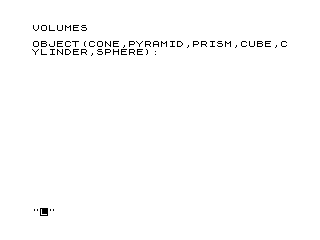
This program calculates the volumes of six geometric shapes: cone, pyramid, prism, cube, cylinder, and sphere. The user selects a shape by typing its name, then enters the required dimensions such as area, height, radius, length, or width. Volumes are computed using standard mathematical formulas, including the built-in PI constant and the exponentiation operator (**) for the sphere formula V = (4·π·r³)/3. After displaying the result, the program waits for a keypress using a busy-loop on INKEY$ before clearing the screen and looping back for another calculation.
Program Analysis
Program Structure
The program is organized into clearly separated blocks by line-number range:
| Line range | Purpose |
|---|---|
| 1–30 | Title display and initialisation |
| 100–170 | Shape selection menu and input dispatch |
| 200–280 | Cone / Pyramid / Prism handler (area × height) |
| 300–350 | Cube/cuboid handler (length × width × height) |
| 400–470 | Cylinder handler (2·π·r·h) |
| 500–530 | Sphere handler (4·π·r³/3) |
| 600–660 | Result display, keypress wait, loop back |
| 700–800 | SAVE and RUN utility lines |
Input and Dispatch
Shape selection is handled by a cascade of IF … THEN GOTO statements at lines 130–160. If none of the recognised strings matches X$, line 170 loops back to 100, effectively re-prompting without an explicit error message. The cone, pyramid, and prism cases are grouped at line 130 because they all share the same base formula (area × height), with the cone and pyramid then halved further at line 270.
Volume Formulas
| Shape | Formula used | Notes |
|---|---|---|
| Prism | V = A × H | Correct |
| Cone / Pyramid | V = A × H / 3 | Correct (1/3 base × height) |
| Cube / Cuboid | V = L × W × H | Correct |
| Cylinder | V = 2·π·R·H | Bug: should be π·R²·H; missing R factor, multiplies by 2 instead |
| Sphere | V = (4·π·R³) / 3 | Correct |
Notable Techniques
- The built-in
PIconstant is used directly in lines460and530, avoiding the need for a numeric approximation. - The exponentiation operator
**is used in line530(R**3) for the sphere formula, which is the standard power operator in this BASIC dialect. - The cone/pyramid shortcut at lines
260–270computesV = A*Hfirst and then conditionally divides by 3, sharing code with the prism case neatly. - A busy-loop keypress wait at line
640(IF INKEY$="" THEN GOTO 640) pauses until any key is pressed before clearing the screen and recycling. - Line numbering uses deliberate gaps (e.g.
300,305,310…) in the cube block, suggesting the section was added or expanded after the initial numbering scheme was laid out.
Bugs and Anomalies
The cylinder volume formula at line 460 is incorrect. It reads LET V=2*PI*R*H, which equals 2πrh (the lateral surface area of a cylinder, not its volume). The correct formula is V = π·R²·H, which would be written LET V=PI*R*R*H or LET V=PI*(R**2)*H.
The label in the shape prompt at line 100 says “CUBE” but the handler at lines 300–345 accepts three independent dimensions (length, width, height), making it a general cuboid calculator rather than a cube-only one. No validation ensures L = W = H for a true cube.
Image Gallery
Source Code
   1 REM **VOLUMES**
  10 CLEAR
  20 PRINT "VOLUMES"
  30 PRINT
 100 PRINT "OBJECT(CONE,PYRAMID,PRISM,CUBE,CYLINDER,SPHERE): ";
 110 INPUT X$
 120 PRINT X$
 130 IF X$="CONE" OR X$="PYRAMID" OR X$="PRISM" THEN GOTO 200
 140 IF X$="CUBE" THEN GOTO 300
 150 IF X$="CYLINDER" THEN GOTO 400
 160 IF X$="SPHERE" THEN GOTO 500
 170 GOTO 100
 200 PRINT "AREA: ";
 210 INPUT A
 220 PRINT A
 230 PRINT "HEIGHT: ";
 240 INPUT H
 250 PRINT H
 260 LET V=A*H
 270 IF X$="CONE" OR X$="PYRAMID" THEN LET V=V/3
 280 GOTO 600
 300 PRINT "LENGTH: ";
 305 INPUT L
 310 PRINT L
 315 PRINT "WIDTH: ";
 320 INPUT W
 325 PRINT W
 330 PRINT "HEIGHT: ";
 335 INPUT H
 340 PRINT H
 345 LET V=L*W*H
 350 GOTO 600
 400 PRINT "RADIUS: ";
 410 INPUT R
 420 PRINT R
 430 PRINT "HEIGHT: ";
 440 INPUT H
 450 PRINT H
 460 LET V=2*PI*R*H
 470 GOTO 600
 500 PRINT "RADIUS: ";
 510 INPUT R
 520 PRINT R
 530 LET V=(4*PI*(R**3))/3
 600 PRINT "VOLUME: ";V
 610 PRINT
 620 PRINT
 630 PRINT "PRESS ANY KEY TO CONTINUE"
 640 IF INKEY$="" THEN GOTO 640
 650 CLS
 660 GOTO 10
 700 SAVE "1006%4"
 800 RUN
Note: Type-in program listings on this website use ZMAKEBAS notation for graphics characters.