
This listing contains two related demonstration and configuration programs for a machine-code windowing library called “Window Print 32” and “Window Print 64,” both authored by John M. Bell in 1986–1987. Each program drives a custom PRINT #channel extension that supports scrolling rectangular windows in four compass and four diagonal directions, multiple character sets, color changes, and simultaneous LIST output to a window. The customization routine (lines 5000–5460) uses POKE to write window parameters (column, line, horizontal size, vertical size, scroll-message flag, and color byte) directly into a parameter table in the machine-code block at addresses 62232 (32-column version) or 61965 (64-column version), then SAVEs the patched code block. The 64-column variant includes a runtime check via PEEK 102/103 to verify that a Zebra OS_64 LROS cartridge is present before proceeding. SOUND commands throughout the demo produce multi-register synthesized musical tones accompanying each scroll animation.
Program Analysis
Overall Structure
The listing contains two self-contained programs sharing a common architecture. The first targets a 32-column display mode (“Window Print 32”) and the second a 64-column display mode (“Window Print 64”). Both consist of three logical sections:
- Demo sequence (lines 1000–2660): an animated showcase of the windowing library’s capabilities.
- Customization routine (lines 5000–5460): an interactive parameter editor that POKEs settings into the machine-code block and SAVEs it.
- Load/bootstrap stubs (lines 6000–9999): code to LOAD the machine-code block, patch it, and start it via
RANDOMIZE USR.
The 64-column program also has a short preamble at lines 9–10 that loads a second binary (“window64”) and calls it via RANDOMIZE USR 59978 after POKEing a small setup routine into RAM.
PRINT # Channel Convention
Both programs rely heavily on PRINT # with channel numbers 8 through 15. Each channel number corresponds to a distinct rectangular window managed by the machine-code library. Control parameters are communicated to the library through numeric arguments following keywords such as INVERSE and OVER in the PRINT # stream — values that would normally be 0 or 1 are here used as encoded command words (e.g., INVERSE 192, OVER 64, OVER 32). This is the library’s extension protocol: BASIC sends escape-coded numbers that the machine-code channel handler interprets as scroll direction, distance, or attribute commands rather than literal print attributes.
Window Parameter Block Layout
The customization routine (lines 5270–5390) reveals the 11-byte parameter record for each of the 8 windows (channels 8–15). The base address for Window Print 32 is 62232; for Window Print 64 it is 61965.
| Offset | Content |
|---|---|
| +0 | Starting column |
| +1 | Starting line |
| +2 | Horizontal size |
| +3 | Vertical size |
| +4 | Current column (cursor) |
| +5 | Current line (cursor) |
| +6 | Scroll-stop message flag (255=yes, 0=no) |
| +7 | Reserved (0) |
| +8 | Reserved (0) |
| +9 | Color byte (paper×8 + ink) |
| +10 | Color byte duplicate |
Note that the 64-column customization loop (lines 5280–5390) skips POKEs for offsets +9 and +10 (no ink/paper prompts), so color configuration is absent from the 64-column variant’s customizer.
Machine Code Integration
The core windowing engine is a pre-assembled machine-code block loaded from tape/disk (“WINDOW” or “WINDOW64”) at address 60000. The BASIC programs interact with it in two ways:
- Patching before save:
POKE 60060,237: POKE 60061,176(32-column) orPOKE 60100,237: POKE 60101,176(64-column) writes the Z80 opcodeLDIR(ED B0) into the code, activating a block-copy routine that was neutralized with NOPs (00) during distribution to prevent accidental execution. - Entry point:
RANDOMIZE USR 60000calls the machine-code initializer after loading.
The 64-column bootstrap at line 10 additionally POKEs a 21-byte inline Z80 routine at address 59978, which configures hardware ports via OUT 255,6 and OUT 244,... sequences before chain-loading the main code block.
64-Column Cartridge Check
Line 6005 of the 64-column program reads PEEK 102 + 256*PEEK 103, which examines the system variable at address 102–103. If this value is zero, the Zebra OS_64 LROS cartridge is not present and the program halts with an error message followed by RANDOMIZE USR 0 — a deliberate crash/reset. This is a guard against running the 64-column library on an incompatible 32-column configuration.
SOUND Usage
Multiple SOUND statements (e.g., lines 1095, 1425, 1565) use the multi-register form with register/value pairs covering registers 0–5, 8–10, 12–13. These program the amplitude envelope (registers 8–10) to maximum (31) and set the envelope period (registers 12–13) for a sustained tone, while registers 0–5 set the tone periods for the three square-wave channels. This produces synchronized musical punctuation during the demo scroll animations.
Demo Animation Technique
Scrolling animations are achieved by repeated PRINT #channel; OVER n; calls inside FOR/NEXT loops. The numeric argument to OVER encodes the scroll direction and step count as a command word to the machine-code handler. For example:
OVER 4— scroll up one lineOVER 8— scroll down one lineOVER 16— scroll leftOVER 32— scroll rightOVER 20,OVER 36,OVER 24,OVER 40— diagonal combinationsOVER 64— used as an “overlay/transparent” flagOVER 128— clear window
Similarly, INVERSE 192 resets a window to its default state, while small values like INVERSE 4, INVERSE 8, INVERSE 16, INVERSE 20 select among four alternate character sets.
Notable Idioms and Anomalies
- Line 2330 prepends
CHR$ 13(carriage return) to a string before printing it to multiple windows simultaneously — this forces the window cursor to the start of a line before output. - Line 2540 (32-column version) and line 2540 (64-column version) draw a decorative horizontal rule using block graphic characters in a PRINT statement at the normal screen output, outside any window channel.
- The 32-column demo’s closing animation at lines 2615 uses a
FORloop with aSTEP -0.1fractional decrement on the SOUND amplitude registers to produce a fade-out effect. - Line 5130 in both versions checks
line+vsize>21but does notGO TOan error handler — it prints a flash warning and pauses, then falls through to continue accepting input, which could allow an oversized window to be saved. - The loop variable in line 5030 (
FOR a=8 TO 15) iterates over all 8 window channels. TheNEXT aat line 5400 is reached only after a successful save confirmation, ensuring all 8 windows are configured before the code block is written to tape.
Image Gallery
Source Code
 1000 REM       WINDOW PRINT 32              * 1986 JOHN M. BELL
 1010 CLS : INK 7: PAPER 1: BORDER 1: CLS
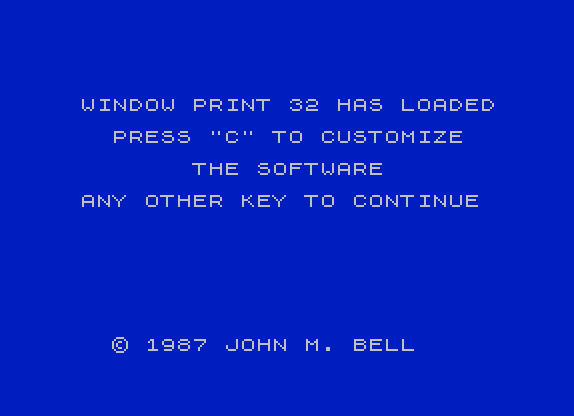
 1030 PRINT AT 5,3;"WINDOW PRINT 32 HAS LOADED"
 1040 PRINT AT 7,5;"PRESS ""C"" TO CUSTOMIZE"
 1050 PRINT AT 9,10;"THE SOFTWARE"
 1060 PRINT AT 11,3;"ANY OTHER KEY TO CONTINUE"
 1070 PRINT AT 20,5;"* 1987 JOHN M. BELL"
 1080 PAUSE 0: LET A$=INKEY$: IF A$="c" OR a$="C" THEN GO TO 5000
 1090 PRINT #8; PAPER 9; INK 15; INVERSE 192;
 1095 SOUND 7,56;0,16;1,13;2,163;3,11;4,201;5,9;8,31;9,31;10,31;12,5;13,8
 1100 PRINT #8;AT 9,0;" THIS IS A DEMONSTRATION OF THE"'
 1110 PRINT #8; INVERSE 16
 1120 PRINT #8;TAB 8;"WINDOW PRINT 32"'
 1130 PRINT #8; INVERSE 32
 1140 PRINT #8;TAB 12;"SOFTWARE"
 1160 PAUSE 120
 1170 FOR a=1 TO 16
 1180 PRINT #8; OVER 4;
 1190 NEXT a
 1200 PRINT #8; INVERSE 16;
 1210 PRINT #8;AT 21,8;"WINDOW PRINT 32"
 1220 PRINT #8; INVERSE 32;
 1230 PRINT #8; OVER 4; OVER 4;
 1240 PRINT #8;AT 21,2;"LETS YOU SCROLL WINDOWS UP"
 1250 FOR A=1 TO 7
 1260 PRINT #8; OVER 4;
 1270 NEXT A
 1280 PAUSE 120
 1290 PRINT #8; OVER 8; OVER 8;
 1300 PRINT AT 0,10;"OR DOWN"
 1310 FOR a=1 TO 12
 1320 PRINT #8; OVER 8;
 1330 NEXT a
 1340 PAUSE 100
 1350 PRINT #8;AT 10,12;"LEFT";AT 11,13;"AND";
 1360 PRINT #8;AT 12,10;"  RIGHT";AT 13,9;"    TOO  "
 1370 FOR A=1 TO 10
 1380 PRINT #8; OVER 16;
 1390 NEXT A
 1400 FOR A=1 TO 20
 1410 PRINT #8; OVER 32;
 1420 NEXT A
 1425 SOUND 7,56;0,184;1,8;2,196;3,7;4,126;5,5;8,31;9,31;10,31;12,5;13,8
 1430 FOR a=1 TO 10
 1440 PRINT #8; OVER 16;
 1450 NEXT a
 1460 PAUSE 120
 1470 PRINT #8; INVERSE 192;
 1480 PRINT #11; PAPER 8; INK 15; INVERSE 192; OVER 64;
 1490 PRINT #12; PAPER 8; INK 15; INVERSE 192; OVER 64;
 1500 PRINT #13; PAPER 8; INK 15; INVERSE 192; OVER 64;
 1510 PRINT #14; PAPER 8; INK 15; INVERSE 192; OVER 64;
 1520 FOR A=1 TO 2
 1530 FOR B=11 TO 14
 1540 PRINT #B;"   OR SCROLL    DIAGONALLY     IN FOUR      DIRECTIONS"
 1550 NEXT B: NEXT A
 1560 PAUSE 100
 1565 SOUND 7,56;0,68;1,3;2,232;3,2;4,114;5,2;8,31;9,31;10,31;12,5;13,8
 1570 FOR A=1 TO 9
 1590 PRINT #11; OVER 20;
 1610 PRINT #12; OVER 36;
 1630 PRINT #13; OVER 24;
 1650 PRINT #14; OVER 40;
 1670 NEXT A
 1680 PAUSE 120
 1690 PRINT #11; INVERSE 192;
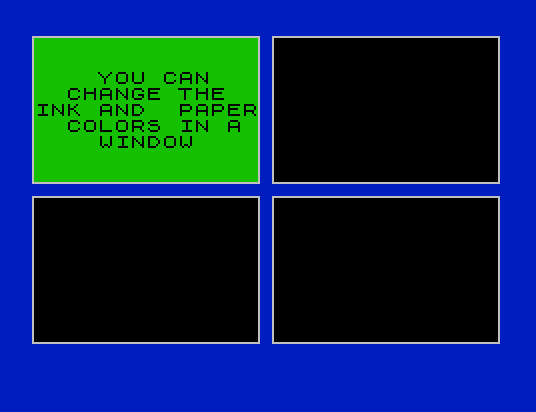
 1700 PRINT #11;''"    YOU CAN     CHANGE THE  INK AND  PAPER  COLORS IN A     WINDOW"
 1710 PAUSE 100
 1720 PRINT #11; PAPER 15; INK 8; INVERSE 128;
 1740 PAUSE 100
 1750 PRINT #11; PAPER 10; INK 14; INVERSE 128;
 1770 PAUSE 100
 1780 PRINT #11; PAPER 12; INK 8; INVERSE 128;
 1800 PAUSE 100
 1810 PRINT #11; PAPER 14; INK 9; INVERSE 128;
 1830 PAUSE 100
 1840 PRINT #11; PAPER 8; INK 15; INVERSE 128;
 1860 PAUSE 100
 1870 PRINT #11; INVERSE 192;
 1880 PRINT #11;''" OR CLEAR THE     WINDOW      COMPLETELY"
 1890 PAUSE 100
 1900 PRINT #11; INVERSE 192;
 1910 PAUSE 120
 1915 SOUND 7,56;0,68;1,3;2,232;3,2;4,114;5,2;8,31;9,31;10,31;12,5;13,8
 1920 LET A$=" YOU CAN EVEN  PRINT IN FOUR NEW CHARACTER SETS"
 1930 PRINT #11; INVERSE 192; INVERSE 4;''A$
 1940 PRINT #12; INVERSE 192; INVERSE 16;''A$
 1950 PRINT #13; INVERSE 192; INVERSE 8;''A$
 1960 PRINT #14; INVERSE 192; INVERSE 20;''A$
 1970 PAUSE 200
 1980 PRINT #8; INVERSE 32
 1990 FOR a=1 TO 12
 2000 PRINT #11; OVER 8;
 2010 PRINT #12; OVER 8;
 2020 PRINT #13; OVER 8;
 2030 PRINT #14; OVER 8;
 2040 PAUSE 1
 2050 NEXT a
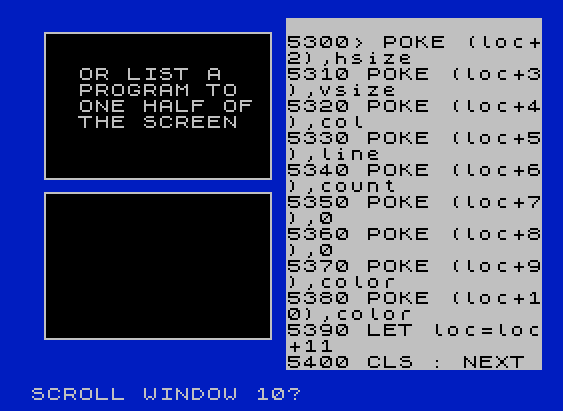
 2060 PRINT #11; INVERSE 192;''"  OR LIST A     PROGRAM TO    ONE HALF OF   THE SCREEN"
 2070 PRINT #13; INVERSE 192;
 2075 PRINT #12; OVER 128
 2076 PRINT #14; OVER 128
 2080 PRINT #10; PAPER 15; INK 8; INVERSE 192
 2090 LIST #10,5300
 2095 SOUND 7,56;0,114;1,2;2,46;2,1;4,162;5,1;8,31;9,31;10,31;12,5;13,8
 2100 PRINT #13; FLASH 3; INVERSE 192;
 2110 PRINT #13;''"WHILE PRINTING IN THE OTHER    WINDOWS"
 2120 PAUSE 300
 2130 PRINT #13; FLASH 2; INVERSE 128;
 2140 FOR a=1 TO 15
 2150 PRINT #11; OVER 16;
 2160 PRINT #13; OVER 16;
 2170 PAUSE 2
 2180 NEXT a
 2190 FOR a=1 TO 32
 2200 PRINT #8; OVER 32;
 2210 NEXT a
 2220 PAUSE 60
 2225 SOUND 7,56;0,162;1,1;2,116;3,1;4,57;5,1;8,31;9,31;10,31;12,5;13,8
 2230 FOR a=1 TO 10
 2240 PRINT #11; OVER 8;
 2250 PRINT #12; OVER 8;
 2260 PRINT #13; OVER 8;
 2270 PRINT #14; OVER 8;
 2280 NEXT a
 2290 PRINT #11; OVER 64;
 2300 PRINT #12; OVER 64;
 2310 PRINT #13; OVER 64;
 2320 PRINT #14; OVER 64;
 2330 LET a$=CHR$ 13+"  AND ALL OF   THIS IS DONE   FROM BASIC!     WITH NO    MACHINE CODE     CALLS!"
 2340 PRINT #11; INVERSE 192;a$;
 2350 PRINT #12; INVERSE 192;a$;
 2360 PRINT #13; INVERSE 192;a$;
 2370 PRINT #14; INVERSE 192;a$;
 2420 PAUSE 300
 2425 SOUND 7,56;0,57;1,1;2,23;3,1;4,221;5,0;8,31;9,31;10,31;12,5;13,8
 2430 PRINT #9; PAPER 13; INK 8;
 2440 PRINT #10; PAPER 13; INK 8;
 2450 FOR a=1 TO 17
 2460 PRINT #9; OVER 32;
 2470 PRINT #10; OVER 16;
 2480 NEXT a
 2490 PAPER 5: BORDER 5: CLS : PAPER 5: CLS
 2510 INK 5: PRINT AT 5,27;". "
 2520 FOR a=1 TO 11: PRINT TAB 27;": ": NEXT a
 2540 PRINT "      '''''''''''''''''''''''''''''''''''''''''''' "
 2550 PRINT #15; PAPER 15; INK 8;; INVERSE 192; OVER 64;
 2560 PRINT #15;AT 2,2;"SO READ THE MANUAL,"
 2570 PRINT #15;AT 4,7;"AND USE"
 2580 PRINT #15; INVERSE 16
 2590 PRINT #15;AT 6,3;"WINDOW PRINT 32"
 2600 PRINT #15; INVERSE 32;
 2610 PRINT #15;AT 8,1;"IN YOUR OWN PROGRAMS"
 2615 FOR a=15 TO 0 STEP -.1: SOUND 6,7;7,7;8,a;9,a;10,a: NEXT a
 2620 PAUSE 300
 2630 FOR a=1 TO 15
 2640 PRINT #15; OVER 8;
 2650 PAUSE 2: NEXT a
 2660 PAUSE 300: GO TO 1000
 5000 REM CUSTOMIZING PROGRAM STARTS HERE
 5010 PAPER 7: INK 0: CLS
 5020 LET loc=62232
 5030 FOR a=8 TO 15
 5040 PRINT AT 3,4;"CUSTOMIZING WINDOW #";a
 5050 INPUT "STARTING LINE OF WINDOW? ";line
 5055 IF line<0 OR line>21 THEN GO TO 5050
 5060 INPUT "STARTING COLUMN OF WINDOW? ";col
 5070 IF col<0 OR col>31 THEN GO TO 5060
 5080 PRINT AT 6,0;"WINDOW STARTS AT; ";line;",";col
 5090 INPUT "VERTICAL SIZE OF WINDOW? ";vsize
 5100 IF vsize<2 OR vsize>21 THEN GO TO 5080
 5110 INPUT "HORIZONTAL SIZE OF WINDOW? ";hsize
 5120 IF hsize<2 OR hsize>31 THEN GO TO 5100
 5130 IF line+vsize>21 THEN PRINT AT 10,0; FLASH 1;"WINDOW TOO LARGE, TRY AGAIN": PAUSE 180: PRINT AT 10,0;"                               "
 5140 PRINT AT 10,0;"WINDOW IS ";hsize;" COLUMNS LONG"
 5150 PRINT AT 8,0;"WINDOW IS ";vsize;" LINES HIGH"
 5160 INPUT "PERMANENT INK COLOR? (0-7) ";ink
 5170 IF ink<0 OR ink>7 THEN GO TO 5150
 5180 PRINT AT 12,0;"PERMANENT INK COLOR; ";ink
 5190 INPUT "PERMANENT PAPER COLOR? (0-7) ";paper
 5200 IF paper<0 OR paper>7 THEN GO TO 5180
 5210 PRINT AT 14,0;"PERMANENT PAPER COLOR; ";paper
 5220 INPUT "STOP SCROLL MESSAGE? (Y/N) ";n$
 5230 LET count=255: IF n$="n" OR n$="N" THEN LET count=0
 5235 LET n$="YES": IF count=0 THEN LET n$="NO"
 5240 PRINT AT 16,0;"SCROLL MESSAGE; ";n$
 5250 INPUT "SAVE PARAMETERS? (Y/N)";a$
 5260 IF a$="N" OR a$="n" THEN CLS : GO TO 5030
 5270 LET color=(paper*8)+ink
 5280 POKE loc,col
 5290 POKE (loc+1),line
 5300 POKE (loc+2),hsize
 5310 POKE (loc+3),vsize
 5320 POKE (loc+4),col
 5330 POKE (loc+5),line
 5340 POKE (loc+6),count
 5350 POKE (loc+7),0
 5360 POKE (loc+8),0
 5370 POKE (loc+9),color
 5380 POKE (loc+10),color
 5390 LET loc=loc+11
 5400 CLS : NEXT a
 5410 CLS : PRINT AT 10,4;"SAVING WINDOW PRINT CODE"
 5420 PRINT AT 14,4; INVERSE 1;"""WINDOW""CODE 60000,2300"
 5430 POKE 60060,237: POKE 60061,176
 5440 SAVE "WINDOW"CODE 60000,2300
 5450 PRINT AT 14,0;"WINDOW PRINT CODE HAS BEEN SAVED"
 5460 PAUSE 300: GO TO 1000
 5900 STOP
 6000 REM LOAD HERE
 6010 IF stop=1 THEN CLEAR 59999: LOAD "WINDOW32"CODE 60000: POKE 60060,0: POKE 60061,0: RANDOMIZE USR 60000
 6020 GO TO 1000
 9999 CLEAR : LET stop=1: SAVE " DEMO32" LINE 6000: SAVE "WINDOW32"CODE 60000,2500: GO TO 9999

    1 REM      WINDOW PRINT 64       * 1986 JOHN M. BELL
    9 GO TO 1000
   10 FOR a=59978 TO 59998: READ b: POKE a,b: NEXT a: LOAD *"window64"CODE 60000: RANDOMIZE USR 59978: OUT 255,6: DATA 062,128,211,255,062,001,211,244,062,006,205,142,014,175,211,244,062,006,211,255,000
 1000 REM      WINDOW PRINT 64       * 1986 JOHN M. BELL
 1010 PAPER 7: CLS
 1030 PRINT AT 5,15;"WINDOW PRINT 64 HAS LOADED"
 1040 PRINT AT 7,17;"PRESS ""C"" TO CUSTOMIZE"
 1050 PRINT AT 9,21;"THE SOFTWARE"
 1060 PRINT AT 11,15;"ANY OTHER KEY TO CONTINUE"
 1070 PRINT AT 20,18;"* 1987 JOHN M. BELL"
 1080 PAUSE 0: LET A$=INKEY$: IF A$="c" OR a$="C" THEN GO TO 5000
 1085 CLS
 1090 PRINT #8; INVERSE 3; INVERSE 192;
 1100 PRINT #8;AT 8,1;" THIS IS A DEMONSTRATION"'';TAB 12;"OF THE"
 1110 PRINT #8; INVERSE 16
 1120 PRINT #8;TAB 7;"WINDOW PRINT 64"'
 1130 PRINT #8; INVERSE 32
 1140 PRINT #8;TAB 11;"SOFTWARE"
 1160 PAUSE 120
 1170 FOR a=1 TO 16
 1180 PRINT #8; OVER 4;
 1190 NEXT a
 1200 PRINT #8; INVERSE 16;
 1210 PRINT #8;AT 21,7;"WINDOW PRINT 64"
 1220 PRINT #8; INVERSE 32;
 1230 PRINT #8; OVER 4;
 1240 PRINT #8;AT 21,1;"LETS YOU SCROLL WINDOWS UP"
 1250 FOR A=1 TO 7
 1260 PRINT #8; OVER 4;
 1270 NEXT A
 1280 PAUSE 120
 1290 PRINT #8; OVER 8; OVER 8;
 1300 PRINT #8;AT 0,10;"OR DOWN"
 1310 FOR a=1 TO 12
 1320 PRINT #8; OVER 8;
 1330 NEXT a
 1340 PAUSE 100
 1350 PRINT #8;AT 10,12;"LEFT";AT 11,13;"AND";
 1360 PRINT #8;AT 12,10;"  RIGHT";AT 13,9;"    TOO  "
 1370 FOR A=1 TO 9
 1380 PRINT #8; OVER 16;
 1390 NEXT A
 1400 FOR A=1 TO 18
 1410 PRINT #8; OVER 32;
 1420 NEXT A
 1430 FOR a=1 TO 9
 1440 PRINT #8; OVER 16;
 1450 NEXT a
 1460 PAUSE 120
 1470 PRINT #8; INVERSE 192;
 1480 PRINT #9; INVERSE 192; OVER 64;
 1490 PRINT #10; INVERSE 192; OVER 64;
 1500 PRINT #11; INVERSE 192; OVER 64;
 1510 PRINT #12; INVERSE 192; OVER 64;
 1520 LET a$="YOU CAN SCROLL  DIAGONALLY     IN FOUR      DIRECTIONS"
 1530 FOR B=9 TO 12
 1540 PRINT #b;a$: PRINT #b;a$;
 1550 NEXT B
 1560 PAUSE 100
 1570 FOR A=1 TO 9
 1590 PRINT #9; OVER 20;
 1610 PRINT #10; OVER 36;
 1630 PRINT #11; OVER 24;
 1650 PRINT #12; OVER 40;
 1670 NEXT A
 1680 PAUSE 120
 1870 PRINT #9; INVERSE 192;
 1880 PRINT #9;''" OR CLEAR THE     WINDOW      COMPLETELY"
 1890 PAUSE 200
 1900 PRINT #9; INVERSE 192;
 1910 PAUSE 60
 1920 LET A$=" YOU CAN EVEN  PRINT IN FOUR NEW CHARACTER SETS"
 1930 PRINT #9; INVERSE 192; INVERSE 4;''A$
 1940 PRINT #10; INVERSE 192; INVERSE 16;''A$
 1950 PRINT #11; INVERSE 192; INVERSE 8;''A$
 1960 PRINT #12; INVERSE 192; INVERSE 20;''A$
 1970 PAUSE 200
 1980 PRINT #8; INVERSE 32
 1990 FOR a=1 TO 12
 2000 PRINT #9; OVER 8;
 2010 PRINT #10; OVER 8;
 2020 PRINT #11; OVER 8;
 2030 PRINT #12; OVER 8;
 2040 PAUSE 1
 2050 NEXT a
 2060 PRINT #9; INVERSE 192;''"  OR LIST A     PROGRAM TO    ONE HALF OF   THE SCREEN"
 2070 PRINT #10; OVER 128;#12; OVER 128;
 2090 LIST #8,5300
 2110 PRINT #11; INVERSE 192;''"WHILE PRINTING IN THE OTHER    WINDOWS"
 2120 PAUSE 300
 2130 FOR a=1 TO 8: PRINT #14; OVER 32;#15; OVER 32;: NEXT a
 2140 PRINT #8; INVERSE 2;
 2150 FOR a=1 TO 29
 2160 PRINT #8; OVER 32;
 2170 PRINT #14; OVER 16;
 2180 PRINT #15; OVER 32;
 2210 NEXT a
 2220 PAUSE 10
 2330 LET a$=CHR$ 13+"  AND ALL OF   THIS IS DONE   FROM BASIC!     WITH NO    MACHINE CODE     CALLS!"
 2340 PRINT #9; INVERSE 192; OVER 64;a$;
 2350 PRINT #10; INVERSE 192; OVER 64;a$;
 2360 PRINT #11; INVERSE 192; OVER 64;a$
 2370 PRINT #12; INVERSE 192; OVER 192;a$
 2380 PAUSE 300
 2390 FOR a=1 TO 10
 2400 PRINT #14; OVER 8;
 2410 PRINT #15; OVER 4;
 2430 PAUSE 3: NEXT a
 2510 CLS : INK 0: PRINT AT 5,44;" .. "
 2520 FOR a=1 TO 8: PRINT TAB 44;" :: ": NEXT a
 2540 PRINT TAB 22;"''''''''''''''''''''''''''''''''''''''''''''''' "
 2550 PRINT #13; INVERSE 192; OVER 64;
 2560 PRINT #13;AT 1,2;"SO READ THE MANUAL,"
 2570 PRINT #13;AT 3,7;"AND USE"; INVERSE 16;
 2590 PRINT #13;AT 5,3;"WINDOW PRINT 64"; INVERSE 32;
 2610 PRINT #13;AT 7,1;"IN YOUR OWN PROGRAMS"
 2620 PAUSE 300
 2630 FOR a=1 TO 15
 2640 PRINT #13; OVER 8;
 2650 PAUSE 2: NEXT a
 2660 PAUSE 100: GO TO 1000
 5000 REM CUSTOMIZING PROGRAM STARTS HERE
 5020 PAPER 7: CLS : LET loc=61965
 5030 FOR a=8 TO 15
 5040 PRINT AT 3,4;"CUSTOMIZING WINDOW #";a
 5050 INPUT "STARTING LINE OF WINDOW? ";line
 5055 IF line<0 OR line>21 THEN GO TO 5050
 5060 INPUT "STARTING COLUMN OF WINDOW? ";col
 5070 IF col<0 OR col>63 THEN GO TO 5060
 5080 PRINT AT 6,0;"WINDOW STARTS AT; ";line;",";col
 5090 INPUT "VERTICAL SIZE OF WINDOW? ";vsize
 5100 IF vsize<2 OR vsize>21 THEN GO TO 5080
 5105 PRINT AT 8,0;"WINDOW IS ";vsize;" LINES HIGH"
 5110 INPUT "HORIZONTAL SIZE OF WINDOW? ";hsize
 5120 IF hsize<2 OR hsize>63 THEN GO TO 5100
 5130 IF line+vsize>21 THEN PRINT AT 10,0; FLASH 1;"WINDOW TOO LARGE, TRY AGAIN": PAUSE 180: PRINT AT 10,0;"                               "
 5140 PRINT AT 10,0;"WINDOW IS ";hsize;" COLUMNS LONG"
 5220 INPUT "STOP SCROLL MESSAGE? (Y/N) ";n$
 5230 LET count=255: IF n$="n" OR n$="N" THEN LET count=0
 5235 LET n$="YES": IF count=0 THEN LET n$="NO"
 5240 PRINT AT 12,0;"SCROLL MESSAGE; ";n$
 5250 INPUT "SAVE PARAMETERS? (Y/N)";a$
 5260 IF a$="N" OR a$="n" THEN CLS : GO TO 5030
 5280 POKE loc,col
 5290 POKE (loc+1),line
 5300 POKE (loc+2),hsize
 5310 POKE (loc+3),vsize
 5320 POKE (loc+4),col
 5330 POKE (loc+5),line
 5340 POKE (loc+6),count
 5350 POKE (loc+7),0: POKE (loc+8),0
 5390 LET loc=loc+11: CLS : NEXT a
 5410 PRINT AT 10,4;"SAVING WINDOW PRINT CODE"
 5420 PRINT AT 14,4; INVERSE 1;"""WINDOW64""CODE 60000,2300"
 5430 POKE 60100,237: POKE 60101,176
 5440 SAVE "WINDOW64"CODE 60000,2300
 5450 PRINT AT 14,0;"WINDOW PRINT CODE HAS BEEN SAVED"
 5460 PAUSE 300: GO TO 1000
 6000 REM LOAD HERE
 6005 IF PEEK 102+256*PEEK 103<>0 THEN CLS : PRINT "Sorry, this program requires"'"Zebra OS_64 LROS cartridge!": PAUSE 0: PAUSE 0: RANDOMIZE USR 0
 6010 IF stop=1 THEN CLEAR 59999: LOAD "WINDOW64"CODE 60000: POKE 60100,0: POKE 60101,0: RANDOMIZE USR 60000
 6020 GO TO 1000
 9999 CLEAR : LET stop=1: SAVE "DEMO64" LINE 6000: SAVE "WINDOW64"CODE 60000,2500: BEEP 1,20: GO TO 9999
Note: Type-in program listings on this website use ZMAKEBAS notation for graphics characters.