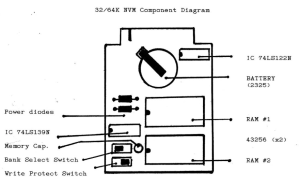
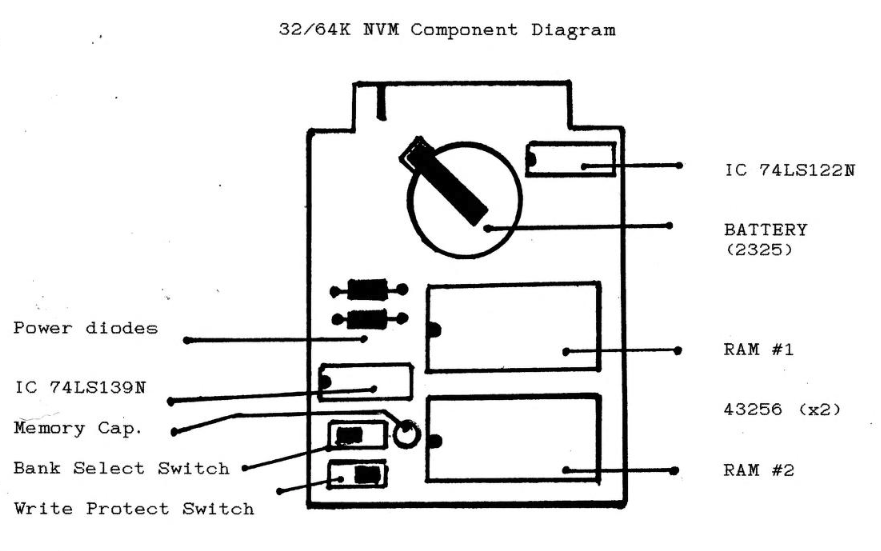
1986 user manual by Thomas B. Woods for his 32K and 64K non-volatile RAM cartridge for the TS 2068, describing how to install and use the battery-backed RAM board.
Congratulations on your purchase of the Universal Dock/Extension Board. This device is design to fit in the Cartridge port on the right side of your I/S 2068. The board has the maximum possible flexibility built into it. Features this device offers are listed below. Following are recommended operating procedures and software techniques you can use to make use to make good use of this NVM memory.
Read the installation/removal instructions and precautions before plugging this memory board into your T/S 2068.
HARDWARE FEATURES:
- 32/64K Non-Volatile RAM an reside in either Cartridge Bank or the EXROM Bank.
- Battery Backup prevent data loss on power failure.
- The board can run under 100% battery or draw power from the 2068 while the computer is powered up.
- Write protect switch prevents accidental data loss during program development.
- Chunk specification can be easily modified even after data has been stored.
- The memory can mask the EXROM or contain LROS and AROS programs.
NVM INSTALLATION and REMOVAL
Remove the paper circuit breaker from between the battery arm and the battery.
To install the board in the computer, open the TCC cartridge door. Discharge your fingers on some metallic object (but don’t shuffle across the carpet to use the door knob).
Place the NVM board in the dock area and apply thumb pressure directly to the center of the edge of the board. DON’T press on the RAM chips during installation. The small rubber feet on the bottom of the board will support it at the proper height, but the keyway must be aligned with the slot before the board will seat properly in the dock connector.
To remove the board, be sure that the write protect switch is on the “PR” side, and discharge your fingers again. Place your right thumb on the edge of the computer in front of the CAP SHIFT key. With your index and second finger of the right hand on each side of the white strip on the first chip, pull back evenly until the board snap loose.
This board is conformally coated, or painted with a special urethane coating that can withstand well in excess of 2000 volts of static discharge from your fingertips. DON’T TEST IT !! We have done our best to give your data the maximum protection against electrical accidents but for added insurance, ground yourself BEFORE you pick up the board. If you live in a static filled environment, touch a nearby metal object such as a lamp before you touch the memory board. A static discharge will not harm you, but could damage the memory.
The . 3 small rubber feet under the board will prevent it from touching a table top or shelf when it is stored outside the computer thereby providing further protection from static or an accidental short circuit.
IMPORTANT !!!
A small piece of insulating tape is placed on the top of the battery arm to prevent the arm from coming in contact with the conductive coating on the inside of the T/S 2068 case. DO NOT remove this plug. the memory board into the computer. If you do, tape when you the battery will short circuit and become discharged after a few hours of use. Before you plug the memory board into the computer, always check that the tape is covering the battery arm and that it is in good condition. Replace with any non-conducting material such is black electrial tape or clear nail polish whenever it becomes necessary.
The T/S 2068 Chunk/Bank memory map looks this:
| HOME | DOCK | EXROM | |
|---|---|---|---|
| CHUNK 0: 0-8K | ROM | LROS | EXROM |
| CHUNK 1: 8-16K | ROM | LROS | OPEN |
| CHUNK 2: 16K-24K | VIDEO | LROS | OPEN |
| CHUNK 3: 24K-32K | VARS/SYS. BASIC | OPEN | OPEN |
| CHUNK 4: 32K-40K | RAM | OPEN | OPEN |
| CHUNK 5: 40K-48K | RAM | OPEN | OPEN |
| CHUNK 6: 48K-56K | RAM | OPEN | OPEN |
| CHUNK 7: 56K-64K | RAM | OPEN | OPEN |
The NVM configurations available to you are AROS, LROS and open areas. A problem with using the areas below chunk 4 (chunk 0 to 3) is that the BASIC operating system may also try to use those chunk while you are. Every time the video screen is updated, 2 and 3 are in home ram. Since the 2068 assumes that chunks the video interrupt is all powerful (it stop the Z80 cpu until it has accessed the ram and created the picture), you must be quick if you desire to use these areas.
This finally brings us to the battery– the most important single component on the board. The first thing you should do is remove the paper which breaks contact between it and the battery arm and LEAVE IT ALONE. DON’T remove and reinstall the battery frequently. It has been calculated that under normal conditions the battery will outlive all of us! The BR-2325 lithium cell has a capacity of 160 millAmp hours.
This means that the battery would last for 1 hour if it were to be subjected to a drain of 160 milliAmps (This is, by the way, equal to the drain of a 64K dynamic ram pack).
In standby mode (the computer turned off or the NVM board unplugged) the NVM board draws approximately 200 nanoAmps. That is 200 BILLIONTHS of an amp!! This is a calculated number from the extrapolation of a log graph. I do not have an ammeter that will measure below 1 microAmp!
Anyway, this means that the battery will last for 150 years!!
However, if we take the manufacturers worst case spec. for the 43256 chip, the battery will last for 417 days. Remember, though, the battery used only when the board is unplugged or when the computer is turned off. When power from the computer is supplied to the board, the battery is not used.
You may decide that you like to power the board by battery at all times and never draw 5 volts from the 2068. In this case the draw of about 50 microAmps would drain the battery in about 6 months of continuous use.
You can measure the voltage on the battery with a Digital volt meter by measuring from the top of the battery to edge connector, the ground line, the right most trace on the which is in front of the LS122. When the battery reaches 2.7 volts, you should consider purchasing a new you should battery.
If you decide that it is absolutely necessary to “chop” power from the battery, then slide a piece of plastic or paper under the battery holder arm. If you constantly remove and reinstall the battery, then the holder will lose tension, which may cause intermittent or erratic operation. If this is a problem, then remove the battery and bend the t battery arm down to provide a more secure fit. You should never need a new battery, but if you do, Radio Shack is presently stocking several types. The battery need only be between 3 (recommended) and 5.3 volts. In lithium cells, the first two numbers signify the diameter of the cell (23 millimeters) and the last two signify the thickness (25 = 2.5 mm.). The thickness also determines the battery capacity. The holder will take 2016 , to 2325 cells and still fit under the dock shelf of the computer.
TIPS and MISC.
If you are having memory loss problems, take a minute to battery is properly seated and clean. Dust deposits may preventure obe connection between the holder arm and the battery.
Be sure to flip the write protect switch on during power down and keep it on if the board is removed from the machine.
The LS139 and LS122 are not powered by the battery at all. If you decide to play with the board outside of the T/S 2068, you will need to supply -a smooth +5 vdc to both of these support chips.
The switch tops are not conformally coated. Insure that you discharge any static buildup that you may have accumulated prior to flipping any switches.
Do not pull the 43256 RAM trouble chips out of their sockets. You may have reseating them because of the static proof coating. There is no circuitry to observe under these chips anyway.
There is a 220 mFd cap across the 3 volt power and ground. This cap will allow you to install a new battery if done within 5 minutes after removing the old one.
On the same subject of extending battery life, do not leave the NVM memory board plugged in the computer for long periods if the computer 1s turned off. Excessive battery drain in this situation will cause the battery to become discharged in about a week.
Remember this rule: When you turn off the computer, unplug the memory board!!!
PROGRAMMING THE 32/64 NVM
Before the finer points of using memory in the 32K extension are explained, let’s backtrack a bit and think about a computer’s memory in general. Memory to the computer is like a large notebook. Each page contains one number from 0 to 255. The computer is able to write a number down or look a number up. In order for the computer to access the notebook, each page is given an “address” to the value which can be stored. Thus, or “page number” in addition the machine can read the value on page 5000 or write the number 44 on page 32000. When you use the Basic PEEK and POKE commands, such as POKE 32000,44 you tell the computer to write a “44” on page 32000.
Built in to the Z80’s microprocessor design is a limitation. The notebook can’t be longer than 65,536 pages. In computer terms this means that the maximum amount of memory available to the computer at any one time is 65,536 bytes (64K). You can’t add more memory to extend the pages to say, 90K.
BANKED MEMORY
The Timex designers came up with a clever way to get around this limitation called ””BANKED MEMORY’. Using this technique, the T/S 2068 is capable of switching from one “bank” of 64K to another. This allows for greatly expanded memory capacity yet still maintains the 64K limit of the 280’s design because at no time does the Z80 see more than 64K of addressable memory. In the note book analogy, this is like having more than one note book. The computer can read the value on page 5000 of note book number 1 or can read the value on page 28000 of note book number 2.
Built in to the T/S 2068 are provisions for 3 “banks” which can each hold a maximum of 64K (It was intended that up to 256 banks would be available, 256 * 64 = 16.384 MEGS, but Timex’s demise put an end to that, at least for a while). These banks are named the HOME, the DOCK, and the EXROM. Each bank has an address just like individual bytes of memory.
The HOME bank is number 255, the DOCK is number 0, and the EXROM is bank “number 254.
When you use the unexpanded T/S 2068, you work mainly with the HOME bank except when you save, load, verify or merge with your tape recorder. These functions all exist in an “extra” bank in which only one 8K ROM is present, hence the name ”’EXROM’, and hence the claim of 72K of memory in the 2068. You have 64K in the HOME bank plus 8K in the EXROM.
Cartridge software which fits under the door on the front of the computer is in actuality, a program which occupies memory in the DOCK bank, It is important to remember that while the computer gives you the ability to use memory in these different banks, you can’t do it unless you actually have the memory. It is not hiding in your computer waiting to be utilized. It is only by adding memory that bank switching functions become useful.
BANKS, CHUNKS and MEMORY SELECTION
Each bank of 64K is further subdivided into a series of 8K “chunks” (8k8K = 64K). This is like placing dividers every 8192 pages in each of our note books. The T/S 2068’s bank switching facilities, in addition to letting you completely switch from one bank to another, also let you mix and match different chunks of two different banks. You can select combinations of the DOCK and HOME banks and the EXROM and HOME banks. Unfortunately, you cannot select combinations of the EXROM and DOCK banks.
Chunk selection is carried out by outputting a value to the I/0 port number 244, You can turn various chunks on or off by using the Basic command: OUT 244,xxx (“xxx” is the number calculated to turn off the desired chunks). You can check which chunks are currently engaged by the Basic command: PRINT IN 244.
Here’s how to determine the proper value to output .to port 244. Since there are 8 chunks in a 64K bank, the 8 bits of the number you output serve as “chunk switches”. If a bit is 1, its corresponding chunk of the NVM board is turned on. If a bit is 0, its corresponding chunk of the HOME bank is turn on. For example, if you OUT 244,0 (or BIN 00000000) you will select all 8 chunks of the HOME bank. If you enter OUT 244,128 Cor BIN 10000000) you will turn on chunk 7 in the NVM board, you would enter the command: OUT 244,240 (or BIN 11110000). Note that using the BIN function makes it quite easy to know which chunks of the NVM board you are turning on or off. The 1’s represent the NVM board, the 0’s represent the HOME bank.
This method works when the memory board is configured for use in the DOCK bank. You can also flip the bank select switch on the board so you can use the memory in the EXROM bank. To enable chunks in the EXROM bank, you must also output a number to I/O port 255. Bit 7 of this port determines if a chunk selection you make (through port 244) will be a combination of DOCK and HOME or EXROM and HOME. When bit 7 is a “1” the EXROM is selected. When bit 7 is “0” the DOCK is selected. Therefore, if you configure your NVM board as EXROM you select desired EXROM chunks of the board by first entering the command OUT 255,128 ‘or BIN 10000000).
Then you OUT 244 with the chunk selection you want. If you want to turn the EXROM off so that chunk selection refers back to the DOCK bank, you execute the Basic command OUT 255,0.
Since other bits of port 255 specify other modes and functions on the computer, you may not always want to simply output a 128 because doing this will reset bits 0-6 giving them the value of zero. To set just bit 7, use Basic command: LET X=IN 255 to find the current status of the port. Then add 128 to the value of X with the command: LET X=X+128, and send the new value back out.to the port with OUT 255,xX.
When you select a combination of active chunks in the DOCK/HOME or EXROM/HOME banks, it is like restructuring the notebook. At any given time, there is a maximum of 65,536 pages, but your chunks (divisions within the notebook) can be mixed. It is important to note that the Basic operating system is located in chunks 0,1,2 and 3 of the HOME bank. You never want to turn these off if you are working in Basic. It’s a guaranteed crash if you do!!
SUMMARY of BASIC COMMANDS to SELECT BANK CHUNK COMBINATIONS
To configure the NVM board as DOCK memory, flip the EX/DX switch to “DX”. You then have four 8K chunks available to you. Any combination of them can be selected as “active” by outputting an appropriate value to port 244. Below are a few possible combinations:
- OUT 244,0 (or BIN 00000000) turns on the entire HOME Bank.
- OUT 244,128 (or BIN 10000000) turns chunk 7 on in the DOCK.
- OUT 244,192 (or BIN 11000000) turns on DOCK chunks 6 and 7.
- OUT 244,224 (or BIN 11100000) turns on DOCK chunks 5,6,7.
- OUT 244,240 (or BIN 11110000) turns on DOCK chunks 4,5,6,7.
These commands define the memory the Z80 microprocessor sees. Bits of the value output which are “1” specify 8K chunks of the DOCK bank. Bits which are “0” specify chunks of the HOME bank.
Selecting or deselecting chunks does not alter values stored in memory. Chunks are simply “switched in” or “switched out”. Do not output a number which will set any of the lower four bits to 1. Doing so will turn off your Basic ROM and you will crash the computer.
You can check the current Status of your memory configuration by executing the Basic IN 244 command. This will result in a decimal number which when converted to binary will tell you which chunks are HOME and which are DOCK.
To use this board as EXROM memory, switch the EX/DX switch to “EX”. Then set bit 7 of port 255 to a value of 1. This is done by adding 128 to whatever value is currently found at the port. Selection of EXROM/HOME chunk combinations then follow the same rules shown above for DOCK configurations.
The on-board battery will keep the contents of the NVM board alive even when you turn the computer off. It is a good and prudent practice, however, to set the Write Protect switch to “PR” before turning off the computer or before you execute the basic NEW command.
EXAMPLES of USING the NVM BOARD in Basic Programs
There are many ways you can use this extra memory. One very simple method is to use it strictly for data storage purposes and accessing the memory with PEEK and POKE commands. In the following listing, line 10 sets ramtop to just below the first byte of chunk 4. This gives you a total of 64K of memory above ramtop- 32K in the HOME Bank and 32K in the DOCK. In addition, you have about 6000 bytes of memory in the HOME bank below ramtop for a basic program and variables.
10 CLEAR 32767: LET s=32776: LET c=1
20 INPUT "ENTER SOME TEXT’; a$
30 GO SUB 9000
40 INPUT "ENTER SOMETHING DIFFERENT”; a$
50 LET c=0: GO SUB 9000
60 PRINT "NOW RETRIEVING DATA FROM THE DOCK”
70 LET c=1: GO SUB 9100: PRINT a$
80 PRINT: PRINT "DATA FROM THE HOME BANK IS…” 90 LET c=0: GO SUB 9100: PRINT a$
100 STOP
9000 OUT 244, (240xc): POKE s,LEN a$ 9010 FOR x=1 TO LEN a$ 9020 POKE (s+x),CODE a$(x): NEXT x: RETURN
9100 OUT 244, (240xc):LET ag$=""
9110 LET l=PEEK s
9120 FOR x=st+1 TO s+l+1
9130 LET a$=a$+CHR$S PEEK x: NEXT x: RETURN
The subroutine at 9000 writes the contents of a$ into memory. The first line (9000) selects which bank. The variable c holds either a 1 (DOCK) or a 0 (HOME> so the command OUT 244, (240xc) will result in 0 (240×0) if c=0 or 240 (240X1) if c=1.
Once the chunk is selected, line 9010 – 9020 use a FOR/NEXT loop to POKE the codes of a$ into their proper address.
The subroutine at line 9100 works the same way but the direction is reversed. Here, a$ is filled with the characters found in memory. In both cases, it is necessary to determine the length of the string in question so that the FOR/NEXT loop will know when to stop. Address 33776 stores this length.
RUNNING BASIC PROGRAM from the DOCK BANK
One big reason why the dock bank was engineered into the T/S 2068 was to make it possible to run cartridges software. Built into your computer’s operating system is the ability to run BASIC programs from the Dock. The advantage of storing a program in the Dock bank is that memory in the Home bank which was ordinarily used to store the program is free to be used for variables. More data can thus be operated on by the computer. In addition, the time spent for loading the program from tape can be reduced considerably. You need only to load the variables – not the program!
Timex’s original intent was that programs stored in the dock bank would come on a ROM or EPROM, but there is nothing to prevent you from putting a program into the RAM of this memory board. In fact, a Dock program stored in RAM offers the advantage of being alterable. This is very helpful should you ever need to change the program in some way.
This disadvantage of using RAM is that there’s always a faint possibility that you could accidently erase the program. The write protect swith reduces the risk substantially, but accidents can happen. Perhaps the best course to follow is to use both EPROMS and RAM. You can write and debug the program very easily using the RAM. Then, when you’re satisfied that everything is running perfectly, you can transfer the program over to an EPROM. If you use EPROM alone, everytime you make a change, you must burn a new one. You must stop, erase your chip, then reprogram it. If you’re like me, this might need to be done dozens (maybe even hundreds) of times.
HOW TIMEX BASIC uses the DOCK BANK for Cartridge Software
When you power up the T/S 2068, part of the initialization involves testing the dock bank to see if a program is stored there. Programs fall into 2 broad categories. They can be either AROS (Application Rom Oriented Software) or LROS (Language Rom Oriented Software). Values in the first 8 bytes of the cartridge addresses 32768 to 32775) define the cartridge and provide the computer with the information it needs to run it. These bytes correspond to the first 8 bytes of the ram board.
By POKING these addresses with proper values, you can make the board take on the characteristics of a cartridge. The 8 bytes, sometimes called “ROS Overhead Bytes” are described below:
| Byte | Start Address Hex | Start Address Decimal | Meaning | Value |
|---|---|---|---|---|
| 0 | 8000 | 32768 | Language type | 1=Basic & machine code. 2=Machine code only |
| 1 | 8001 | 32769 | Cartridge type | 1=LROS, 2=AROS |
| 2,3 | 8002 | 32770 | Start of program | A two byte address |
| 4 | 8004 | 32772 | Chunk specification | Binary value where “0” represents chunk used in the dock bank. “1” represents chunk used in the home bank. |
| 5 | 8005 | 32773 | Autostart? | 0=No, 1=Yes |
| 6,7 | 8006 | 32774 | # of bytes reserved | Number of bytes in the home banks reserved for machine code (reserved area starts at 26688 decimal) |
For a typical Basic program to be stored in the dock bank, you could set the 8 bytes with the values below. In parentheses is the effect these values will have: POKE 32768,1 (for BASIC); POKE 32769,2 (for AROS); POKE 32770,8 and POKE 32771,128 (for starting address of Basic being at 8008 hex-32776 dec.); POKE 32772,15 (a binary 00001111 meaning chunk 4-7 in dock are used); POKE 32773,1 (program will autostart); POKE 32774,0 and POKE 32775,0 (no storage space reserved-all of home bank will be available for Basic variables).
Basic AROS programs stored in the DOCK are run in an interesting way. Immediately above the area reserved for machine code or data storage, is another area of memory called the AROS BUFFER. It starts with a length of 207 bytes, but it can expand and contract. When the computer finds a BASIC program in the dock it runs it by bank switching to the chunks which hold the program (as defined by the “chunk spec” at address 32772). Next, it finds the line number it is to execute and transfers the line into the AROS BUFFER, adjusting the buffer size if necessary. The entire home bank is switched back in, and the program line in the buffer is executed.
The Dock bank, therefore is used only as a storage medium for the Basic program. Variables used by the program are stored in the Home bank. Lines are pulled out of the Dock, inserted into the AROS BUFFER (which is in chunk 3 of the Home bank) and executed from there. Dock Basic does not run exactly the same way that Home Basic does. Certain commands can present problems. The command DEF FN and FN can not be used in the AROS programs. All Basic commands including user defined graphics and complex calculated GOTOs and GOSUBs are supported.
The USR function which calls a machine code routine will determine the proper bank (dock or home) to select by the way you define the chunk spec byte in the AROS overhead. For example, if you use the recommended value of 15, you are indicating that chunk 4,5,6 and 7 are used in the dock bank. A user call will call the dock. If you set the chunk spec to a binary 10001111, you are indicating that chunk 4,5, and 6 are Dock while chunk 7,0,1,2 and 3 are Home. If you RANDOMIZE USR 65000 (which is in chunk 7) the computer will execute the user call found in the home bank. Additionally, your machine code should not cross chunks. The computer enables only the chunk inwhich the user address resides. In contrast to the USR function, PEEK and POKE always refer to memory in the home bank. Bank switching, using the OUT 255 and OUT 244 commands cannot be accomplished by a cartridge type program.
All tape/disk commands (save, load, verify and merge) act like POKE and PEEK in that they only work on memory in the HOME bank. This is true always- not just when you run a program from the dock bank.
HOW to Store a BASIC Program in the DOCK BANK
The computer, under most normal circumstances, sets the starting address of Basic programs to 26710 decimal. This presents a bit of a problem if you want to write or load a program into the dock because this is squarely in the middle of chunk 3. A Basic program which is to be stored in the dock must start no lower than address 32776 which is the Oth byte after the start of chunk 4, Bytes 1-8 remember, are used for the ROS overhead.
Wouldn’t it be nice if we could tell the computer to change its starting address for programs so they begin at 32776 instead of 26710? Fortunately, you can with a very short machine code program. Turn on your computer and enter the line shown in listing 1. Then RUN it.
9999 RESTORE 9999: FOR x=23296 TO 23304: READ y: POKE x,y: NEXT x: RANDOMIZE USR 23296: DATA 033, 085,104, 001,178, 023, 195,187,018This line moves the program area of memory up to address 32776.
You should delete this line after it has run. It is important to note that the line does not do any bank switching for you. You’1ll still be in the Home bank after it has executed. Also, don’t type NEW or you’ll reset the program area to its lower address making it necessary to enter and run the line again. At this point you can begin entering a progran directly from the keyboard or you can load one from a cassette.
Extremely long programs may need to be shortened before you can load them. Since the program now starts at a higher address, you have about 6K less free memory to work with. Once you have your program thoroughly bebugged, save a copy on tape (or Disk). You May need it for more debugging later. Now you are ready to transfer the program into the Dock bank. This is done by adding the line below to your listing.
9999 RESTORE 9999: FOR x=23296 TO 23340: READ y:- POKE x,y: NEXT x: RANDOMIZE USR 23296: DATA 175, 006, 002, 033, 083, 092, 094, 035, 086, 213, 033, 089, 092, 016, 247, 225, 209, 237, 082, 068, 077, 239,175,211, 244, 126, 245, 062, 240, 211, 244, 241, 119, 011, 035, 229, 033,000, 000, 237, 066, 225, 032, 234,201By RUNNING 9999, you will copy your program over to the dock. Be sure that before you do, the switches on the memory board are set so the Dock bank is selected and write protect is turned off. After the line is run, all that remains is to POKE the eight ROS overhead bytes with the proper values. Use those given previously to experiment with.
When the final overhead byte is poked, execute the OUT 244,0. Set the write protect switch to PR and turn off the computer. To test your new cartridge program turn the computer back on again. The program will come up running automatically if you poked the autostart overhead byte with a 1. If you poked it with a 0, type RUN and ENTER to start the program.
Remember that the computer at this point does not have any variables in memory so if your dock program tries to operate on a variable which has not been inititialized by a program line, it will stop with an error. Undeclared variables must be loaded into the computer from tape (or Disk). Save and Load commands should be incorporated into the dock program to handle this. The action of these commands is the same as when you use them normally except that in the case of a program save, only the variables will go onto tape (or Disk). Remember that cassette and Disk operations act only on the home bank. Since the program you have now exists only in the dock, there are no program lines to save – only variables.
If your program does stop with an error, or if you intentionally BREAK, you won’t be able to list the dock program nor can you add Basic programs lines. Commands entered in the immediate mode (without a line number) will execute properly.
That is why it is important to save a copy of your program to tape (or Disk) BEFORE you try it out in the dock bank. If a bug causes your basic to stop, you can use the tape or Disk version for debugging. New tries can then be transferred into the dock using the methods already detailed.
Several Timex system variables exist which may be useful to you. They are:
| ARSBUF at 23748 and 23749 | a pointer to the AROS BUFFER |
| ARSFLG at 23750 | bit 7 set indicates AROS is present. bits 0-6 are used by the computer when data is being placed in the home bank. |
| ADATLN at 23751 and 23752 | a pointer to the current start of an AROS DATA line. |
The ARSFLG (23750) is especially important. It acts as a switch to turn off the AROS program. If you POKE 23750,0 you can add and enter program lines into the home bank. RUN will cause the bank program to execute.
If you POKE 23750,128 the program in the dock bank is turned back on. You can no longer add program lines and the RUN command will pertain to the AROS program.
A STEP–BY–STEP REAL EXAMPLE
This experiment will demonstate the steps required to put a program in the dock bank. Follow each step in order and to the letter.
- Plug the NVM memory board into the computer. Set the memory for in the DOCK, and the WR/PR should br set to WR”. Turn ON the computer and enter Listing shown previously.
- Type RUN and ENTER. Then delete the program line.
- Enter the “demo” listing below.
4 PRINT AT 9,3;"P.L.0. SOFTWARE PRESENT…": PRINT "FLIGHT PLAN FROM PALESTINE"
5 LET a=128: LET b=87: PLOT a,b
10 LET x=1+INT (RND*10)
20 LET y=1+INT (RND*10)
22 LET d1=1+INT (RND*10)
24 LET d2=1+INT (RND*10)
26 IF d1<6 THEN LET d1=-d1
28 IF d2<6 THEN LET d2=-d2
30 LET d1=(d1/ABS d1)xx: LET d2=(d2/ABS d2)*y
60 IF a+d1>255 OR a+d1<0 THEN LET d1=-d1
70 IF b+d2>175 OR b+d2<0 THEN LET d2=-d2
85 LET a=a+dl: LET b=b+d2
90 DRAW d1,d2
95 GO TO 10- Add the Home to Dock Transfer routine shown in listing 2 and execute the command RUN 9999.
- Now enter the following POKES:
POKE 32768,1
POKE 32769,2
POKE 32770,8
POKE 32771,128
POKE 32772,BIN 00001111
POKE 32773,1
POKE 32774,0
POKE 32775,0- Type: OUT 244,0 and press ENTER. Ignore any unusual error reports.
- Flip the Write Protect Switch to PR.
- Turn OFF your computer, then turn it back ON. The program is now in the Dock bank and will come up running automatically!!
When the program is running, you can press BREAK to stop the program. You can enter commmands in the immediate mode (such as PRINT a or PRINT x), but you cannot add any program lines or see a listing of the AROS program on the screen. However, if you POKE 23750,0 you turn off the AROS. Now new lines can be entered but they will be considered a completely separate program by the computer. If you type RUN, this new program will run. If you POKE 23750,128 and then type RUN, you turn the AROS back on. Flight Plan will start running again.
STORE a PROGRAM and VARIABLES in the DOCK BANK
The previous section showed you how to STORE a program in the Dock bank and run it as if it were an EPROM cartridge. That method gives the advantages of having more memory for variables (which are stored in the Home bank). Cassette and Disk loading time is therefore reduced because memory used for program storage need not be loaded. Disadvantages are that you do not eliminate loading entirely, and some quirks of the operating system may mean you’1l have to re-write portions of the Basic before it will work.
An alternative method is to store not just the program, but also the variables in the dock bank. This eliminates saving and loading altogether. Operation is the same as if you were running completely in the home bank except you must restrict total size to the 32k provided on the board. Using this technique is a little more cumbersome since you must initialize the system manually and then GOTO a line number to start the program operating, but with this method, you CAN add or edit lines. The battery powered ram means that the program is always there. This saves a lot of time that you’d normally spend running your tape recorder. Periodic saves are still possible, of course, and I strongly recommend that you continue to make tape/disk backups.
You need to do it on a much less frequent basis, however.
In addition, this method lets you run Basic from the EXROM bank if you wish. All you have to do is OUT 255,128 and flip the EXROM switch on the ‘board. This eliminates potential conflicts with others devices which may give you memory in the Dock. It is the easiest way there is to make full use of the EXROM bank.
To use this system, set the switches on the memory board to WR and DK. Enter listing 4 on the next page and RUN it.
10 OUT 244,240: FOR x=32768 TO 32909: READ y: POKE x,y:NEXT x: OUT 244,0
30 DATA 000, 000, 000, 000, 000, 000, 000, 000, 000, 000, 000, 000, 000, 000, 000, 000, 000, 000, 000, 000, 000, 000
40 DATA 033, 085,104, 001, 059, 024, 205, 187, 018, 017, 085, 104, 033, 045, 128, 001, 110, 000, 237, 176, 195, 085, 104, 175, 042, 010, 128, 237, 091, 008, 128, 237, 082, 040, 080, 055, 213, 042
50 DATA 012, 128, 237, 082, 229, 193, 235, 205, 187, 018, 042, 010, 128, 034,075, 092, 225,211, 244, 017, 255, 255, 205, 138, 104, 126, 205, 138, 104, 119, 035, 235, 237, 082, 235, 032, 238,201
60 DATA 245,219, 244, 238, 240, 211, 244, 241, 201, 205, 138,104, 042, 083, 092, 034, 008, 128, 229, 042, 075, 092, 034, 010, 128, 042, 089, 092, 035, 012, 128, 062, 240, 225, 205, 117, 104, 024, 217, 042, 083,092, 024,191
INITIALIZE COMMAND:
After it stops, initialize the system using the immediate command:
OUT 244,240: RANDOMIZE USR 32790Now you can type in or load the program you wish to use. The program will be located in, and will execute from the home bank. To put it in to the memory board, execute the command:
To save the program to the dock bank:
RANDOMIZE USR 26771A second or two is required for the transfer to complete itself.
All memory from the start of the program to the top address 65535 will transfer. This means that even the machine code or user defined graphics which are located above ramtop will be saved to the dock (or EXROM) bank.
Copying of the home bank to the dock bank is the equivalent of saving a program on tape (or Disk). Instead of saving to a cassette or disk you are saving to battery backed memory. Any time you update your program, you also need to update the memory so adopt the practice of executing the RANDOMIZE USR 26771 command frequently.
After memory is copied in this way, switch the write protect switch to PR and leave it there untill you are ready to transfer your program again.
Programs stored in this way will not come up running automatically. After turning on the computer, load’ the pragram from the memory board into the Home bank by executing the initialize command:
OUT 244,240: RANDOMIZE USR 32790After a brief pause, the computer stops with a O/ok report, which you can LIST the program, RUN it, or GO TO a specific line number. Remember, always protect your program by leaving the write protect switch in the PR mode until just before you are ready to transfer data back into the extra memory. The write protect switch guards against glitches and run-away machine code which could ruin your program on the board by overwriting it.
After initialization, if a program is present in the NVM, it will appear on the screen when you type LIST. You can add, alter, and delete program lines in the usual manner. If you want to completely erase the program, do not use NEW as this will reset the computer as well. Instead, use the command, DELETE 1,9999 followed by CLEAR. Every program line from 1 to 9999 will be erased, and all your variables.
CONCLUSION
The instructions provided here cover only a few of the many possible ways you can use your 32/64K Non-volatile Ram. Timex enthusiasts are only just beginning to fully understand how to use additional banks of memory on their T/S 2068s. Much more information about this topic will come as discoveries are made.
Document