
In this installment we conclude our look at Word-Processing Programs avaiable for the TS2068. Make note that this does not include programs written for the British counterpart, the Spectrum. Programs written for that specific machine will not work on an unmodified TS2068, because the rear edge connector channels are different between the two machines.
Also, this being the conclusion of the series does not mean that I have covered All of the Word-Processors for the 2068. I reviewed all of the programs that were available to me. If there are any others out there that should be looked at, please forward a copy of them to me, and I will be glad to give them coverage.
MSCRIPT
$69.95
21st Century Electronics
P.O. Box 5037
Guttenberg, NJ 07093
In all areas of competetive business, there seem to be at least two “big boys” battling it out…Coke & Pepsi…Ford & GM…IBM & Apple…etc.
The same holds true with Word-Processors for the 2068. After looking at all the programs I had available, it came down to TASWORD TWO (reviewed in Issue #12) and MSCRIPT as the main contenders.
MSCRIPT is the Word-Processor that TIMEX itself was going to release. Written by Micro-Systems Software (the authors of MTERM & MTERM II), it was designed to work with the AERCO printer interface.
MSCRIPT comes with a 70-page manual in a very nice vinyl binder. The latest version I received had the feature to allow you to choose the colors of INK and PAPER you wanted to use. MSCRIPT utilizes a 64 column screen, but you are not limited to this for your printout. You can make your document as wide or as narrow as you want.
MSCRIPT was not really developed for the TS2068 alone. Micro-Systems developed it for a number of computers, making the features “transportable”. This means that whether you use an IBM, an Apple, or a TS2068, the commands will be identical. This saves a lot of time learning a whole set of new commands.
The only thing that I don’t like about MSCRIPT is that you don’t have the luxury of “what you see is what you get”. With TASWORD TWO if you want to center a line of text, it appears centered on the screen. Not so with MSCRIPT. There are a jumble of commands imbedded in the text to do the job for you. However, if you use MSCRIPT a reasonable amount of time, this does not really seem a problem.
All in all, I find MSCRIPT a very well done program, and it deserves your attention.
TEXT EDITOR 2000
$6.00
People’s Software Supply
609 E. N. 18th Street
Abiline, TX 79601
This program is a fine example of what can be achieved if you can write only in BASIC. I have always believed that a fine program does not have to have Machine Code to work. The final result may be a little slower, but it will be a lot less complicated.
If you want to save even the $6.00 price of TEXT EDITOR 2000, you can get it for FREE! Just type in the listing on pages 18 through 23 in Issue #13 of T-S HORIZONS. Chris Nystrom, the author of TEXT EDITOR 2000 was kind enough to provide us with the listing and instructions to print in the magazine!
(If you don’t have a copy of Issue #13, order a back issue while you still can…it’s going fast!)
TEXT EDITOR 2000 was written to use a 2040 printer, but probably can be modified to work with a full-size printer.
I commend Chris on the fine job he did with this program…WELL DONE!
Word 1.5
N/A
James Dupuy [address omitted]
Word 1.5 is another Word-Processor written entirely in BASIC. James Dupuy wrote this program, and I first saw the listing in an issue of COMPUTER TRADER magazine. Dupuy is a regular contributor to TRADER, and he does a great job.
I recommend that you contact Dupuy about this program, even if you already have another Word-Processor. Just looking at his programming style is worth the cost of the program.
WORD-MOST / TEXTMAN
WORD-MOST                TEXTMAN
$19.95                   $24.95
Sharp's                  T.E.J. Computer Products
107 Nine Mile Road       859 N. Virgil Avenue
Sandson, VA 23150        Los Angeles, CA 90029
Both of these programs seemed to be too complicated to me to use regularly, but if used over a time probably would do alright.
Both programs utilize a 32-column screen, which is alright if you are using a 2040 Thermal Printer. But if you are a full-size printer, the screen becomes cumbersome.
Also, the documentation for both programs seemed lacking. I feel that 50% of a program’s worth is in the manual, especially if the program is to be used a great deal of time.
Again, I did not spend a great deal of time with these programs, but I feel that other programs fared better.
T50WDS84B (!?!)
$12.50
WIDJUP Company
1120 Merrifield S.E.
Grand Rapids, MI 49507
Just as I was getting ready to send the final draft of this review to the publisher, I received a package in the mail. What’s This? WHAT?!?
Yes, the name of this program IS T50WDS84B. Don’t ask me what it means, I haven’t the foggiest.
But, WHAT A PROGRAM! T50 is designed to utilize the 2040 Thermal Printer in a very unique way. It turns your textfile SIDEWAYS to print a 64-column format. It prints 16 or 32 lines per segment (single or double spacing), and has a textfile size of 320 lines.
(An example of a printout is shown in figure 1.) All you do is print out the textfile, cut the segments apart, and tape them together to make full-size sheets.
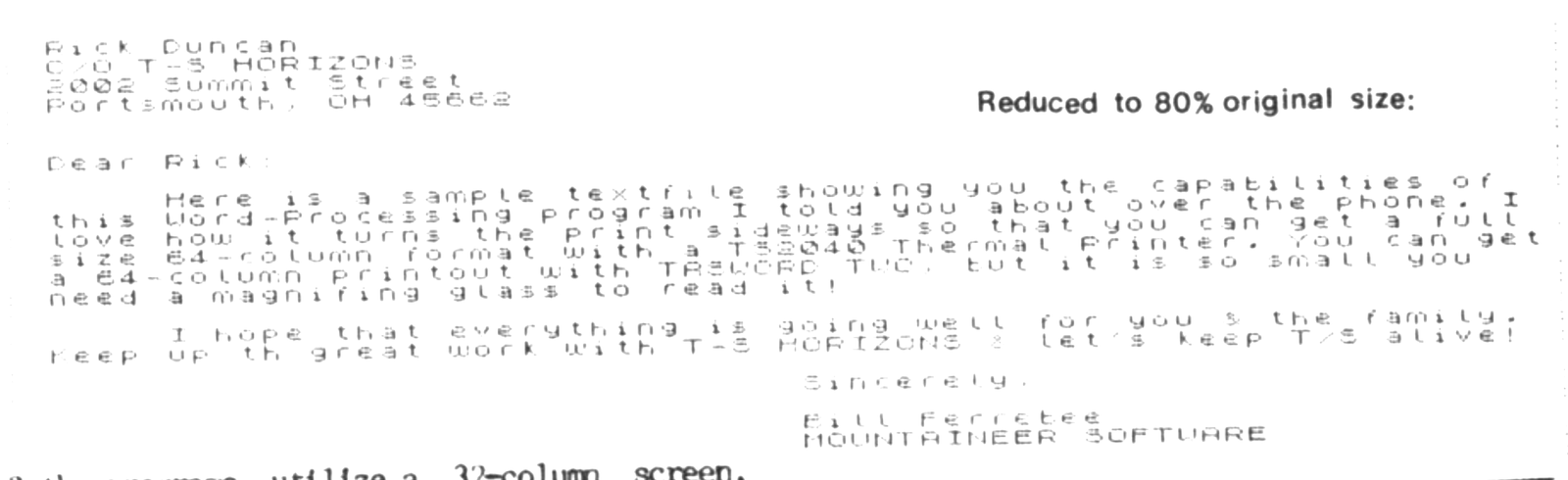
Again, a programmer is only limited by his imagination!
If you do not have a full-size printer, then T50 is for you!
In closing, I hope this series has proven to you that the TS2068 is a teriffic machine to use as a Word-Processor, and that many great programs are available for your use. Just pick the one that suits YOUR needs!