
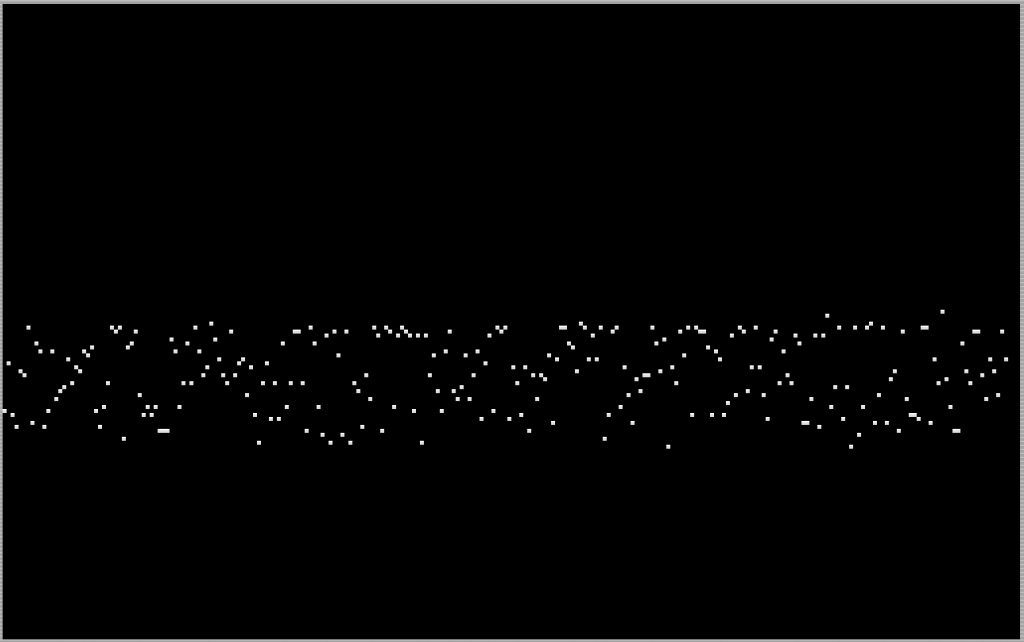
Audioscan reads the EAR port in real time and plots the incoming audio signal as a waveform on screen, offering three display modes: line graph, bar graph, and point graph.
A short machine code routine (18 bytes) is POKEd into memory starting at address 65368; it samples the EAR bit from port 254 and returns the result via the USR function.
The main scan loop iterates over all 256 horizontal pixel columns, calling the machine code sampler on each pass and scaling the result by dividing by 1.5 before plotting.
A spacebar pause feature lets the user freeze the current scan, with menu options to return to the main menu, restart the scan, or end the program.


Program Analysis
Program Structure
The program is organized into four logical sections: initialization and menu (lines 200–240), the main scan loop (lines 250–275), the freeze/restart/exit handler (lines 300–330), and the machine code loader (lines 400–425). The REM at line 102 contains a vestigial DEF FN that is never actually executed or used elsewhere — it appears to be an early design note left in the listing.
Machine Code Routine
Lines 400–420 define and install an 18-byte machine code sampler. The data bytes are READ and POKEd into address 65368 (near the top of the 64K address space). The USR tone call at line 255 invokes this routine and returns a value reflecting the EAR port state. Disassembly of the 18 bytes reveals a loop that samples bit 6 of port 254 (the EAR input) and accumulates a count, returning via RET:
| Offset | Hex | Mnemonic (approx.) |
|---|---|---|
| 0 | 01 00 FF | LD BC, $FF00 |
| 3 | 11 00 00 | LD DE, $0000 |
| 6 | DB FE | IN A, ($FE) |
| 8 | CB 77 | BIT 6, A |
| 10 | 20 01 | JR NZ, +1 |
| 12 | 13 | INC DE |
| 13 | 10 F7 | DJNZ loop |
| 15 | 37 | SCF |
| 16 | 4B | LD C, E |
| 17 | C9 | RET |
The routine counts how many times bit 6 of port 254 is set over 255 iterations (controlled by the DJNZ loop using B as a counter), giving a 0–255 amplitude value that is returned to BASIC via the HL register pair. This is a simple pulse-density measurement of the EAR signal.
Display Modes
Three graphical modes are selectable via the menu. The variable q selects which subroutine is called (or skipped) on each column:
- Mode 1 — Line graph (line 110): Uses
DRAW INK 1from the previous sample point(x, y)to the current point, creating a connected waveform. The y-delta is scaled by dividing by 1.5. - Mode 2 — Bar graph (line 120): Uses
DRAW INK 2to draw a vertical bar downward from the plotted point by half the sample value. - Mode 3 — Point graph: Only the
PLOTat line 255 executes; theGO SUBat line 260 is skipped becauseq=3fails theq<3test.
The IF q<3 THEN GO SUB 100+(q*10) idiom at line 260 is a compact computed GO SUB, dispatching to line 110 or 120 based on the mode without a lookup table.
Scan Loop and Freeze Mechanism
The outer loop at line 255 iterates n from 0 to 255, using n directly as the x pixel coordinate. Each iteration samples the EAR port via USR tone, plots the point, optionally calls the appropriate draw subroutine, then checks INKEY$ for the spacebar at line 265 to freeze. When frozen, the user is prompted (line 300) with PAUSE 0 waiting for a keypress, after which INKEY$ is polled in a tight loop at lines 310–330.
Notable Techniques and Anomalies
- The unused
DEF FN a(l)in the REM at line 102 suggests an earlier version used a function to compute the y-scaling, later replaced by inline arithmetic (INT(l/1.5)). - The line graph subroutine (line 110) maintains state across calls using variables
xandyto track the previous sample position, which are initialized to 0 at line 250 before each full scan.
Media
Source Code
 2 REM ZX Appeal Jul/August 1986
 3 REM p21
 100 REM Audioscan
 102 REM DEF FN a(l)=1+INT (.5+l/30)
 103 GO SUB 410
 105 GO TO 200
 110 DRAW INK 1;x-n,INT (-l+y)/1.5: LET x=n: LET y=l:RETURN
 120 DRAW INK 2;0,-l/2: RETURN
 200 PAPER 0: INK 7: BRIGHT 1: CLS
 210 PRINT AT 0,10;"Audioscan"
 220 PRINT AT 2,2;"This program gives a graphic    representation of a signal      input to the 2068 ear socket."
 225 PRINT AT 7,2;"Load tape or other signal       source to the ear socket and    1select option:"
 230 PRINT AT 12,5;"1--line graph";AT 13,5;"2--bar graph";AT 14,5;"3--point graph"
 240 INPUT INVERSE 1;"enter option (1 to 3)";q: IF q<1 or q>3 THEN GO TO 240
 250 CLS: PRINT #1; INVERSE 1;"space to freeze scan": LET i$="": LET x=0: LET y=0
 255 FOR n=0 TO 255: LET l=USR tone: PLOT n,INT (l/1.5)
 260 IF q<3 THEN GO SUB 100+(q*10)
 265 LET i$=INKEY$: IF i$=" " THEN GO TO 300
 270 NEXT n
 275 GO TO 250
 300 PRINT #1; INVERSE 1;"m=menu r=restart e=end": pause 0
 310 LET i$=INKEY$: IF i$="m" THEN RUN
 320 IF i$="r" THEN GO TO 270
 330 IF i$="e" THEN STOP
 400 DATA 1,0,255,17,0,0,219,254,203,119,32,1,19,16,247,55,75,201
 410 LET tone=65368
 420 FOR n=tone to tone+17: READ d: POKE n,d: NEXT n: RETURN
 425 STOP
Note: Type-in program listings on this website use ZMAKEBAS notation for graphics characters.