TIVERTON, RHODE ISLAND, USA – DICK TAYLOR
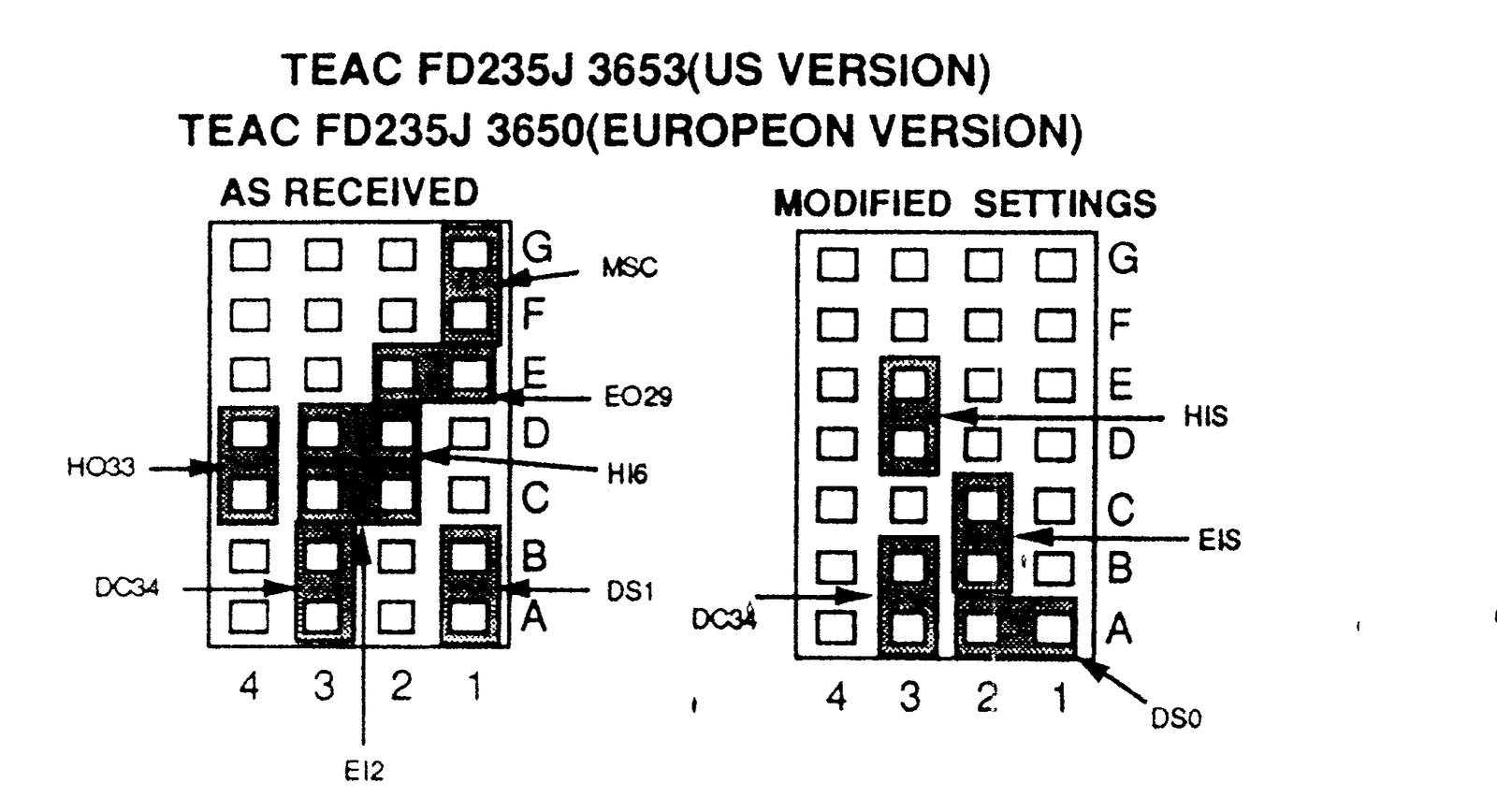
Well, it sounded easy enough from Miracle System’s Ad for the Gold Card in QL World; “enables the QL to interface to 3.2M Byte diskdrives (as well as 720K and 1.44)”. I could certainly see the possibilities for high density drives. I knew that Miracle had problems with an early TEAC ED drive, but they insisted that Gold Card ROM versions 2.15 and later had resolved the problem (see earlier issues of IQLR for details).I had been having minor problems with one of my floppies, and this seemed to be an opportune time to order a replacement and upgrade my system at the same time. Even though the cost of ED floppy disks is extremely high ($6.00 per diskette), I only plan on needing a half dozen of them. The access speed of the ED drives is 19 ms, the same as for the Miracle System’s Hard Drive. I plan to setup several “system” disks containing associated programs and use them as mini hard drives (3.2 meg. each). This will give me the advantage of a hard drive without the high cost. I called J.D. Hannam Distributors and ordered a 3.2M TEAC FD235J 3653 for $95.00 and a 1.44M TEAC FD235HF3217 for $55.00,which I received within a week. Then the trouble began. The 1.44M drive worked fine with the jumper straps in the factory settings. Even the drive select jumper was already in the position to make it flp2. The 3.2M drive was another story. It comes with seven jumpers and 28 pins on which they can be installed. This provides an almost infinite number of combinations. Over the next week, Bob Dyl and I tried just about every one of those infinite combinations. Of the three write and three read formats that the drive has to recognize, (3.2M, 1.44M and 720K), I was able to get almost any combination of five (such as read all three densities but only write to 3.2M and 1.44M).My next move was to call Stuart Honeyball at Miracle Systems for help.To my surprise, his comment was “we tried a TEAC drive when we first started, but never did get it to work”. This is not what we had been led to believe, nor the level of support we had come to expect from Miracle. He further suggested that I call someone in Germany (no suggestion as to who). I wrote to Jochen Merz and Franz Herrmann, but as it turned out we solved the problem before they could reply. In the meantime, Bob had been on the phone continuously to J.D.Hannam, TEAC and Mitsubishi with the results of our latest attempts. All three of these organizations were terrific and expended a considerable amount of time and effort on the part of their technical staff to find a resolution. The major problem they had was that they were not only unfamiliar with the QL/QDOS,but also had no information on Gold Card protocol. By this time Bob and I were convinced that a solution could be found, because we had been able to find combinations of strap setting that allowed us to read and write to all three densities even though we couldn’t made it happen all at once.Finally, TEAC had us start removing straps. This put us on the right track that finally led to success. The illustration below shows the strap settings that make this drive 100% compatible. The one thing that you may want to change from the illustration is the strap labelled DS0. The position shown is for the drive to be Flp1. If you want it configured for Flp2 then the DS0 strap would have to be shifted to A1-B1.These drives work fantastic, provide a tremendous upgrade in access speed and storage capability and I would recommend them to anyone with a Gold Card.