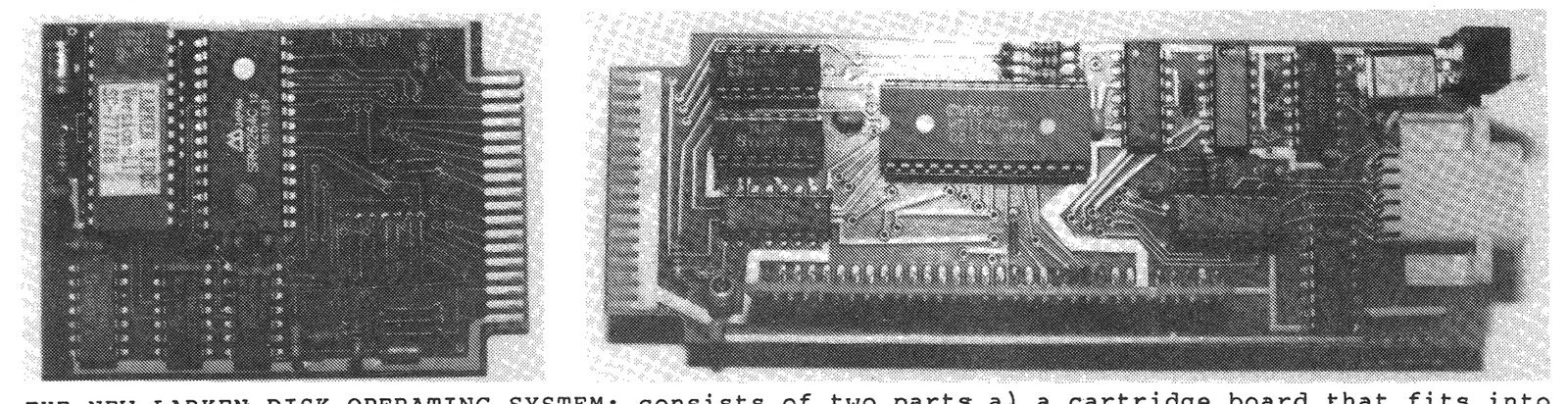
When I was looking for a disk operating system, the first thing I wanted was a system that would work on ALL of the ROM configurations available for the TS2068. At that time, I was running MSCRIPT, TASWORD II with a Spectrum Emulator, and ZTERM modem software with the Zebra OS-64 cartridge. Secondly, I was looking for a system which would leave me the largest amount of RAM possible because I was working mostly with large data-base and word processor type programs. Finally, I needed a system that would be simple to use and also within my limited budget. I searched in vain until the answer appeared almost in my own back yard [Ed.- Mr. Solly currently lives in Ottawa, Ontario, Canada].
The new Larken DOS dveloped by Larry Kenny of Larken Electronics, was like having my every wish come true. The disk operating system (DOS) fits neatly onto a cartridge which loads into the Timex Command Cartridge port. For a little bit extra, a second socket, fitted with a switch, can be added to the cartridge, to hold an additional chip that the user may own, such as a Spectrum Emulator, or a Zebra OS-64.
The rear circuit card is a compact double-density disk drive interface which also has a Kempston joystick port and a Non-Maskable Interrupt (NMI) push button. Because the DOS is “burned into its own EPROM, all the RAM of the computer is available to the user. The DOS is completely accessable whether you are using the standard Timex Sinclair ROM, the Spectrum Emulator ROM, or the Zebra OS-64 software ROM. Programs which are designed to run on both the TS2068 and Spectrum, need not be saved in two different formats to be re-loaded into each ROM configuration. A formated double-sided, double-density 80-track disk drive is capable of saving up to 800K of programs.
Converting programs to run on the Larken DOS, once the hardware is installed and the DOS is called into operation by RANDOMIZE USR 100: OPEN# 4, “dd”, is essentially a snap. The Larken DOS uses the same Sinclair tokens (which are found on the 2068 keyboard), as the tape-driven systems. After learning a few simple instructions and four mnemonic extensions, I was ready to handle most programs. The necessary adjustments needed to convert tape drive commands to Larken DOS commands can be quickly illustrated by the following chart of equivalents.
Tape Drive Command          Larken DOS Command

SAVE "Name"                 PRINT #4: SAVE "Name.Bn"
SAVE "Name" LINE 10         PRINT #4: SAVE "Name.Bn" LINE 10
SAVE "Name" CODE            [No equivalent]
SAVE "Name" CODE s,l        PRINT #4: SAVE "Name.Cn" CODE s,l
SAVE "Name" SCREEN$         PRINT #4: SAVE "Name.Cn" SCREEN$
SAVE "Name" DATA A()        PRINT #4: SAVE "Name.An" DATA A()
SAVE "Name" DATA A$()       PRINT #4: SAVE "Name.A$" DATA A$()
LOAD "Name"                 PRINT #4: LOAD "Name.Bn"
LOAD "Name" LINE 10         PRINT #4: LOAD "Name.Bn" LINE 10
LOAD "Name" CODE            PRINT #4: LOAD "Name.Cn" CODE
LOAD "Name" CODE s          PRINT #4: LOAD "Name.Cn" CODE s
LOAD "Name" CODE s,l        PRINT #4: LOAD "Name.Cn" CODE s,l
LOAD "Name" SCREEN$         PRINT #4: LOAD "Name.Cn" SCREEN$
LOAD "Name" DATA A()        PRINT #4: LOAD "Name.An" DATA A()
LOAD "Name" DATA A$()       PRINT #4  LOAD "Name.A$" DATA A$()
A “name” in LKDOS can be any combination of letters, numbers and graphics, up to six characters plus the appropriate extension. The “name” may also be in an alpha-numeric string so long as it follows the proper format and its total length is not longer than nine characters. If the “name” is to be stored in a DIM’ed alpha-numeric array, which I do not recommend although it can be done, then the array can not be any longer than nine characters of which the final three characters must be the proper extension.
The Larken DOS also has commands and error reports which are specific to its own operating system plus a number of extended BASIC commands. Here are two examples of Larken commands:
PRINT #4: CAT "",This is a very useful command that not only allows the user to see what has been stored on the disk but also, thanks to the use of unique extensions, what kind of files have been stored, the length in blocks of each file, and the total number of free blocks available. In the TS2068 ROM and the Zebra OS-64 mode, the user can also specifiy which type of file he wishes to be listed by entering, for example, CAT “.B”, when searching for just BASIC programs. Specific program names can also be searched in this manner.
PRINT #4: OPEN# 3,"lp"This command will allow you to LPRINT and LLIST to a full size printer that uses Aerco-type printer interface.
The extended BASIC commands available on Larken DOS allow the user to create geometric shapes with the DRAW and CIRCLE commands and then to fill them with any of 10 different patterns. Also available are a double POKE command (also known in some BASIC’s as DOKE), window creating commands, and a command which will read and LPRINT an ASCII text file directly from disk.
Finally, the Larken DOS has a number of new error reports to make operations easier for the user. These reports are:
S - Protect Error
T - File Not Found
U - Disk Full
V - Wrong File Type
W - Invalid Command
X - Cat Data Error
  - CRC Error (number)
Larry Kenny told me that he plans to add sequential file capabilities and other disk support software to his Larken system.
The cost of the new Larken system for the TS2068 (which does not include the actual drives or disk drive power supply), is $119.95 (U.S.). Optional extra socket for add-on ROMs is $6.00. The system may be ordered directly from the manufacturer: Larken Electronics, RR #2 Navan, Ontario, Canada K4B-1H9, tel. (613) 835-2680; or several dealers have them in stock, including RMG Enterprises, Weymil Corp., and Variety Sales.