
Nowak’s Letter Gets Response
Editor’s note: Our mail box has been quite full the past two months due to a letter and request we published in the Sept/Oct ’86 issue of TDM, on page 3. To paraphrase Mr. Nowak‘s letter, he requested a short program or routine that would by-pass the monitor and dump directly to the printer for doing simple computations. While the answer appears to be simple, such as the use of the LPRINT command, here is what some of our readers came up with. And thanks to everyone who took the time to write.
Dear Tim,
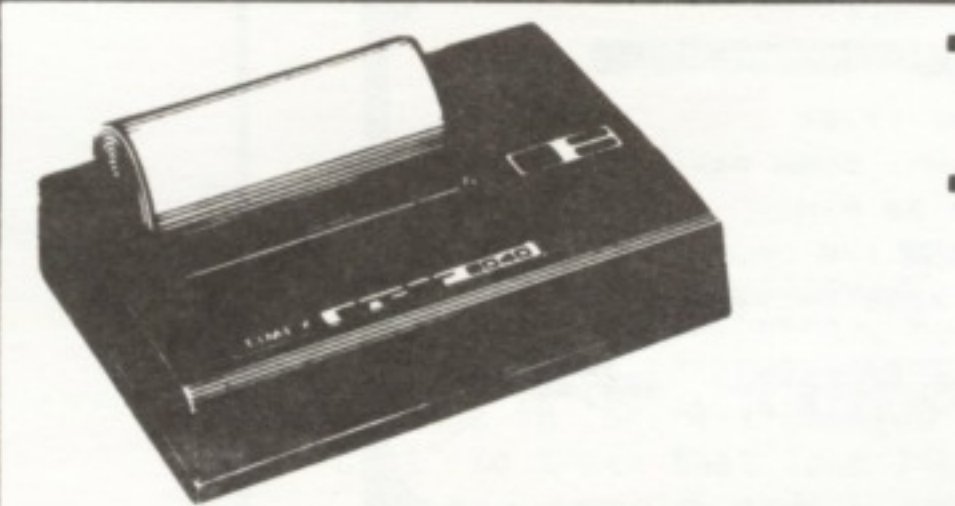
In the Sept/Oct 1986 issue Michael J. Nowak asked for a way to have the 2068 print to the printer instead of the screen. One simple method, which will work in the immediate mode or as a program line, is: OPEN #2, “P” The “#2” part refers to PRINT and LIST commands. The “P” refers to the 2040 printer (“S” would mean screen in this syntax). Hence, PRINT or LIST will subsequently go to the printer instead of the screen. LLIST, LPRINT, INPUT, and lower screen messages will still appear on the screen. CLOSE #2 gets things back to normal.
Opening and closing files in this way was not mentioned in the 2068 User Manual (more Timex unfinished business), but it can be a useful feature. Listing #1 is an example in which channel #4 is used to give a screen or printer option for the output. I chose #4 because #1, #2, and #3 are reserved for INPUT, PRINT/LIST, and LPRINT/LLIST commands, respectively. It’s worth experimenting with!
Sincerely,
Larry Dietrich
Blanca, CO
 100 REM EXAMPLE OF DEVICE INDEPENDENT OUTPUT
 110 LET GETKEY=1000
 120 PRINT "Output to Screen or Printer?    (Press S
or P)"''
 130 GO SUB GETKEY
 140 IF I$<>"S" AND I$<>"s" AND I$<>"P" AND I$<>"p" THEN
GO TO 130
 150 OPEN #4,I$
 200 REM BODY OF PROGRAM
 210 FOR L=1 TO 10
 220 PRINT #4;TAB (L<10);L;" squared = ";L*L
 230 NEXT L
 240 PRINT '"DONE": REM THIS PRINTS TO SCREEN
 250 STOP
1000 REM GETKEY SUB
1010 LET I$=INKEY$
1020 IF I$="" THEN GO TO 1010
1030 RETURN
Listing 1
 1 squared = 1
 2 squared = 4
 3 squared = 9
 4 squared = 16
 5 squared = 25
 6 squared = 36
 7 squared = 49
 8 squared = 64
 9 squared = 81
10 squared = 100
To the Editor,
In response to Mr. Nowak’s letter in TDM Sept/Oct ’86 issue–the enclosed program works well on the 2068 and TS 1000 (using the proper “to the power” symbol). It can be enhanced by putting in an entry counter with C$ and B tabbed to other locations and/or reversing the position of C$ and B. The base program is:
10 INPUT C
20 PRINT C or LPRINT C
30 GOTO 10
The value of C is calculated and printed (Lprinted) as a single value. The entry prompted by an L cursor is not printed (Lprinted) and is “lost”.
W.B. Gray Jr.
West Caldwell, NJ
   1 REM ......Evaluators.......
   2 REM ......LINES 1,2,3,4,51,
100,101 NOT NECESSARY...........
   3 LPRINT "INPUT","ANSWER"
   4 LPRINT ".....","......"
  20 INPUT C$
  30 IF C$="0" THEN GO TO 100
  40 LET B=VAL C$
  50 LPRINT C$;TAB 15;"=";B
  51 LPRINT "-------------------
------------"
  60 GO TO 20
 100 LPRINT
 101 LPRINT "*******************
************"
 102 STOP
3+8= 11 ------------------------------- 5*7= 35 ------------------------------- B+10= 45 ------------------------------- B/9= 5 ------------------------------- (B/4)+11= 12.25 -------------------------------
To the Editor,
Regarding Mr. Nowak’s letter: There is a very simple solution to this, but it has two small drawbacks. After turning on the 2068, type in:
POKE 26692,80 : POKE 26697,80 (Enter)
Now everything that would normally go to the screen will go to the printer. Drawback #1- No program line or immediate command can be entered that is longer than 32 characters (the length of the printer buffer). Longer program lines can be loaded from tape, before or after the Poke’s, or typed in before the Poke’s. Drawback #2- with an immediate command like: PRINT 2+2 (Enter) the answer (4) will overwrite the “P” in the word PRINT in the printer buffer before it is sent to the printer…so type in: PRINT 2+2 and then hold down the space bar to fill the printer buffer. When the printer starts to print, press enter and the answer (4) will print on the next line.
Yours Truly,
P. Aylesworth
Bradford, Ontario
Canada
Goyette’s “Ski” and “Cavern” A Hit
Dear Tim,
I found “SKI” (TDM-July/August 86) by Charles E. Goyette, to be a fantastic game. The only problem was that the person with the highest score for a game was not always listed as being the winner. Changing H$ to S$ in line 500 seems to correct this.”
Sincerely,
Kenneth Fracchia
Buffalo, NY
Dear Time Designs,
I have enjoyed both “CAVERN” and “SKI” by Charles E. Goyette. They both act and react faster than my fingers can manipulate the keys. I did however, make a slight change in “SKI”. I changed the trees that look like “bugs” to trees that look like trees with:
9000 DATA 1,128,1,128,3,192,3,19
2,7,224,7,224,1,128,1,128
This makes a nice pine tree with the addition of color, “INK 4”, in line 1100.
For what it’s worth.
Sincerely,
Richard B. McMahill
Washington, DC
Mathematics
Dear Sir,
Readers of TDM might be interested in the following equalities produced by my 2068. Other such relationships can be obtained by use of the program shown on page 232 of Laurie Buxton’s book, “Mathematics For Everyone”.
    PI - 103993/33102 = 0
 EXP 1 -  49171/18089 = 0
 SQR 2 -  66922/47321 = 0
 SQR 3 -  70226/40545 = 0
SQR 10 - 168717/53353 = 0
  .125 - 1/8 = 5.8207661E-11
   1.3 - 13/10 = 4.6566129E-10
Sincerely yours,
Howard R. Wilkerson
Greenville, SC
Request for LARKEN Help, etc.
Dear Sir,
I am writing in the hopes that you may be able to help me with a few questions. First of all I understand that there is a version of Prologue available for the Spectrum. I have searched all present and back issues of ZX Computing, Your Sinclair and Sinclair User that I own and could find no mention of it. I am hoping that you or one of your readers might know of the program I am talking about.
Secondly, I am hoping that someone might be able to help me with some conversion problems. I am trying to convert some of the other languages for the TS 2068 and the Spectrum onto the LARKEN disc drive system. I have Abersoft FORTH, Hi-Soft C, Hi-Soft Pascal and YS Megabasic which I would like to make full compatable with the Larken system. So far, I have been able to put the main Basic loaders and machine code onto disc, but I do not know how to convert Save-Load routines within each language to save and load from disc. Perhaps someone has already solved the problem and could offer me some help. I thank you for your time and trouble.
Sincerely,
David Sölly
OTSUG Librarian
Ottawa, Ontario
Editor: I have found no reference to a “Prologue” program for the Spectrum, but some other “Speccy-phile” may provide the answer. As for your software conversion problems with the LARKEN disc drive interface, it sounds like you may have an earlier version of the LARKEN DOS. I have been in contact with Larry Kenny (a.k.a.; Larken Electronics) and he mentioned that a new 2068 DOS is available on disc that has improved LOAD/SAVE commands (supporting Arrays, Basic Code), and also FORMAT, CAT, ERASE and OPEN# commands. Larry also mentioned that he will begin work on offering the DOS (which is Spectrum compatible) on a cartridge, therefore using no computer RAM. Hold on to your seat on this one…it will have the NMI save feature. This will allow you to do “snap shot” saves like that on the John Oliger Disc Interface. I would suggest that anyone requiring information on new LARKEN improvements write to: Larken Electronics, RR#2 Navan, Ontario, Canada K4B-1H9.
“Pigskin Picks”
Dear Tim,
I am sending my check for another enjoyable year of TDM…the only real connection I have with the TS world, and I always look forward to receiving my TDM. I have enclosed a small football prediction program that I wrote. The program will average about 65% correct over the whole season.
I am also wanting to start a Users Group in the Bee County Area. If I can start one, it will be called “Bee County Timex Sinclair Users Group”- B.C.T.S., and if it is possible I would like to give the members that don’t have computers a ZX81 or TS 1000 for joining. I would like to hear from other TS users for some input on this subject.
Sincerely,
Tom Proffitt
[address omitted]
Beeville, TX 78102
Editor: “Pigskin Picks” was fun, but my team looked just as bleak as before I keyed in your program (better luck for me next year, I guess). Hope you get a users group off the ground. A free computer offer is hard to beat.
   1 REM "BY:TOM PROFFITT
        DATE:1982
      PLACE:BEEVILLE,TEXAS
   2 REM "Pigskin Picks" can als
o be used for Basketball. It wor
ks best after the fourth game. "
Not to be used for gambling if y
ou want to keep your money!"
   3 BORDER 1: PAPER 1: INK 7: C
LS : POKE 23609,70
  10 PRINT TAB 8;"PIGSKIN PICKS"
  11 PRINT "********************
************"
  50 INPUT "enter 1st. team ";a$
  55 REM ENTER OFFENSE-POINTS
 140 INPUT "POINTS-FOR ";c
 150 REM ENTER DEFENSE-POINTS
 160 INPUT "POINTS-AGAINST ";d
 170 INPUT "enter games played "
;e
 200 INPUT "enter 2nd.team ";f$
 255 REM ENTER OFFENSE-POINTS
 290 INPUT "POINTS-FOR ";i
 300 REM ENTER DEFENSE-POINTS
 320 INPUT "POINTS-AGAINST ";j
 350 INPUT "enter games played "
;k
 460 LET t=c/e
 470 LET u=d/e
 480 LET r=i/k
 490 LET s=j/k
 500 LPRINT a$;" ";INT (t+s)/2
 510 LPRINT f$;" ";INT (u+r)/2
 520 LPRINT
 530 LPRINT
 540 GO TO 10
Note: Type-in program listings on this website use ZMAKEBAS notation for graphics characters.