
Well, here we are again! For those of you who may not have seen the last MCM article, I’ll explain what we are doing. The object of this series is to present you with several machine language programs that can be used to enhance your BASIC programs. You don’t have to know anything about machine language to use these routines though. If you follow the instructions carefully, you shouldn’t have any trouble. Last time, I gave a more detailed introduction, and we covered a DATA-READ simulation. If you find this article interesting, I am sure you’ll want to get a copy of the last one.
This month’s feature consists of five short screen scrolling routines (138 bytes total). There’s one for each of the four directions: up, down, left, and right. These may be used individually to scroll the screen in the desired direction; or, by running the fifth routine, you can call up any of the other four. In other words, you may use a different USR statement for each of the scrolls, but it’s also possible to use a single USR statement to access all of them. By using the later method, you also get the ability to combine a vertical and a horizontal scroll to get a diagonal scroll. Another feature of these routines is that they don’t affect the CLS command in any way. As you have probably noticed, the TIMEX scroll command causes CLS quite a bit of grief. There is one limitation though, you must have at least 4K of memory so that the screen is always fully expanded.
I’ve thrown in a sixth routine as well. It allows you to find the address of any BASIC line rather easily. This will be especially useful as the REM statements which contain machine code start to pile up. If you POKE the line number in the right place, running this routine will give you the appropriate address. You won’t have to use the mile long, and potentially troublesome, PEEK expressions that you used in the last article. I figured that this would be a welcome addition.
We are ready to enter the routines now, so you need to LOAD the loader program that I gave you last time. You should LOAD the version which has the DATA-READ routine saved with it. That way, you can have all your machine code routines in one BASIC program. If you didn’t SAVE it last time, here it is again:
LOADER PROGRAM LISTING
  10 PRINT "ENTER START ADDRESS"
  20 INPUT A
  30 CLS
  40 FOR B=A TO A+175
  50 PRINT (STR$ PEEK B+"   ")( TO 4);
  60 NEXT B
  80 LET B=0
  90 LET N=999
 100 LET M=9999
 110 LET Y=INT (B/8)
 120 LET X=(B-Y*8)*4
 130 PRINT AT Y,X;"???"
 140 INPUT C
 150 IF C<256 THEN POKE A+B,C
 160 PRINT AT Y,X;(STR$ PEEK (A+B)+"   ")( TO 4)
 170 IF C=N AND B>0 THEN LET B=B-1
 180 IF C<>N AND B<175 THEN LET B=B+1
 190 GOTO 110
If the line number of the DATA-READ routine is 9999 or 9998, then EDIT the line and change it to 9997. DO NOT MOVE THE CURSOR PAST THE REM! For reasons I’ll discuss later, the address finding routine must be stored at the very end of a BASIC program. It is this routine which we will enter first.
To start, enter the 9999 REM statement which will hold the new routine. It should have exactly 30 characters after the REM, and, should look like this:
ORIGINAL REM LISTING 1
9999 REM 123456789012345678901234567890Now, RUN the loader program (in FAST mode). When it asks for an address, type this statement in: PEEK 16396 + 256 * PEEK 16397 – 31. For those of you who aren’t using REM statements, be sure to answer with <ADDRESS – 6> so that your screen matches the table except for the first six numbers. After the screen fills and the cursor (three inverse question marks) appears, you may enter the numbers in TABLE 1. As I explained last time, those not using REM statements should skip the first six numbers. They aren’t a part of the routine, they just fix the REM statements so that the DATA-READ routine doesn’t use them as data. Remember, you MUST NOT alter any of the numbers beyond the end of the table.
Here’s a refresher on using the loader. When you enter a number, the cursor advances to the next position. If you find that you entered a number incorrectly, you can back up one space at a time by entering the letter N. Back up until the cursor is on top of the offending number, then re-enter the correct number. Use the letter M to get back where you left off. It advances the cursor one space at a time. If you BREAK the program by mistake, don’t worry, just RUN the program again. The numbers you entered before will still be there. After you have fixed ALL of the errors, you can quit by entering the letter Q. You will notice that the screen looks exactly like the table in the magazine, except that the screen doesn’t stop where the table does. This facilitates error checking. I’ll remind you again, DO NOT change the numbers beyond the end of the table.
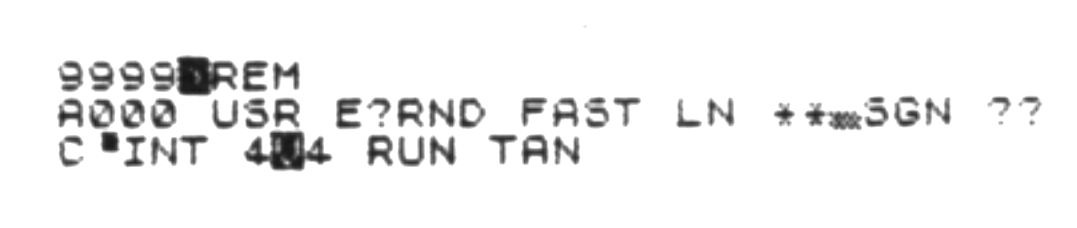
When all the numbers in TABLE 1 have been entered and checked, you should break the loader program. The REM statement should look like this:
MODIFIED REM LISTING 1
Add this line to help you remember how to use the routine when you don’t have this article with you:
ADDRESS FINDER I.D. REM
9998 REM ADDRESS OF MC IN A REM POKE 16508, INT(LINE/256) : POKE 16507, LINE-INT(LINE/256)*256 : LET ADDRESS=11+USR (PEEK 16396+256*PEEK 16397-25)SAVE the loader program with the REM statements now. This is in case you have missed an error that will crash the computer. Obviously, you will also need this on tape anyways, but it’s important to SAVE it before testing.
To test the address finder, type the following lines into the computer. If the message “IT WORKS OK” appears, the routine is fine. If the message is not printed, or if the computer crashes — go back and fix the errors. You may try re-entering the test lines if you think you made a mistake there.
POKE 16507,15
POKE 16508,39
IF PEEK 16396+256*PEEK 16397-36=USR (PEEK 16396+256*PEEK 16397-25) THEN PRINT "IT WORKS OK"
Here follows more detailed instructions for the use of the address finding routine: NEVER RUN A USR STATEMENT WITHOUT CALCULATING THE CORRECT ADDRESS! You must use this routine to calculate or re-calculate the addresses of your routines after changing ANY part of your BASIC program. You should include the address calculating statements within the program itself. If you don’t recalculate the addresses, you will probably crash the computer! It may seem annoying, but that’s the price one has to pay for the added benefits. You should never erase the lines holding this routine as they will be needed as long as you use my machine language routines. The instructions REM is, of course, optional, but I think you will find it helpful.
Here follows a short demonstration program that I will use in explaining the use of the address finder:
ADDRESS FINDER SAMPLE LISTING
  10 LET ADDRESS=PEEK 16396+256*PEEK 16397-25
  20 POKE 16508,INT (9997/256)
  30 POKE 16507,9997-INT (9997/256)*256
  40 LET RESTORE=11+USR ADDRESS
  50 LET READ=RESTORE+32
TABLE 1: ADDRESS FINDER
118 39  16  0   25  212 42  123
64  229 205 216 9   209 68  77
40  2   207 32  126 186 32  252
35  126 187 32  247 201
TABLE 2: SCROLL ROUTINES
118 39  16  0   140 231 55  245
58  33  64  31  48  5   31  56
5   24  22  31  56  51  241 58
33  64  31  31  31  48  4   31
216 24  88  31  208 24  63  167
245 42  12  64  229 84  93  1
33  0   9   1   247 2   197 237
176 193 225 9   151 6   32  35
119 16  252 241 208 24  208 167
245 42  12  64  229 229 1   24
3   9   235 225 1   247 2   9
237 184 151 6   32  225 35  119
16  252 241 208 24  177 1   117
25  12  42  16  64  22  0   43
126 185 40  4   114 87  24  247
16  243 201 1   117 24  12  42
12  64  22  0   35  126 185 40
4   114 87  24  247 16  243 201
Line 20 defines the address of the address finding routine IF AND ONLY IF it is the very last line in the BASIC program!
Lines 30 and 40 specify the line whose address you wish to find. Any lines used in this manner should appear at the beginning of your BASIC program. This is because other machine code routines may use the same addresses. Its a good place anyways, because then you can be sure you always have correct addresses when you RUN the program. It is not necessary to enter the whole expression after the POKE. You may fill in their equivalent values. For example, line 30 could be replaced by 30 POKE 16508, 39 since 39 = INT (9997 / 256). If you change the line number of the routine, be sure to change these lines also.
Line 50 puts the correct address for the RESTORE command into the variable. If a non-existent line number was specified, the program will stop with an L/<line number> error message. The ‘L’ stands for a ‘Line number error’. Note that you must add 11 to the value of the USR expression. The address returned is the address of the actual beginning of the line. To get the beginning of the machine code, you have to add 11 to this address! This means that the routine could possibly be used for purposes other than the one I wrote it for.
Oh! One more thing: you’ll find that your computer will never automatically list the lines after the DATA-READ REM. They are there though. If you specifically say LIST 9998 (or whatever line follows), then the computer will list the lines.
With our ‘librarian’ routine taken care of, we can go on to bigger and better things. You guessed it… its time to enter the scroller routines. To do so, you need to LOAD the loader program again. Be sure to LOAD the version that has the address finder routine SAVEd with it.
Let’s make use of the new address finding routine by slightly modifying the loader. (Of course, if you don’t store the machine code in REM statements, this paragraph does not apply to you.) By adding two POKE statements and a USR statement, the loader will accept a line number as an address. By changing the program so it looks like this, you now have a loader that’s a lot easier to use:
MODIFIED LOADER LISTING
  10 PRINT "LINE NUMBER OF REM FOR M-CODE?"
  15 INPUT A
  20 POKE 16508,INT (A/256)
  25 POKE 16507,A-INT (A/256)*256
  30 LET A=5+USR (PEEK 16396+256*PEEK 16397-25)
  35 CLS
  40 FOR B=A TO A+175
  50 PRINT (STR$ PEEK B+"   ")( TO 4);
  60 NEXT B
  80 LET B=0
  90 LET N=999
 100 LET M=9999
 110 LET Y=INT (B/8)
 120 LET X=(B-Y*8)*4
 130 PRINT AT Y,X;"???"
 140 INPUT C
 150 IF C<256 THEN POKE A+B,C
 160 PRINT AT Y,X;(STR$ PEEK (A+B)+"   ")( TO 4)
 170 IF C=N AND B>0 THEN LET B=B-1
 180 IF C<>N AND B<175 THEN LET B=B+1
 190 GOTO 110
After the loader program is ready, the first thing to do is type in a REM statement that has exactly 144 characters after the REM. The line number is not critical, but I’d suggest you make it 9995 so that it is right next to all the other machine code REMs. An example REM follows:
ORIGINAL REM LISTING 2
9995 REM 123456789012345678901234567890123456789012345678901234567890123456789012345678901234567890123456789012345678901234567890123456789012345678901234With the REM entered, you may RUN the loader in the FAST mode. If you have modified the loader, respond to the resulting prompt with the line number of the REM that you just typed in. As always, those not using REMs are advised to enter the desired address of the routine – 6. In either case, enter the numbers in TABLE 2. Once again, skip the first six numbers if you’re not using a REM. It may seem repetitive, but once again I’ll warn you not to alter anything beyond the end of the table.
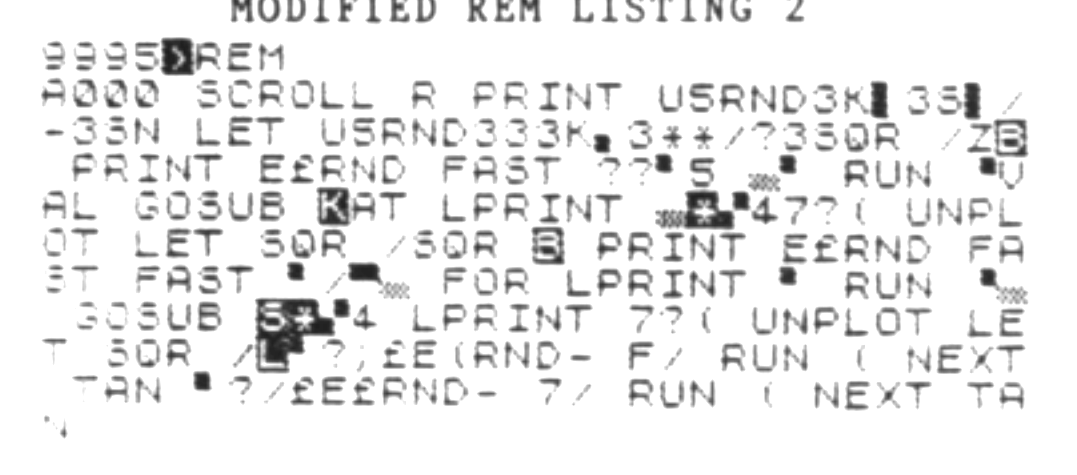
With the data entered and verified against the table, quit the program by entering a Q. The following REM shows what the line should look like:
MODIFIED REM LISTING 2
Now, enter the following name tag REM so that you know which routine is in the line you just entered. This will be important later when you have forgotten.
SCROLLER I.D. REM
9994 REM SCROLLER - DISPATCHERAt this point, SAVE the loader and routines on tape.
It’s now time to explain how to use the scroll routines that you have just finished entering. Once again, I’ll remind you that they must not be used unless your screen display is fully expanded. I’m told that it is always expanded when you have 4K or more of RAM hooked up for BASIC. In any case, a 16K machine will definately be using a fully expanded display.
As I mentioned before, there are two ways to access these scrolls. The first way is to use separate USR statements for each of the four individual directions. The following listing shows how you can use the scroll routines in this manner:
INDIVIDUAL USR EXAMPLE LISTING
  10 LET ADDRESS=PEEK 16396+256*PEEK 16397-25
  20 POKE 16508,INT (9995/256)
  30 POKE 16507,9995-INT (9995/256)*256
  40 LET DISPATCH=11+USR ADDRESS
  50 LET UP=DISPATCH+33
  60 LET DOWN=DISPATCH+65
  70 LET LEFT=DISPATCH+96
  80 LET RIGHT=DISPATCH+117
  90 PRINT AT 10,15;"X"
 100 RAND USR UP
 110 RAND USR RIGHT
 120 RAND USR DOWN
 130 RAND USR LEFT
Try it out. If it doesn’t work, you had better find any errors you missed while entering the table of numbers. You’ll have to use the loader to fix them.
The second method of using these scrolls is via a single dispatching routine which can call up any one of the four separate scrolling routines. For the dispatcher to know which scroll is desired though, requires some data to be stored somewhere. I’ve chosen the byte located at address 16417 since it is normally unused by the computer. A simple POKE 16417,<number> will provide the data required by the dispatcher.
The scroll that will occur when the dispatcher is called depends upon the number that is POKEd into address 16417. If a 1 is poked, the routine will cause an UP scroll. A POKE 16417,2 will yield a DOWN scroll. Likewise, a 4 will initiate a LEFT TO RIGHT scroll and an 8 yields a RIGHT TO LEFT scroll. You may combine more than one scroll by simply adding the numbers required for a particular direction. In other words, POKE 16417,5 or POKE 16417,4+1 will cause the dispatcher to scroll the screen diagonally towards the upper right hand side of the screen. Using this method, you may achieve a scroll in 8 unique directions. Note that adding an up and a down scroll does not do anything. Likewise, neither does adding a LEFT-RIGHT and a RIGHT-LEFT scroll.
As you can see, using the scroll routines is quite elementary. The following listing is an example of how you can use the scroll dispatcher:
SCROLL DISPATCH EXAMPLE LISTING
  10 LET ADDRESS=PEEK 16396+256*PEEK 16397-25
  20 POKE 16508,INT (9995/256)
  30 POKE 16507,9995-INT (9995/256)*256
  40 LET SCROLLER=11+USR ADDRESS
  50 LET DIRECTION=16417
  60 PRINT AT 10,15;"X"
  70 INPUT X
  80 POKE DIRECTION,X
  90 RAND USR SCROLLER
 100 GOTO 70
Now that you know how to use the scroll dispatcher, try it out. If the computer crashes, you have either made an error in calculating the address of the routines, or you have failed to correct an error while typing in the machine code numbers. Carefully check the USR statements against my examples first. If they are correct, then you’ll have to recheck and correct your mistake in the machine code numbers. You do this by following the same procedure you used when you started the loader to enter the table the first time. Be sure to SAVE the corrected version to tape.
When you want to write a program using these routines, the loader is no longer needed, and may be erased line by line. You may also delete any REM statements containing unused machine code routines. The address finding routine is ALWAYS used.
If you would like to fix up an already written program with these routines, you may do so by adding the loader listing to the existing program listing. Type in the appropriate 9999 REM for the address finder, and enter it. Then you can add an appropriate REM for the other routine you wish to add. Modify the loader for use with the address finder, then enter the desired routine. It is a lot more bother to fix up an existing program, but its probably less bother than re-entering the whole thing with the REMs previously created.
As with the DATA-READ routine, I will make an assembly language listing available to those who are genuinely interested. It is fully documented so that a programmer can follow the logic incorporated in the routines. If you would like this listing, please send 50 cents to cover my costs. If you have questions not answered in the article, I will attempt to answer them if you send a self-addressed and stamped envelope. If you missed the article featuring the DATA-READ simulation, you may check with TSH about getting a back issue, or I can provide a copy of the article with the assembly listing ($2.00). My address is:
Kevin R. Bulgrien
LeTourneau College #1014
P.O. Box 7001
Longview, TX 75607
Note: Usually I can respond to a request within a day or so. If, however, I can’t, please be understanding. Being a college senior means that my schedule is very full. I work on this project if I find time. I had planned to try to get these articles in for every TSH issue, but it’s proving to be nearly impossible – time is hard to find!
Note: Type-in program listings on this website use ZMAKEBAS notation for graphics characters.