
Gauss Elimination is one of the oldest, most commonly employed, efficient, and straight forward methods of obtaining the solution of sets of simultaneous linear equations on a digital computer. This method is very easily understood and programmed.
Consider as an example the following set of four equations:
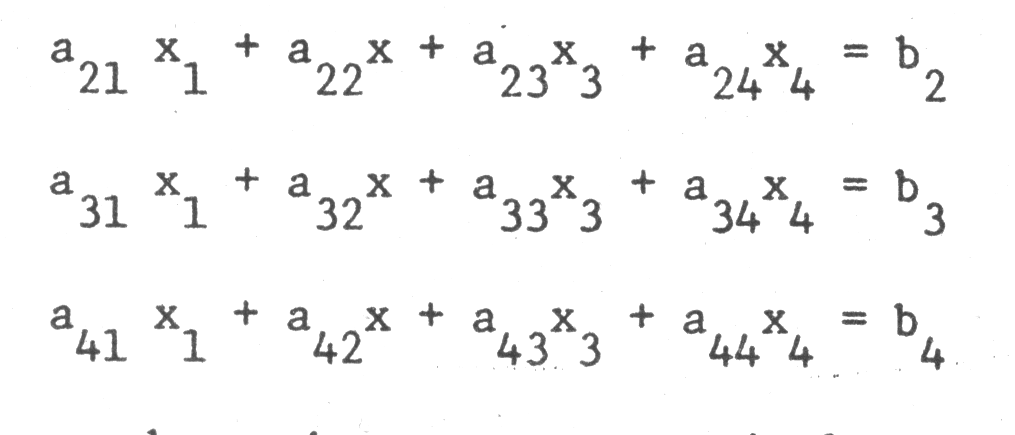
This can be written more succincly using matrix notation as:
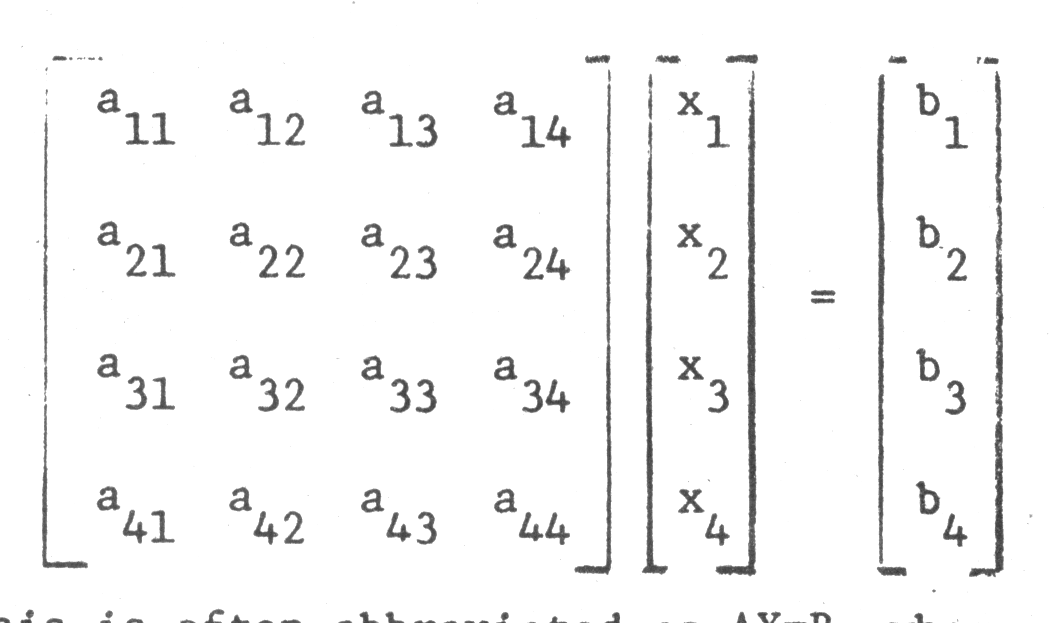
This is often abbreviated as AX=B, where A is called the “matrix of coefficients” and X is called the “solution vector.”
The solution vector to this set remains unchanged if “elimentary row operations” are performed on the system, i.e., if
1) any equation is multiplied (or divided) by a constant, or
2) a given equation is replaced by the sum (or difference) of that equation and any other equation in the system.
Gauss elimination is, in a nutshell, a sequential application of elementary row operations. The top row is first divided by a₁₁. Thus
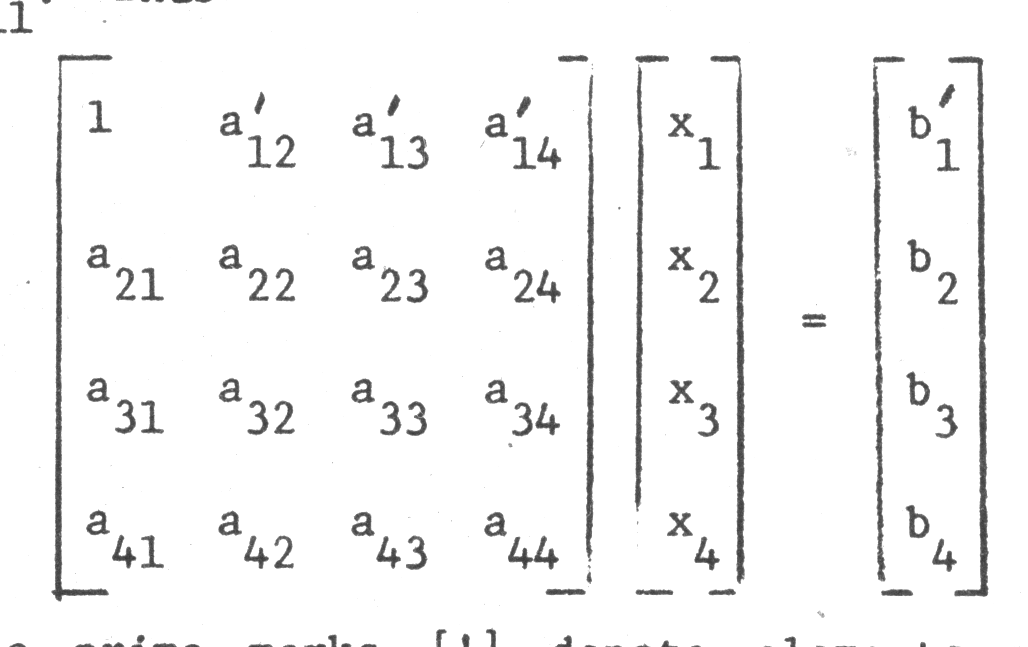
The prime marks [‘] denote elements which have been changed from their original values. The first row is then multiplied by a₂₁ and subtracted from the second equation. This yields:
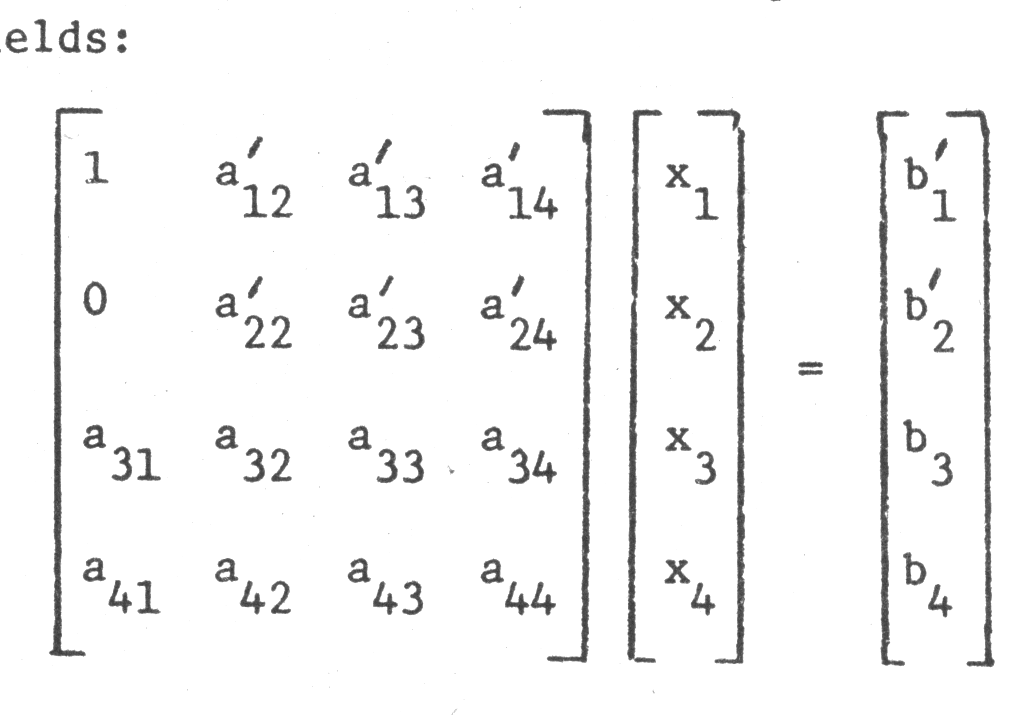
The first equation is then multiplied by a₃₁ and subtracted from the third, then multiplied by a₄₁ and subtracted from the fourth. During these operations, the first row is referred to as the “pivot row” and a₁₁ is termed the “pivot element.”
Following these operations, the entire first column below a₁₁ has now been cleared to zero and the set appears as
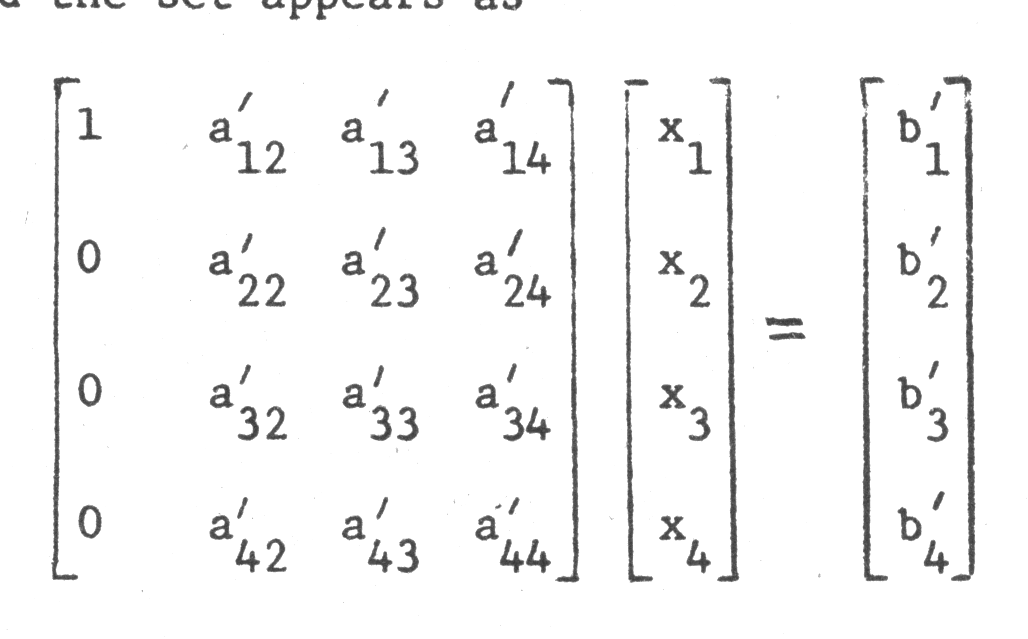
The second row now becomes the pivot row and a′₂₂, the pivot element. The second row is divided by a′₂₂, the multiplied by a′₃₂ and subtracted from the third row.
Multiplication of the second row by a′₄₂ followed by subtraction of this row from the fourth row then clears the remainder of the elements of the second column which fall below the diagonal.
The process is continued with the next rows, each serving as pivot rows, until the equations are in the form:
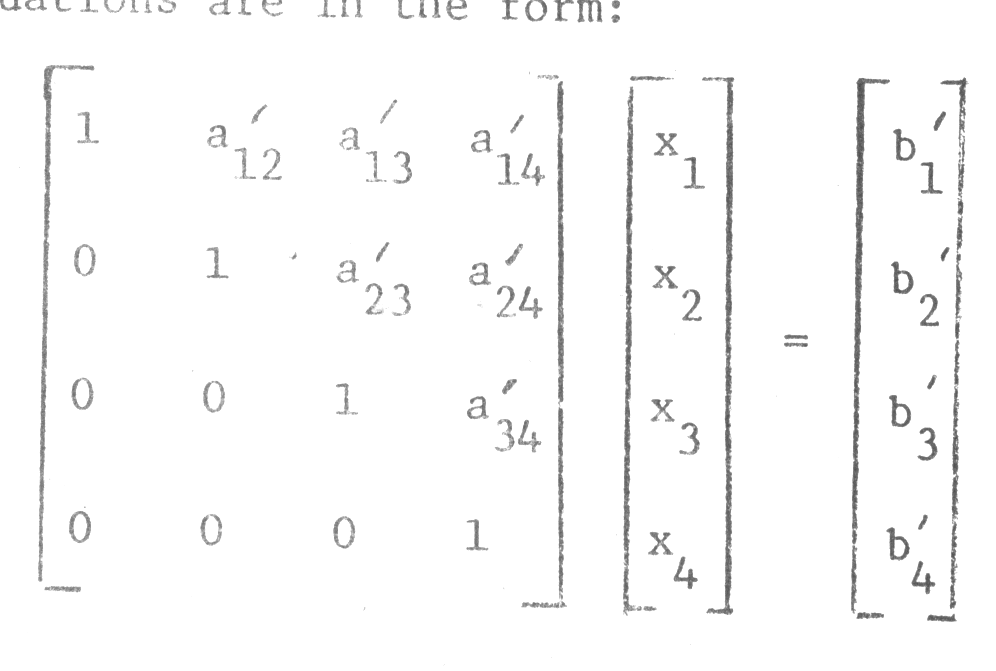
The bottom equation of the system now yields directly the value of x₄ as:
x₄ = b′₄
The third equation may be solved for x₃ since x₄ is known.
x₃ + a′₃₄x₄ = b′₃
or x₃ = b′₃ – a′₃₄x₄
Repeated back substitution, moving upward, yields only one new unknown for each equation, and eventually the unknown vector x will be completely determined when the top equation is solved for x₁.
THE PROGRAM
The computer program is a straight forward application of these ideas.
1) First, N, the number of equation is prompted and entered. The program limits N to 10 or less, by the dimension statements in lines 4, 5, and 6. However this can be increased depending on the amount of memory available.
2) Then the matrix A is entered by rows, i.e., a₁₁, a₁₂, …a IN, than a₂₁, a₂₂,…a₂N, etc.
3) Finally the column vector B is entered as b₁, b₂,…bN. From this point, the computer proceeds, and the solution is printed out as N components.
EXAMPLE
The system of equations:
3X₁ – X₃ = 4
-X₁ + 2X₂ + X₃ = -2
3X₁ + 6X₂ + 3X₃ = 6
In matrix form is written:
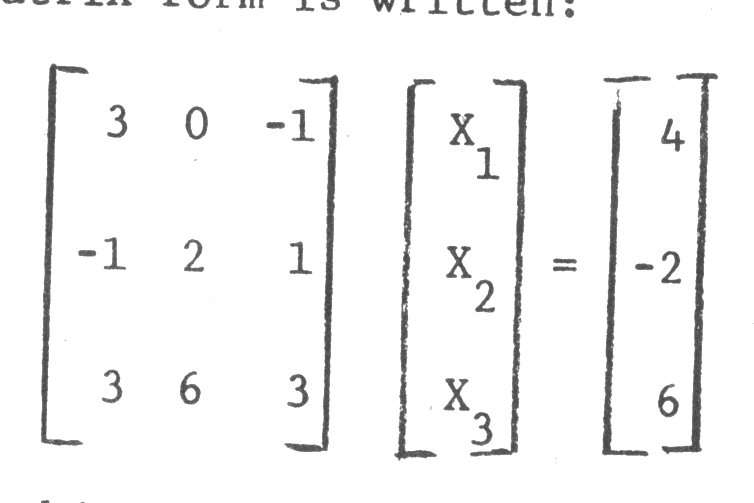
1) In this case N=3.
2) Then the coefficients are entered as 3, 0, -1, -1, 2, 1, 3, 6, and 3.
3) Then the B vector is entered as 4, -2, 6.
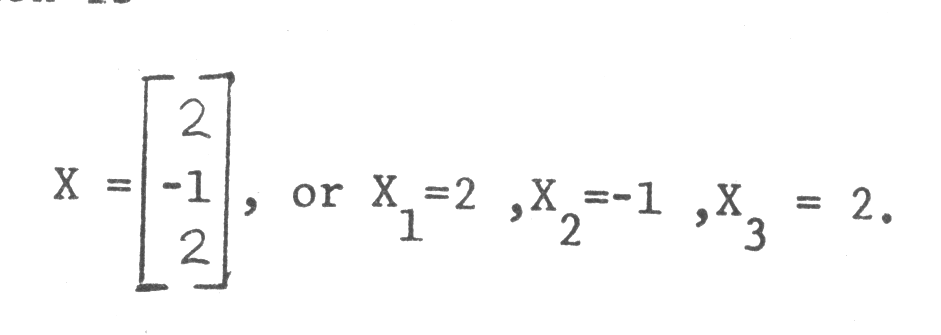
The solution is
 1 REM GAUSS
 2 REM GAUSS ELIMINATION
 3 REM PROGRAM
 4 DIM A(10,10)
 5 DIM B(10)
 6 DIM X(10)
 7 PRINT "INPUT N"
 8 INPUT N
 9 LET N1=N
10 FOR I=1 TO N
11 FOR J=1 TO N1
12 INPUT A(I,J)
13 NEXT J
14 NEXT I
15 PRINT "ENTER B VECTOR"
16 FOR I=1 TO N
17 INPUT B(I)
18 NEXT I
19 LET K=1
20 LET I=K+1
21 IF (A(K,K) =0) THEN GOTO 35
22 LET A1=A(I,K) /A(K,K)
23 LET B(I) =B(I) -B(K)*A1
24 LET J=K
25 LET A(I,J) =A(I,J)-A(K,J) *A1
26 IF (J>=N)  THEN GOTO 29
27 LET J=J+1
28 GOTO 25
29 IF (I>=N) THEN GOTO 32
30 LET I=I+1
31 GOTO 21
32 IF (K>=(N-1))  THEN GOTO 49
33 LET K=K+1
34 GOTO 20
35 LET M=K+1
36 IF (A(M,K)<>0)  THEN GOTO 40
37 LET M=M+1
38 IF M<=N  THEN GOTO 36
39 GOTO 67
40 LET C1=B(K)
41 LET B(K)=B(M)
42 LET B(M)=C1
43 FOR J=1 TO N
44 LET Z1=A(K,J)
45 LET A(K,J)=A(M,J)
46 LET A(M,J)=Z1
47 NEXT J
48 GOTO 22
49 REM BEGIN BACK SUBSTITUTION
50 LET L=N
51 LET SUM=0
52 IF L<N THEN GOTO 57
53 LET X(L)=(B(L)-SUM)/A(L,L)
54 IF (L<=1) THEN GOTO 62
55 LET L=L-1
56 GOTO 51
57 LET J=L+1
58 LET SUM=SUM+A(L,J)*X(J)
59 IF J>=N THEN GOTO 53
60 LET J=J+1
61 GOTO 58
62 PRINT "ROOTS ARE."
63 FOR L=1 TO N
64 PRINT X(L)
65 NEXT L
66 GOTO 68
67 PRINT "SINGULAR EQUATIONS"
68 STOP
Note: Type-in program listings on this website use ZMAKEBAS notation for graphics characters.