
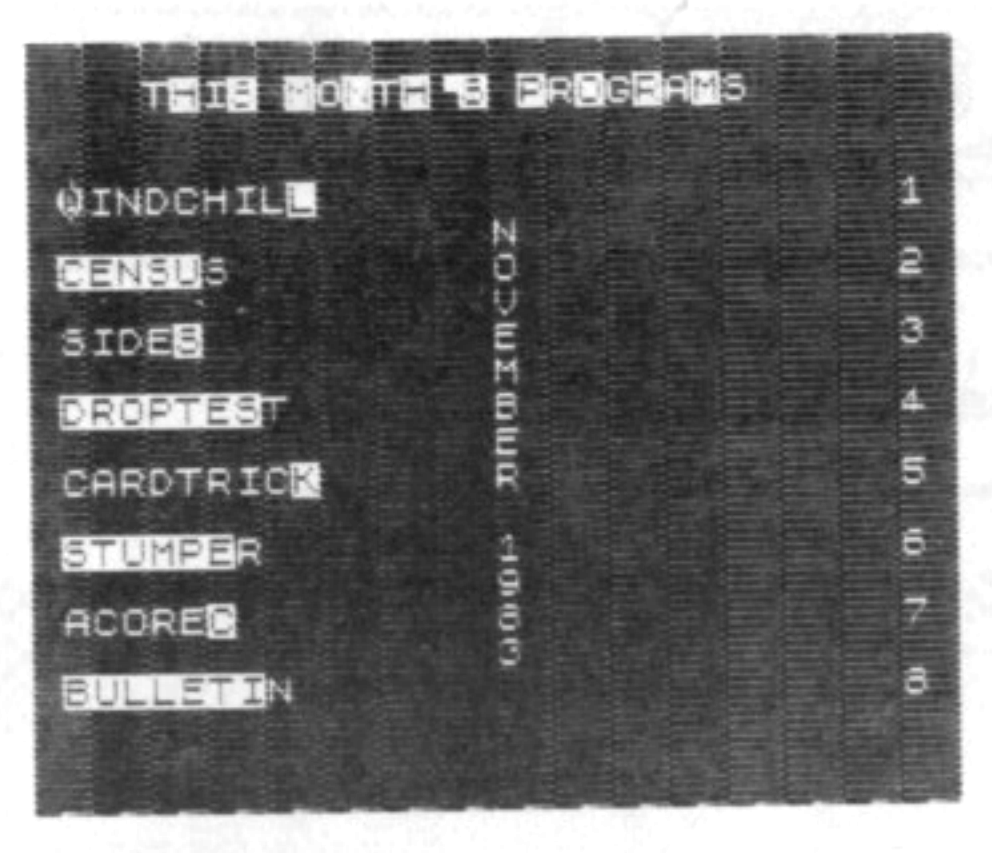
THIS MONTH’S PROGRAMS – NOVEMBER 1983
There are 7 programs on this month’s cassette, not counting the LOADER program.
The program names are as they appear on the above menu, which is similar to what will appear on the screen when the LOADER program is running.
Each program is recorded only once on each side of the cassette. The first programs that can be LOADed will be of the small size followed by the larger sized programs. The other side of the cassette is a duplicate of the first side.
For you new subscribers who aren’t familiar with LOADing procedures for cassette programs, follow these directions:
A – Make sure that the volume setting of the recorder is set at about 80 % maximum.
B – If you have a Bass and/or Treble control on the recorder, make sure the Treble is at maximum and the Bass is at minimum.
C – To LOAD the first program, type in LOAD “” and press the ENTER key on the computer. Then press the PLAY button of the recorder. The lead time on the NOV/83 cassette is about 10 seconds until the first program begins.
The time needed to load the LOADER program is 1 minute & 40 seconds. When the program is loaded, a list of this month’s programs will appear automatically.
Shut off the recorder when the LOADER program is loaded. Any of the listed programs can now be loaded into the computer by pressing the appropriate number on the keyboard and then pressing the PLAY key on the recorder. The loader program loads by searching for the name of the program you want and ignoring any of the other programs it may encounter along the way.
If you want to go directly to a program without waiting, we suggest you first find the tape location of the beginning of each of the programs with your recorder counter. This can be done as you go through the programs the first time, noting the tape location on the counter as each one is being loaded.
If you don’t have a counter, approximate the tape position with the fast forward key just before where the program would start, and then LOAD the program with the name of the program using the format LOAD “NAME OF PROGRAM”.
Some of our subscribers have told us that they could not get the programs to load by name but they would load with the double quotes. Others have told us that the loader program wouldn’t load certain programs. Most have told us that all the programs could be loaded either way. Every customer’s cassette is made from the same master tape, so the programs on everyone’s cassettes are identical. We feel it is most probably a problem of volume adjustment or recorder design. We have noticed this situation on some of our recorders.
PROGRAMS (all programs this
month are self-running
– program’s name has inverse
last character if self-running
RT = run time/LT = load time)
There is an approximate 7 to 20
second pause between programs
“WINDCHILL” LT = :27
Many of us have heard of the enigmatic Wind Chill temperature. Here, in the Chicago area, weather forecasters take glee in trying to forecast winter temperatures that are actually lower than what the thermometer specifies.
Wind Chill temperatures are simply the effect that wind has on exposed skin to give the impression of a temperature lower than what the impression would be without the wind. I don’t take much stock in this effect because it doesn’t take into account the humidity.
Enter the current Farenheit temperature and wind velocity in mph. and the Wind Chill Temperature will be displayed.
“CENSUS” LT = :38
Enter the vital data as requested and be astounded as the screen displays the vital Census data of the U.S., constantly up-dating it every few minutes to the current levels.
This program is designed to tune in to the secret coded radio transmissions from the U.S. Census Bureau to receive the data you see (if you are caught, it is the only offense still punishable by firing squad).
“SIDES” LT = :29
“Draw two lines that meet and form a right (90 degree) angle. Draw another line at any angle that intersects these two lines so that a triangle is formed. The sum of the squares of the distance of the first two lines, in the triangle, is equal to the square of the distance of the last line in the triangle!”
So spoke Pythagoras some time ago. I was there when Joe Pythagoras postulated this theorum in 1972 at the Athen’s Bar & Grill in North Peoria. It sounded strangely familiar, but I couldn’t put my finger on where I might have heard about it before.
Oh, well! Joe gave me the idea for this program. If a triangle is drawn where sides A and B form the right angle and side C forms the side opposite that angle, then A squared + B squared = C squared. Every now and then, all three sides can be represented by three even numbers, such as (3 x 3) + (4 x 4) = (5 x 5).
This program starts with a blank screen. Don’t be alarmed – wait about a minute. The first triplet series will then display (3 4 5). When it does, press the ENTER key and the program will cycle to the next triplet.
Great way to make a boring afternoon even more boring.
“DROPTEST” LT = :42
If you thought the last program was great, you will be mesmerized by this one.
Picture yourself standing on the edge of a cliff or on top of a large building. You know the height and you drop a brick. This program will tell you the time in seconds that it takes for the brick to fall the required height and the resulting sound of it hitting the bottom to return for you to hear.
The program doesn’t take into account if the brick strikes a passerby and the time that elapses before he screams.
“CARDTRICK” LT = 2:21
Now it’s time for you to be truly awed. Pick a card, any card. Just press the key number of which row it’s in. After the third pass, your card will be displayed. It never misses!
“STUMPER” LT = 1:17
This one is downright nasty! After about 30 seconds of blank screen, two rows of ten numbers each appear. The row on the left is yours and the one on the right is the computer’s.
The object of the game is to get a point by picking one of your numbers that is larger than the one that the computer picks. The computer, however, will get the point if its number is larger.
You have an advantage – you can pick any of your available numbers. The computer, however, has to scan its row, from top to bottom, to find a larger one. If it doesn’t find one, it takes the number at the top of its list.
There is an even distribution of numbers for both sides. This doesn’t, however, mean that you will win 50% of the time, as you will soon see. Expect to win about one out of every 10 games, at first.
It is very addictive and after playing till about 4 in the morning, I was able to win almost 50% of the time.
“ACOREC” LT = 2:59
This is an Accounts Receivable program with sort and print-out capabilities. It is self prompting for input of data. You can enter data for up to 100 bills. This data can be sorted by date with the oldest outstanding bills at the top of the list. Data can be edited, deleted or new data added. The file can be saved on tape and recalled at a later time. Old files can be cleared for new data entry from scratch. Printout is formatted with the numeric figures having right-margin justification.
“BULLETIN” LT = 1:59/RT = 7:20
Our bi-monthly Bulletin Board Program.