
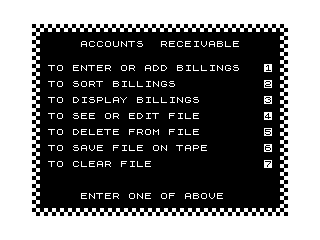
This is an Accounts Receivable billing management program that stores up to 100 customer billing records in a two-dimensional string array. Each 32-character record in B$(100,32) packs the due date (bytes 1–6), customer name (bytes 7–22), and amount due (bytes 23–31) into fixed-width fields. The program offers a menu-driven interface with seven functions: entering billings, sorting (using a Shell sort at line 2000), displaying with optional hard-copy LPRINT output, searching and editing individual records, deleting records, saving to tape via SAVE, and clearing all data with RUN. A machine code routine is called at line 50 via RAND USR 16514, likely for screen or system initialisation, and POKE 16418 is used to toggle SLOW/FAST mode programmatically. The deletion routine at line 5400 marks a record with a string of “%Z” characters so it sorts to the end of the file, then immediately re-sorts and decrements the record counter.
Program Analysis
Program Structure
The program is organised around a central menu loop at lines 30–300 and a set of subroutine/module blocks dispatched by a computed GOTO 1000*VAL A$. Each major function occupies a distinct line-number block:
| Lines | Function |
|---|---|
| 30–300 | Initialisation, decorated menu screen, and key dispatch |
| 400–410 | Subroutine: zero-pad a 1-digit string to 2 characters |
| 500–590 | Subroutine: prompt for and validate the file date (MM/DD/YY) |
| 600–680 | Subroutine: ensure a numeric string has a decimal point and two decimal places |
| 1000–1510 | Module 1 – Enter/add billings |
| 2000–2200 | Module 2 – Sort billings (Shell sort) |
| 3000–3230 | Module 3 – Display billings, optional LPRINT |
| 4000–4700 | Module 4 – Search and edit a billing record |
| 5000–5430 | Module 5 – Search and delete a billing record |
| 6000–6060 | Module 6 – Save file to tape |
| 7000–7020 | Module 7 – Clear file (RUN) |
| 9000–9060 | Subroutine: “Press ENTER to continue” pause |
| 9998–9999 | SAVE the program itself, then RUN |
Data Storage Layout
All records are stored in B$(100,32), a 100-element array of 32-character strings. Each element is treated as a fixed-width packed record with the following field layout:
| Bytes | Field | Format |
|---|---|---|
| 1–2 | Year | 2-digit YY |
| 3–4 | Month | 2-digit MM |
| 5–6 | Day | 2-digit DD |
| 7–22 | Customer name | Up to 16 characters, space-padded |
| 23–31 | Amount due | Right-aligned numeric string |
Storing the date as YYMMDD at the start of the record is deliberate: it means lexicographic sorting of the whole record automatically sorts by date first, then alphabetically by name — which is exactly what the Shell sort at line 2000 exploits by comparing B$(I) directly with B$(L).
Machine Code Usage
Line 50 calls RAND USR 16514, invoking machine code at address 16514 decimal (0x4082). This falls within the ZX81 system variables / display file area. The exact purpose is not documented in the listing but is typically used for a fast screen clear or hardware initialisation routine. Line 60 follows with POKE 16418,0 (system variable CDFLAG at 0x4022), which forces FAST mode at the hardware level, complementing the FAST / SLOW BASIC keywords used throughout.
Shell Sort Implementation
Lines 2005–2200 implement a classic Shell (diminishing-increment) sort on the B$ array. The gap sequence starts at INT(R1/2) and halves each pass until it reaches zero, at which point the array is fully sorted. The comparison B$(I) <= B$(L) at line 2080 operates on the full 32-character record strings, making the YYMMDD date prefix the primary sort key with no extra code required.
Deletion Technique
When a record is deleted (line 5400), the program does not physically remove the entry. Instead it overwrites the record with a string of 32 %Z characters — the highest printable characters in the ZX81 character set. Calling the sort immediately afterwards (line 5410 GOSUB 2005) bubbles this sentinel record to the end of the array. Decrementing R1 at line 5420 then hides it from all subsequent operations.
Key BASIC Idioms
- Computed GOTO:
GOTO 1000*VAL A$at line 300 dispatches to the correct module (1000, 2000, … 7000) based on the single-key menu selection, avoiding a chain of IF statements. - Zero-padding subroutine: Lines 400–410 prepend “0” to any 1-character string, ensuring all date fields are exactly 2 digits wide for correct lexicographic sorting.
- Decimal-point normalisation subroutine: Lines 600–680 scan for a decimal point; if absent, “.00” is appended; if only one decimal digit is present, a trailing “0” is added. This ensures monetary values display consistently.
- FAST/SLOW toggling: The program switches aggressively between
FAST(no display, faster execution) andSLOW(display updated) modes.SLOWis set just beforeINPUTstatements so the user can see the prompt;FASTis restored immediately after. - Inverse-video menu text: Menu item labels at lines 100–200 use the
%character (ZX81 inverse space) to create an alternating inverse-space/character pattern, producing a bold highlighted appearance without needing additional PRINT AT calls.
Border Drawing
Lines 80–88 draw a decorative border around the screen. Lines 80–81 print % (inverse space + space) pairs across rows 22 and 23 to create a bottom border. Lines 83–88 then print a block graphic character (▖, from A$="\'.") around the full perimeter — top row, bottom row, left column, and right column — using three separate FOR loops.
Bugs and Anomalies
- Line 3020 typo:
PRINT AT 10,0;"THE BILLINGSS UNPAID…"contains a double “SS” in “BILLINGSS”. - Y$ single-character check: At line 3004,
Y$is assigned fromINKEY$(always 0 or 1 character). Line 3105 and 3192 then referenceY$(1), which on a ZX81 would cause an error ifY$=""; however the loop at 3004–3005 ensuresY$is non-empty before proceeding, so in practiceY$(1)is always valid. - Line 1340 accepts 3–4 digit year input: The check
IF LEN A$<2 OR LEN A$>4accepts 2, 3, or 4 character year strings. Line 1350 then takes the last 2 characters (A$(LEN A$-1 TO LEN A$)), so a 4-digit year like “1983” correctly yields “83”, but the upper bound of 4 is unnecessarily generous. - Line 260 character code range: The check
CODE A$<29 OR CODE A$>35accepts only ZX81 character codes 29–35, which correspond to the digits “1” through “7”. This is the correct approach for numeric key validation on the ZX81.
Image Gallery
Source Code
   1 REM Y% .'. :%KNOT $TAB @@RND: TAB '.RNDTAN
   2 FAST
   3 DIM B$(100,32)
   4 LET R1=0
   5 LET N$=""
  30 FAST
  40 CLS
  50 RAND USR 16514
  60 POKE 16418,0
  70 FOR N=0 TO 31
  80 PRINT AT 22,N;"% ";AT 23,N;"% "
  81 NEXT N
  82 LET A$="'."
  83 FOR N=0 TO 31
  84 PRINT AT 0,N;A$;AT 23,N;A$
  85 NEXT N
  86 FOR N=0 TO 23
  87 PRINT AT N,0;A$;AT N,31;A$
  88 NEXT N
 100 PRINT AT 2,5;"% %A%C%C%O%U%N%T%S% % %R%E%C%E%I%V%A%B%L%E% "
 110 PRINT AT 5,2;"%T%O% %E%N%T%E%R% %O%R% %A%D%D% %B%I%L%L%I%N%G%S";TAB 29;"1"
 120 PRINT AT 7,2;"%T%O% %S%O%R%T% %B%I%L%L%I%N%G%S";TAB 29;"2"
 130 PRINT AT 9,2;"%T%O% %D%I%S%P%L%A%Y% %B%I%L%L%I%N%G%S";TAB 29;"3"
 140 PRINT AT 11,2;"%T%O% %S%E%E% %O%R% %E%D%I%T% %F%I%L%E";TAB 29;"4"
 150 PRINT AT 13,2;"%T%O% %D%E%L%E%T%E% %F%R%O%M% %F%I%L%E";TAB 29;"5"
 160 PRINT AT 15,2;"%T%O% %S%A%V%E% %F%I%L%E% %O%N% %T%A%P%E";TAB 29;"6"
 170 PRINT AT 17,2;"%T%O% %C%L%E%A%R% %F%I%L%E";TAB 29;"7"
 200 PRINT AT 21,6;"%E%N%T%E%R% %O%N%E% %O%F% %A%B%O%V%E";AT 21,6;"ENTER ONE OF ABOVE";AT 21,6;"%E%N%T%E%R% %O%N%E% %O%F% %A%B%O%V%E"
 210 SLOW
 250 LET A$=INKEY$
 260 IF A$="" OR CODE A$<29 OR CODE A$>35 THEN GOTO 200
 270 POKE 16418,2
 300 GOTO 1000*VAL A$
 400 IF LEN A$=1 THEN LET A$="0"+A$
 410 RETURN
 500 PRINT ,,,,,,"WHAT IS TODAY 'S DATE?"
 510 PRINT ,,"FORMAT MUST BE AS IN THIS SAMPLE"
 520 PRINT ,,"OCTOBER 3RD, 1982 WOULD BE:"
 530 PRINT "      10/03/82"
 540 PRINT ,,"JANUARY 31ST, 1983 WOULD BE:"
 550 PRINT "      01/31/83"
 555 SLOW
 560 INPUT N$
 565 FAST
 570 IF LEN N$<>8 THEN GOTO 555
 580 PRINT ,,
 590 RETURN
 600 FAST
 610 FOR I=1 TO LEN A$
 620 IF A$(I)="." THEN GOTO 670
 630 NEXT I
 640 LET A$=A$+".00"
 660 RETURN
 670 IF I=LEN A$-1 THEN LET A$=A$+"0"
 680 GOTO 660
 1000 FAST
 1010 CLS
 1020 IF N$="" THEN GOSUB 500
 1025 CLS
 1026 PRINT ,,,,,,,,,,,,,,"THE FILE DATE/NAME IS ";N$
 1030 PRINT ,,,,"  ENTER EACH ITEM OF INFORMATION"
 1040 PRINT "FOR EACH BILLING. IF YOU HAVE NO"
 1050 PRINT "MORE TO ENTER, JUST PRESS"
 1060 PRINT "<ENTER> FOR THE CUSTOMER PROMPT."
 1070 FOR N=R1+1 TO 100
 1080 SCROLL
 1085 SCROLL
 1090 PRINT "CUSTOMER 'S NAME (16 CHAR. MAX.)?"
 1095 SLOW
 1100 INPUT A$
 1101 IF A$="" THEN GOTO 1500
 1102 IF LEN A$>16 THEN GOTO 1095
 1103 FAST
 1104 LET B$(N,7 TO 22)=A$
 1106 SCROLL
 1108 PRINT ,A$
 1110 SCROLL
 1120 PRINT "NUMBER OF MONTH BILL IS DUE?";
 1130 SLOW
 1140 INPUT A$
 1145 IF LEN A$<1 OR LEN A$>2 THEN GOTO 1140
 1150 FAST
 1160 GOSUB 400
 1170 PRINT TAB 32-LEN A$;A$
 1180 LET B$(N,3 TO 4)=A$
 1190 SCROLL
 1200 PRINT "DATE (NUMBER) BILL IS DUE?";
 1210 SLOW
 1220 INPUT A$
 1230 FAST
 1240 IF VAL A$>31 OR VAL A$<1 THEN GOTO 1210
 1250 GOSUB 400
 1260 LET B$(N,5 TO 6)=A$
 1270 PRINT TAB 32-LEN A$;A$
 1280 SCROLL
 1300 PRINT "WHAT IS THE YEAR (2 DIGITS)?";
 1310 SLOW
 1320 INPUT A$
 1330 FAST
 1340 IF LEN A$<2 OR LEN A$>4 THEN GOTO 1310
 1350 LET A$=A$(LEN A$-1 TO LEN A$)
 1360 PRINT TAB 28;"19";A$
 1370 LET B$(N, TO 2)=A$
 1380 SCROLL
 1390 PRINT "WHAT IS THE AMOUNT DUE?";
 1400 SLOW
 1410 INPUT A$
 1420 IF VAL A$>99999.99 THEN GOTO 1400
 1430 FAST
 1435 GOSUB 600
 1440 LET B$(N,23 TO 31)=A$
 1445 PRINT TAB 32-LEN A$;A$
 1450 SCROLL
 1460 PRINT "................................"
 1470 NEXT N
 1500 LET R1=N-1
 1510 GOTO 30
 2000 GOSUB 2005
 2002 GOTO 30
 2005 FAST
 2010 LET N=R1
 2020 LET N=INT N/2
 2030 IF N=0 THEN GOTO 2200
 2040 LET J=1
 2050 LET K=R1-N
 2060 LET I=J
 2070 LET L=I+N
 2080 IF B$(I)<=B$(L) THEN GOTO 2150
 2090 LET A$=B$(I)
 2100 LET B$(I)=B$(L)
 2110 LET B$(L)=A$
 2120 LET I=I-N
 2130 IF I<1 THEN GOTO 2150
 2140 GOTO 2070
 2150 LET J=J+1
 2160 IF J>K THEN GOTO 2020
 2170 GOTO 2060
 2200 RETURN
 3000 FAST
 3001 CLS
 3002 PRINT ,,"DO YOU WANT HARD COPY?"
 3003 SLOW
 3004 LET Y$=INKEY$
 3005 IF Y$="" THEN GOTO 3004
 3008 LET TB=0
 3010 CLS
 3020 PRINT AT 10,0;"THE BILLINGSS UNPAID ARE AS     FOLLOWS:"
 3030 SCROLL
 3035 IF Y$="Y" THEN LPRINT " "
 3036 IF Y$="Y" THEN LPRINT " "
 3040 PRINT "DATE DUE   CUSTOMER       AMOUNT"
 3042 SCROLL
 3044 SCROLL
 3046 FOR N=1 TO R1
 3050 PRINT B$(N,3 TO 4);"/";B$(N,5 TO 6);"/";B$(N, TO 2);TAB 10;B$(N,7 TO 22);
 3051 DIM O$(32)
 3060 FAST
 3070 LET A=VAL B$(N,23 TO 31)
 3080 LET A$=STR$ A
 3090 GOSUB 600
 3095 LET O$=B$(N,3 TO 4)+"/"+B$(N,5 TO 6)+"/"+B$(N, TO 2)+"  "+B$(N,7 TO 22)+O$( TO 6-LEN A$)+A$
 3100 PRINT TAB 32-LEN A$;A$
 3105 IF Y$(1)="Y" THEN LPRINT O$
 3110 LET TB=TB+A
 3120 SLOW
 3130 SCROLL
 3140 NEXT N
 3150 SCROLL
 3160 SCROLL
 3170 LET A$=STR$ TB
 3180 GOSUB 600
 3190 PRINT "TOTAL MONEY OWED IS";TAB 31-LEN A$;"$";A$
 3192 IF Y$(1)="Y" THEN LPRINT " "
 3193 DIM O$(32)
 3196 LET O$="TOTAL MONEY OWED IS"+O$( TO 12-LEN A$)+"$"+A$
 3197 IF Y$(1)="Y" THEN LPRINT O$
 3200 SCROLL
 3210 SCROLL
 3220 GOSUB 9000
 3230 GOTO 30
 4000 FAST
 4010 CLS
 4020 PRINT ,,"WHAT IS THE CUSTOMER 'S NAME?"
 4030 SLOW
 4040 INPUT A$
 4050 FAST
 4060 IF LEN A$>16 THEN GOTO 4030
 4070 CLS
 4080 FOR N=1 TO R1
 4090 IF B$(N,7 TO 6+LEN A$)=A$ THEN GOTO 4200
 4100 NEXT N
 4110 PRINT ,,"THE NAME ";A$
 4120 PRINT "IS NOT IN THE FILE ::::"
 4130 GOSUB 9000
 4140 GOTO 30
 4200 CLS
 4210 PRINT ,,B$(N,7 TO 22)
 4220 PRINT B$(N,3 TO 4);"/";B$(N,5 TO 6);"/";B$(N, TO 2),B$(N,23 TO 31)
 4230 PRINT ,,,,"IS THIS THE CORRECT BILLING?"
 4240 SLOW
 4250 LET C$=INKEY$
 4260 IF C$="" THEN GOTO 4250
 4270 FAST
 4280 IF C$="N" THEN GOTO 4100
 4300 PRINT ,,"CUSTOMER","1","DATE","2","AMOUNT","3","NONE OF ABOVE","4"
 4310 PRINT ,,,,"WHICH ONE DO YOU WANT TO CHANGE?"
 4320 SLOW
 4330 LET C$=INKEY$
 4340 IF C$="" OR CODE C$<29 OR CODE C$>32 THEN GOTO 4330
 4350 FAST
 4360 GOTO 4300+(100*VAL C$)
 4400 PRINT ,,B$(N,7 TO 22)
 4410 PRINT "CHANGE TO?",
 4420 SLOW
 4430 INPUT A$
 4440 FAST
 4450 IF LEN A$>16 THEN GOTO 4420
 4460 LET B$(N,7 TO 22)=A$
 4470 PRINT A$
 4480 GOSUB 9000
 4490 GOTO 30
 4500 PRINT ,,B$(N,3 TO 4);"/";B$(N,5 TO 6);"/";B$(N, TO 2)
 4510 PRINT "CHANGE TO (SAME FORMAT)?"
 4520 SLOW
 4530 INPUT A$
 4540 FAST
 4550 IF LEN A$<>8 THEN GOTO 4520
 4560 IF A$(3)<>"/" AND A$(6)<>"/" THEN GOTO 4520
 4570 LET B$(N, TO 6)=A$(7 TO 8)+A$( TO 2)+A$(4 TO 5)
 4580 PRINT ,A$
 4590 GOSUB 9000
 4595 GOTO 30
 4600 LET A=VAL B$(N,23 TO 31)
 4610 LET A$=STR$ A
 4620 GOSUB 600
 4630 PRINT ,,A$
 4640 PRINT "CHANGE TO?";
 4650 SLOW
 4660 INPUT A
 4670 FAST
 4680 IF A>99999.99 THEN GOTO 4650
 4685 LET A$=STR$ A
 4690 GOSUB 600
 4692 LET B$(N,23 TO 31)=A$
 4694 PRINT TAB 32-LEN A$;A$
 4696 GOSUB 9000
 4700 GOTO 30
 5000 FAST
 5010 CLS
 5020 PRINT ,,"WHAT IS THE CUSTOMER 'S NAME?"
 5030 SLOW
 5040 INPUT A$
 5050 FAST
 5060 IF LEN A$>16 THEN GOTO 5030
 5070 CLS
 5080 FOR N=1 TO R1
 5090 IF B$(N,7 TO 6+LEN A$)=A$ THEN GOTO 5200
 5100 NEXT N
 5110 PRINT ,,"THE NAME ";A$
 5120 PRINT "IS NOT IN THE FILE ::::"
 5130 GOSUB 9000
 5140 GOTO 30
 5200 CLS
 5210 PRINT ,,B$(N,7 TO 22)
 5220 PRINT B$(N,3 TO 4);"/";B$(N,5 TO 6);"/";B$(N, TO 2),B$(N,23 TO 31)
 5230 PRINT ,,,,"IS THIS THE CORRECT BILL?"
 5240 SLOW
 5250 LET C$=INKEY$
 5260 IF C$="" THEN GOTO 5250
 5270 FAST
 5280 IF C$="N" THEN GOTO 5100
 5300 PRINT ,,"ENTER <Y> IF YOU WANT TO DELETE."
 5310 SLOW
 5320 INPUT A$
 5330 IF A$="Y" THEN GOTO 5400
 5340 GOTO 30
 5400 LET B$(N)="%Z%Z%Z%Z%Z%Z%Z%Z%Z%Z%Z%Z%Z%Z%Z%Z%Z%Z%Z%Z%Z%Z%Z%Z%Z%Z%Z%Z%Z%Z%Z%Z"
 5410 GOSUB 2005
 5420 LET R1=R1-1
 5430 GOTO 30
 6000 FAST
 6010 CLS
 6020 PRINT ,,"PREPARE THE DATA TAPE IN THE    RECORDER AND PRESS ENTER :::"
 6030 SLOW
 6040 INPUT A$
 6050 SAVE N$
 6060 GOTO 30
 7000 FAST
 7010 CLS
 7020 RUN
 9000 FAST
 9010 PRINT AT 21,0;"PRESS ENTER TO CONTINUE :::"
 9020 SLOW
 9030 INPUT A$
 9040 FAST
 9050 CLS
 9060 RETURN
 9998 SAVE "ACORE%C"
 9999 RUN
Note: Type-in program listings on this website use ZMAKEBAS notation for graphics characters.