
Parts One and Two of this series covered the VARS, System Variables, and the Safe Area methods of passing data from one program module to another in a chained program.
The Above RAMTOP method of passing data, in chained programs, is very similar to the Safe Area method and is the best of all of the methods, as data stored above RAMTOP is protected from LOAD, RUN, NEW, an expanding program, or the expansion of the display file. About the only thing that can wipe out data properly stored above RAMTOP is a program crash, a power failure, a program bug, or resetting RAMTOP.
The amount of bytes or addresses you can lower RAMTOP and still have the program RUN is determined by the Upper and Lower Limits of the Safe Area of the program. In a Chained Program, the module that requires the most memory in order to RUN, determines the address to which RAMTOP can be set for the entire program. A method for finding the Upper and Lower Limits of the Safe Area and the minimum setting for RAMTOP that will allow the program to run, was presented in the series of articles: “Adventures In The RAM Jungle And Other Mysteries” (see Sept/Oct ’85 thru Jan/Feb ’86 issues of TDM).
When the computer is turned on, the address of RAMTOP is the first nonexistent byte at the top of the user availble Random Access Memory (RAM). For the 1k ZX81, this address will be 17408; for the 2k TS 1000 it will be 18432; and for the 16k TS 1500 it will be 32768. When a 16k Ram pack (TS 1016) is attached and the computer turned on, RAMTOP is at address 32768 for all three computers. To check the address of RAMTOP, ENTER:
PRINT PEEK 16388+256*PEEK 16389This only returns the value stored in the system variable RAMTOP. To check that RAMTOP is actually at this address, let A= the address stored in the system variable. Then ENTER:
PRINT PEEK (A-1)The result should be 62
In the case of the TS 1500 with the 16k Ram Pack attached, the bytes from address 32768 to 49151 are above RAMTOP and can be used for storage of data including machine code programs. Any part or all of the additional memory can be incorporated into the BASIC programming area by raising RAMTOP. Of course RAMTOP can also be lowered.
Should you have an odd amount of RAM, to find the maximum address to set RAMTOP, add to 16 the k of the RAM and multiply by 1024 (the number of bytes in one k). For example, if you have four k RAM:
(16+4)*1024=20480However, the maximum address that you could set RAMTOP is 65535 not 65536 as the maximum value you can POKE into an address is 255.
RAMTOP can be lowered to make room for the storage of data by POKEing the address desired into the system variable RAMTOP and then entering NEW. The system variable RAMTOP consists of two bytes located at addresses 16388 and 16389. The formulas for POKEing the low byte into the lower addresses and high byte into the higher addresses are given on page 134 of the TS 1000 and page 160 of the TS 1500 User Manuals. For example, to set RAMTOP to 18000, then n=16388 and v=18000. Substituting in the formulas, type into the computer:
10 POKE 16388,18000-256*INT (18000/256)
20 POKE 16388+1,INT (18000/256)
30 NEW
Now RUN the program. To check that RAMTOP was moved, ENTER:
PRINT PEEK 17999The result will be 62. As you can see, the NEW command wipes out the program. It also destroys any variables, strings and dimensions. This precludes the use of this method of setting RAMTOP in a module designed to automatically LOAD the next module of a chained program. A routine for setting RAMTOP without destroying the program or any variables or strings was presented on pages 9 and 10 of the July/August ’85 issue.
Although RAMTOP cannot be set using NEW in a module designed to LOAD the next module, it is used in some types of programs where the operator does the linking. NEW is also used where machine code is to be shifted above RAMTOP to wipe out the program in order that a new program be typed into the computer. This can be accomplished by POKEing the code into the Safe Area for the program, before the line containing NEW. For example, clear the computer memory by turning it off and then back on. Type in the program given above adding the following line:
25 POKE 18001,255RUN the program. Now ENTER the direct command:
PRINT PEEK 18001As you can see the 255 is still in address 18001, RAMTOP is set below this at 18000, and the program has been destroyed.
For the 1k RAM ZX81: Set RAMTOP to 17000 using v=17000, PEEK 16999 for the 62, change Line 25 for address 17001, and PEEK 17001 for the 255.
If you intend to do serious programming, work with chained programs or use word processors, then you should have two accessories besides an interfaced printer. The first is a tape recorder (or other storage device) capable of consistant SAVEs and LOADs. Two is even better, one for LOADing programs or data connected Ear to Ear with the computer, the other for SAVEing programs or data connected Mic to Mic. I use a Radio Shack CTR-51 only for LOADing as it has a wider allowable volume control setting range on some commercially produced software. My other tape recorder is a GE Computer Data Recorder model no. 3-5158B.
The second accessory is an emergency power supply particularly in Florida where we refer to the power company as “Florida Flicker and FLash”. Figure No.1 is a circuit diagram for an automatic emergency power supply that will maintain the program for power interuptions up to 15 minutes. You must remember to throw the switch off before disconnecting the regular computer power supply or before plugging into the computer.
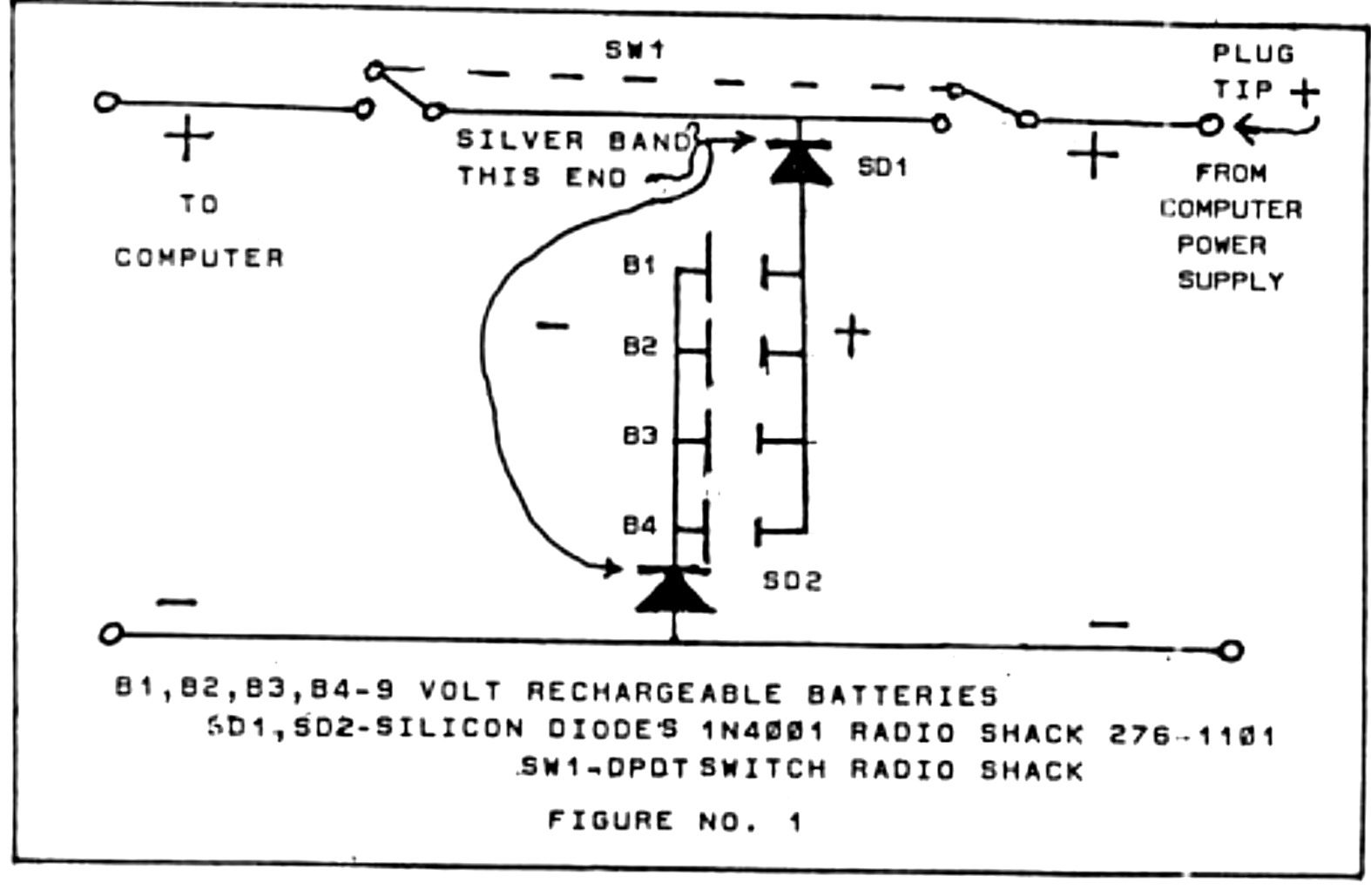
In addition to the parts listed on the diagram, you will need the following items:
- 1 project box large enough to accomodate the circuit plus the four batteries.
- 1 rubber grommet to protect the leads to the computer.
- 4 nine volt battery connectors.
- 1 two conductor 1/8″ modular phone jack, open circuit type, panel mounting (Radio Shack 274-251).
- 1 two conductor 1/8″ mini phone plug (Radio Shack 274-286).
The use of a 12 volt latern battery instead of rechargeable 9 volt batteries and a battery powered tape recorder, would allow the SAVEing of the program or data. However, leaving the switch on inadvertantly without the computer power supply on could be costly. If you use the 12 volt battery, also use 2.5 amp silicon diodes (Radio Shack 276-1114). As diodes are easily damaged with heat…heat sink them while soldering.
A practical chained program illustrating the Above RAMTOP method of passing data will be presented in Part Four of this series of articles.