
The first part of this series of articles covered: the definitions of Linking and Chaining, how to make a program self running, making one program module load another, and the VARS method of passing data from one program module to another. By data, I mean text, computed variables, arrays or strings. The second part of the series will present the System Variables and the Safe Area methods of passing data.
A complete list of all of the System Variables, their names and addresses, the number of bytes, if they are saved with the program, and if they cannot be poked without crashing the system, is in the Appendix of the User Manual. The System Variables method of passing data from one program module to another is very limited. Only the two bytes of the System Variable RAMTOP can be used for this purpose, as all of the other System Variables that can be poked without crashing the system, are reset by loading the next module. For example–type the following lines into the computer:
  10 SAVE "POKE"
  20 LET A=255
  30 FOR N=16477 TO 16506
  40 POKE N,A
  50 NEXT N
  60 POKE 16388,A
  70 POKE 16389,A
  80 POKE 16393,A
  90 POKE 16417,A
 100 POKE 16430,A
 110 POKE 16431,A
 120 POKE 16434,A
 130 POKE 16435,A
 140 POKE 16438,A
 150 POKE 16439,A
 160 POKE 16507,A
 170 POKE 16508,A
 180 LOAD "PEEK"
Record the program on tape, using the command GOTO 10. When the diagonal load lines appear on the screen, after the program is saved, stop the tape and use the BREAK key to return to the programming mode. Do not rewind the tape. To clear the memory, turn off the computer. Do not use NEW as this would reset RAMTOP. Power up and type in the following lines of the second program module:
  10 SAVE "PEEK"
  20 PRINT "STRLEN 16430: ";PEEK 16430;", 16431: ";PEEK 16431
  30 PRINT "MEMBOT ";
  40 FOR N=16477 TO 16506
  50 PRINT N;": ";PEEK N;",";
  60 NEXT N
  70 PRINT
  80 PRINT "RAMTOP 16388: ";PEEK 16388;", 16389: ";PEEK 16389
  90 PRINT "VERSN 16393: ";PEEK 16393
 100 PRINT "NOT USED 16417: ";PEEK 16417
 110 PRINT "SEED 16434: ";PEEK 16434;", 16435: ";PEEK 16435
 120 PRINT "COORDS 16438: ";PEEK 16438;", 16439: ";PEEK 16439
 130 PRINT "NOT USED 16507: ";PEEK 16507;", 16508: ";PEEK 16508
Without rewinding the tape, record the second program module using the command GOTO 10.
To run the chained program, rewind the tape. ENTER either the command: LOAD “POKE” or LOAD “” (no space between the quotes), and play the tape. As you can see, only the 255 poked into the two bytes of the System Variable RAMTOP, were passed from one program module to the next. In using the System Variable RAMTOP for this purpose, you must remember that if the value in address 16388 plus 256 times the value in address 16389 is less than 19712, a minimum Display File is set up. This may not be desirable with 16K or more RAM. If the combined value is 19712 or more, then an expanded Display File is set up, using additional memory, which may not be desirable with only 2K RAM. Also if NEW is entered, RAMTOP will be reset to the address of the combined value.
The System Variables, in which the poked value was not passed from one chained module to the next, may be poked and the value saved along with the program, like variables and strings (see “Of Strings And Things” in the March/April ’86 issue of TDM). To illustrate this procedure:
Turn off the computer to clear the memory. Power up and rewind the tape. Load the “POKE” module only (by pressing BREAK when the load lines appear before the second module loads). Stop the tape. Delete lines 140 to 180 by entering only the line number. Delete lines 10 to 130 by typing in the “PEEK” program. Rewind the tape and save the program using the command GOTO 10. Turn off the computer to clear the memory. Power up, rewind the tape, and load the new unchained “PEEK” program. As you can see, the value 255 poked into these System Variables was saved except those in RAMTOP and in addresses 16477 to 16501 of MEMBOT. There are certain conditions regarding the use of the System Variables for this purpose. They are:
NAME      ADDRESS   CONDITIONS

VERSN     16393     None
NONE      16417     None
STRLEN    16430     Value must be recovered
          16431     before any LET or INPUT
                    command in the program.
SEED      16434     Value must be recovered
          16435     before any RAND or RND
                    command in the program.
COORDS    16438     Value must be recovered
          16439     before any PLOT or UNPLOT
                    command in the program.
MEMBOT    16502     Only these listed ad-
          to        dresses can almost always
          16506     be used.
NONE      16507     None
NONE      16508     Cannot be used when the
                    System Variable RAMTOP
                    has been poked to less
                    than 19712 without enter-
                    ing NEW.
A method for determining the addresses of the Upper and Lower Limits of the Safe Area of a program was presented in “Adventures In The RAM Jungle And Other Mysteries” (Sept/Oct ’85 to Jan/Feb ’86 issues of TDM). The Safe Area method is much more suitable for passing large amounts of data, in Chained programs, than either the VARS or the Systems Variables methods. Two disadvantages are that the data can be wiped out by NEW and by allowing the program to be listed when operating in Mode 2 or 3 (see “Adventures…”, page 9, in Jan/Feb ’86 issue of TDM). The amount of data that can be passed, using the Safe Area method, is limited by the program module with the lowest Upper limit of the Safe Area and the module with the highest Lower Limit of the Safe Area (see Figure No.1). The number of modules is limited only by the length of the tape and number of tapes available. Thus, when large amounts of data are to be passed, each module should be as short as possible and accomplish only one task. Combined with “Top Down” programming in each module, this is a form of “Structured Programming”.
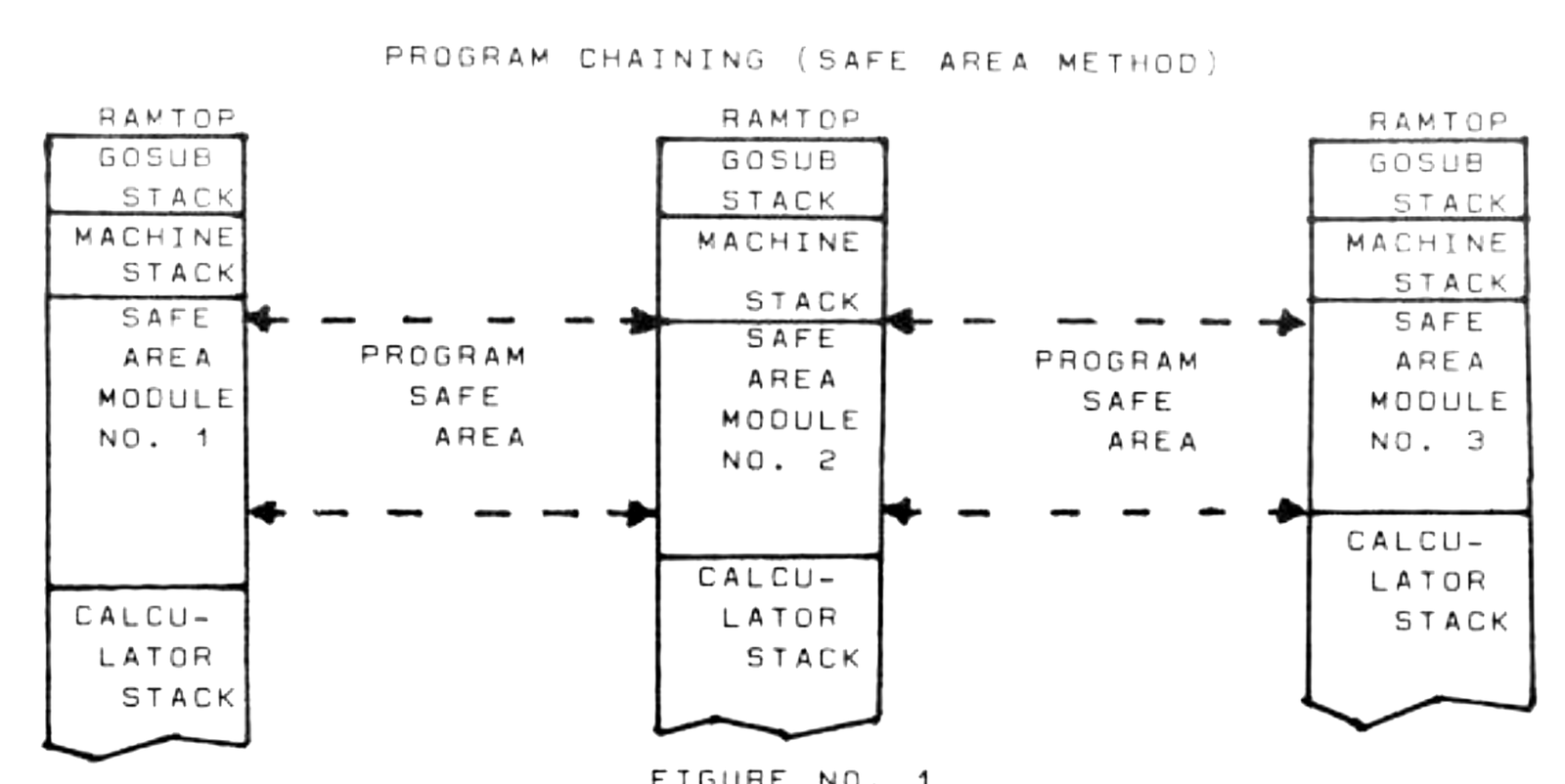
Using the Safe Area method, Z80 decimal code can be poked by the program directly into the Safe Area addresses. Each address can accept only positive values from 0 to 255. Variables with negative values or over 255 can be converted to a string, as in the VARS method, and each character converted to its code before poking. For example–type the following lines into the computer:
  10 SAVE "POKE"
  20 LET A=-12345678912345
  30 LET A$=STR$ A
  40 LET B=1
  50 FOR N=18000 TO 18013
  60 POKE N,CODE A$(B)
  70 LET B=B+1
  80 NEXT N
  90 LOAD "PEEK"
Record the first module on tape using the command GOTO 10. This time you can use NEW to clean the memory before typing in the second module, as follows:
  10 SAVE "PEEK"
  20 DIM A$(14)
  30 LET B=1
  40 FOR N=18000 TO 18013
  50 LET A$(B)=CHR$ PEEK N
  60 LET B=B+1
  70 NEXT N
  80 LET A=VAL A$
  90 PRINT A
Record the second module on the tape with the command GOTO 10. Rewind the tape and load and run the chained program, using the command LOAD “PEEK” or LOAD “”. The display should read: -1.2345679E+13.