
Authors
Publication
Pub Details
Date
Pages
Ultra-Easy Designer Graphics
by Paul Bingham
When I first ordered my 2068 back in, well, what seems eons ago, one thing I looked forward to most was the machine’s touted User Defined Graphics capabilities. What a boon to an old ZX81 programmer this would be! On the face of it, UDGs looked pretty exciting. No matter that there were only 21 of them, ruling out easy trial of new fonts and type faces—just having any would be great.
Oh, but the real rain on the parade came when I read through the manual’s five page chapter on UDGs. It became apparent that with POKE USER “a” + whatever and countless BIN sequences needed to set up each and every savory UDG byte, these little jewels were going to be bears to work with. Now as is usually the case, things were not as hopeless as they seemed after a little investigating. As it turned out, the UDG area is just a section high in memory where there is room for 21 segments each eight bytes long. And to my surprise, I did not find my ones and zeros I had POKEd, but rather decimal numbers between 0 and 255. Somewhere along the line, the 2068 was converting the barrage of zeros and ones to elegant code. If one could find a way to POKE the right codes in directly then the POKE USER BIN nonsense could be circumvented…
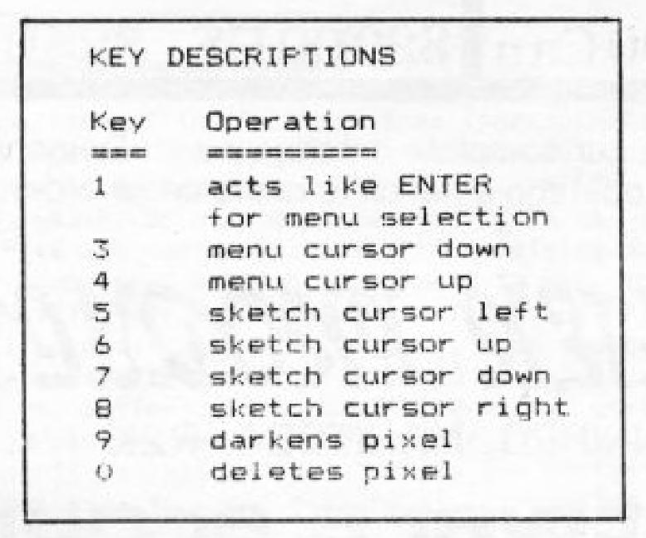
So for all who have wanted to exploit the use of 2068 UDGs easily, I have written a colorful little 6K utility which leaves you all the fun of designing and little of the drudgery. As can be seen in Figure A, it allows the user to design four UDG characters on screen at once and by the use of on-screen menus to alter, move or save them. All features are accessed by the top row of keys and ENTER as shown in Figure B.
Figure A
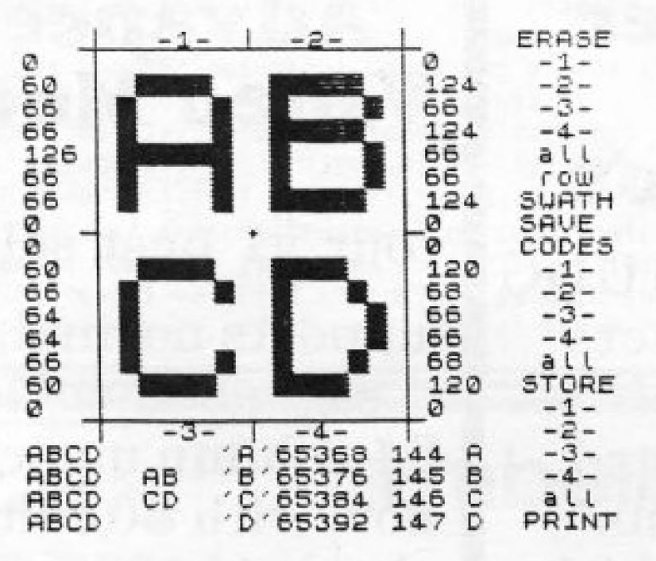
Figure B
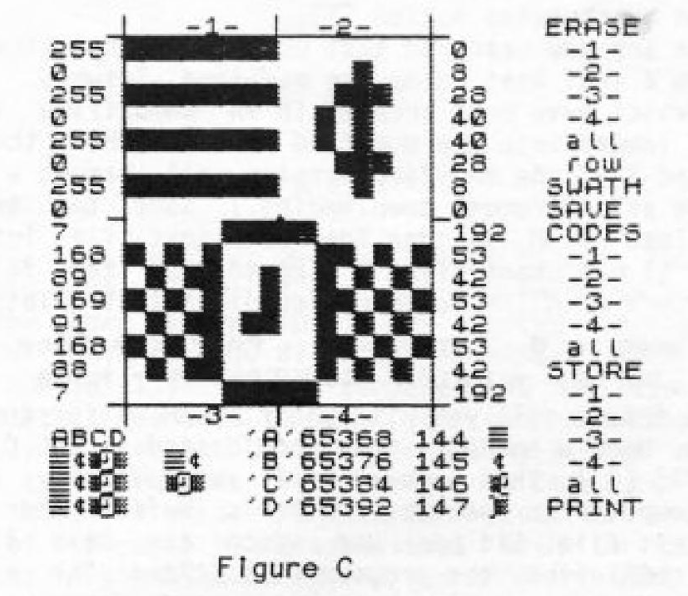
Creating new symbols and characters is as simple as moving the cursor. Figure C shows a watch that is actually two UDG characters side by side. This shows that one need not be bound by an “eight X eight” block, but that multiple character designs are possible.
In the 2068 manual the UDG characters are referred to as “a”, “b”, “c”, ect. to “u”. We will also refer to them as such in some parts of the program. In other places they are referred to by character codes. By telling our 2068 to PRINT CHR$ 144 it will print UDG character “a” because that’s its code! CHR$ 164 will get you UDG character “u”, which is the last one. The program keeps you reminded of the current letter and code along with the memory location of each UDG at the bottom of the screen as can be seen in Figures A and C. You might read the manual’s pages 197, 198, and 243 also.
Now about the listing. The program will serve you without lots of documental aids. So it will suffice to get you on your way with just a few tips:
In trouble by hitting the wrong key? Just hit break or if you are in an Input sequence, type in the command STOP. As long as the designs you have been working on are in the UDG area, you can re-RUN without losing any of them. GOTO 100 works just the same and won’t harm any variables.
Be sure to call for “CODES” on the menu for all the blocks you have designed on the screen BEFORE calling for “STORE” on the menu. Without the codes, the “STORE” feature will store blanks (zeros) in the UDG area. STORE sends the particular codes for the block (or all four blocks if you chose “all”) to the letter destination you input. Inputting “a” puts it in the first position. But you can send them anywhere or even to multiple locations.
Now if you look at line 10 of the listing after GOSUB 9000 you will find a little FOR/NEXT loop with READ and DATA. These little two lines sets up a UDG character which is a pointing finger cursor used in the program. By using such as a guideline, you can set up READ and DATA statements with the codes this program comes up with to do lots of User Defined Graphics characters much more simply in your own programs. A word of caution: the cursor takes up position “u” (or CHR$ 164), so don’t try to overwrite it.
Good luck in your designing efforts. If you have any comments or improvements, feel free to send them to me. Also, if you are not up to the task of typing in a long listing, then a copy with refinements, bells and whistles is available on a new cassette tape for $5. Send to: Paul Bingham, P.O. Box 2034, Mesa, AZ 85204.
Figure C
BASIC Listing — TS2068 Program: ULTRA-EASY DESIGNER GRAPHICS
1 REM "ULTRA-EASY DESIGNER GRAPHICS" version 1.0 by p. bingham
10 GO SUB 9000: FOR t=65528 TO 65535: READ o: POKE t,o: NEXT t: DATA 0,0,63,252,252,248,0,0
20 DIM d(32): DIM u(20): LET cs=7: LET at=7: LET px=5: LET py=1: INPUT "Press ENTER to continue...";n$: GO TO 105
21 LET x=1: LET y=5: GO TO 400
22 LET x=1: LET y=13: GO TO 400
23 LET x=9: LET y=5: GO TO 400
24 LET x=9: LET y=13: GO TO 400
25 FOR m=21 TO 24: GO SUB m: NEXT m: RETURN
26 PAPER 7: LET k=5+(8*INT (px/13)): FOR h=k TO k+7: PRINT AT py,h;CHR$ 128: NEXT h: RETURN
27 PAPER 0: LET k=5+(8*INT (px/13)): FOR h=k TO k+7: PRINT AT py,h;CHR$ 143: NEXT h: RETURN
28 INPUT "1)SAVE UDGs  2)LOAD UDGs ";t: IF t=1 THEN SAVE "UDG"CODE 65368,159: RETURN
29 LOAD "UDG"CODE 65368,159: GO SUB 9000: RETURN
30 LET s=1: LET x=1: LET y=4: LET q=1: GO TO 35
31 LET s=9: LET x=1: LET y=12: LET q=22: GO TO 35
32 LET s=17: LET x=9: LET y=4: LET q=1: GO TO 35
33 LET s=25: LET x=9: LET y=12: LET q=22: GO TO 35
34 FOR m=30 TO 33: GO SUB m: NEXT m: RETURN
35 GO SUB 300: RETURN
36 LET s=1: GO TO 48
37 LET s=9: GO TO 48
38 LET s=17: GO TO 48
39 LET s=25: GO TO 48
40 FOR m=36 TO 39: GO SUB m: LET f=1: NEXT m: RETURN
41 INPUT "1)COPY  2)DISPLAY  ";t: IF t=1 THEN COPY : LPRINT : LPRINT : LPRINT : RETURN
43 DIM t$(4): INPUT "Which in 1234?(EX:abct):";t$: FOR t=1 TO 4: GO SUB 350: LET h=((CODE t$(t))-97)*8+65368: FOR m=h TO h+7: LET a1=PEEK m
44 FOR g=8 TO 1 STEP -1: LET a1=a1/2: IF INT a1<a1 THEN PAPER 0: PRINT AT y1,x1+g;CHR$ 143;: LET a1=INT a1: GO TO 46
45 PAPER 7: PRINT AT y1,x1+g;CHR$ 128;
46 NEXT g: LET y1=y1+1: NEXT m: NEXT t: RETURN
48 INPUT "UDG letter as Storage:";v$: IF CODE v$>65 AND CODE v$<123 THEN GO TO 65
49 INPUT "Illegal entry! ENTER continues ";v$: GO TO 48
50 LET q=1
55 IF u(q)<>0 THEN LET w=u(q): GO TO 480
57 IF q=20 THEN LET w=1: GO TO 480
60 LET q=q+1: GO TO 55
65 IF CODE v$>96 AND CODE v$<117 THEN LET w=CODE v$-96: GO TO 480
70 IF VAL v$>0 AND VAL v$<21 THEN LET w=VAL v$: GO TO 480
75 GO TO 48
100 GO SUB 9000
105 PAPER 1: PRINT AT cs,26;" ": PAPER 7: PRINT AT cs,26;CHR$ 164: GO SUB 8000: PAPER 1: PRINT AT cs,26;" "
110 IF CODE INKEY$=51 THEN LET cs=cs+1: GO TO 120
115 GO TO 140
125 IF cs=9 THEN LET cs=10
130 IF cs=15 THEN LET cs=16
135 IF cs>21 THEN LET cs=1
137 PAPER 7: PRINT AT cs,26;CHR$ 164
140 IF CODE INKEY$=52 THEN LET cs=cs-1: GO TO 160
150 GO TO 190
165 IF cs=9 THEN LET cs=8
170 IF cs=15 THEN LET cs=14
175 IF cs<1 THEN LET cs=21
180 PAPER 7: PRINT AT cs,26;CHR$ 164
190 IF CODE INKEY$=49 THEN GO SUB cs+20
200 GO TO 105
300 FOR h=x TO x+7: DIM a(8): LET b=1: LET c=0
310 FOR t=8 TO 1 STEP -1: LET a(t)=INT ((ATTR (h,y+t))/8)
320 IF a(t)<>7 THEN LET c=c+b
330 LET b=b*2: NEXT t: LET d(s)=c: LET s=s+1
340 PAPER 5: BRIGHT 1: PRINT AT h,q;"  ": PRINT AT h,q;c: NEXT h: BRIGHT 0: RETURN
350 IF t<=2 THEN LET y1=1: LET x1=(INT (t*6/12))*8+4: RETURN
360 LET y1=9: LET x1=(INT (t*3/12))*8+4: RETURN
400 PAPER 7: FOR h=x TO x+7: FOR t=y TO y+7: PRINT AT h,t;CHR$ 128: NEXT t: NEXT h: RETURN
480 LET j=INT (s/8): LET i=65360+8*w: LET e=w+143: PAPER 7
490 FOR t=i TO i+7: POKE t,d(s): LET s=s+1: NEXT t
500 LET ki=i: LET f=e: FOR h=18+j TO 21: PRINT AT h,12;CHR$ (f-79);AT h,14;ki;AT h,20;f;AT h,24;CHR$ f: LET ki=ki+8: LET f=f+1: NEXT h
510 PRINT AT 18,j+1;CHR$ (e-79): FOR h=19 TO 21: PRINT AT h,j+1;CHR$ e: NEXT h
515 IF j<2 THEN PRINT AT 19,j+7;CHR$ e: RETURN
520 PRINT AT 20,j+5;CHR$ e: RETURN
8000 GO SUB 8100
8002 LET n=CODE INKEY$: IF n=53 THEN GO SUB 8100: LET px=px-1
8005 IF px<5 THEN LET px=20
8010 IF n=54 THEN GO SUB 8100: LET py=py+1
8015 IF py>16 THEN LET py=1
8020 IF n=55 THEN GO SUB 8100: LET py=py-1
8025 IF py<1 THEN LET py=16
8030 IF n=56 THEN GO SUB 8100: LET px=px+1
8035 IF px>20 THEN LET px=5
8040 IF n=48 THEN PAPER 7: PRINT AT py,px;CHR$ 128
8042 IF n=57 THEN PAPER 0: PRINT AT py,px;CHR$ 143: PAPER 7
8045 FOR t=103 TO 105: PLOT 104,t: PLOT t,104: NEXT t
8050 RETURN
8100 LET at=INT ((ATTR (py,px))/8)
8105 IF at=7 THEN PRINT AT py,px;CHR$ 134: PRINT AT py,px;CHR$ 137: PRINT AT py,px;CHR$ 128
8110 IF at=0 THEN PAPER 7: PRINT AT py,px;CHR$ 134: PRINT AT py,px;CHR$ 137: PAPER 0: PRINT AT py,px;CHR$ 143: PAPER 7
8980 RETURN
9010 BORDER 1: BRIGHT 1
9015 PAPER 5: BRIGHT 1: FOR t=0 TO 21: PRINT AT t,0;"                    ";: NEXT t
9020 PAPER 1: BRIGHT 0: FOR t=0 TO 21: PRINT AT t,26;" ": NEXT t
9030 PAPER 5: BRIGHT 1
9050 PAPER 1: BRIGHT 1: FOR t=0 TO 21: PRINT AT t,27;"      ": NEXT t
9060 PAPER 5: BRIGHT 0: FOR t=4 TO 21: PRINT AT 0,t;" ";AT 17,t;" ": NEXT t
9070 FOR t=1 TO 16: PRINT AT t,4;" ";AT t,21;" ": NEXT t
9080 PRINT AT 0,4;"_";AT 0,21;"_";AT 8,4;"_";AT 8,21;"_"
9090 FOR t=32 TO 39: PLOT 39,t: PLOT 103,t: PLOT 168,t: PLOT 39,t+136: PLOT 103,t+136: PLOT 168,t+136: NEXT t
9092 PRINT AT 0,8;"-1-";AT 17,8;"-3-";AT 0,15;"-2-";AT 17,15;"-4-"
9093 PLOT 39,39: DRAW 0,129: DRAW 129,0: DRAW 0,-129: PLOT 32,39: DRAW 143,0
9095 PAPER 1: INK 7: PRINT AT 0,27;"ERASE";AT 7,27;"SWATH";AT 8,27;"SAVE ";AT 9,27;"CODES";AT 15,27;"STORE";AT 21,27;"PRINT"
9100 BRIGHT 1: LET a=28: LET j=1: GO SUB 9500
9105 LET j=10: GO SUB 9500
9110 LET j=15: GO SUB 9500
9120 PRINT AT 6,a;"row"
9130 BRIGHT 0: PAPER 7: FOR t=1 TO 16: PRINT AT t,5;"     ": NEXT t
9200 INK 0: PAPER 5: BRIGHT 1
9215 PRINT AT 18,1;"ABCD"
9220 PRINT AT 18,11;"'A'";AT 19,11;"'B'";AT 20,11;"'C'";AT 21,11;"'D'"
9225 PAPER 7: BRIGHT 0: PRINT AT 19,1;"    ";AT 20,1;"    ";AT 21,1;"    ";AT 19,7;"  ";AT 20,7;"  "
9250 RETURN
9500 PRINT AT j,a;"-1-";AT j+1,a;"-2-";AT j+2,a;"-3-";AT j+3,a;"-4-";AT j+4,a;"all": RETURN
Products
Media
Note: Type-in program listings on this website use ZMAKEBAS notation for graphics characters.