
I must confess to being one of the culprits behind the lateness of this issue. The demands of my “real job” and other obligations have left me with virtually zero time for computer activities over the past several weeks.
Things look a little better for the rest of the year, though (I have some holiday time coming), and we should be back on schedule by the Sept-Oct issue.
2068 USERS TAKE NOTE: Will wonders never cease! Every single topic in this month’s ZX81 Resources applies to your computer, too!
LARKEN DISK SYSTEM
After using the Larken for a couple of months now, I must say it meets or exceeds all expectations. The DOS (ZX-LDOS) is certainly the most sophisticated available for the ZX81, but its operation is simple, logical, and well documented. LDOS lends itself extremely well to user-written DOS utilities for damaged-track recovery, etc. The ability to Save & Load BASIC, ARRAY, or CODE files up to 47K long makes it a winner, providing programmed data manipulation capabilities never before possible. The DOS commands & disk format are IDENTICAL to the 2068 version, so CODE written on a 2068 and saved on a 2068 Larken disk may be loaded by a ZX81 from the same disk!
The system has been 100% reliable without exception, and for CDN$124.00 or U.S.$100.00 delivered, it remains an outstanding deal. A complete review, discussion of the DOS, DOS utility listings, and a comparison with the AERCO FD-ZX will appear on these pages in an upcoming issue. The system is available from Larken Electronics, RR#2 Navan, Ontario, Canada K4B 1H9.
EPROM SERVICES PROGRAMMER
I recently received a sample unit of the EPROM SERVICES PROGRAMMER MK.1, sent for evaluation by club member Larry Chavarie, of Ottawa, Ont.
After using this device, I decided I liked it enough to order one for myself. Although the unit is costly compared to the JLO programmer, the features justify the price.
As opposed to the JLO unit, which is memory mapped, the E/S programmer is completely port-mapped. The programmer, like the JLO, is a male card peripheral designed to plug into a motherboard. It measures approx. 3.6″w * 3.5″h, with a 28 pin Zero Insertion Force socket. An 8-pole DIP switch next to the ZIF socket for the EPROM permits selection of Intel type 2716, 2732, 2732A, 2764, 27128, and TI type 2516 & 2532 EPROMS.
The programmer is centred around an 8255 PIA chip, giving port-mapped control of all EPROM pins. An onboard switching boost-regulator provides the 21V or 25V programming voltage without the need for a separate power supply. Switching of the programming Vp is done automatically under software control. Eproms may be inserted or removed safely without powering down, permitting several EPROMS to be programmed without having to power down & reload between each one.
The truly remarkable part is the software. 1K (ZX81) or 1.5K (Spectrum/2068) in length, the MC software is available in 11K-12K or 31K-32K versions for the ZX81, and 30.5K-32K or 62K-63.5K versions for the Spectrum or Spectrumized 2068.
An 11-option Menu provides choices of: *TEST (compares each bit in EPROM with code to be programmed- it may be possible to overwrite a programmed EPROM), *COMPARE (an area of EPROM with an area of memory), *COPY (an area of EPROM into memory), *CLEAR (an area of memory to FF hex), *PROGRAM (see later), *CLEAN (check that EPROM is erased), *REPEAT (program another EPROM, same parameters), *E.DUMP (hex listing of EPROM), *M.DUMP (hex listing of memory), *PARAMETERS (lets you check before REPEATing), and QUIT (to BASIC).
When performing a PROGRAM, or any of the EPROM checking operations, parameters must be entered for start address of DATA, starting address in EPROM, and LENGTH of data. Entry is in hexadecimal format. When PROGRAMMING an EPROM, menu selection is made of EPROM type, parameters are entered, and the program takes over. First, the parameters are tested for validity. Then the EPROM is TESTed to see if it can be successfully programmed. If all is well, the programming Vp is switched on and programming commences. During programming, each byte is checked to see if programming is necessary, and if so, up to 4 attempts are made to program it. A verify is performed after each attempt. If the verification/retry fails, the program returns to the menu with a report of the failed address. Programming may be aborted at any time, with a report of the address about to be programmed.
I have found the EPROM SERVICES Programmer 1 to be very convenient and reliable. The capability of programming 27128 EPROMS with none of the complications inherent with a memory-mapped programmer is also a definite plus. The ZIF socket, switching flexibility, self-contained Vp source, and fancy software, as well as the ability to change EPROMs “on the run” makes this a very impressive unit. All this luxury doesn’t come for free, though.
The Programmer 1 sells for£64.95 , from EPROM SERVICES, 3 WEDGEWOOD DRIVE, LEEDS LS8 1EF, ENGLAND.
MODified Shapes For T/S
This programming feature is adapted (well OK, cribbed) from the article “MODified Shapes for IBM”, in COMPUTE!, May 1986 issue, written by Paul W. Carlson. This month, we’ll discuss the background, and cover 1 of 4 programs which create nifty geometric patterns.
The program listing provided here will run on the ZX81/TS1000 with Oliger/TI Video and Silicon Mountain‘s JOBASIC or PIXL-ATR. It will also run on the 2068, but with reduced colour resolution.
The object of Mr. Carlson’s article was to illustrate some interesting uses of the MOD (Modulo) command in IBM BASIC.
“MOD gives the integer (whole number) remainder of an integer division. For example, 17 MOD 3 = 2, because 17 divided by 3 equals 5, with a remainder of 2. Likewise, 30 MOD 5 = 0, since 5 divides evenly into 30 with a remainder of zero.
“Although some dialects of BASIC don’t include a MOD operator, the INT function can be used for the same purpose. In Microsoft (or Sinclair) BASIC, the expression K-INT(K/J)*J gives exactly the same result as the IBM BASIC expression K MOD J.
“One of the most common uses of MOD is to test whether a value is odd or even. The expression X MOD 2 yields a 1 if X is odd, or 0 if X is even.”
Next issue we’ll discuss the use of Modulo arithmetic in further depth, and examine the operation of the following program.
*Can also be adapted for std. ZX81 or TS1000 with Callisto Software‘s GRAPHICA, or N. Elmaleh‘s SW HI-RES.
   1 REM MODified Triangles for Timex-Sinclair
   2 REM For ZX81: INITIALIZE JOBASIC OR PIXL-ATR VARIABLES
   3 GOTO 40
   5 REM MODULO SUBROUTINE
   6 LET RES=ARG-INT (ARG/MOD)*MOD
   7 RETURN
  10 REM IBM> TI/2068 PLOT SCALING
  15 LET XX1=(X1/1.25)+XSET
  20 LET XX2=(X2/1.25)+XSET     ●2068: USE
  25 LET YY1=191-(Y1/1.1)        YY1=175-(Y1/1.3)
  30 LET YY2=191-(Y2/1.1)        YY2=175-(Y1/1.3)
  35 RETURN
  39 REM TRIANGLE ROTATION
  40 DIM X(3)
  50 DIM Y(3)
  60 DIM Z(3)
  70 DIM T(3)
  80 LET XSET=1
 100 LET SU=.1
 110 LET RU=1-SU
 120 LET II=1
 130 LET C=1
 200 FOR J=0 TO 3               ●LOOP THRU J COLUMNS
 210 LET II=-II                  AND I ROWS
 220 LET JJ=1
 230 FOR I=0 TO 6
 240 LET JJ=-JJ
 250 IF I<J OR I>6-J THEN GOTO 1100
 300 IF J<2 OR I>2 THEN GOTO 320
 310 GOTO 400
 320 LET ARG=C                  ●ADVANCE COLOUR MOD 3
 330 LET MOD=3
 340 GOSUB 5
 350 LET C=RES+1
 400 IF J=3 THEN GOTO 420
 410 GOTO 500
 420 LET ARG=C                  ●ADVANCE COLOUR MOD 3
 430 GOSUB 5
 440 LET C=RES+1
 500 LET X(1)=0
 510 LET X(2)=39
 520 LET X(3)=78
 530 LET Y(1)=0
 540 LET Y(3)=0
 550 IF II=JJ THEN GOTO 580
 560 LET Y(2)=-48               ●CHANGE Y(2) VALUES TO PLOT
 570 GOTO 600                    SOME POLYGONS UPSIDE DOWN
 580 LET Y(2)=48
 600 FOR N=1 TO 11              ●LOOP THRU N ROTATIONS
 610 LET X1=3+X(3)+I*39
 620 LET Y1=175-Y(3)-J*48+II*JJ*24
 700 FOR M=1 TO 3               ●LOOP THRU M SIDES
 710 LET X2=3+X(M)+I*39
 720 LET Y2=175-Y(M)-J*48+II*JJ*24
 730 LET C=ARG
 740 GOSUB 5
 750 LET C=RES+1
 800 GOSUB 10
 802 REM SET INK COLOUR BY VARIABLE C
 803 REM C SEQUENCES MOD3 +1, IE 1,2,3,1,2,3,1...
 809 REM DRAW SIDE (JOBASIC):
 810 IF USR V THEN LPRINT D;XX1,YY1;XX2,YY2
 814 REM DRAW SIDE (2068):
 815 PLOT XX1,YY1:DRAW XX2-XX1,YY2-YY1
 820 LET X1=X2
 830 LET Y1=Y2
 840 LET ARG=M
 850 GOSUB 5
 860 LET NJ=RES+1
 900 LET Z(M)=RU*X(M)+SU*X(NJ)
 910 LET T(M)=RU*Y(M)+SU*Y(NJ)
 920 NEXT M
1000 FOR P=1 TO 3               ●MOVE RELATIVE COORDS
1010 LET X(P)=Z(P)               FROM "NEXT" ROTATION
1020 LET Y(P)=T(P)               TO "CURRENT" ROTATION
1030 NEXT P
1040 NEXT N
1100 NEXT I
1110 NEXT J
1200 IF INKEY$="" THEN GOTO 1200
1210 STOP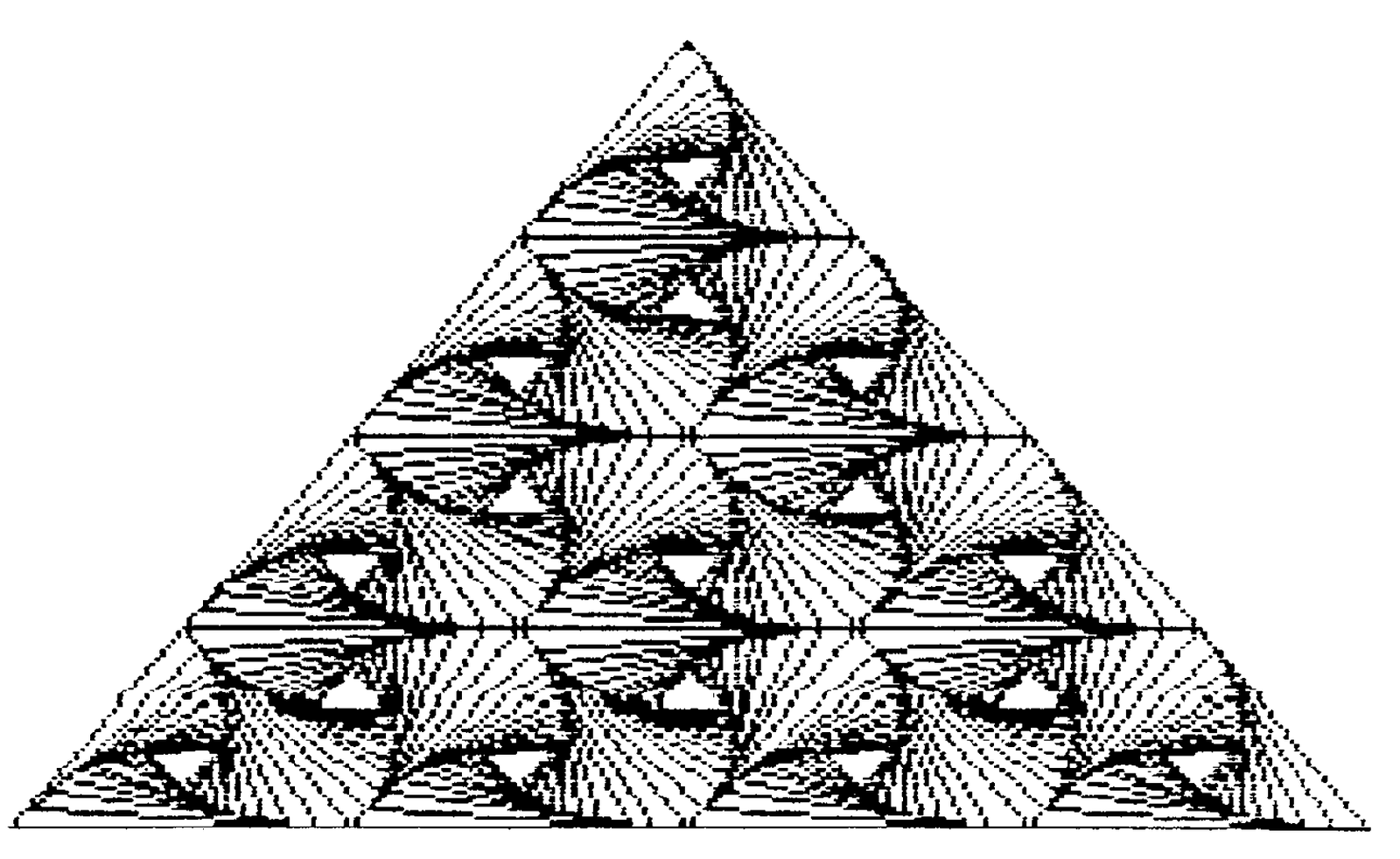
Media
Note: Type-in program listings on this website use ZMAKEBAS notation for graphics characters.