
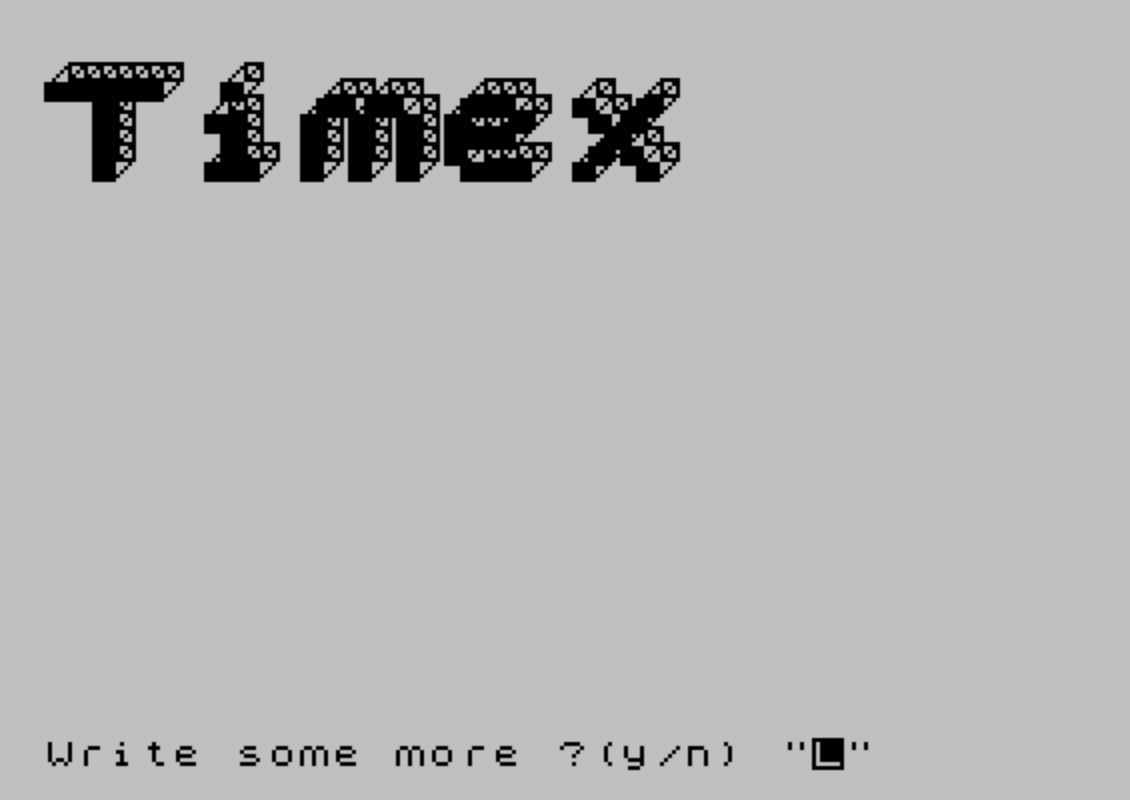
3D Word renders text in a three-dimensional block-letter style on the ZX Spectrum by sampling each character’s pixel data from the screen using POINT, then reconstructing each lit pixel as a 3D cube drawn with a series of DRAW commands. The program first prints the word in small characters at the bottom of the screen (line 100), reads the pixel state of each character cell using a nested loop over pixel columns and rows (lines 110–160), and plots a cube-face outline for every set pixel at a scaled-up position. Users can specify a vertical offset from the top of the screen and enter up to seven characters of their own text. A default demonstration mode using “3D-WORD” runs automatically on startup, prompting the user to enter custom text after displaying an introductory screen.
Program Structure
The program has a clear initialization-then-branch flow. Lines 10–30 set display attributes, initialize the default word a$="3D-WORD" and vertical offset p=30, then jump to line 100 to render immediately. The introductory splash (lines 40–70) is only reached when the program loops back after completing the default demonstration. User input is collected in lines 80–90, and the core rendering engine runs from lines 100–160. Lines 170–220 handle post-render looping, offering to write more text and optionally clear the screen.
Screen-as-ROM Character Sampling Technique
The most technically interesting aspect of this program is its use of the display file as an implicit character generator ROM. Line 100 prints the input string a$ at line 21 (the bottom of the screen) using small text. The nested loop at lines 110–160 then iterates over pixel columns (f, 0 to 8*a-1) and pixel rows (n, 0 to 7), calling POINT (f,n) to read whether each pixel of the rendered text is set. This avoids any need to store or access character bitmap data directly — the BASIC ROM’s own character rendering does the work, and the result is sampled back out.
3D Cube Drawing Routine
When a pixel is found to be set (line 120 skips to NEXT when POINT returns 0), lines 130–150 execute a sequence of PLOT and DRAW commands that trace the three visible faces of a cube in isometric-style perspective. The cube is scaled 4:1 relative to the source pixel, positioned at f*4 horizontally and n*4+135-p vertically (with p controlling vertical placement). The drawing sequence constructs:
- The front face (a slightly inset square) — lines within line 130
- The top-right perspective edge lines — line 140
- The left-side perspective connection — line 150
The use of many short relative DRAW steps rather than absolute PLOT calls keeps each cube’s geometry self-contained and position-independent.
Input Validation
Line 90 enforces a maximum of 7 characters and a minimum of 1 character for the input string. Strings outside this range trigger a low BEEP (1 second at pitch –30) and loop back to re-prompt. This is important because the rendering loop at line 110 samples 8*a pixel columns, and longer strings would overflow the screen width available at line 21.
Vertical Offset Parameter
The variable p controls how far from the top of the screen the 3D text is rendered. The prompt text notes that the default (isp) is 8 pixels. The formula n*4+135-p at line 130 means that increasing p moves the rendered output upward; the baseline of 135 places the bottom of the block letters roughly in the middle of the screen with the default offset.
Demo Mode and Loop Logic
Line 170 checks whether a$ still holds the default value "3D-WORD". If so, it pauses briefly and jumps to line 40, displaying the introductory splash before prompting for user input. This creates an elegant self-demo loop on first run without requiring a separate flag variable. After the demo, lines 180–220 offer the user options to write more text or quit, with an optional screen clear between runs.
Notable Observations and Potential Issues
- The
POINT (f,n)call samples from the very top-left of the screen (row 0 of pixel coordinates), but the text is printed at screen line 21. On the Spectrum, pixel row 0 is the top of the display; line 21 of the character grid corresponds to pixel rows 168–175. The loop checks rowsn=0 TO 7, which are the top 8 pixel rows of the display — not row 21. This appears to be a mismatch: the text is printed at the bottom, but sampled from the top. The rendering will likely read blank pixels unless the text at line 21 is somehow mapped differently, or there is another version dependency at play. - The maximum word length of 7 characters times 8 pixels wide = 56 pixels, which fits within the 256-pixel screen width when scaled 4× (56 × 4 = 224 pixels), leaving a small margin.
- The
FLASH 1attribute is used on the “Press any key” prompt at line 60, providing visual attention without consuming additional program logic. - Line 70 uses the
PAUSE 0followed byCLSidiom to wait for any keypress before clearing the screen and proceeding to input prompts.
Image Gallery

Source Code
 10 BORDER 7:INK 0:PAPER 7
 20 LET a$="3D-WORD":LET p=30
 30 GO TO 100
 40 PRINT PAPER 1; INK 7; AT 13,0;"   Now you can write your own             3D words              "
 50 PRINT '' PAPER 0; INK 7;" Now please follow the prompts. "
 60 PRINT INK 7; PAPER 2; FLASH 1; AT 21,10;"Press any key"
 70 PAUSE 0:CLS
 80 INPUT "Pixels from top((isp)=8 pixels)";p
 90 INPUT "letters (7 max) ";a$:IF LEN a$>7 OR LEN a$<1 THEN BEEP 1,-30:GO TO 90
 100 LET a= LEN a$:PRINT INK 7; AT 21,0;a$
 110 FOR f=0 TO 8*a-1:FOR n=0 TO 7
 120 IF POINT (f,n)=0 THEN GO TO 160
 130 PLOT f*4,n*4+135-p:DRAW 4,0:DRAW 0,4:DRAW -4,0:DRAW 0,-3:DRAW 3,0:DRAW 0,2:DRAW -2,0:DRAW 0,-1:DRAW 2,0:DRAW -2,-2
 140 DRAW 5,5:DRAW 0,4:DRAW 0,-4:DRAW 4,0:DRAW 0,4:DRAW 0,-4:DRAW -5,-5
 150 DRAW 0,4:DRAW 5,5:DRAW -4,0:DRAW -5,-5
 160 NEXT n:NEXT f
 170 IF a$="3D-WORD" THEN PAUSE 50:GO TO 40
 180 INPUT "Write some more ?(y/n) ";w$
 190 IF w$="n" THEN STOP
 200 INPUT "Clear the screen ?(y/n) ";c$
 210 IF c$="y" THEN CLS
 220 GO TO 80
Note: Type-in program listings on this website use ZMAKEBAS notation for graphics characters.