
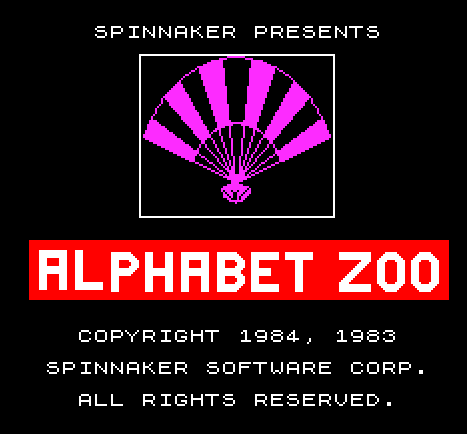
Alphabet Zoo is a loader program that displays a title screen while a separate machine code file is transferred from tape. The program uses PAPER, INK, BRIGHT, and FLASH attributes to create a styled splash screen with a copyright notice and estimated load time. After loading, it transfers control to machine code at address 32768 via PRINT USR 32768, which runs the code and presumably returns a value to print. A commented-out line (9993) hints at the save routine used to produce the companion code file “alpzoo.C1”, starting at address 32768 with a length of 20,801 bytes.
Program Structure
The program divides cleanly into three phases: screen setup and title display (lines 5–120), tape loading and execution (lines 130–140), and utility/maintenance lines stored as remarks at the end (lines 9992–9998).
Screen Setup
Lines 5–40 establish two distinct screen regions. Lines 5–7 set the top two rows (AT 0 and AT 1) to a neutral white-on-white appearance using BRIGHT 0, PAPER 7, and INK 7, effectively blanking them. Lines 10–40 then switch to blue paper with bright white ink (PAPER 1:INK 7:BRIGHT 1) and fill rows 2 through 21 with spaces, painting the main play area blue.
Title Screen Content
The title screen elements are positioned manually using PRINT AT:
- Line 50: “ALPHABET ZOO” centered at row 5, column 10
- Line 60: “COPYRIGHT 1984” at row 7, column 9
- Line 70: “SPINNAKER SOFTWARE CORP.” at row 9, column 4
- Line 80–90: Load time warning (“APPROXIMATE LOAD TIME: / 2 MINUTES”) at rows 12 and 14
- Lines 100–110: A flashing “PLEASE WAIT” message at row 18, using
FLASH 1before the print andFLASH 0after
Machine Code Loading and Execution
Line 130 loads the binary file "alpzoo.C1" directly into memory at address 32768 (the start of the upper RAM area, just above the 32K boundary). Line 140 uses PRINT USR 32768 to call the machine code as a function; USR in this context calls the routine and returns whatever value is left in the BC register pair, which is then printed. This is a common technique when the machine code is self-contained and either does not return or returns a status value.
Maintenance and Save Lines
Lines 9992–9998 are developer utilities stored at the end of the program where they will not interfere with normal execution:
- Line 9992: A
SAVEstatement to re-save this BASIC loader, set to auto-run from line 1. - Line 9993: A
REMwrapping aRANDOMIZE USR 100call followed by aSAVEfor the companion code block — 20,801 bytes starting at 32768. TheRANDOMIZE USR 100prefix suggests a setup or compression routine at address 100 was run before saving. This line is commented out to prevent accidental execution. - Line 9998: An empty
REM, likely a placeholder or separator.
Notable Techniques
The use of INK 7:PAPER 7 with spaces to “erase” rows without clearing the whole screen is a deliberate technique to control which screen areas receive which attribute colors, avoiding a full CLS that would reset all attributes uniformly. The flashing wait prompt is toggled cleanly by bracketing only the relevant PRINT with FLASH 1 and FLASH 0, leaving the rest of the display unaffected.
Anomalies
After line 120 sets INK 1:PAPER 1 (blue on blue, effectively invisible text), the LOAD on line 130 and PRINT USR on line 140 execute under those attributes. The output of PRINT USR 32768 on line 140 would therefore be printed in invisible ink, suggesting the machine code routine either never returns to BASIC or that the printed value is intentionally hidden.
Image Gallery
Source Code
    5 BRIGHT 0:PAPER 7:INK 7
    6 PRINT AT 0,0;"                                "
    7 PRINT AT 1,0;"                                "
   10 PAPER 1:INK 7:BRIGHT 1
   20 FOR i=2 TO 21
   30 PRINT AT i,0;"                                "
   40 NEXT i
   50 PRINT AT 5,10;"ALPHABET ZOO"
   60 PRINT AT 7,9;"COPYRIGHT 1984"
   70 PRINT AT 9,4;"SPINNAKER SOFTWARE CORP."
   80 PRINT AT 12,5;"APPROXIMATE LOAD TIME:"
   90 PRINT AT 14,11;"2 MINUTES"
  100 FLASH 1
  110 PRINT AT 18,9;" PLEASE  WAIT "
  120 FLASH 0:INK 1:PAPER 1
  130 LOAD "alpzoo.C1"CODE 32768
  140 PRINT USR 32768
 9992 SAVE "ALPZOO.B1" LINE 1
 9993 REM RANDOMIZE USR 100:SAVE "zlpzoo.C1"CODE 32768,20801
 9998 REM
Note: Type-in program listings on this website use ZMAKEBAS notation for graphics characters.