
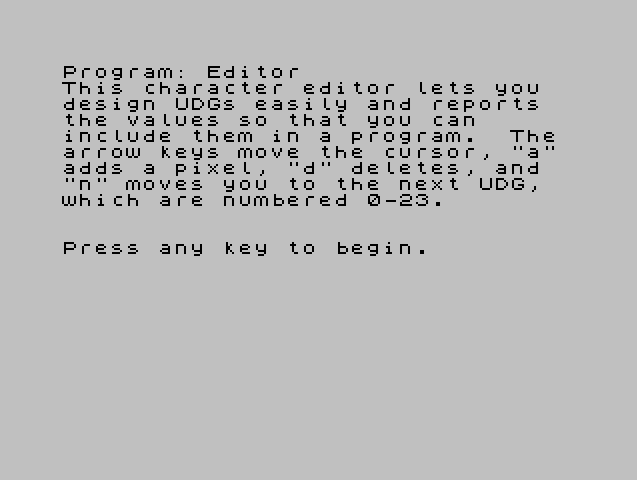
This program is an interactive UDG (User Defined Graphics) character editor that allows users to design custom characters on an 8×8 pixel grid. The editor draws a visual grid using PLOT and DRAW commands, supports cursor movement via the numeric arrow keys (5/6/7/8), and allows pixels to be added with “a” or deleted with “d”. Each pixel change updates a byte array c(8) using bit manipulation (powers of two based on column position), and the computed values are immediately POKEd into UDG RAM via USR CHR$(144+c). The program supports 24 UDGs (numbered 0–23) and displays both the current byte values and a live preview of the character being edited.
Program Structure
The program is organized into clearly separated routines, navigated by line-number ranges:
| Lines | Purpose |
|---|---|
| 1–5 | Introduction text and keypress gate |
| 60–180 | Initialization: INK/PAPER, cursor position, character selection, grid setup |
| 300–610 | Main keyboard input loop and cursor rendering |
| 700–800 | Add pixel routine |
| 900–950 | Delete pixel routine |
| 1300–1450 | Draw grid lines and display byte values |
| 1500–1800 | Calculate and update UDG character data |
| 2000–2060 | Draw screen border |
There is a notable gap between lines 390 and 410: line 392 routes unrecognised keypresses back to the input loop, but the cursor-bounds clamping at lines 410–440 is only reached via a GO TO 400 from the movement keys. This means the GO TO 400 target does not actually exist as a line — lines jump to 400 but execution falls through to 410, which is the intended behavior in Sinclair BASIC (execution continues at the next available line).
Cursor Rendering
The cursor is drawn using PLOT/DRAW with INVERSE 1 to erase the old cursor position by XOR-inverting pixels, then redrawn at the new position without INVERSE. The cursor shape is a cross: a horizontal segment and a vertical segment, each 4 pixels long, offset by 2 pixels from the cell corner. The screen coordinates are derived as xc = x*8 and yc = (21-y)*8, mapping grid coordinates to pixel coordinates.
Pixel Add/Delete and Attribute Detection
When adding a pixel (line 700), the program checks PEEK(q) against attribute values before writing. Attribute byte 10 corresponds to INK 2, PAPER 1 (used to indicate already-set or forbidden cells), and 8 indicates a special state; if either is found, the add is skipped. When deleting, attribute 56 (INK 0, PAPER 7 — the background) is the guard value. Direct attribute manipulation via POKE q, 10 and POKE q, 56 is used rather than drawing characters, relying on the attribute file at address 22528.
The address calculation q = x + 22528 + (32*y) is the standard Spectrum attribute file formula, confirming these are attribute memory addresses, not display file addresses.
UDG Data Calculation
The subroutine at line 1500 computes which bit within the character byte corresponds to the current pixel:
xv = 7-(x-10)converts screen column (10–17) to bit position (7–0, MSB to LSB)z = 2^xvproduces the bitmask for that columnv = y-5maps screen row (6–13) to array index (1–8)- The flag
pselects addition (p=0) or subtraction (p=1) to set or clear the bit inc(v)
No bitwise AND/OR is available in Sinclair BASIC, so arithmetic addition and subtraction serve as bit-set and bit-clear operations, which is correct only if the bit was not already set/cleared — the attribute pre-checks at lines 715–716 and 915 serve as guards to prevent double-toggling.
UDG RAM Poking
At line 1710, USR CHR$(144+c) returns the address of the first byte of the selected UDG in RAM. The loop at lines 1720–1740 then POKEs all 8 bytes from the array c(). There is a subtle bug here: POKE q+(s-1), c(q) should be POKE s+(q-1), c(q) — using q as both the loop index and as part of the address with an off-by-one adjustment (s-1 instead of s) means when q=1 the POKE goes to address s, which is correct, but the expression is needlessly confusing and would only be correct because q+(s-1) = s+(q-1) algebraically — so the result is actually correct despite the unusual form.
Key BASIC Idioms
- Busy-wait key polling:
IF INKEY$="" THEN GO TO 310 - Screen grid drawn with
FORloops usingPLOT/DRAWrather than character graphics DIM c(8)initializes the byte array to zeros, conveniently representing a blank UDGPRINT AT 5,5;CHR$(144+c)provides a live preview of the UDG as it is edited
Image Gallery
Source Code
    1 REM character editor
    2 PRINT "This character editor lets you  design UDGs easily and reports  the values so that you can      include them in a program.  The arrow keys move the cursor, ""a"" adds a pixel, ""d"" deletes, and  ""n"" moves you to the next UDG,  which are numbered 0-23."
    3 PRINT : PRINT : PRINT "Press any key to begin."
    4 IF INKEY$="" THEN GO TO 4
    5 CLS
   60 INK 0: PAPER 7
  110 LET x=10: LET y=6
  120 DIM c(8)
  125 CLS : GO SUB 2000
  130 PRINT AT 20,6;"Input character number";
  140 INPUT c: PRINT c
  150 CLS
  160 GO SUB 2000
  170 GO SUB 1300
  180 GO TO 550
  300 REM keyboard input
  310 IF INKEY$="" THEN GO TO 310
  320 LET xo=x: LET yo=y
  330 IF INKEY$="a" THEN GO TO 700
  340 IF INKEY$="d" THEN GO TO 900
  350 IF INKEY$="5" THEN LET x=x-1: GO TO 400
  360 IF INKEY$="6" THEN LET y=y+1: GO TO 400
  370 IF INKEY$="7" THEN LET y=y-1: GO TO 400
  380 IF INKEY$="8" THEN LET x=x+1: GO TO 400
  390 IF INKEY$="n" THEN GO TO 100
  392 GO TO 300
  410 IF x<10 THEN LET x=10
  420 IF x>17 THEN LET x=17
  430 IF y<6 THEN LET y=6
  440 IF y>13 THEN LET y=13
  500 REM draw cursor
  510 LET xc=xo*8: LET yc=(21-yo)*8
  520 PLOT INVERSE 1;xc+2,yc+4
  530 DRAW INVERSE 1;4,0
  540 PLOT INVERSE 1;xc+4,yc+2
  550 DRAW INVERSE 1;0,4
  560 LET xc=x*8: LET yc=(21-y)*8
  570 PLOT xc+2,yc+4
  580 DRAW 4,0
  590 PLOT xc+4,yc+2
  600 DRAW 0,4
  610 GO TO 300
  700 REM add point
  710 LET q=x+22528+(32*y)
  715 IF PEEK (q)=10 THEN GO TO 300
  716 IF PEEK (q)=8 THEN GO TO 300
  720 POKE q,10
  730 LET p=0
  740 GO SUB 1500
  800 GO TO 300
  900 REM delete point
  910 LET q=x+22528+(32*y)
  915 IF PEEK (q)=56 THEN GO TO 300
  920 POKE q,56
  930 LET p=1
  940 GO SUB 1500
  950 GO TO 300
 1300 REM display grid
 1310 FOR g=64 TO 128 STEP 8
 1320 PLOT 80,g
 1330 DRAW 64,0
 1340 NEXT g
 1350 FOR g=80 TO 144 STEP 8
 1360 PLOT g,64
 1370 DRAW 0,64
 1380 NEXT g
 1390 FOR q=1 TO 8
 1400 PRINT AT q+5,20;c(q)
 1410 NEXT q
 1420 PRINT AT 20,8;"Character #-";
 1430 PRINT c
 1440 PRINT AT 5,5;CHR$ (144+c)
 1450 RETURN
 1500 REM calculate character values
 1510 LET xv=7-(x-10)
 1520 LET z=2^xv
 1530 LET v=y-5
 1540 IF p=1 THEN GO TO 1600
 1550 LET c(v)=c(v)+z
 1560 GO TO 1650
 1610 LET c(v)=c(v)-z
 1650 FOR q=1 TO 8
 1660 PRINT AT q+5,20;"   "
 1670 PRINT AT q+5,20;c(q)
 1680 NEXT q
 1710 LET s=USR CHR$ (144+c)
 1720 FOR q=1 TO 8
 1730 POKE q+(s-1),c(q)
 1740 NEXT q
 1750 PRINT AT 5,5;CHR$ (144+c)
 1800 RETURN
 2000 REM draw border
 2010 PLOT 0,0
 2020 DRAW 255,0
 2030 DRAW 0,175
 2040 DRAW -255,0
 2050 DRAW 0,-175
 2060 RETURN
Note: Type-in program listings on this website use ZMAKEBAS notation for graphics characters.