
Whether you’re digging through TAP files from World of Spectrum, trying to understand how a vintage BASIC program works, building your own TAP files for an emulator, or just curious what’s on those old disk images — TS-2068 Disk Browser is a free, open-source desktop app that makes it easy.
What Can You Do With It?
Browse and Understand TAP Files
Got a TAP file with multiple programs in it? Open it and see every file inside — BASIC programs, CODE blocks, SCREEN$ loading screens, data arrays — each shown with its type, size, and TAP header info. Click any BASIC program to see a syntax-highlighted listing you can actually read, complete with color-coded keywords and line numbers.
Ever wondered what a program actually does? The cross-reference tab shows you every variable and which lines use it. The variables tab shows runtime values if the program was captured mid-execution. It’s like having a debugger for 40-year-old software.
Create Your Own TAP Files
Writing a BASIC program and want to package it for an emulator? Use Create TAP (Cmd/Ctrl+Shift+A) to build a TAP file from scratch:
- Select your files — BASIC programs, CODE blocks, SCREEN$ screens
- Set the TAP name, type, and load address for each
- Reorder them so they load in the right sequence
- Save as a single
.tapthat works in any emulator
You can also open an existing TAP, edit BASIC lines inline, and re-export with your changes. The editor is smart — it only re-tokenizes the lines you changed, so the rest of the binary stays identical to the original.
Assemble Multi-File TAP Packages
Many Spectrum programs need multiple files loaded in sequence — a BASIC loader, then a SCREEN$, then a CODE block. On tape, these must appear in the right order. The app detects these dependencies automatically by scanning BASIC programs for LOAD commands. Or switch to manual mode and drag files into the order you want.
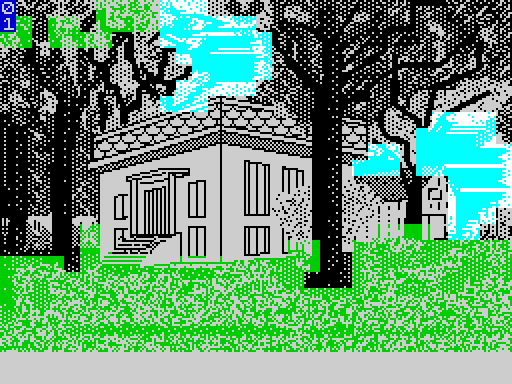
View ZX Spectrum Screens
SCREEN$ files render as proper ZX Spectrum displays with full color attributes. If a disk or TAP has multiple screens, cycle through them with the slideshow. Export any screen as PNG at 1x, 2x, or 4x scale.
Convert Bitmap Fonts to TrueType
ZX Spectrum font files (768-byte character sets) render as character grids with a live preview — type any text to see it in the font. The killer feature: Save TTF converts the bitmap font to a TrueType font file you can install on your computer and use in Word, Photoshop, or anywhere else.
Explore Emulator Snapshots
Open .sna or .z80 snapshot files to see the SCREEN$ at the moment of capture and extract the BASIC program that was running. Great for recovering programs from old snapshots or understanding how a game’s loader works.
Try It Right Now
You don’t need your own vintage files to take it for a spin. The GitHub repository includes an examples/ folder with several disk images:
- PubDom5.img (Oliger) — a public domain software collection with BASIC games and utilities, some using TS-2068 extended keywords like
ON ERRandSTICK - Fonts(L).img (Larken) — a collection of ZX Spectrum bitmap fonts (Helvetica, Times, Western, Stencil, and more) you can preview and convert to TrueType
- SINCUS_News_17.img (Larken) — SINCUS newsletter articles from the mid-1980s, stored as word processor text files and instantly readable
- larken-daisyb6-disk1.img (Larken) — a sophisticated word processor with modular BASIC programs and tons of SCREEN$ title screens
- 1.img (Oliger) — contains state machine captures of commercial games with extractable BASIC loaders
Download the app, grab the examples, and start exploring.
For the Disk Image Crowd
OK, there are maybe three of us who actually have vintage disk images from Larken, Oliger, and Aerco disk systems. But the programs, fonts, screens, and documents on those disks belong to the whole community. This app can unlock them.
More disk images are available in the Timex Sinclair Software Archive on archive.org.
The app supports 14 formats:
- Disk images: Larken LKDOS, Oliger JLO SAFE (V1 & V2), Aerco DOS-64 & RP/M, Zebra DIRSCP & CP/M, Sinclair QL, MGT +D/DISCiPLE
- Tape files: TAP and TZX
- Snapshots: SNA and Z80 (v1/v2/v3)
- Screen files: SCR
For disk images specifically, the app highlights DOS-specific commands in BASIC listings — Larken’s RANDOMIZE USR 100:LOAD, Oliger’s LOAD /"filename", PRINT #4: channel shortcuts — so you can immediately see which lines are disk I/O. It detects which files a BASIC program LOADs from disk and bundles them into TAP packages for emulator use. Extract All generates TAP files plus TXT listings, TTF fonts, PNG screens, and a manifest documenting everything.
TS-2068 Extended Keywords
The TS-2068 added five keywords that share byte values with ZX Spectrum characters: ON ERR ({), STICK (|), SOUND (}), FREE (~), and RESET (©). The app uses context heuristics to figure out which interpretation is correct — { GO TO 9854 is clearly ON ERR GO TO 9854 — with a manual toggle when you need to override.
Get It
TS-2068 Disk Browser is free and open-source (GPL v3), available for macOS (Universal), Windows, and Linux.
- Download: GitHub Releases
- Source code & examples: GitHub Repository
- Disk images to explore: Timex Sinclair Software Archive
- Getting Started Guide: GETTING_STARTED.md
If you find bugs or have feature requests, open an issue on GitHub.