
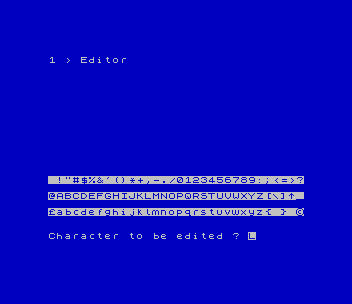
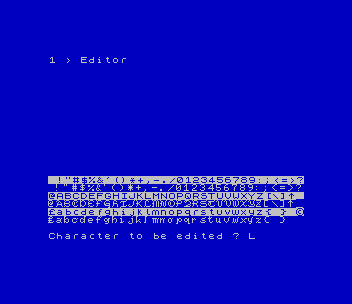
Edits and rotates complete 96-character fonts. A set loaded by name is shown at the bottom of the screen, each line directly beneath the matching line of the standard character set in inverse video. Choose a character and you edit it on an 8×8 grid: the cursor keys move, p plots a pixel and e erases one, o shows another character in a comparison grid, and q copies a character into the editing grid as a starting point. c or n stores the result, and the new shape appears in the font display. The rotate option turns every character in the set 90, 180 or 270 degrees clockwise, which produces sideways fonts for printing down the page.
The program carries the credit "CHARACTER SET EDITOR By Bob Mitchell 1990". Mitchell’s documentation, dated 901121 from Willowdale, Ontario, says he wrote it while making TS2068 keyboard overlays with Pixel Print Professional, which needed fonts turned sideways. He based it on "Character Redefinition" by D. Robinson, from Personal Software, Autumn 1985, page 18, cut down to work on a single set. The 42-byte rotate routine comes from the Supercode 3.5 collection by F. Vachha and V.B. Rumsey. The tape includes the disk’s font library: 20 fonts, among them acorn, amstrad, greek, IBM, old English, italic, mini and tiny, plus two sets by Les Cottrell. Each comes upright (suffix _), rotated right (>) and rotated left (<), and names begin with ! for Pixel Print compatibility. Enter a name such as !olde_ at the LOAD prompt. The documentation is included.
Program Analysis
Program Structure
- Lines 92–94:
POKEthe 42-byte rotate routine from theDATAat line 8500 into 63163. - Lines 100–280: set up the character list
j$and a table of bit valuesh(), then show the three-option menu. - Lines 1000–1100: the editor loop. The grid cells are UDG
a, redefined as a hollow box, and the cursor is a flashing block drawn withOVER 1. - Lines 1200–1730: store a character (eight
POKEs into the font at 64512), plus the compare, overlay and display-refresh routines. - Lines 2000–2040: save or load a set as
name.Cf, 768 bytes at 64512. - Lines 4000–4070: rotation. The program calls the routine once per character for each quarter turn.
- Line 9000: saves the program.
Notable Techniques
- The program switches the CHARS system variable (23607) between 60 for the ROM font and 251 for the edited set at 64512, so both fonts can be printed on screen together.
- To pass each character’s address to the machine code, the program uses
RANDOMIZE lto split it into the SEED bytes at 23670/23671. It then pokes those bytes into the routine’sLD HLoperand at 63166/63167. - Each grid row is kept as a running byte value in
a(): plotting adds2^(16-y)and erasing subtracts it, so storing a character needs no bit scanning. POKE 23658,0turns off CAPS LOCK so the lower-case command keys work.
Potential Issues
- The documentation describes a fourth menu option, HELP, which this version of the program doesn’t have.
- The editing grid starts blank. To change an existing character, bring it in with
qfirst.
This program comes from a Larken disk in the TS User Group collection. For tape, the LKDOS prefixes and the drive prompt were removed, so fonts load and save by name from tape. It was tested in ZEsarUX.
Image Gallery
Source Code
    1 REM CHARACTER SET EDITOR
    5 REM By Bob Mitchell 1990
   92 RESTORE 8500
   94 FOR i=0 TO 41: READ n0: POKE 63163+i,n0: NEXT i
  100 POKE 23658,0: POKE 23607,60: BORDER 0: PAPER 0: INK 7: OVER 0: CLS
  102 LET j$=" !""#$%&'()*+,-./0123456789:;<=>?@ABCDEFGHIJKLMNOPQRSTUVWXYZ[\]^_`abcdefghijklmnopqrstuvwxyz{ } *"
  210 LET b=1
  215 LET po=60
  225 DIM c(12): DIM h(8)
  226 LET h(1)=128: FOR f=2 TO 8: LET h(f)=h(f-1)/2: NEXT f
  240 BORDER 0: PAPER 0: INK 7: CLS : PRINT "Character Set Editor"''"      MENU": PRINT ''"1 > DEFINE set"''"2 > SAVE/LOAD set"''"3 > ROTATE whole set"
  250 LET i$=INKEY$: IF i$<"1" OR i$>"3" THEN GO TO 250
  260 IF i$="1" THEN GO TO 1000
  270 IF i$="2" THEN GO TO 2000
  280 IF i$="3" THEN GO TO 4000
 1000 PAPER 1: OVER 0: BORDER 1: INK 9: CLS : PRINT AT 0,0;"1 > Editor"
 1002 FOR f=1 TO 6: POKE USR "a"+f,129: NEXT f: POKE USR "a",255: POKE USR "a"+7,255
 1005 POKE 23607,60: PRINT AT 15,0; INVERSE 1;j$(1 TO 32)''j$(33 TO 64)''j$(65 TO 96)
 1010 LET ch=251
 1022 POKE 23607,ch: PRINT AT 16,0;j$(1 TO 32)''j$(33 TO 64)''j$(65 TO 96)
 1030 OVER 0: INK 7
 1033 POKE 23607,po: INPUT AT 0,0;"Character to be edited ? "; LINE c$: IF CODE c$>127 OR CODE c$<32 OR LEN c$>1 THEN BEEP .5,-20: GO TO 1033
 1034 PRINT AT 13,0; INVERSE 1;"EDITING: ";c$
 1035 FOR f=1 TO 8: PRINT AT f,0;"aaaaaaaa aaaaaaaa": NEXT f
 1036 PRINT AT 0,0; INK 2; PAPER 7;"COMPARE  87654321"
 1037 LET x=1: LET y=9: DIM a(8)
 1038 DIM b$(8,8): LET k=(CODE c$-32)*8
 1040 PRINT AT 0,18;"Cursor keys to";AT 1,19;"move.";AT 2,17;"p=plot.";AT 3,17;"e=erase.";AT 4,17;"c=store chr."
 1041 PRINT AT 5,17;"n=store chr.";AT 6,18;"and return";AT 7,18;"to menu.";AT 8,17;"o=compare";AT 9,18;"chr.";AT 10,17;"q=overlay a";AT 11,18;"chr.";AT 12,17;"m=facility menu"
 1042 PLOT 135,104: DRAW 0,-38: DRAW 120,0
 1045 OVER 1: INK 5: PRINT AT x,y;"::": BEEP .003,x+y: PRINT AT x,y;"::"
 1046 LET i$=INKEY$
 1050 IF i$="8" AND y<16 THEN LET y=y+1
 1052 IF i$="5" AND y>9 THEN LET y=y-1
 1053 IF i$="7" AND x>1 THEN LET x=x-1
 1054 IF i$="6" AND x<8 THEN LET x=x+1
 1060 IF i$="p" AND b$(x,y-8)=" " THEN PRINT AT x,y; OVER 0;"::": LET b$(x,y-8)="::": LET a(x)=a(x)+2^(16-y)
 1065 IF i$="e" AND b$(x,y-8)="::" THEN PRINT AT x,y; OVER 0;"a": LET b$(x,y-8)=" ": LET a(x)=a(x)-2^(16-y)
 1070 IF i$="o" THEN GO SUB 1500
 1075 IF i$="c" THEN GO SUB 1200: GO SUB 1700: GO TO 1030
 1080 IF i$="n" THEN GO SUB 1200: GO SUB 1700: GO TO 1010
 1085 IF i$="q" THEN GO SUB 1600
 1090 IF i$="m" THEN CLS : BORDER 0: PAPER 0: OVER 0: INK 7: GO TO 240
 1100 GO TO 1045
 1200 OVER 0: FOR f=1 TO 8: POKE ch*256+256+k+f-1,a(f): NEXT f: RETURN
 1500 INPUT "Chr to be compared ? "; LINE g$: IF CODE g$<32 OR CODE g$>127 OR LEN g$>1 THEN BEEP .5,-20: GO TO 1500
 1505 FOR f=1 TO 8: PRINT AT f,0; OVER 0;"aaaaaaaa": NEXT f
 1510 FOR f=0 TO 7: LET gr=PEEK (ch*256+256+((CODE g$-32)*8)+f)
 1515 FOR g=1 TO 8
 1520 IF gr>=h(g) THEN PRINT AT 1+f,g-1; OVER 0;"::": LET gr=gr-h(g)
 1530 NEXT g: NEXT f
 1540 RETURN
 1600 INPUT "Chr to be overlaid ? "; LINE g$: IF CODE g$<32 OR CODE g$>127 OR LEN g$>1 THEN BEEP .5,-20: GO TO 1600
 1605 FOR f=1 TO 8: PRINT AT f,9; OVER 0;"aaaaaaaa": NEXT f
 1607 DIM a(8)
 1610 FOR f=0 TO 7: LET gr=PEEK (ch*256+256+((CODE g$-32)*8)+f)
 1615 FOR g=1 TO 8
 1620 IF gr>=h(g) THEN PRINT AT 1+f,g+8; OVER 0;"::": LET gr=gr-h(g): LET a(f+1)=a(f+1)+h(g): LET b$(f+1,g)="::"
 1630 NEXT g: NEXT f: RETURN
 1700 LET k=CODE c$-32: IF k<32 THEN LET xx=16: GO TO 1730
 1710 IF k<64 THEN LET xx=18: LET k=k-32: GO TO 1730
 1720 IF k<96 THEN LET xx=20: LET k=k-64
 1730 POKE 23607,ch: PRINT AT xx,k;c$: POKE 23607,po: RETURN
 2000 INPUT "1=SAVE  0=LOAD ";sl
 2010 IF sl THEN INPUT ("SAVE file name <=6 "); LINE n$
 2015 IF NOT sl THEN INPUT ("LOAD file name <=6 "); LINE n$
 2020 INPUT "drive? ";drv: RANDOMIZE USR 100: GO TO drv
 2030 IF sl THEN RANDOMIZE USR 100: SAVE n$+".Cf"CODE 64512,768
 2035 IF NOT sl THEN RANDOMIZE USR 100: LOAD n$+".Cf"CODE 64512
 2040 BEEP 1,10: GO TO 240
 4000 REM rotate font
 4002 INPUT ("ROTATE CLOCKWISE"'"1=1/4 Turn"'"2=1/2 Turn"'"3=3/4 Turn "); LINE r$
 4004 IF r$<"1" OR r$>"3" THEN BEEP 1,1: GO TO 4002
 4005 LET rot=CODE r$-48
 4007 INPUT ;: PRINT #0;"Stand by..."
 4008 FOR r=1 TO rot
 4010 FOR q=0 TO 95
 4020 LET l=64512+q*8
 4030 RANDOMIZE l: POKE 63166,PEEK 23670: POKE 63167,PEEK 23671
 4040 RANDOMIZE USR 63163
 4050 NEXT q
 4060 NEXT r
 4070 BEEP 1,10: INPUT ;: PRINT #0;"Rotation finished."'"Press a key.": PAUSE 0: GO TO 240
 4100 STOP
 8500 DATA 30,128,33,0,226,6,1,14
 8501 DATA 0,229,123,166,254,0,40,3
 8502 DATA 121,128,79,203,32,35,48,242
 8503 DATA 225,197,203,59,48,231,17,7
 8504 DATA 0,6,8,25,209,115,43,16
 8505 DATA 251,201
 8999 REM ! CLOSE #
 9000 INPUT "SAVE PROGRAM drive? ";drv: RANDOMIZE USR 100: GO TO drv: RANDOMIZE USR 100: SAVE "redef.B1" LINE 1
Note: Type-in program listings on this website use ZMAKEBAS notation for graphics characters.