
This program displays each character in the TS2068 character set one at a time, rendering its 8×8 pixel grid on screen using POINT to sample pixels from the character printed at the top-left corner. For each of the eight rows of the character, it reads the corresponding ROM byte via PEEK starting at address 15616 (the beginning of the character ROM) and prints it alongside the pixel grid. Lit pixels are shown as inverse-video spaces and unlit pixels as dots, giving a clear visual of the bitmap construction. The program advances to the next character each time a key is pressed, cycling through all printable characters from CHR$ 32 onwards.
Program Structure
The program is divided into three logical phases:
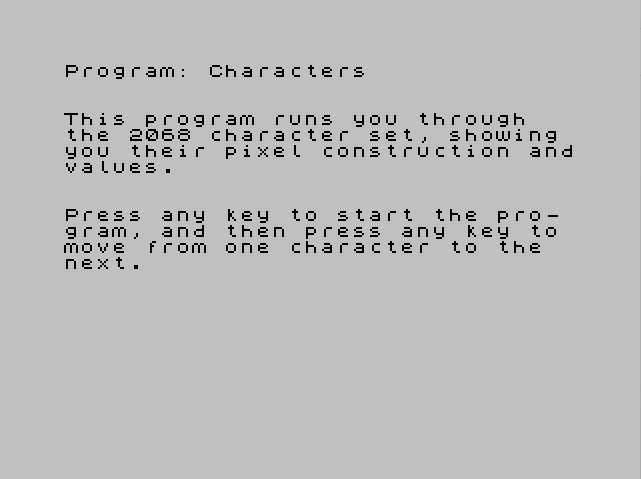
- Introduction (lines 1–3): Prints explanatory text and waits for any key before starting.
- Initialisation (lines 5–6): Sets
ato 32 (first printable character) andcto 15616 (start of the TS2068 character ROM). - Display loop (lines 10–90): Clears the screen, prints the current character, samples its pixels using
POINT, displays the pixel grid with inverse/dot rendering, PEEKs the ROM byte for each row, then waits for a keypress before advancing.
Key Variables
| Variable | Role |
|---|---|
a | ASCII/character code of the current character being displayed; starts at 32, incremented by 1 per iteration |
c | Address pointer into the character ROM; starts at 15616, incremented once per row (8 times per character) |
y | Fixed at 175 — the bottom pixel row of the character printed at AT 0,0 on the Spectrum/TS2068 screen |
x | Fixed at 0 — the leftmost pixel column of the character |
k | Loop variable iterating over the 8 pixel rows (175 down to 168) |
j | Loop variable iterating over the 8 pixel columns (0 to 7) |
Pixel Sampling Technique
The program prints the target character at screen position AT 0,0 (line 15) and then uses POINT (j,k) to interrogate individual pixels in the 8×8 cell. The coordinate system used by POINT has its origin at the bottom-left of the screen, so pixel row y=175 corresponds to the topmost pixel row of the character at text row 0, and the inner loop runs from y-7 (168) up to y (175).
The PRINT AT expressions for placing the grid symbols convert from POINT coordinates back to text-cell rows with 183-k and use column offset j+10 to position the grid towards the centre of the screen.
ROM Byte Display
Address 15616 is the start of the TS2068 character ROM (equivalent to the ZX Spectrum’s font data at the same address). For each of the 8 rows of the current character, PEEK c retrieves the raw byte and prints it at the end of the corresponding grid row (line 62). The pointer c is incremented in line 65 so it steps through all 8 bytes of the character before the outer loop ends. Because c is never reset inside the character loop, it accumulates correctly across all 255 iterations — each new character’s 8 bytes follow immediately from the previous one’s in ROM.
Keypress Handling
Lines 80–90 implement a simple spin-wait: IF CODE INKEY$>0 THEN GO TO 10 advances to the next character only when a key is detected (CODE of empty string is 0). Line 90 loops back to 80 while no key is held. This is a common Sinclair BASIC idiom but note there is no debounce; if the key from line 3 is still held when the display loop is first entered, the program will immediately skip the first character. Additionally, the program does not reset a or c when all characters are exhausted, so it will continue past the defined character set into whatever memory follows the font ROM.
Notable Techniques and Anomalies
- Using
POINTto read character pixels is an elegant workaround — it avoids directly calculating the ROM address from the character code, instead letting the display hardware do the work, then sampling it visually. - The
avariable is incremented at line 20 before the pixel loop, meaning the character printed at line 15 is always one ahead of the value ofawhen the loop runs. On the first passais set to 32 (line 5), printed asCHR$ 32(space), then incremented to 33, so the ROM pointercand the displayed grid correspond toCHR$ 32while subsequent displays are off by one relative toa. This is a minor logical inconsistency but does not prevent the program from working correctly as a character-set viewer, sincecadvances in lock-step with the character actually displayed. - The column expression
j+10and row expression183-kplace the 8×8 grid starting at approximately column 10, rows 8–15 — keeping it away from the character preview at AT 0,0. - No bounds check is performed on
aorc, so the program will run past CHR$ 255 if the user keeps pressing keys.
Image Gallery
Source Code
    1 PRINT : PRINT : PRINT "This program runs you through   the 2068 character set, showing you their pixel construction andvalues."
    2 PRINT : PRINT : PRINT "Press any key to start the pro- gram, and then press any key to move from one character to the  next."
    3 IF INKEY$="" THEN GO TO 3
    5 LET a=32
    6 LET c=15616
   10 CLS
   15 PRINT AT 0,0;CHR$ a
   20 LET a=a+1
   30 LET y=175
   35 LET x=0
   38 FOR k=y-7 TO y
   40 FOR j=x TO x+7
   50 IF POINT (j,k)=1 THEN PRINT AT 183-k,j+10; INVERSE 1;" "
   55 IF POINT (j,k)=0 THEN PRINT AT 183-k,j+10;"."
   60 NEXT j
   62 PRINT AT 23-(183-k),j+10;PEEK c
   65 LET c=c+1
   70 NEXT k
   80 IF CODE INKEY$>0 THEN GO TO 10
   90 GO TO 80
Note: Type-in program listings on this website use ZMAKEBAS notation for graphics characters.