
You command an expeditionary force landing on an unknown, inhabited planet. Build armies, aircraft and fleets in the cities you hold, explore a 64 × 64 world one square at a time, and take every city before your rivals do.
Loading the game
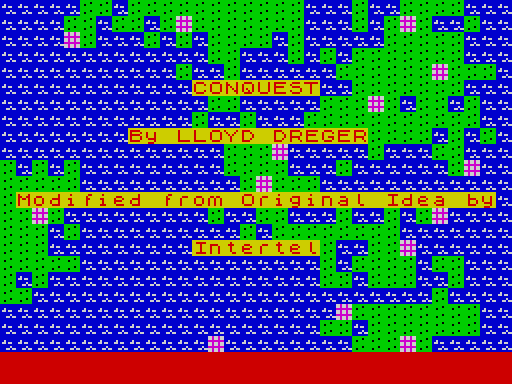
Conquest comes in four parts: a small loader, the title screen, the BASIC control program (conque.B2) and the 13 KB machine-code game (conque.C1, loaded at address 52399). Two ready-made maps, map1.C1 and map2.C1, follow them on the tape.
From tape or an emulator
- Insert
Conquest.tap. - Type LOAD "" and press ENTER. The title screen appears, then the main menu.
- Leave the tape in place. When you choose a map or a saved game by number, the program searches the tape for it.
Don’t use RUN: The program keeps its constants and the Commanders table in BASIC variables, and RUN or CLEAR erases them. If you stop the program, type GO TO 4 to get back to the menu.
The main menu
| Key | Option | What it does |
|---|---|---|
| 1 | New Game | Set up players and a map, then play. See section 3. |
| 2 | Load Game | Asks for a game number and loads gameN.C1, then carries on where it was saved. |
| 3 | Save Game | Saves the game in memory as gameN.C1 (20,882 bytes), then offers to continue it. |
| 4 | Map Editor | Draw or generate a world. See section 12. |
| 5 | Save Map | Saves the map in memory as mapN.C1 (4,097 bytes). The map must have passed Verify Cities first. |
| 6 | View Commanders | Games played, games won and win percentage for up to 20 commander names. Press any key to leave. |
| 7 | Quit | Stops the program. GO TO 4 returns to the menu. |
Controls
Conquest was written for the TS2068’s built-in joystick port. This edition also works fully from the keyboard: the cursor keys stand in for the stick and ENTER stands in for the fire button. On most emulators the PC arrow keys already send the Spectrum cursor keys.
| Action | Keyboard | Joystick |
|---|---|---|
| Move a menu bar or the map cursor | CAPS+5 6 7 8 (left, down, up, right) | Push the stick |
| Select, place, confirm, continue | ENTER | Fire |
| Commands | Lower-case letters and the digits 0–9 | — |
Questions typed at the bottom of the screen (names, numbers, y/n) are ordinary BASIC INPUTs and need ENTER after the answer. Questions inside the game itself (Continue?, Resigns y/n, Accept?) take a single keypress.
Starting a game
- How many players? Two or three.
- How many human players? Anywhere from 0 to the number of players. Humans play first; the remaining places go to the computer. With no humans at all the computers play each other in a demonstration, and the game pauses for a key after each move so you can follow it.
- Names. Each human enters a name of 1 to 8 letters. Computer players are called Yellow, Red and White, the colours of players 1, 2 and 3.
- Production and Ability for every player (see below). Type u or d and ENTER to change the flashing value; o and ENTER accepts it and moves on. Answer n to Okay? to start again.
- Music on? In-game, m turns the music on or off and e does the same for sound effects.
- Random map? y builds a new world at the start of play. n asks for a map number to load from tape (1 or 2 for the maps supplied), or press ENTER alone to use the map you have just made in the editor.
- Give computer players map? y shows the computer players the whole world from turn one. That makes them much stronger opponents.
Production and Ability
These two numbers are handicaps. They let a beginner play a strong computer on even terms, or let one player give another a head start. Both start at 10.
| Setting | Range | Effect |
|---|---|---|
| Production | 0–18 | How fast your cities build. Build times are worked out once at the start from B = 20 − Production. An army takes B÷2 turns and a battleship 4×B, so at 10 an army takes 5 turns, and at 18 it takes 1. |
| Ability | 0–20 | How well your forces fight. In each round of a battle your unit hits with a chance of about Ability ÷ 20, before modifiers. At 10 that is an even 50%. |
The map screen
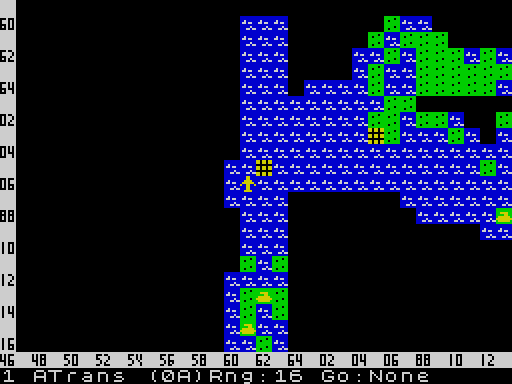
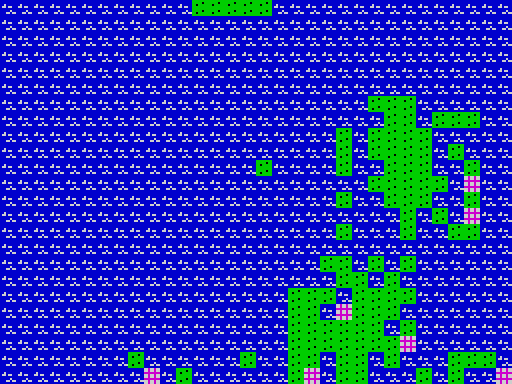
The world is 64 squares by 64 and wraps around at every edge, so sailing off the right edge brings you back on the left. The screen shows a window of 22 rows by 31 columns of it, with the map row numbers down the left edge and the column numbers along the bottom. Coordinates are always given as row/column.
You see only what your cities and units have seen. Unexplored squares are black. Each city and unit sees the eight squares around it. Enemy submarines stay hidden unless one of your cities, destroyers, cruisers or submarines is next to them. A submarine, for its part, sees only ships.
The bottom line reports on the unit whose turn it is, for example 1 ATrans (0A) Rng:16 Go:None: unit number 1, an air transport carrying 0 armies, 16 moves of fuel left, and no destination set.
Terrain
- Sea: Blue with white waves. Ships only.
- Land: Green. Armies only.
- Mountain: Impassable except to aircraft.
- Shoal: Cyan. Impassable except to aircraft.
- Neutral city: White and magenta grid. Take it with an army.
- Your city: Filled with your colour: yellow, red or white.
Units are drawn in their owner’s colour: yellow for player 1, red for player 2, white for player 3. The icons are shown in section 7.
How a turn runs
Each round opens with a TURN n screen. Then each player has a go in order, and every go follows the same steps.
- TURN OF: name. Press a key when you are ready, so other players can look away from the screen.
- Production. For each of your cities that has finished a unit, the game shows the city, its position and the new unit, then asks Continue? Press n to open the PRODUCTION screen and build something else. Any other key keeps the city building the same type.
- Losses Since Last Turn. If you lost cities or units during your opponents’ turns, they are listed here.
- Orders. The screen centres on each of your units in turn and waits for orders. Units that already have a destination move on their own until they arrive or are blocked. Units that are asleep (loading or on sentry) are skipped.
Before turn 1 each human player chooses what their home city will build.
Giving orders
Move one square with the digit keys. The numbers go clockwise from the upper left: 2 is north, 4 east, 6 south, 8 west, and the odd numbers are the diagonals.
Send a unit somewhere: move the cursor with the cursor keys or stick, then press ENTER or fire. The unit sets off at once and keeps going on later turns.
Command keys
| Key | Command | Details |
|---|---|---|
| 1–8 | Move | One square in that direction. Moving onto an enemy attacks it. Moving an army onto a neutral city attacks the city. |
| ENTER / fire | Go to | The square under the cursor becomes the unit’s destination. |
| 0 or SPACE | Stay | The unit stays put for the rest of this turn. Aircraft still burn fuel for the moves they don’t use. |
| 9 or w | Wait | Skip this unit for now without finishing it. It keeps only the moves it has left. |
| s | Sentry | Armies only. The army sleeps (drawn as a hut) and wakes when an enemy comes into view. |
| l | Load | The unit sleeps and waits for cargo (“Loading”). Armies next to a loading transport, and fighters next to a loading carrier, board it. It wakes when full or when something appears. |
| u | Unload | Wakes the armies or fighters carried by this transport or carrier so they can move off. |
| o | Orders off | For all your units: cancels every destination and wakes every sleeping unit. |
| h | Home | Aircraft only. Flies to the nearest city of yours within fuel range. |
| p | Flight plan | With the unit in one of your cities and the cursor on another of your cities no more than 20 squares away, sets a standing route (“F/P Set”). Fighters that refuel in the first city then fly on to the second by themselves. With the cursor anywhere else it clears the route (“F/P Canceled”). |
| x | Production | If the unit is in a city, opens that city’s PRODUCTION screen. |
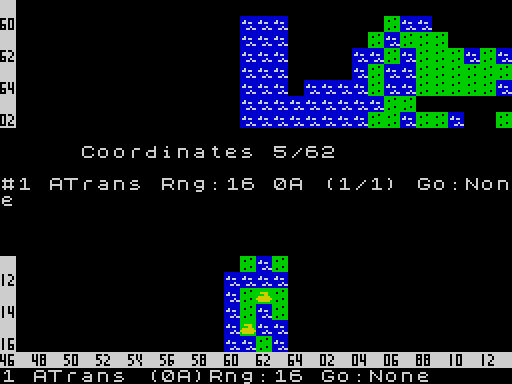
| i | Information | Coordinates, unit number and type, destination, fuel (Rng), cargo (A = armies, F = fighters) and strength as (hits left/full). |
| r | War report | See section 10. |
| a | All the world | Shows the world you know in nine screens. Press ENTER for each. |
| c | Centre | Centres the view on the unit. |
| f g t v | Scroll | Moves the view one column east (f) or west (g), or one row south (t) or north (v). |
| m / e | Sound | Turns the music or the sound effects on and off. |
| z | Resign | Asks Resigns y/n. y gives up the game. |
| q | Quit to menu | Returns to the main menu with the game still in memory, ready to save. |
Units
Build times depend on the Production setting (B = 20 − Production). The last column shows the times at the default setting of 10. A city that switches to a different type also pays a one-off change-over cost of 1 turn (army) up to 8 turns (battleship).
| Unit | Hits | Moves | Damage | Goes on | Carries | Build | At 10 |
|---|---|---|---|---|---|---|---|
| Army | 1 | 1 | 1 | Land, cities | — | B÷2 | 5 |
| Fighter | 1 | 5 | 1 | Anywhere | — · fuel 20 | B | 10 |
| ATrans | 1 | 4 | 1 | Anywhere | 2 armies · fuel 16 | 1½B | 15 |
| Sub | 2 | 2 | 3 | Sea | — | 2B | 20 |
| Destroyr | 3 | 3 | 1 | Sea | — | 2B | 20 |
| STrans | 3 | 2 | 1 | Sea | 6 armies | 2½B | 25 |
| Cruiser | 8 | 2 | 2 | Sea | — | 3B | 30 |
| Carrier | 8 | 2 | 1 | Sea | 8 fighters | 3½B | 35 |
| Batlship | 12 | 2 | 3 | Sea | — | 4B | 40 |
Aircraft and fuel
ATrans is an air transport. It can fly two armies over sea, mountains or enemy lines and can be built in an inland city. STrans is the sea transport.
Fighters and air transports use one unit of fuel for every square and refuel fully when they start a turn in one of your cities. Fighters can also refuel on a carrier. The final step into a city or onto a carrier costs nothing. A plane that runs dry is lost (“No Fuel”), so watch the Rng figure and use h when in doubt.
Ships, damage and cargo
Damaged ships slow down; a battleship with 5 hits or fewer left crawls along at 1 square a turn. Ships are repaired one hit each time they sail into one of your cities (“Docked”). Nothing else repairs them.
Cargo moves with its carrier and is lost with it. Damage also shrinks the space aboard: a transport with 3 hits or fewer holds twice its hits in armies. Entering one of your cities unloads the cargo automatically.
Cities and production
Cities are the only source of new units, and holding them is the whole point of the game. Each player starts with one city. A map has between 50 and 63, and they start out neutral.
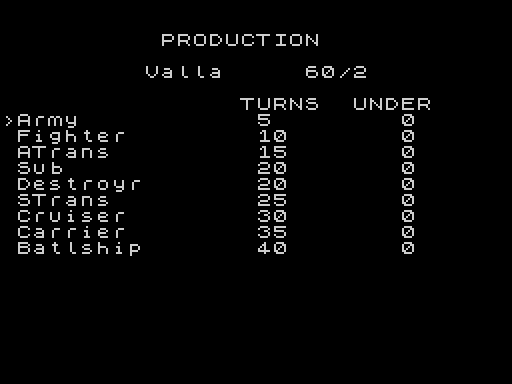
The PRODUCTION screen lists what a city can build, its build time (TURNS) and how many of your cities already build that type (UNDER). Choose with the cursor keys and ENTER. It opens when the game starts, when you capture a city, when you answer n to Continue?, and when you press x with a unit in the city.
- Ports and inland cities. A city next to the sea can build anything. An inland city can build only armies, fighters and air transports.
- Changing your mind costs time. Choosing again restarts the countdown, and a different type adds its change-over cost.
- Stacking. Any number of your own units can share a city. Entering a city ends that unit’s move.
- Unit limit. When the unit table is full (about 350 units in play) the game shows PRODUCTION SUSPENDED and cities pause until units are lost.
Combat
Move a unit onto an enemy to attack. The two sides trade blows until one is destroyed. In each round the attacker hits if a random number from 0 to 19 is less than its owner’s Ability, and then the defender gets the same chance. Each hit removes the attacker’s damage value from the target’s hits, and damage stays after the battle.
Modifiers
- A unit defending inside a city loses 2 from its chance, and a ship in port cannot fire back.
- An army defending against a cruiser or battleship fights at half strength.
- Air transports, submarines and sea transports defend at half strength.
- Transports and carriers attack at half strength.
- An army attacking straight off a transport loses 2.
- Neutral cities always defend with an Ability of 10. An empty city falls to the first hit.
Who can attack what
- Armies and cities on land can be attacked only by armies, fighters, cruisers and battleships.
- Units at sea or in the air can be attacked by anything. An army has to be standing on land or in a city to attack.
- An enemy city with units inside is defended by its strongest unit. An empty one can be taken only by an army.
- Capturing a city uses up the army, which becomes the garrison, and you choose the city’s new production.
The war report
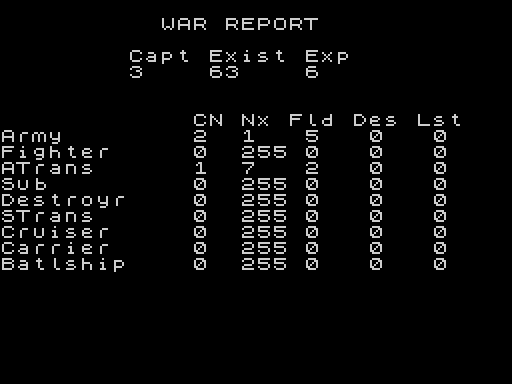
Press r at any unit’s prompt.
| Column | Meaning |
|---|---|
| Capt | Cities you hold |
| Exist | Cities in the world |
| Exp | Percentage of the map you have explored |
| CN | Your cities building this type |
| Nx | Turns until the next one appears (255 = none on order) |
| Fld | How many you have in the field |
| Des | Enemy units of this type you have destroyed |
| Lst | Your own units of this type lost |
Winning, saving and quitting
A player is out of the game once they have no cities and no units left, or once they resign. The last commander standing wins. Their name appears under CONGRATULATIONS, and the Commanders table on the main menu is updated for every player in the game.
- Resigning: press z and then y. Your cities become neutral and your units disappear. In a three-player game the other two fight on.
- Computer surrender: after turn 150 a computer player that has fallen well behind may offer to resign (“Red Resigns / Accept?”). Press any key to accept. n refuses, and then no computer will offer again.
- Stopping to save: press q at any unit’s prompt to return to the menu, choose 3 Save Game, give a number, and answer y to Continue game? to play on. Load it later with 2.
- Keeping the Commanders table: the table lives in the BASIC program. To keep it between sessions, quit with 7, type GO TO 9992, and save the program over the old
conque.B2.
The map editor
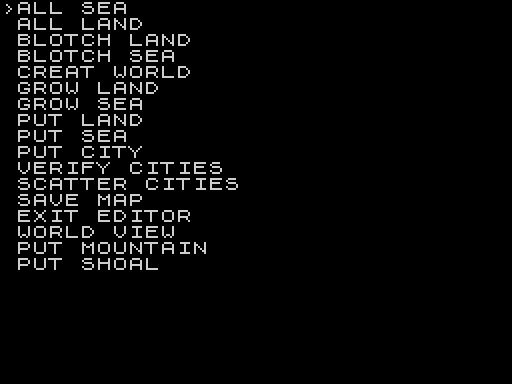
Choose 4 from the main menu. The editor’s menu bar always starts on ALL SEA, which wipes the map without asking, so move off it before you press ENTER.
| Item | Effect |
|---|---|
| ALL SEA · ALL LAND | Fill the whole world |
| BLOTCH LAND · BLOTCH SEA | Brush: a solid blob up to 9 squares across |
| GROW LAND · GROW SEA | Brush: a scattered speckle over 15 × 15 squares |
| PUT LAND / SEA / CITY / MOUNTAIN / SHOAL | Brush: a single square |
| CREAT WORLD | Build a complete random world |
| SCATTER CITIES | Add cities at random, then verify |
| VERIFY CITIES | Check the map is playable (required before saving) |
| WORLD VIEW | Look at the whole map in nine screens |
| SAVE MAP | Leave the editor and save the map to tape or disk |
| EXIT EDITOR | Back to the main menu |
Painting with a brush
Choosing a brush item puts a white * cursor on the map. Move it with the cursor keys or stick and press ENTER or fire to paint. f g t v scroll the view, c centres it on the cursor, i shows the coordinates and terrain under the cursor, a shows the whole world, and m or q returns to the menu. The cursor can’t reach the screen’s outer row and column, so scroll to paint there.
What makes a map playable
- At least 50 and at most 63 cities. With fewer than 50, Verify shows “Cities: 50 – 63”.
- At least 768 squares of land or mountain before cities can be scattered (“Not Enough Land”).
- Every city that touches land needs another city on the same landmass within about 11 squares. Every coastal city needs another coastal city on the same water within the same distance.
- A city that breaks the rule flashes, with Illegal City Land? or Illegal City Sea? at the bottom. Press n to accept it as it is. Any other key stops the check.
The same check runs when a random world is built for a new game, so you may see the Illegal City prompt there too. Press n to carry on. Any other key throws that world away and builds a new one.
Tips for commanders
- Set your home city to armies first. Cheap armies take nearby neutral cities quickly, and every city you take adds to your output.
- An inland start is not a trap. Air transports carry armies over water and mountains.
- Fighters are your scouts. Send them out and back with h, and use a flight plan (p) to keep them cycling between two cities.
- Leave an army on sentry (s) in or beside a city you hold. It wakes when enemies approach.
- Your naval screen needs destroyers, cruisers or subs: they are the only ships that can spot submarines.
- Damaged ships should put into port. Each visit repairs one hit.
- Against a stronger computer, raise your own Production or Ability, or say n to giving the computers the map.
Image Gallery
Source Code
    1 POKE VAL "23730", VAL "24":POKE VAL "23731", VAL "123":LOAD "conque.C1"CODE
    4 LET h$="":BORDER k0:PAPER k0:INK VAL "7"
    5 LET a=k0:CLS :PRINT ' TAB 12;"CONQUEST";''' TAB k5;"1. New Game";'' TAB k5;"2. Load Game";'' TAB k5;"3. Save Game";'' TAB k5;"4. Map Editor";'' TAB k5;"5. Save Map";'' TAB k5;"6. View Commanders";'' TAB k5;"7. Quit"
    6 IF INKEY$="" THEN GO TO k3+k3
    7 IF INKEY$ >="1" AND INKEY$ <="7" THEN LET a= VAL INKEY$
    8 IF a=7 THEN STOP
    9 GO SUB a*kc
   10 GO TO k5-k1
  100 CLS :PRINT '"How many Players? (2 or 3)"
  101 INPUT a:IF a <>k2 AND a <>k3 THEN GO TO kc+k1
  102 LET x= VAL "31541":POKE x,a:PRINT '"How many Human Players? (0-3)"
  103 INPUT a:IF a>(PEEK x) THEN GO TO kc+k3
  106 POKE (x-k1),a: LET a$="Yellow":LET b$="Red":LET c$="White"
  107 IF a=k0 THEN GO TO VAL "112"
  108 IF a >=k1 THEN PRINT ''"First Player's Name?":INPUT a$
  109 IF a >=k2 THEN PRINT ''"Second Player's Name?":INPUT b$
  110 IF a=k3 THEN PRINT ''"Third Player's Name?":INPUT c$
  112 LET b= CODE a$(LEN a$)+kh:LET d$=a$:LET d$(LEN d$)= CHR$ b
  114 LET b= CODE b$(LEN b$)+kh:LET d$=d$+b$:LET d$(LEN d$)= CHR$ b
  116 LET b= CODE c$(LEN c$)+kh:LET d$=d$+c$:LET d$(LEN d$)= CHR$ b
  117 LET x= VAL "31514":POKE x,kh:LET x=x+k1:FOR b=k1 TO LEN d$
  118 POKE x, CODE d$(b):LET x=x+k1:NEXT b
  120 CLS :PRINT '"First Player    ";a$;'' TAB k5;e$;'' TAB k5;f$;''"Second Player   ";b$;'' TAB k5;e$;'' TAB k5;f$;''"Third Player    ";c$;'' TAB k5;e$;'' TAB k5;f$
  121 PRINT AT kl-k1,k0;"u=UP; d=Down; o=Okay"
  122 DIM c(k3,k2):LET a= PEEK VAL "31541":FOR b=k1 TO a:FOR d=k1 TO k2:LET c(b,d)= VAL "10":NEXT d:NEXT b:GO SUB VAL "999"
  123 LET m=k3:FOR l=k1 TO a:FOR n=k1 TO k2:PRINT AT m,k3; FLASH k1;"\::"
  125 INPUT h$:IF h$="u" THEN LET c(l,n)=c(l,n)+ SGN PI:GO SUB VAL "999":GO TO VAL "124"
  126 IF h$="d" THEN LET c(l,n)=c(l,n)- SGN PI:GO SUB VAL "999":GO TO VAL "124"
  127 IF h$="o" THEN PRINT AT m,k3;" ":LET m=m+k2:NEXT n:LET m=m+k2:NEXT l
  128 PRINT AT VAL "21",k0;"Okay? (y  OR n)":INPUT h$:IF h$="n" THEN GO TO VAL "122"
  130 FOR b=k1 TO k3:LET c(b,k1)=20-c(b,k1):NEXT b
  131 LET m= VAL "31544":FOR b=k1 TO a:FOR d=k2 TO k1 STEP -k1:POKE m,c(b,d):LET m=m+ SGN PI:NEXT d:NEXT b
  133  PRINT AT kl,k0;"Music on? (y  OR n)":INPUT h$:IF h$="n" THEN POKE km,k0
  135  PRINT AT kl,k0;"Random map? (y  OR n)":INPUT h$:IF h$="y" THEN GO TO kx
  150 CLS :PRINT "Which map number?":INPUT b$:LET a$="map"+b$+".C1":LOAD a$ CODE
  151 PRINT ''"Give computer players map? (y OR n)":INPUT h$:IF h$="y" THEN RANDOMIZE USR VAL "59950"
  155 GO TO kx
  199 RETURN
  200 CLS :PRINT "Which game number?":INPUT b$:LET a$="game"+b$+".C1":LOAD a$ CODE
  210  PRINT AT kl,k0;"Music on? (y  OR n)":INPUT h$:IF h$="n" THEN POKE km,k0:GO TO kx
  300 CLS :PRINT "Game number please.":INPUT h$:LET a$="game"+h$+".C1":SAVE a$ CODE VAL "31514", VAL "20882"
  320 PRINT ''"Continue game? (y OR n)":INPUT h$:IF h$="y" THEN GO TO kx
  399 RETURN
  400 RANDOMIZE USR ky
  405 RANDOMIZE USR VAL "6E4"
  410 RANDOMIZE USR kz
  499 RETURN
  500 CLS : LET a= PEEK kw:IF a<16 THEN PRINT ''"Cities not verified":RETURN
  505 PRINT "what number please.":INPUT h$:LET a$="map"+h$+".C1":SAVE a$ CODE kw, VAL "4097":RETURN
  600 FOR x=k1 TO kl-k1:IF g(x)=k0 THEN GO TO 603
  601 LET p(x)=w(x)/g(x)*kc
  603 NEXT x
  605 CLS :PRINT TAB k5+k9;"COMMANDERS","  NAME       GAMES WINS PERCENT"
  610 FOR x=k1 TO kl-k1:PRINT AT x+k1,k0;s$(x); TAB 15;g(x); TAB kl;w(x); TAB kl+k5;p(x):NEXT x
  620 PAUSE 4E4:RETURN
  800 RANDOMIZE USR ky
  805 RANDOMIZE USR 53500
  810 RANDOMIZE USR kz
  812 IF NOT PEEK 52360 THEN RETURN
  815 LET a= PEEK 31541:LET d= PEEK 51361:IF a=k3 AND d <>k0 AND d <>255  THEN RETURN
  820 LET d$="":LET a$="        ":LET b$=a$:LET c$=a$
  825 FOR x=31515 TO 31538:LET d$=d$+ CHR$ (PEEK x):NEXT x
  830 FOR x=k1 TO LEN d$:IF CODE d$(x)<kh THEN LET a$(x)=d$(x):NEXT x
  835 LET a$(x)= CHR$ (CODE d$(x)-kh):LET b=x
  840 FOR x=x+1 TO LEN d$:IF CODE d$(x)<kh THEN LET b$(x-b)=d$(x):NEXT x
  845 LET b$(x-b)= CHR$ (CODE d$(x)-kh):IF a=k2 THEN GO TO 860
  850 LET b=x:FOR x=x+1 TO LEN d$:IF CODE d$(x)<kh THEN LET c$(x-b)=d$(x):NEXT x
  855 LET c$(x-b)= CHR$ (CODE d$(x)-kh):LET b= PEEK 52360:IF a=k2 THEN LET a=k1+(b=k1):GO TO 865
  860 LET a=k1+(b=k1)+(d=k1):IF a=k2 THEN LET a=a+(b=k2)+(d=k2)
  865 CLS :PRINT AT k5,k5;"CONGRATULATIONS"; AT k5+k2,k5;"COMMANDER ";(a$ AND a=k1);(b$ AND a=k2);(c$ AND a=k3)
  866 LET w$="":LET w$=w$+(a$ AND a=k1)+(b$ AND a=k2)+(c$ AND a=k3)
  868 FOR x=k1 TO kl-k1:IF w$=s$(x) THEN LET g(x)=g(x)+k1:LET w(x)=w(x)+k1:GO TO 875
  869 IF s$(x)="        " THEN LET s$(x)=w$:GO TO 868
  870 NEXT x
  871 PRINT AT kl,k0;"NO ROOM IN TABLE":PAUSE 4E4:RETURN
  872 REM DIM s$(20,10),g,w AND p to 20
  875 IF w$=a$ THEN LET h$="bc"
  876  IF w$=b$ THEN LET h$="ac"
  877  IF w$=c$ THEN LET h$="ab"
  878 LET l$="":LET l$=l$+(a$ AND h$(k1)="a")+(b$ AND h$(k1)="b")
  880 FOR x=k1 TO kl-k1:IF s$(x)=l$ THEN LET g(x)=g(x)+k1:GO TO 886
  881 IF s$(x)="        " THEN LET s$(x)=l$:LET g(x)=g(x)+k1:GO TO 886
  882 NEXT x
  883 GO TO 871
  886 LET l$="":LET l$=l$+(b$ AND h$(k2)="b")+(c$ AND h$(k2)="c")
  888 FOR x=k1 TO kl-k1:IF s$(x)=l$ THEN LET g(x)=g(x)+k1:RETURN
  889 IF s$(x)="        " THEN LET s$(x)=l$:LET g(x)=g(x)+k1:RETURN
  890 NEXT x
  891 GO TO VAL "871"
  950 STOP
  999 LET e=k3:FOR b=k1 TO a:FOR d=k1 TO k2:PRINT AT e,17;"  ":LET e=e+k2:NEXT d:LET e=e+k2:NEXT b:LET e=k3:PRINT AT e,17;:FOR b=k1 TO a:FOR d=k1 TO k2:PRINT c(b,d);:LET e=e+k2:PRINT AT e,17;:NEXT d:LET e=e+k2:PRINT AT e,17;:NEXT b:RETURN
 1000 SAVE "conquest" LINE 1
Note: Type-in program listings on this website use ZMAKEBAS notation for graphics characters.